
Introduction
Thank you for choosing the Crompton Ameo Fresh Nutri Blender. This manual provides essential information for the safe and efficient operation, maintenance, and care of your new appliance. Please read these instructions thoroughly before first use and retain them for future reference.
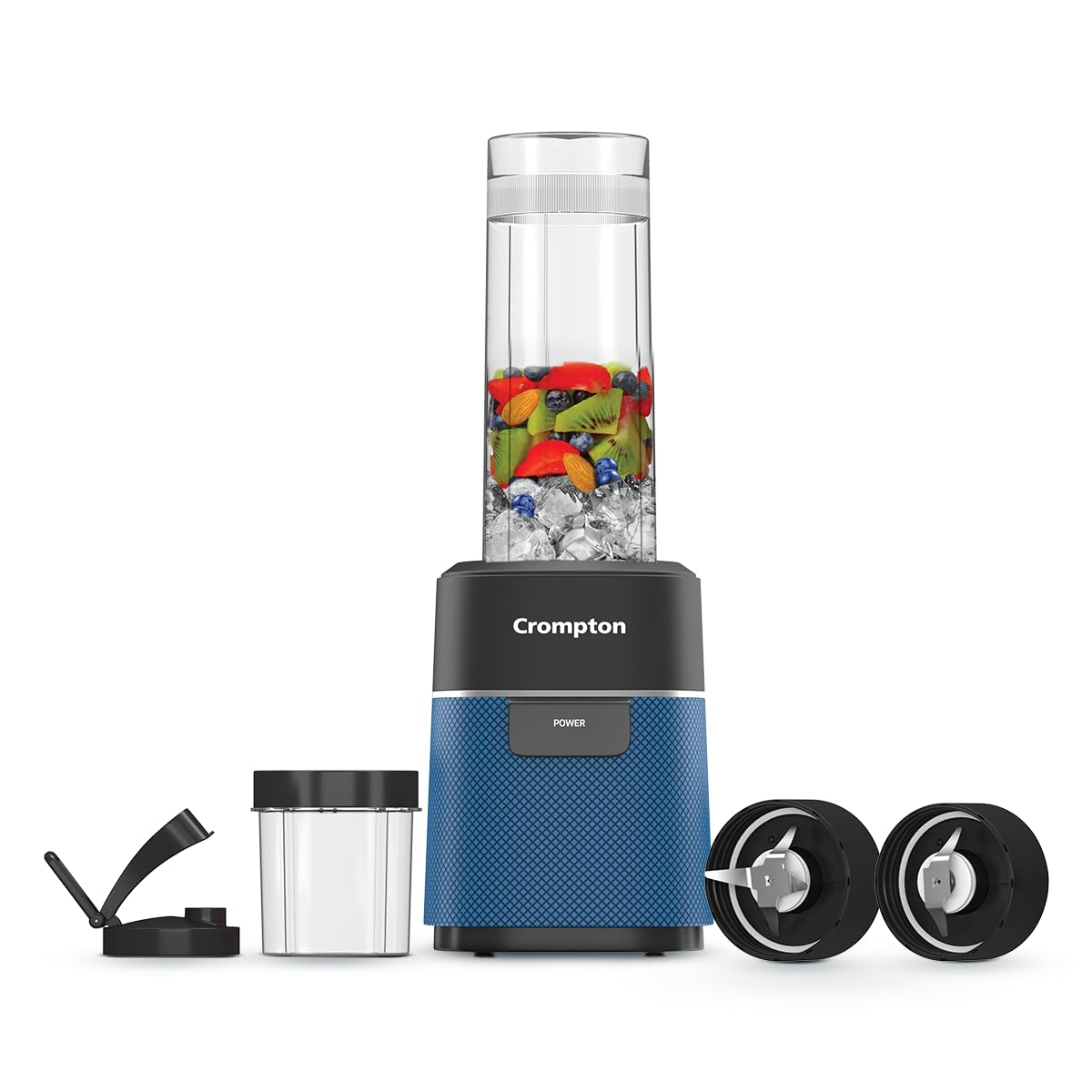
Figure 1: Crompton Ameo Fresh Nutri Blender with its components.
Important Safeguards
When using electrical appliances, basic safety precautions should always be followed to reduce the risk of fire, electric shock, and/or injury to persons, including the following:
- Read all instructions before operating the blender.
- Do not immerse the motor base in water or other liquids. Clean with a damp cloth only.
- Always ensure the appliance is switched off and unplugged from the power outlet before assembling, disassembling, or cleaning.
- Avoid contact with moving parts. Blades are sharp. Handle with care.
- Do not operate any appliance with a damaged cord or plug, or after the appliance malfunctions or has been dropped or damaged in any manner.
- Do not use attachments not recommended or sold by the manufacturer.
- Do not let the cord hang over the edge of a table or counter, or touch hot surfaces.
- Always operate the blender on a flat, stable surface.
- Do not fill jars above the MAX fill line to prevent spillage.
- This appliance is for household use only.
Product Components
The Crompton Ameo Fresh Nutri Blender typically includes the following components:
- Motor Base (400 Watts)
- Blending Jar (Food Grade, 570ml capacity)
- Grinding Jar (Food Grade)
- Blending Blade Assembly (SS 304)
- Grinding Blade Assembly (SS 304)
- Sipper Cap
- Storage Lid
- Instruction Manual
Assembly and Setup
Follow these steps to assemble your blender for use:
- Unpack: Carefully remove all components from the packaging.
- Clean: Wash the jars, blades, sipper cap, and storage lid with warm soapy water. Rinse thoroughly and dry. Wipe the motor base with a damp cloth.
- Prepare Ingredients: Cut ingredients into small pieces suitable for blending. Do not overfill the jar beyond the MAX fill line.
- Attach Blade: Screw the appropriate blade assembly (blending or grinding) onto the open end of the jar until secure.
- Place Jar on Base: Invert the jar and place it onto the motor base. Ensure the jar is aligned correctly with the base.
- Lock Jar: Gently press the jar down and rotate it clockwise until it locks securely into place. You will hear a "double click" sound, confirming the intelligent locking mechanism is engaged. The blender will not operate unless the jar is securely locked.

Figure 2: Visual guide for placing and locking the jar onto the blender base.
Operating Instructions
The Crompton Ameo Fresh Nutri Blender is designed for efficient blending and grinding with its 400-watt motor and specialized blade technologies.
Blending and Grinding
- Ensure Secure Lock: Verify that the jar is securely locked onto the motor base. The intelligent locking mechanism prevents operation if not properly engaged.
- Connect Power: Plug the power cord into a suitable electrical outlet (230V).
- Start Blending: Press and hold the Power button on the motor base to begin blending. The 400-watt motor, combined with Maxi Blend Technology, creates a vortex for lump-free results.
- Monitor Blending: Continue holding the button until ingredients reach the desired consistency. The Pro Blend Technology and unique jar designs optimize airflow for rapid blending.
- Stop Blending: Release the Power button to stop the blending process instantly.
- Remove Jar: Rotate the jar counter-clockwise to unlock it from the motor base, then lift it off.
- Serve/Store: Unscrew the blade assembly. Attach the sipper cap for on-the-go consumption or the storage lid for refrigeration.

Figure 3: The intelligent locking system ensures safe operation.

Figure 4: Operating the blender using the power button.

Figure 5: Maxi Blend Technology ensures smooth, lump-free results.

Figure 6: The blender includes different SS 304 blades for various blending and grinding needs.

Figure 7: Sipper cap and storage lid for convenience.
Cleaning and Maintenance
Proper cleaning and maintenance ensure the longevity and hygienic operation of your blender.
- Unplug: Always unplug the blender from the power outlet before cleaning.
- Wash Jars and Lids: Detach the blade assembly from the jar. Wash jars, blades, sipper cap, and storage lid with warm, soapy water immediately after use. Rinse thoroughly.
- Blade Care: Handle blades with extreme caution as they are sharp. Use a brush to clean around the blades if necessary.
- Motor Base: Wipe the motor base with a damp cloth. Do not immerse the motor base in water or any other liquid.
- Drying: Ensure all parts are completely dry before reassembling or storing.
- Dishwasher Safety: The jars and blades are not dishwasher safe. Hand wash only.
- Storage: Store the blender in a clean, dry place.

Figure 8: Food-grade materials and easy cleaning ensure hygiene for your family.
Troubleshooting
If you encounter issues with your blender, refer to the following table for common problems and solutions:
| Problem | Possible Cause | Solution |
|---|---|---|
| Blender does not start | 1. Not plugged in 2. Jar not securely locked 3. Overload protection activated | 1. Ensure power cord is firmly plugged in. 2. Press down and rotate jar clockwise until it clicks into place. 3. Unplug, remove some ingredients, wait 15 minutes, then restart. |
| Ingredients not blending smoothly | 1. Too little liquid 2. Jar overfilled 3. Ingredients too large | 1. Add more liquid (water, milk, juice). 2. Reduce the amount of ingredients. 3. Cut ingredients into smaller pieces. |
| Leakage from jar | 1. Blade assembly not tightened 2. Jar overfilled 3. Gasket not properly seated | 1. Ensure blade assembly is tightly screwed onto the jar. 2. Do not fill past the MAX line. 3. Check if the UV-sealed silicon gasket is correctly in place. |
| Unusual noise or odor | 1. Overload 2. Foreign object in jar 3. Motor issue | 1. Stop operation, reduce load. Refer to overload protection. 2. Unplug and check for any foreign objects. Remove carefully. 3. If problem persists, contact customer support. |
Specifications
Key technical specifications for the Crompton Ameo Fresh Nutri Blender:
| Feature | Detail |
|---|---|
| Brand | Crompton |
| Model Number | ACGJMG-AMEOFRSHBLB |
| Color | Black and Blue |
| Wattage | 400 Watts |
| Voltage | 230.0 V |
| Capacity | 1.1 Liters (total), Blending Jar: 570ml |
| Product Dimensions (D x W x H) | 16.3D x 8.5W x 11.6H Centimeters |
| Item Weight | 2.5 Kilograms |
| Material (Jars/Container) | Food Grade |
| Blade Material | SS 304 Stainless Steel |
| Special Feature | Adjustable Speed Control (Basic Control Type) |
| Dishwasher Safe | No |
Warranty Information
The Crompton Ameo Fresh Nutri Blender comes with a Full Warranty. For specific terms and conditions, including warranty duration and claim procedures, please refer to the warranty card included in your product packaging or contact Crompton customer support.
Customer Support
For any queries, assistance, or service requests regarding your Crompton Ameo Fresh Nutri Blender, please contact Crompton customer support. Contact details can typically be found on the product packaging, warranty card, or the official Crompton website.
Recipe Booklet
Access a 28-day recipe booklet for smoothie ideas and more by scanning the QR code below:

Figure 9: Scan this QR code to access your 28-day recipe booklet.