
Introduction
Thank you for choosing the YITAHOME King Size Bed Frame. This bed frame is designed to provide a comfortable and functional sleeping solution with integrated LED lighting, a storage headboard, and a convenient charging station. This manual provides essential information for assembly, operation, maintenance, and troubleshooting to ensure optimal use and longevity of your product.

Image: The YITAHOME King Size Bed Frame, showcasing its upholstered design, storage headboard with integrated lighting, and under-bed LED illumination.
Important Safety Information
Please read all instructions carefully before assembly and use. Keep this manual for future reference.
- Ensure all parts are present and undamaged before beginning assembly. Do not use if any parts are missing or broken.
- Assemble the bed frame on a soft, clean surface to prevent scratches.
- Tighten all screws and bolts securely, but do not overtighten. Periodically check and retighten fasteners as needed.
- Do not exceed the maximum weight capacity of 1100 pounds.
- Keep electrical components (LED lights, charging station) away from water and moisture.
- Only use the provided power adapter for the LED lights and charging station.
- Keep small parts and packaging materials away from children to prevent choking hazards.
- Do not stand or jump on the bed frame.
Package Contents
Your YITAHOME King Size Bed Frame package includes all necessary components for assembly. Please verify that you have received the following:
- Headboard components (upholstered panels, frame)
- Side rails and footboard components
- Metal slat system
- LED light strips and power adapter
- Charging station module (2 x 3-prong outlets, 2 USB ports)
- Assembly hardware (screws, bolts, washers, Allen wrench)
- Installation Manual
If any parts are missing or damaged, please contact YITAHOME customer support for assistance.
Setup and Assembly
The YITAHOME King Size Bed Frame is designed for fast and effortless assembly. No box spring is needed. Please follow the detailed instructions provided in the included Installation Manual for step-by-step guidance.
- Unpack all components and lay them out on a clean, soft surface.
- Identify each part according to the parts list in the Installation Manual.
- Begin by assembling the headboard, attaching the upholstered panels and the storage shelf.
- Connect the side rails to the headboard and footboard.
- Install the heavy-duty metal slats into the frame. Ensure they are securely fastened for optimal support.
- Integrate the LED light strips and charging station module as instructed.
- Once assembled, ensure all connections are tight and the frame is stable.
For visual assistance, refer to the diagrams in your Installation Manual. Assembly typically requires two adults.
Operating Instructions
LED Lighting System
The integrated LED light strips under the bed and on the headboard can be controlled via a remote control or a dedicated mobile application, offering over 60,000 colors and various modes.
- Power On/Off: Use the power button on the remote or in the app to turn the lights on or off.
- Color Selection: Choose from a wide spectrum of colors using the color wheel on the app or specific color buttons on the remote.
- Brightness Adjustment: Adjust the intensity of the lights to your preference.
- Dynamic Modes: Explore various pre-set dynamic modes such as fading, jumping, or strobing effects.
- Music Modes: The lights can synchronize with music played through your device (via app control) or react to ambient sounds (Mic Mode).
- Timing Function: Set timers for the lights to automatically turn on or off.
- App Control: Download the specified mobile application (refer to the Installation Manual for QR code or app name) to unlock full control features and customization options.

Image: Illustration of the LED bed frame with its remote control and mobile app interface, highlighting various lighting modes and control options.
Charging Station
The headboard features a built-in charging station for your convenience.
- Power Outlets: Two 3-prong 125V/12A AC outlets are available for powering devices such as lamps, laptops, or other electronics.
- USB Ports: Two 5V/2A USB ports are provided for charging smartphones, tablets, and other USB-powered devices.
- Power Cord: The charging station is equipped with a 5.9-foot power cord for connection to a wall outlet.
- Usage: Simply plug your devices into the appropriate outlets or USB ports. Ensure the bed frame's power cord is connected to a live electrical outlet.

Image: Close-up view of the integrated charging station on the headboard, showing the two AC outlets and two USB ports, along with their specifications.
Maintenance
Regular maintenance will help preserve the appearance and functionality of your YITAHOME King Size Bed Frame.
- Cleaning:
- For the upholstered parts, gently vacuum or use a soft, damp cloth with mild soap. Blot spills immediately.
- For metal parts, wipe with a soft, dry cloth. Avoid abrasive cleaners.
- Ensure electrical components are dry before cleaning.
- Fastener Check: Periodically check all screws and bolts to ensure they remain tight. Retighten as necessary to maintain stability and prevent noise.
- Electrical Components: Do not attempt to repair the LED lights or charging station yourself. Contact qualified personnel if issues arise.
Troubleshooting
| Problem | Possible Cause | Solution |
|---|---|---|
| Bed frame is wobbly or noisy. | Loose fasteners; uneven assembly. | Check and tighten all screws and bolts. Ensure the bed frame is on a level surface. Re-assemble if necessary, following instructions carefully. |
| LED lights are not working. | Power cord not plugged in; remote battery dead; loose connection; faulty LED strip. | Ensure the power adapter is securely plugged into a working outlet and the bed frame. Check remote battery. Verify all LED strip connections. Contact customer support if the issue persists. |
| Charging station not providing power. | Power cord not plugged in; wall outlet not working; device not compatible. | Ensure the bed frame's power cord is fully plugged into a live wall outlet. Test the wall outlet with another device. Try a different device to confirm compatibility. |
Specifications
| Feature | Detail |
|---|---|
| Model Number | MAYIHIvlaJ |
| Size | King (U.S. Standard) |
| Assembled Dimensions (L x W x H) | 87" x 75.9" x 45.2" (221cm x 193cm x 115cm) |
| Under-bed Clearance | 12.2" (31cm) |
| Recommended Mattress Size | 10"-12" |
| Weight Capacity | 1100 lbs |
| Color | Grey |
| Finish Type | Powder Coated (frame) |
| Special Feature | No Box Spring Needed, LED Lights, Storage Headboard, Charging Station |
| Charging Station | 2 x 125V/12A AC Outlets, 2 x 5V/2A USB Ports, 5.9 ft Power Cord |
| Assembly Required | Yes |
| Item Weight | 116.8 pounds |
| Manufacturer | YITAHOME |
| Country of Origin | China |

Image: Detailed diagram showing the dimensions of the King Size bed frame and its 1100 lbs weight capacity.
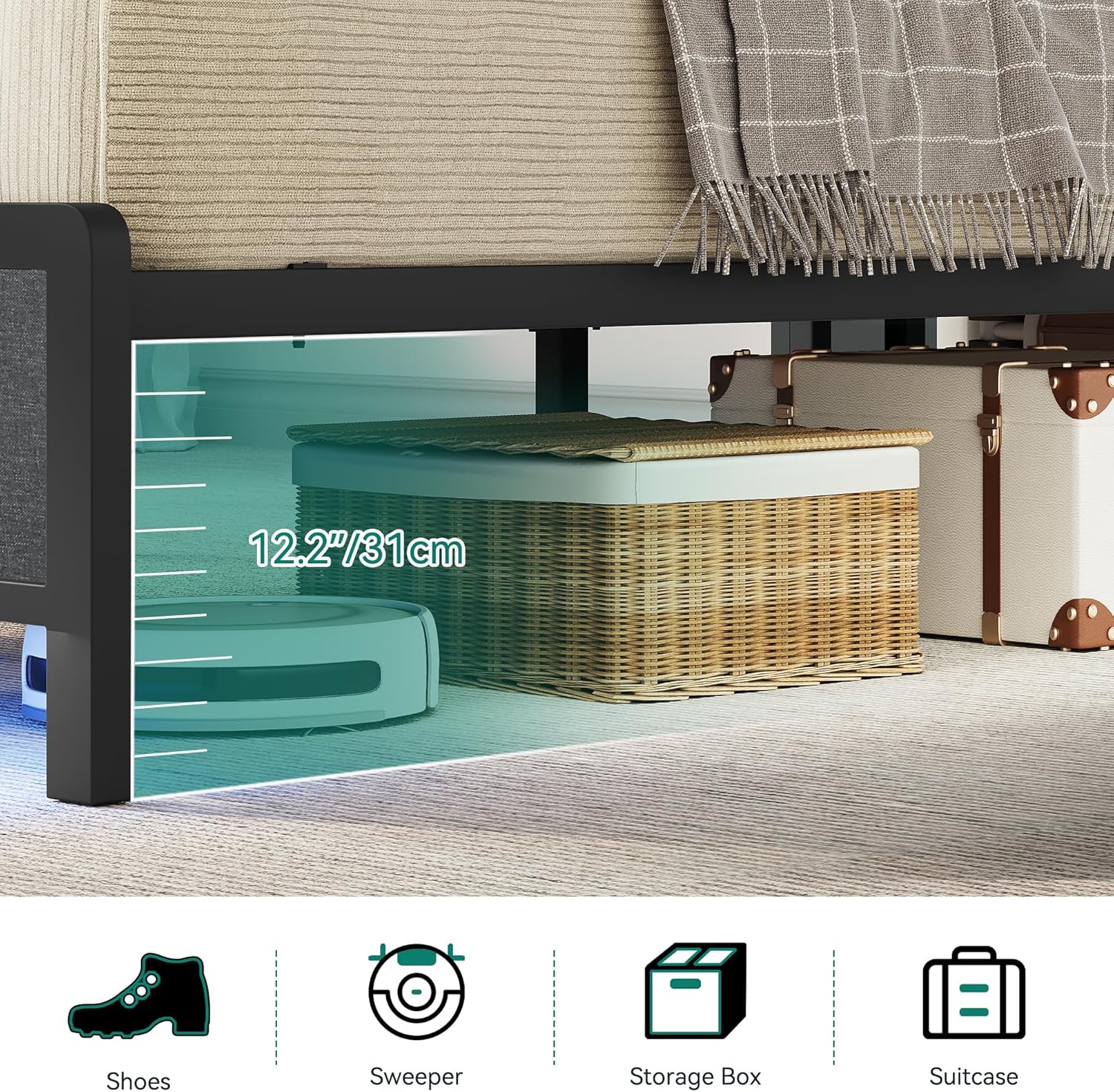
Image: Illustration demonstrating the 12.2 inch (31 cm) under-bed clearance, suitable for various storage items like shoes, sweepers, storage boxes, and suitcases.
Official Product Videos
No official product videos from the seller were found for this item. Please refer to the detailed instructions and diagrams in the included Installation Manual for visual guidance.
Warranty and Support
YITAHOME is committed to providing high-quality products and customer satisfaction. For any questions, concerns, or assistance with your bed frame, please contact YITAHOME customer support.
- Customer Support: Refer to the contact information provided in your product packaging or visit the official YITAHOME website for support options.
- Returns: This product typically comes with a 30-day easy return policy. Please check your purchase details for specific return conditions.
- Protection Plans: Additional protection plans may be available for purchase to extend coverage beyond the standard warranty.
For the most up-to-date warranty information, please consult the official YITAHOME website or the documentation included with your purchase.


