1. Introduction
This manual provides essential information for the safe and effective operation of your Generic Spray Cross-Country RC Truck SUV, Model 168h-33. Please read it thoroughly before first use and retain it for future reference.
2. Safety Information
WARNING: CHOKING HAZARD - Small parts. Not for children under 3 years.
This product contains small parts and is not suitable for children under 3 years of age due to potential choking hazards. Adult supervision is recommended during operation. Do not swallow any parts of the product or its accessories.
Ensure batteries are installed correctly according to polarity. Do not mix old and new batteries, or different types of batteries. Dispose of used batteries responsibly.
3. Package Contents
- 1x Spray Cross-Country RC Truck SUV (Model 168h-33)
- 1x 2.4GHz Wireless Remote Control
- 1x 3.7V Rechargeable Battery (for vehicle)
- 1x USB Charging Cable
- 3x AA Batteries (for remote control, included)
- 1x Water Bottle/Dropper (for spray function)
- User Manual (this document)
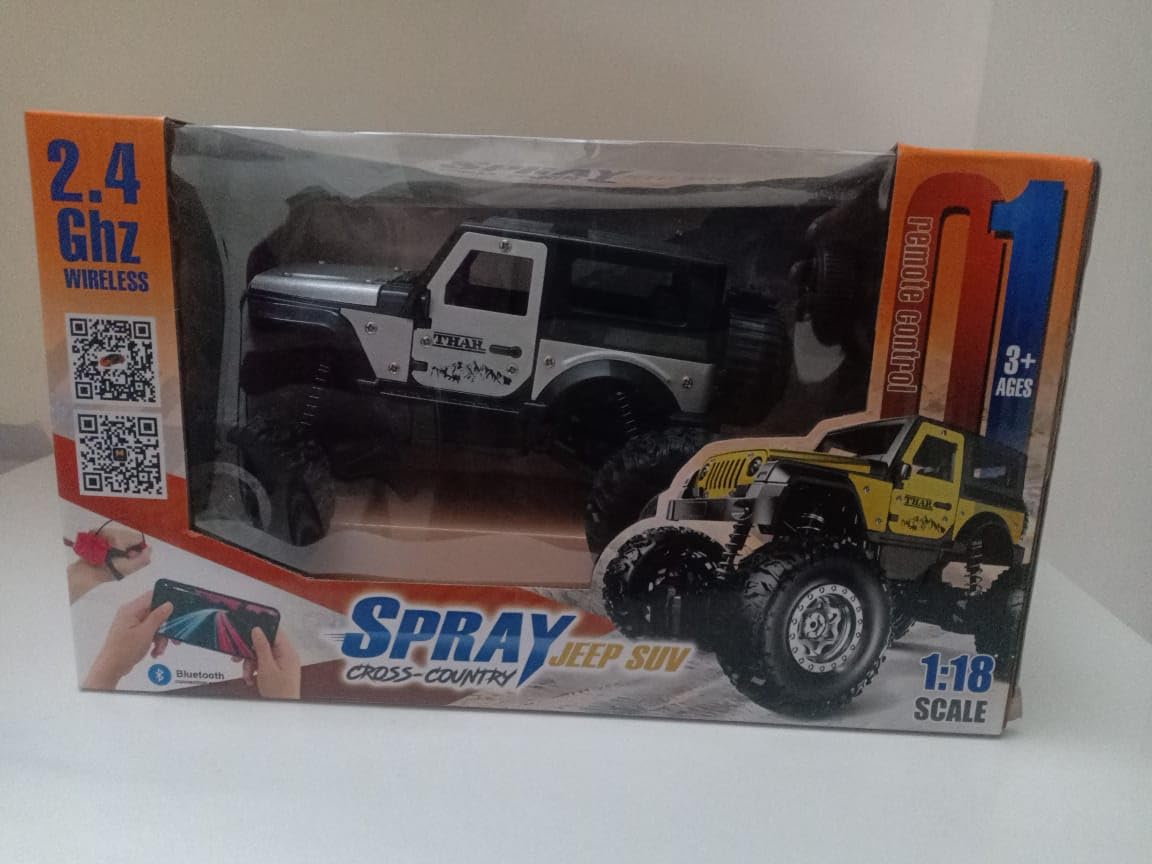
Figure 3.1: The Spray Cross-Country RC Truck SUV as packaged. The box displays the 2.4GHz wireless feature, 1:18 scale, and mobile control capability via a QR code.
4. Setup
4.1 Battery Installation and Charging
- Vehicle Battery: Locate the battery compartment on the underside of the RC truck. Open the cover, connect the included 3.7V rechargeable battery, and close the compartment. To charge, connect the battery to the USB charging cable and a USB power source. Charging takes approximately 2 hours.
- Remote Control Batteries: Locate the battery compartment on the back of the 2.4GHz remote control. Open the cover, insert 3 AA batteries (included) observing correct polarity, and close the cover securely.
4.2 Mobile App Installation and Connection
- Scan the QR code provided on the product packaging (refer to Figure 4.1) using your smartphone's camera or a QR code scanner app. The QR code directs to https://www.sumsemi.top for app download.
- Download and install the application on your smartphone.
- Ensure the RC truck is powered ON.
- Open the installed application on your smartphone.
- Within the app, click to search for available devices.
- Select the RC truck from the list of found devices to establish a Bluetooth connection.
- Once the connection is successful, you can start controlling the vehicle via the mobile app.

Figure 4.1: Illustrations for battery installation in the RC truck and remote control, alongside mobile app installation steps and the QR code for app download.
5. Operating Instructions
5.1 Powering On/Off
- To power on the RC truck, slide the ON/OFF switch located on the underside of the vehicle to the 'ON' position.
- To power on the remote control, slide its power switch to the 'ON' position.
- To power off, slide both switches to the 'OFF' position.
5.2 Basic Controls (Remote Control)
- Forward/Backward: Use the throttle trigger/lever on the remote control. Pull to move forward, push to move backward.
- Left/Right Steering: Use the steering wheel/knob on the remote control. Turn left to steer left, turn right to steer right.
5.3 Mobile App Controls
Once connected via the mobile app (refer to Section 4.2), the app interface will display virtual controls for steering, acceleration, and other functions. Follow the on-screen prompts for intuitive control.
5.4 Special Features: Light Spray Function
The RC truck is equipped with a light spray function. To activate:
- Locate the water reservoir on the RC truck.
- Carefully fill the reservoir with a small amount of clean water using the provided dropper/bottle. Do not overfill.
- Activate the spray function using the designated button on the remote control or through the mobile app interface.

Figure 5.1: The RC truck demonstrating its light spray function from the rear. This image highlights the feature and the robust four-wheel suspension system.
6. Maintenance
- Cleaning: Wipe the vehicle with a soft, dry cloth after use. Avoid using water or harsh chemicals, especially near electronic components.
- Battery Care: Always remove batteries from the vehicle and remote control when not in use for extended periods. Recharge the vehicle battery fully before storage.
- Storage: Store the RC truck and its accessories in a cool, dry place, away from direct sunlight and extreme temperatures.
7. Troubleshooting
| Problem | Possible Cause | Solution |
|---|---|---|
| Vehicle does not respond. | Low battery in vehicle or remote; vehicle/remote not powered on; not paired. | Charge vehicle battery; replace remote batteries; ensure both are ON; re-pair remote/app. |
| Poor control range or interference. | Obstacles; other 2.4GHz devices nearby; low battery. | Operate in open areas; move away from other wireless devices; check batteries. |
| Spray function not working. | Water reservoir empty; blockage; low vehicle battery. | Refill reservoir; check for blockages; ensure vehicle battery is charged. |
| Mobile app cannot connect. | Bluetooth off; vehicle off; app not installed correctly. | Ensure Bluetooth is on; vehicle is on; reinstall app; try pairing again. |
8. Specifications
| Feature | Detail |
|---|---|
| Model Number | 168h-33 |
| Scale | 1:18 Scale |
| Control Frequency | 2.4GHz Wireless |
| Control Method | Remote Control, Mobile App (Bluetooth) |
| Vehicle Battery | 3.7V Rechargeable Battery (Included) |
| Remote Control Batteries | 3x AA Batteries (Included) |
| Material Type | Carbon Fibre |
| Product Dimensions | 22 x 15 x 15 cm |
| Item Weight | 531 g |
| Recommended Age | 3 years and up |
| Special Features | Light Spray Function, Four-Wheel Suspension, LED Lights |
9. Warranty and Support
For warranty information or technical support, please refer to the retailer where the product was purchased or contact the manufacturer directly. Keep your proof of purchase for any warranty claims.
Manufacturer: grace international imports
Packer: jasonsbusiness2@gmail.com


