
SUNDERWELL LBW12A
SUNDERWELL Electric Hoverboard Model LBW12A User Manual
Model: LBW12A | Brand: SUNDERWELL
1. Introduction
This manual provides essential information for the safe and efficient operation of your SUNDERWELL Electric Hoverboard Model LBW12A. Please read this manual thoroughly before first use and retain it for future reference. This hoverboard is designed for personal recreational use and features LED lights, a Bluetooth speaker, and self-balancing technology.

Figure 1: SUNDERWELL Electric Hoverboard Model LBW12A (Chrome Red)
2. Safety Information
Your safety is paramount. Always wear appropriate safety gear, including a helmet, knee pads, and elbow pads, when operating the hoverboard. Adult supervision is recommended for younger riders.
2.1 General Safety Guidelines
- Do not operate the hoverboard under the influence of alcohol or drugs.
- Ensure the hoverboard is fully charged before each use.
- Avoid riding on wet, uneven, or slippery surfaces.
- Maintain a safe distance from pedestrians and other vehicles.
- Do not attempt stunts or sudden maneuvers that could lead to loss of control.
- The maximum load-bearing capacity is 120 lbs. Exceeding this limit can affect performance and safety.
- Recommended age range: Kid.

Figure 2: The hoverboard is designed with safety in mind, featuring robust construction.
3. Package Contents
Verify that all items are present in the package:
- SUNDERWELL Electric Hoverboard Model LBW12A
- Charging Adapter
- User Manual (this document)
4. Product Overview
The SUNDERWELL Electric Hoverboard is equipped with features designed for an enjoyable riding experience.
4.1 Key Features
- Self-Balancing Design: Intelligent correction of tilt angle for stable riding, suitable for beginners.
- LED Lights: Features head lights, indicator lights, fender lights, and flashing wheel lights for visibility and style.
- Bluetooth Speaker: High-quality built-in speaker for audio playback from paired devices.
- Durable Wheels: 6.5-inch all-terrain wheels with splash fenders, bigger pedals, and wider tires.

Figure 3: The hoverboard features colorful LED lights on the wheels, fenders, and front.
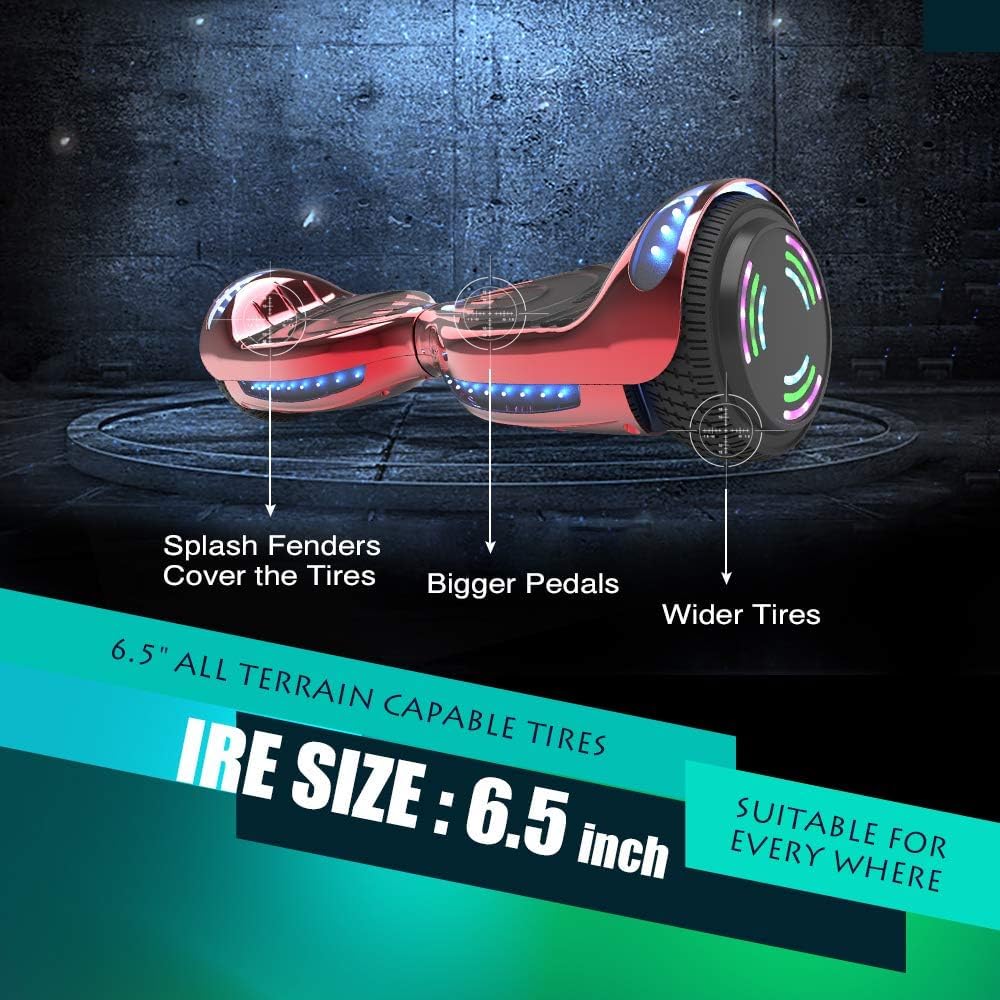
Figure 4: Detailed view of the 6.5-inch all-terrain wheels and footpads.

Figure 5: Internal components and structure of the hoverboard.
5. Setup
5.1 Initial Charging
Before first use, fully charge your hoverboard. The charging time is approximately 2-3 hours. The charger light will indicate charging status (typically red for charging, green for full).

Figure 6: Battery specifications and charging indicators.
5.2 Powering On/Off
Locate the power button on the hoverboard. Press and hold to turn the device on or off. The indicator lights will illuminate upon activation.
5.3 Bluetooth Pairing
To connect your mobile device to the hoverboard's Bluetooth speaker:
- Ensure the hoverboard is powered on.
- Enable Bluetooth on your mobile device.
- Search for available devices and select 'Bluetooth' (or similar name) to pair.
- Once paired, you can play music through the hoverboard's speakers.
Video 1: Demonstration of Bluetooth speaker functionality and LED lights.

Figure 7: Visual guide for connecting your phone via Bluetooth.
6. Operating Instructions
6.1 Riding the Hoverboard
The self-balancing feature assists new riders in quickly adapting to the hoverboard. Follow these steps for safe operation:
- Place one foot firmly on a footpad. The hoverboard will stabilize itself.
- Step onto the other footpad with your second foot. Maintain a relaxed posture.
- Lean slightly forward to move forward, and lean backward to slow down or reverse.
- To turn, apply gentle pressure with your left foot to turn right, and with your right foot to turn left.
- To dismount, step off one foot at a time, ensuring the hoverboard is stationary.

Figure 8: The self-balancing system makes it easy for beginners to learn.
6.2 Performance
The hoverboard can reach a top speed of up to 10 MPH and offers a range of over 8 miles on a single charge. Its 6.5-inch wheels are designed to handle various terrains, including minor obstacles up to a 12-degree incline.
Video 2: Demonstration of the hoverboard's top speed and smooth operation.

Figure 9: The hoverboard is capable of handling small obstacles and inclines.
7. Maintenance
7.1 Cleaning
Wipe the hoverboard with a damp cloth after use. Avoid using harsh chemicals or abrasive cleaners. Do not rinse the hoverboard directly with water.
7.2 Storage
Store the hoverboard in a cool, dry place away from direct sunlight and extreme temperatures. If storing for an extended period, ensure the battery is partially charged (around 50%) and recharge it every few months to maintain battery health.
7.3 Battery Care
Use only the provided charging adapter. Do not overcharge the battery. Disconnect the charger once the indicator light turns green. If the battery shows signs of damage or malfunction, discontinue use and contact customer support.
8. Troubleshooting
If you encounter any issues with your hoverboard, refer to the following common problems and solutions:
8.1 Common Issues
- Beeping and flashing red circle light
- Not balancing when riding
- Cannot turn on
- Bluetooth not working
- Only one wheel works
- Unusual noise during operation
- Not charging
8.2 Reset Procedure
If you experience any of the above problems, performing a reset may resolve the issue:
- Place the hoverboard on a level surface.
- Press and hold the power switch for 20 seconds.
- When the LED lights flash, release the power switch.
- Turn off the hoverboard.
- Turn it on again. The reset is complete.
Video 3: Visual guide on how to reset the hoverboard to resolve common issues.
9. Specifications
| Feature | Specification |
|---|---|
| Model Name | LBW12A |
| Brand | SUNDERWELL |
| Battery | 24V/4A (1 12V battery included) |
| Charging Time | 2-3 hours |
| Range | Over 8 miles |
| Top Speed | Up to 10 MPH |
| Wheel Size | 6.5 inches |
| Maximum Load | 120 lbs |
| Product Dimensions | 20.75" L x 7.5" W x 7.9" H |
| Product Weight | 11.3 lbs |
| Special Features | Built-In Bluetooth speaker, LED lights |
10. Warranty and Support
SUNDERWELL offers the following customer support services:
- 30 Days Free Returns and Exchanges: Please ensure the original packaging is retained.
- 90 Days Free Replacement of Accessories: For any accessory issues within 90 days of purchase.
For any questions or concerns, please contact SUNDERWELL customer support directly. Do not return the goods without prior contact. We are committed to providing the best support.

Figure 10: Overview of SUNDERWELL's customer support and warranty policies.
no relevant documents
Ask a question about this manual
Ask about setup, troubleshooting, compatibility, parts, safety, or missing instructions. Manuals+ will review the question and use this page’s manual context to help answer it.