
Introduction
This manual provides comprehensive instructions for the assembly, operation, and maintenance of your N-GEN GAMING Video Gaming Chair. Please read this manual thoroughly before assembly and use to ensure proper function and safety. Keep this manual for future reference.

Image: The N-GEN GAMING Video Gaming Chair, showcasing its design and available color variants.
Safety Information
- Do not exceed the maximum weight capacity of 300 pounds.
- Ensure the chair is stable and properly assembled before use.
- Follow all assembly instructions carefully to avoid potential hazards.
- Keep small parts away from children during assembly.
- Avoid standing on the chair or using it as a step stool.
Package Contents
Verify that all components are present before beginning assembly. If any parts are missing, please contact customer support.
- Seat Base
- Backrest
- Left Armrest
- Right Armrest
- Footrest Cushion and Metal Bar
- Control Mechanism
- Gas Lift
- Base Legs (5 pieces)
- Wheels (5 pieces)
- Lumbar Cushion
- Headrest Cushion
- Assembly Tools (Allen Key, Bolts)
Setup and Assembly
Follow these steps carefully to assemble your N-GEN GAMING chair. It is recommended to have a clear, spacious area for assembly.
Assembly Video Guide
Video: Official assembly guide for the N-GEN GAMING chair. This video demonstrates each step of the assembly process, from unboxing to final adjustments, ensuring a smooth setup.
Step-by-Step Assembly Instructions
- Assemble the Base: Insert each of the five base legs into the center base until you hear a "CLICK" sound, indicating they are securely in place. Then, insert the five wheels into the ends of the base legs. Finally, insert the gas lift into the center hole of the assembled base.
- Attach the Footrest: Pull the footrest metal bar out from under the seat. Place the footrest cushion under the metal bar, aligning the bolt holes vertically. Under-tighten the bolts in a diagonal order first, then fully tighten all bolts using the included Allen key.
- Install the Control Mechanism: Place the seat upside down. Align the control mechanism with the bolt holes on the underside of the seat. Ensure the "FRONT" sticker on the mechanism faces the front of the seat. Under-tighten the bolts in a diagonal order first, then fully tighten all bolts using the included Allen key.
- Mount the Seat: Carefully align the hole on the control mechanism with the gas lift and mount the seat onto the gas lift.
- Attach the Backrest: Insert the metal plate of the backrest into the seat connector. Align the plate and under-tighten the bolts. Fully tighten using the included Allen key.
- Install Armrests: Align the armrests to the sides of the seat and backrest, ensuring correct direction (left and right). Under-tighten the bolts, then fully tighten using the included Allen key.
- Attach Cushions: Install the lumbar support cushion and headrest cushion using their elastic straps. Adjust their positions for optimal comfort.
Image: Illustration of inserting the base legs into the chair's central hub.
Image: Illustration of inserting the caster wheels into the chair's base legs.
Image: Illustration of inserting the gas lift cylinder into the assembled chair base.
Operating Instructions
Adjustable Reclining Backrest
The chair features a reclining backrest that can be adjusted from 90 degrees (upright for work) to 135 degrees (reclined for rest). Use the lever on the side of the seat to adjust and lock the backrest at your desired angle.

Image: Visual representation of the chair's adjustable recline angles for various activities.
Linkage Armrests
The linkage armrests move in conjunction with the reclining backrest, providing continuous arm support regardless of the recline angle. This design ensures effortless adjustment and comfortable arm positioning.
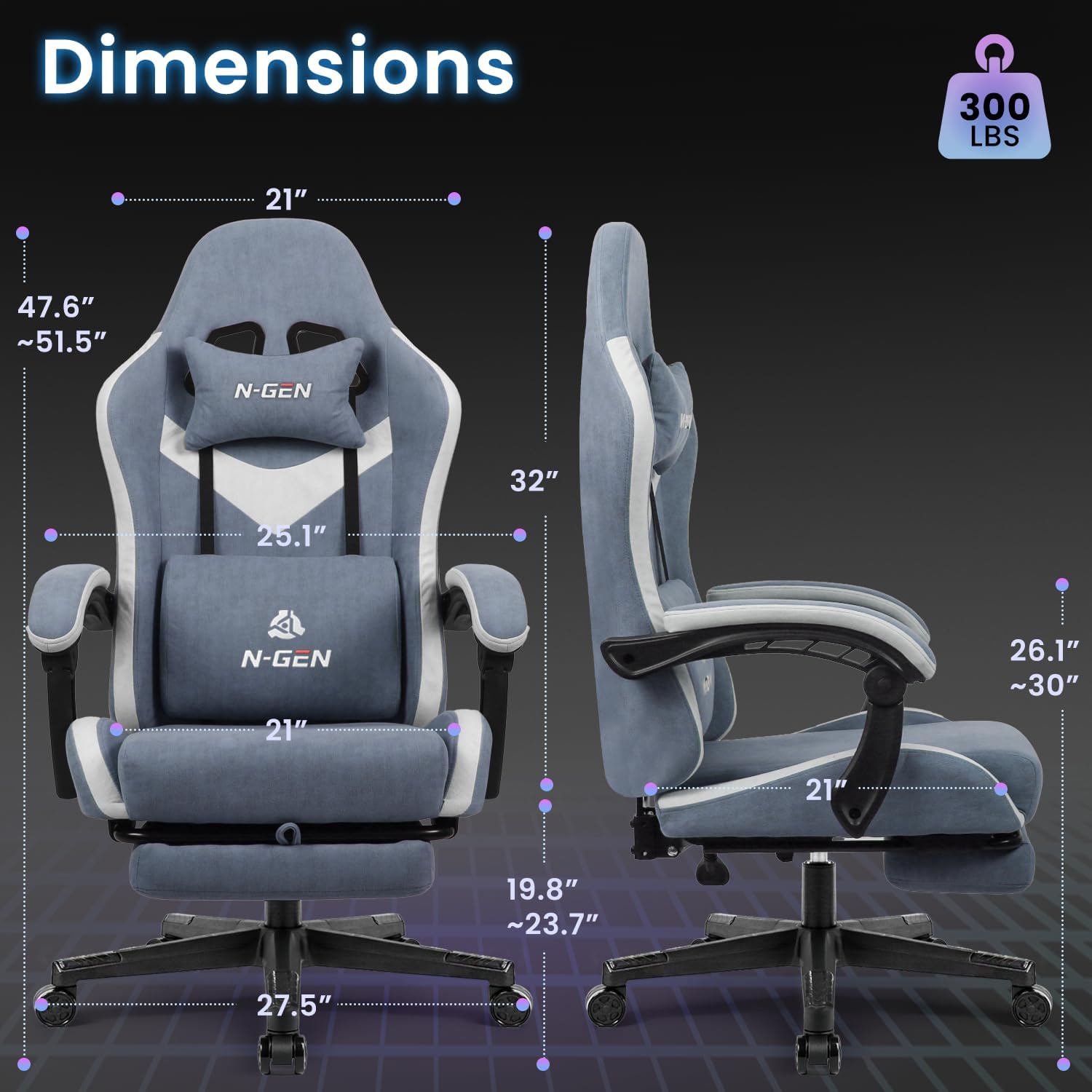
Image: Detail of the linkage armrest, highlighting its ergonomic movement.
Lumbar and Headrest Support
The chair includes removable and adjustable lumbar and headrest cushions. Position these cushions to provide optimal support for your lower back and neck, promoting proper posture and reducing muscle strain during extended use.

Image: Diagram illustrating the ergonomic support features of the chair, including the headrest and lumbar cushion.
Retractable Footrest
For enhanced relaxation, the chair is equipped with a retractable footrest. Pull it out when you wish to extend your legs and push it back under the seat when not in use.
Height Adjustment
Utilize the lever located under the seat to adjust the chair's height. Pull the lever up to raise the chair, or pull it up while seated to lower it. Release the lever to lock the height.
Swivel and Rolling Functionality
The chair features a 360-degree swivel and smooth-rolling casters for easy movement and maneuverability around your workspace.
Maintenance
- Cleaning: Wipe clean with a damp cloth. Avoid harsh chemicals or abrasive cleaners that may damage the fabric.
- Fastener Check: For optimal safety and longevity, check and tighten all bolts every six months using the provided Allen key.
- Caster Care: Periodically clean any debris from the wheels to ensure smooth rolling.
Troubleshooting
If you encounter any issues with your chair, please refer to the following common solutions:
- Chair Wobbles: Ensure all bolts are fully tightened. Check that the base legs are securely clicked into the center base.
- Difficulty Adjusting Height: Verify that the gas lift is correctly inserted and not obstructed. Ensure the height adjustment lever is functioning properly.
- Squeaking Noises: Re-tighten all bolts. Apply a small amount of lubricant to moving parts if necessary, avoiding contact with fabric.
- Casters Not Rolling Smoothly: Remove any hair or debris that may be caught in the wheels.
If problems persist, please contact customer support for further assistance.
Specifications
| Feature | Detail |
|---|---|
| Brand | N-GEN GAMING |
| Model Name | Video Gaming Chair |
| Item Model Number | Fabric Gaming Chair |
| Color | Blue |
| Product Dimensions | 27.5"D x 25.1"W x 51.5"H |
| Back Style | Solid Back |
| Special Features | Adjustable Height, Arm Rest, Ergonomic, Rolling, Swivel |
| Product Care Instructions | Wipe Clean |
| Maximum Weight Recommendation | 300 Pounds |
| Arm Style | Linkage Armrest |
| Seat Depth | 21 inches |
| Fill Material | Sponge |
| Item Weight | 36 pounds |
| Manufacturer | NEO CHAIR INC. |

Image: Detailed dimensions of the N-GEN GAMING Video Gaming Chair.

Image: Illustration of the Class-3 Gas Lift and durable Nylon Base, highlighting key structural components.
Warranty and Support
For any missing parts or assembly inquiries, please contact NEO Direct customer support at support@neodirect.com. Specific warranty details may vary; please refer to your purchase documentation or contact the seller for information regarding warranty coverage.


