Introduction
This manual provides essential information for the safe and efficient operation, installation, and maintenance of your ECOPOOLTECH PLC30 Above Ground Pool Heater. Please read these instructions thoroughly before installation and use to ensure proper function and longevity of your unit. Keep this manual for future reference.
Safety Information
Always observe the following safety precautions to reduce the risk of injury, electric shock, fire, or damage to the product.
- Electrical Safety: Ensure the unit is connected to a properly grounded outlet. Do not use extension cords. Disconnect power before performing any maintenance or service.
- Water Safety: Never operate the heater if the water level is too low or if there is no water flow. Ensure all connections are watertight to prevent leaks.
- Placement: Install the heater in a well-ventilated area, away from flammable materials. Maintain adequate clearance around the unit for proper airflow.
- Children and Pets: Keep children and pets away from the unit during operation.
- Professional Installation: While designed for easy installation, consult a qualified electrician or pool professional if you are unsure about any steps.
Product Features
- Efficient Heating: Utilizes heat pump technology for energy-efficient operation, achieving a Coefficient of Performance (COP) of 5.3. This means for every unit of electricity consumed, 5.3 units of heat are generated.
- Smart Control System: Features a built-in flow sensor to automatically manage heating based on water pump operation and maintain a consistent temperature.
- Designed for Small Pools: Ideal for above-ground pools up to 2000 gallons.
- Wide Operating Range: Operates effectively in outdoor temperatures ranging from 46°F to 105°F, capable of heating pool water up to 100°F under optimal conditions.
- Easy Installation: Plug-in design with included hose clamps and connectors for straightforward setup.
- User-Friendly Interface: Digital control panel with an easy-to-read display for convenient temperature setting and monitoring.
- Quiet Operation: Equipped with soundproofing, operating at a low noise level of 50dB.
- Environmentally Friendly: Powered by electricity, using heat pump technology to transfer heat from the air to the water, avoiding the use of natural gas or propane.

Image: Diagram illustrating how the ECOPOOLTECH PLC30 extends the usable swimming season compared to a pool without a heat pump.

Image: The ECOPOOLTECH PLC30 unit shown in a serene pool environment with a sleeping dog nearby, emphasizing its quiet operation.
Package Contents
Verify that all items are present in the package before beginning installation.
- ECOPOOLTECH PLC30 Pool Heater Unit
- 10ft Power Cable with USA Standard Plug
- Hose Clamps (2)
- Hose Adapters (2)
- User Manual (this document)

Image: A visual representation of the ECOPOOLTECH PLC30 pool heater and its included accessories: power cable, hose clamps, adapters, and the user manual.
Specifications
| Model Number | EE100 (PLC30) |
| Product Dimensions | 12 x 13 x 15 inches |
| Manufacturer | ECO POOLTECH |
| Power Supply | 110V/120V, 60Hz |
| Heating Capacity | 11488 BTU |
| Recommended Pool Volume | Up to 2000 gallons (above ground pools) |
| Operating Temperature Range | 46°F to 105°F (Outdoor Air) |
| Maximum Water Temperature | 100°F (Optimal Conditions) |
| Noise Level | 50dB |
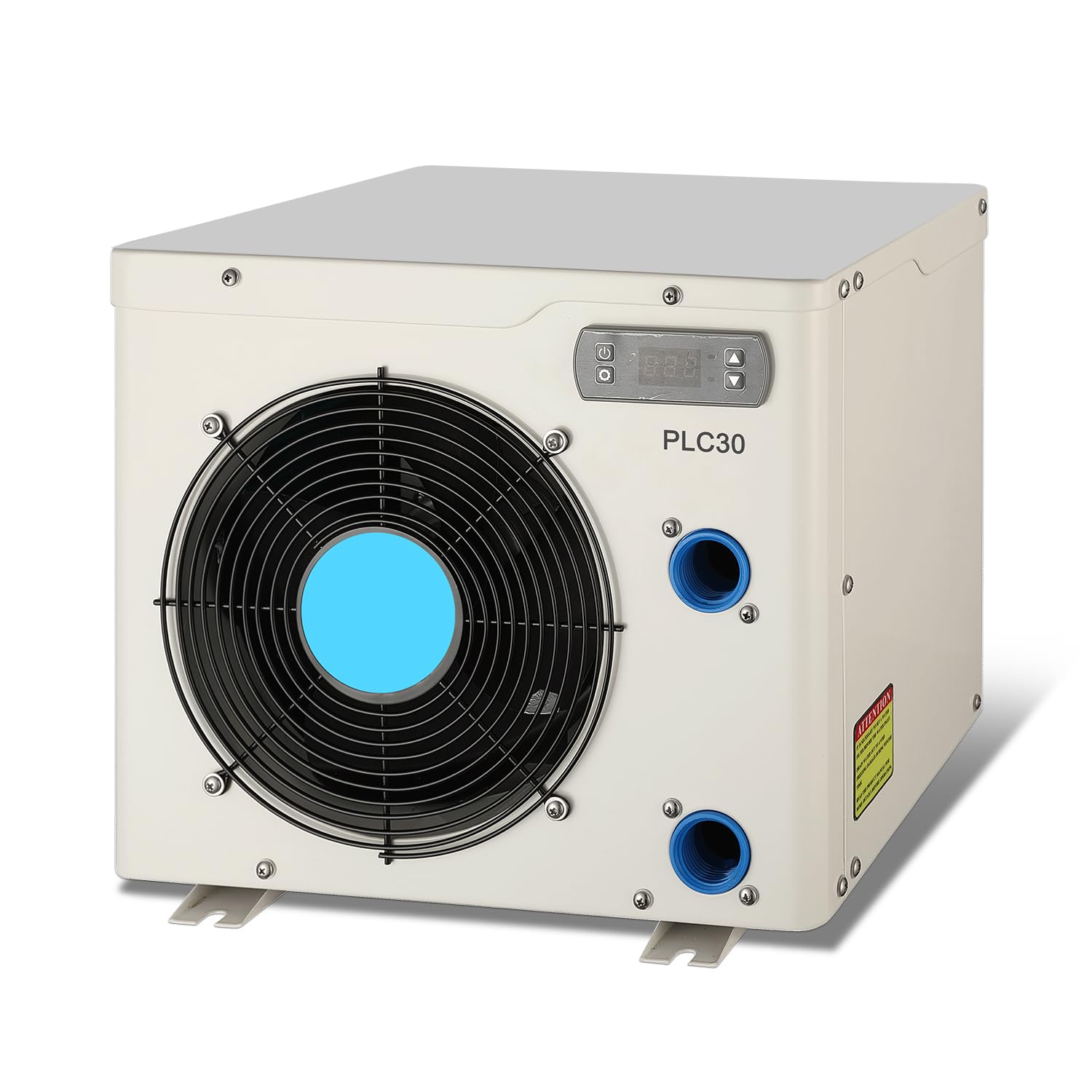
Image: U.S. Government Energy Guide label for the POOLCOMFT PLC30 Swimming Pool Heat Pump, indicating a thermal efficiency of 5.3.
Setup and Installation
The ECOPOOLTECH PLC30 is designed for straightforward installation. Follow these steps for proper setup.
- Choose a Location: Place the heater on a stable, level surface near your above-ground pool. Ensure it is in a well-ventilated area, allowing for adequate airflow around the unit.
- Connect Hoses: Connect the pool's filtration system output to the heater's inlet and the heater's outlet back to the pool. Use the provided hose clamps and adapters to secure all connections tightly to prevent leaks.
- Electrical Connection: Plug the 10ft power cable directly into a dedicated, grounded 110V/120V, 60Hz electrical outlet. Do not use extension cords or adapters.
- Check for Leaks: Once connections are made and the pool pump is running, check all hose connections for any signs of water leakage.
- Initial Start-up: Ensure the pool pump is running and there is sufficient water flow through the heater before powering on the unit.

Image: An above-ground pool with a family swimming, showing the ECOPOOLTECH PLC30 heater connected to the pool's filtration system, illustrating easy installation.
Model Selection Guide
Refer to the following guide to ensure your heater is appropriately sized for your pool and local climate. This model (PLC30) is suitable for pools up to 2000 gallons in warmer climates (62°F and 72°F ambient temperatures).
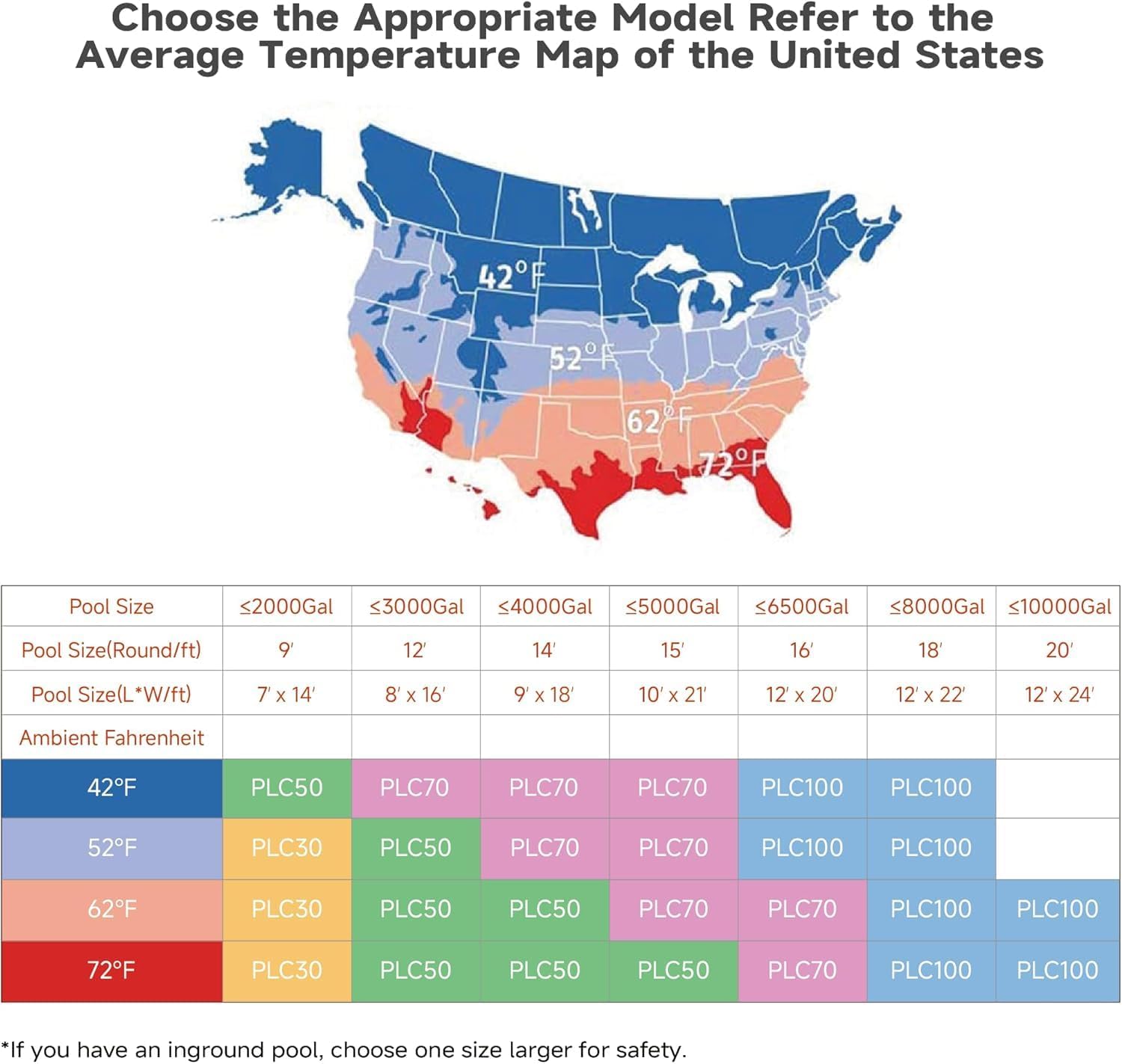
Image: A chart and map illustrating how to choose the appropriate pool heater model based on pool size (gallons/feet) and average ambient temperatures across different regions of the United States. The PLC30 is highlighted for smaller pools in warmer zones.
Operating Instructions
The PLC30 features a digital control panel for easy operation.
- Power On: Ensure the unit is plugged in and the pool pump is circulating water. The heater will automatically detect water flow.
- Set Desired Temperature: Use the digital control panel to set your desired water temperature. The display will show the current water temperature and the set temperature.
- Automatic Operation: The intelligent control system, with its built-in flow sensor, will automatically activate the heating process when water flow is detected and the water temperature is below your set point. It will stop heating once the desired temperature is reached or if water flow ceases.
- Monitoring: Periodically check the digital display to monitor the water temperature.

Image: A graphic representation of the intelligent control system, showing how it maintains a stable water temperature within a narrow range of ±2°F.
Maintenance
Regular maintenance ensures optimal performance and extends the lifespan of your pool heater.
- Clean Exterior: Periodically wipe down the exterior of the unit with a soft, damp cloth. Do not use harsh chemicals or abrasive cleaners.
- Check Airflow: Ensure the air intake and exhaust vents are clear of debris, leaves, and other obstructions to maintain proper airflow.
- Inspect Hoses and Connections: Regularly check hoses and connections for wear, cracks, or leaks. Tighten hose clamps as needed.
- Winterization: Before freezing temperatures arrive, disconnect the heater, drain all water from the unit and hoses, and store it in a dry, protected area.
- Professional Inspection: Consider an annual inspection by a qualified pool technician.
Troubleshooting
If you encounter issues with your ECOPOOLTECH PLC30 heater, refer to the following common problems and solutions.
| Problem | Possible Cause | Solution |
|---|---|---|
| Heater not turning on | No power, tripped breaker, no water flow. | Check power connection and circuit breaker. Ensure pool pump is running and water is circulating through the heater. |
| Water not heating | Incorrect temperature setting, insufficient water flow, ambient temperature too low, pool too large. | Verify desired temperature setting. Ensure adequate water flow. Check if ambient temperature is within operating range. Confirm pool volume is within recommended limits (up to 2000 gallons). |
| Error code displayed | Internal fault or sensor issue. | Note the error code and refer to the manufacturer's support for specific guidance. Try power cycling the unit. |
| Unusual noise | Debris in fan, loose components. | Disconnect power and inspect fan area for obstructions. If noise persists, contact customer support. |
If troubleshooting steps do not resolve the issue, please contact ECOPOOLTECH customer support.
Warranty and Support
For detailed warranty information, please refer to the warranty card included with your product or visit the official ECOPOOLTECH website. If you require technical assistance or have questions regarding your PLC30 pool heater, please contact ECOPOOLTECH customer support. While direct phone support may not always be available, email support is provided and has been noted as helpful.
Manufacturer: ECO POOLTECH
Website: Visit the ECOPOOLTECH Store on Amazon (for general brand information)