Important Safety Information
Please read this manual thoroughly before operating the Bear 3L Hot Water Dispenser. Retain this manual for future reference. Failure to follow these instructions may result in electric shock, fire, or serious injury.
- Electrical Safety: Ensure the power supply matches the voltage specified on the appliance. Do not immerse the appliance, cord, or plug in water or other liquids. Unplug when not in use and before cleaning.
- Hot Water Caution: The dispenser produces hot water. Exercise extreme caution to prevent burns. Keep hands and face clear of the dispensing nozzle during operation.
- Child Safety: This appliance is not intended for use by persons (including children) with reduced physical, sensory, or mental capabilities, or lack of experience and knowledge, unless they have been given supervision or instruction concerning use of the appliance by a person responsible for their safety. Children should be supervised to ensure they do not play with the appliance. The child lock feature should always be engaged when not in active use.
- Placement: Place the dispenser on a stable, flat, heat-resistant surface, away from edges and out of reach of children. Do not place near hot gas or electric burners, or in a heated oven.
- Maintenance: Do not attempt to repair the appliance yourself. Contact qualified service personnel for any repairs.
Product Overview
Familiarize yourself with the components of your Bear 3L Hot Water Dispenser.
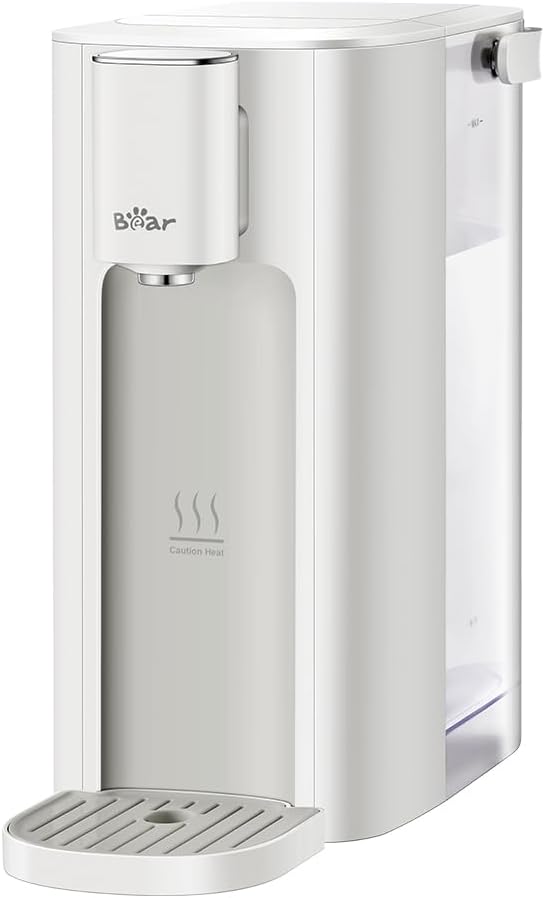
Image 1: Bear 3L Hot Water Dispenser. A front-angled view of the Bear 3L Hot Water Dispenser in cream white. It features a sleek, minimalist design with a water dispensing nozzle on the left, a transparent water tank on the right, and a removable drip tray at the base. The 'Bear' logo is visible above the nozzle, and 'Caution Heat' text with steam icons is printed below it.
Main Components:
- Water Tank: 3-liter capacity, transparent for easy water level monitoring, and detachable for filling and cleaning.
- Dispensing Nozzle: Where hot water is released.
- Control Panel: Digital touch screen for temperature and volume selection, and activation of functions.
- Drip Tray: Removable tray at the base to catch any drips or spills.
- Power Cord: For connecting the appliance to an electrical outlet.
Setup
- Unpacking: Carefully remove all packaging materials. Inspect the dispenser for any damage.
- Initial Cleaning: Before first use, wash the detachable water tank and drip tray with mild detergent and rinse thoroughly. Wipe the exterior of the dispenser with a damp cloth.
- Placement: Place the dispenser on a dry, stable, and level surface. Ensure there is adequate space around the unit for ventilation.
- Filling the Water Tank:
- Remove the water tank from the back of the unit.
- Fill the tank with clean, potable water. Do not exceed the maximum fill line.
- Securely reattach the water tank to the dispenser.
- First Use Flush: For the first use, or after extended periods of non-use, it is recommended to flush the system.
- Place a large heat-resistant container (at least 500ml capacity) under the dispensing nozzle.
- Select the highest temperature (90°C) and maximum volume (500ml).
- Dispense water. Repeat this process 2-3 times to ensure the internal components are clean.
- Power Connection: Plug the power cord into a grounded electrical outlet. The digital display will illuminate.
Operating Instructions
The Bear Hot Water Dispenser features a digital touch screen for easy operation.
- Power On: The dispenser is typically in standby mode when plugged in. Touch the power icon on the digital screen to activate.
- Unlock Feature: For safety, the dispenser has a child lock. Touch and hold the unlock icon (or follow on-screen prompts) to unlock the controls before dispensing.
- Select Temperature: Touch the temperature icon to cycle through the available temperature settings: 45°C, 60°C, 70°C, 80°C, 85°C, 90°C. Select your desired temperature. Note: The maximum temperature is 90°C.
- Select Water Volume: Touch the volume icon to cycle through the available water volume settings: 150ml, 200ml, 250ml, 300ml, 500ml. Select the desired volume.
- Dispense Water: Place your cup or container under the dispensing nozzle. Once temperature and volume are selected and the unit is unlocked, touch the dispense/start button. Hot water will begin to flow within approximately 3 seconds.
- Stop Dispensing: To stop water flow before the selected volume is reached, touch the dispense/start button again.
- LED Night Light: The dispenser is equipped with an LED night light for visibility in low-light conditions. Its operation is typically automatic or can be toggled via the control panel (refer to on-screen icons if available).
Maintenance and Cleaning
Regular cleaning ensures optimal performance and extends the lifespan of your dispenser.
- Before Cleaning: Always unplug the dispenser from the power outlet and allow it to cool completely before cleaning.
- Exterior Cleaning: Wipe the exterior surfaces with a soft, damp cloth. Do not use abrasive cleaners or solvents.
- Water Tank Cleaning:
- Remove the water tank.
- Wash with mild dish soap and warm water. Rinse thoroughly to remove all soap residue.
- Dry completely before reattaching.
- Drip Tray Cleaning:
- Remove the drip tray from the base of the dispenser.
- Empty any collected water.
- Wash with mild soap and water, then rinse and dry.
- Automatic Cleaning Program: The dispenser features an automatic cleaning program to remove accumulated water and deep clean the interior.
- Refer to the digital touch screen for the specific icon or menu option to activate the automatic cleaning program.
- Follow the on-screen instructions. This process typically involves dispensing hot water, so ensure a large container is placed under the nozzle.
- Descaling: Over time, mineral deposits (limescale) may build up, especially in hard water areas.
- Use a descaling solution suitable for kitchen appliances, following the product's instructions.
- Alternatively, a solution of white vinegar and water (1:1 ratio) can be used. Fill the water tank with the descaling solution.
- Run the dispenser through several cycles with the descaling solution, ensuring a container is in place.
- After descaling, rinse the water tank thoroughly and run several cycles with fresh, clean water to flush out any remaining descaling solution.
Troubleshooting
Before contacting customer support, please refer to the following common issues and solutions.
| Problem | Possible Cause | Solution |
|---|---|---|
| No power/Dispenser not turning on |
|
|
| No water dispensed |
|
|
| Water not hot enough |
|
|
| Water leakage |
|
|
Specifications
| Feature | Detail |
|---|---|
| Brand | Bear |
| Model Number | YSJ-E40T2-2025NEW |
| Color | Cream White |
| Capacity | 3 Liters |
| Power | 2050W |
| Temperature Settings | 45°C, 60°C, 70°C, 80°C, 85°C, 90°C |
| Water Volume Choices | 150ml, 200ml, 250ml, 300ml, 500ml |
| Product Dimensions (L x W x H) | 5.08 x 11.61 x 10.87 inches |
| Item Weight | 4.51 pounds |
| UPC | 199284549692 |
| Manufacturer | Bear Electric Appliance Co.,Ltd |
Warranty and Support
For warranty information or technical support, please refer to the documentation included with your purchase or contact Bear customer service. Keep your proof of purchase for warranty claims.
Manufacturer: Bear Electric Appliance Co.,Ltd


