1. Introduction
This manual provides detailed instructions for the safe and efficient operation of your PEKOKO L4Pro Handheld Portable Marking Machine. Please read this manual thoroughly before using the device to ensure proper function and to prevent damage.
The PEKOKO L4Pro is a versatile handheld marking machine designed for various applications, including personalized customization, batch coding, and printing of QR codes, barcodes, text, serial numbers, dates, characters, images, and logos.
2. Product Overview and Components
Familiarize yourself with the main components of the PEKOKO L4Pro marking machine.

Image: PEKOKO L4Pro Handheld Marking Machine with its key parts labeled for identification.
- Host: The main body of the device.
- Battery: Removable power source.
- Protection Shield: Guards the printing mechanism.
- Fan: For cooling the internal components.
- USB Interface: For data transfer and connectivity.
- Trigger Button: Activates the printing process.
- Main Control Screen: 5-inch color touch screen for operation.
- Power Switch: Turns the device on and off.
The standard package includes:
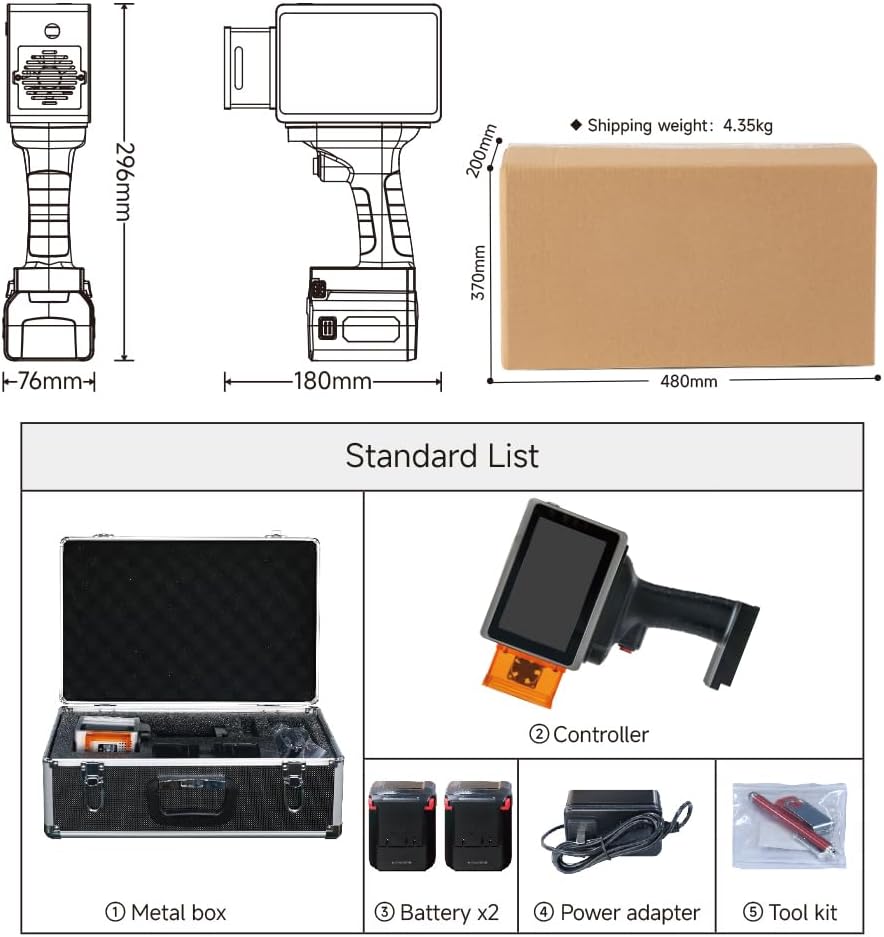
Image: Standard list of items included with the PEKOKO L4Pro, showing the metal carrying case, the controller unit, two batteries, a power adapter, and a tool kit.
- Metal box (carrying case)
- Controller (main unit)
- Battery x2
- Power adapter
- Tool kit
3. Setup
3.1 Charging the Battery
The PEKOKO L4Pro comes with a removable 9000mAh battery. Ensure the battery is fully charged before first use.
- Connect the power adapter to the charging port on the battery.
- Plug the power adapter into a standard electrical outlet.
- The battery indicator will show charging status. A full charge provides up to 6 hours or more of continuous use.
3.2 Installing the Battery

Image: A hand demonstrating the correct way to insert the removable battery into the base of the PEKOKO L4Pro handheld marking machine.
- Align the battery with the slot at the bottom of the main unit.
- Gently slide the battery into place until it clicks securely.
- To remove, press the release button (if present) and slide the battery out.
3.3 Installing the Ink Cartridge
The device uses inkjet cartridges. Refer to the specific cartridge instructions for installation. Ensure the cartridge is properly seated for optimal printing.
4. Operating Instructions
4.1 Powering On/Off
- To power on, press and hold the Power Switch (8) until the screen illuminates.
- To power off, press and hold the Power Switch until the shutdown prompt appears, then confirm.
4.2 Navigating the Touch Screen Interface
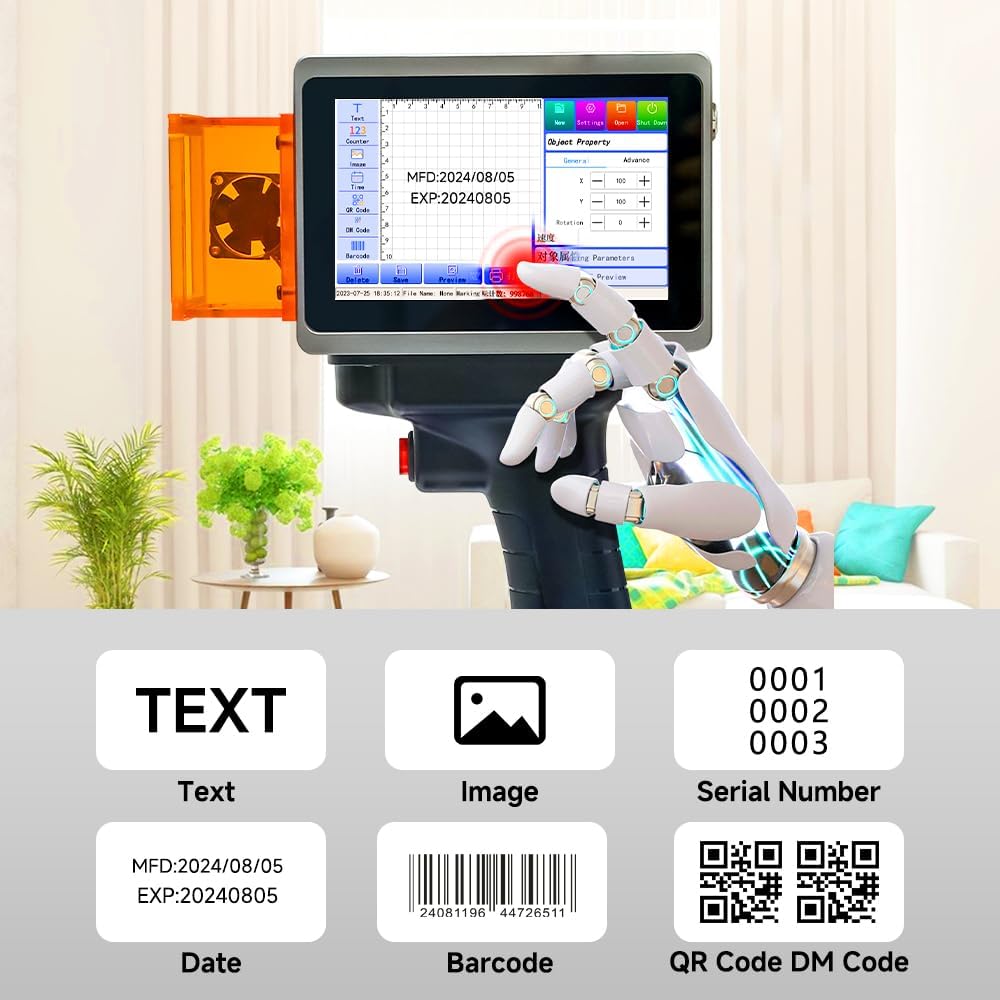
Image: The 5-inch color touch screen interface of the PEKOKO L4Pro, displaying options for creating different types of prints such as text, images, serial numbers, dates, barcodes, and QR codes.
The 5-inch color touch screen provides a simple interface for creating and managing print jobs. The self-developed software allows for customization and upgrades.
- Text: Create and edit text messages.
- Image: Import and print images or logos.
- Serial Number: Generate sequential numbers.
- Date: Automatically insert current date/time.
- Barcode/QR Code: Generate and print various code types.
4.3 Creating a Print Job
- From the main screen, select the desired content type (e.g., Text, QR Code).
- Enter or import your content using the on-screen keyboard or USB interface.
- Adjust parameters such as font size, style, position, and rotation as needed.
4.4 Using Preview Modes

Image: The PEKOKO L4Pro showcasing its dual preview modes, where a projected border and graphic help users accurately determine the engraving position on a wooden surface before printing.
The L4Pro features dual preview modes (projected border & graphic) to accurately determine the printing position.
- Quick Preview: Allows you to see the result before printing and adjust the design's position.
- You can preview the overall pattern position or the pattern outline.
4.5 Printing
- Once your design is ready and positioned using the preview, hold the device firmly.
- Press the Trigger Button (6) to initiate printing.
- Move the device smoothly across the surface to apply the mark.
5. Applications and Usage Examples
The PEKOKO L4Pro is suitable for marking on a wide range of materials and items.

Image: A collage showing various items and materials successfully marked with the PEKOKO L4Pro, such as painted cosmetics, wood, car windows, painted metal, cardboard cartons, canvas fabric, animal identification tags, aluminum cans, and mobile phone cases.
- Cosmetic (painted)
- Wood
- Car windows
- Metal (painted)
- Carton
- Canvas
- Animal Tag
- Cans
- Mobile phone case
The machine is ideal for industrial use, DIY crafts, small businesses, and handmade gift making.
6. Maintenance
Proper maintenance ensures the longevity and optimal performance of your PEKOKO L4Pro.
- Cleaning: Regularly wipe the exterior of the device with a soft, dry cloth. Avoid using harsh chemicals.
- Ink Cartridge Care: Store ink cartridges according to manufacturer instructions. Replace cartridges when ink is low or dry.
- Protection Shield: Keep the protection shield clean and free from debris to ensure clear printing.
- Battery Care: Charge the battery regularly, even if not in use, to maintain battery health. Avoid extreme temperatures.
7. Troubleshooting
This section addresses common issues you might encounter with your PEKOKO L4Pro.
| Problem | Possible Cause | Solution |
|---|---|---|
| Device does not power on. | Battery is low or not installed correctly. | Charge the battery. Ensure the battery is securely installed. |
| Poor print quality or no ink. | Ink cartridge is empty, clogged, or improperly installed. | Replace the ink cartridge. Clean the print head if necessary (refer to cartridge instructions). Reinstall the cartridge correctly. |
| Screen is unresponsive. | Software glitch or temporary freeze. | Restart the device by holding the power button. If issue persists, contact support. |
| Print is misaligned. | Incorrect positioning or rapid movement during printing. | Use the preview function to verify position. Ensure smooth and consistent movement during printing. |
8. Specifications
Key technical specifications for the PEKOKO L4Pro Handheld Portable Marking Machine.
Image: Technical drawing illustrating the dimensions of the PEKOKO L4Pro handheld marking machine (296mm height, 76mm width, 180mm depth) and its shipping box (480mm x 370mm x 200mm) with a shipping weight of 4.35kg.
- Model: L4pro
- Product Dimensions: 10"D x 6"W x 8"H (approx. 25.4cm D x 15.2cm W x 20.3cm H)
- Item Weight: 8.8 pounds (approx. 4 kg)
- Connectivity Technology: USB
- Printing Technology: Inkjet
- Printer Output: Monochrome
- Maximum Print Speed: 1200 ppm (Monochrome)
- Maximum Color Print Resolution: 4800 x 1200 dpi (Note: Product output is monochrome, this might refer to internal processing or potential color capability with different cartridges)
- Max Copy Resolution Black-White: 600 dpi
- Maximum Media Size: 5.5 x 8.5 inch
- Max Input Sheet Capacity: 10 (This might refer to a specific mode or accessory, as it is a handheld device)
- Special Features: Portable and handheld, Touch Screen, Easy to operate, Two batteries included. (Note: While 'No consumables' is listed in product features, ink cartridges are included components and are consumables.)
- Battery Capacity: 9000mAh (Up to 6 hours or more continuous use)
9. Warranty and Support
The PEKOKO L4Pro comes with a one-year warranty.
- Warranty Type: One year warranty.
- For warranty claims or technical support, please contact PEKOKO customer service.
- You can visit the official PEKOKO Store on Amazon for more information: PEKOKO Store.

