
Introduction
This instruction manual provides detailed guidance for the assembly, operation, and maintenance of your CECER Queen Size Murphy Bed. Designed for versatility and space-saving, this multi-functional cabinet bed includes integrated storage and a convenient charging station. Please read all instructions carefully before beginning assembly and retain this manual for future reference.
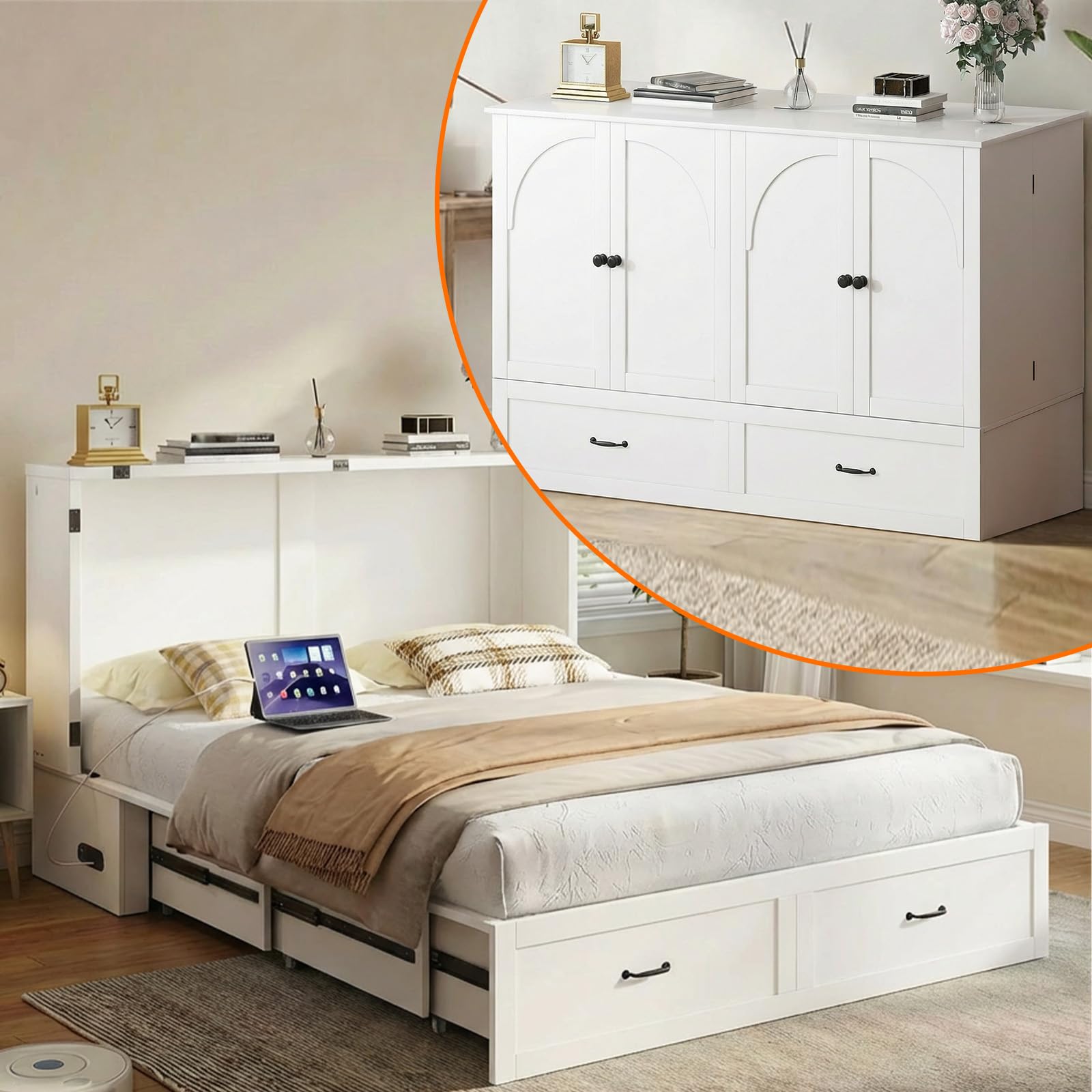
Image: The CECER Queen Size Murphy Bed in its open bed configuration and closed cabinet configuration, highlighting its dual functionality.
Safety Information
Your safety is paramount. Please adhere to all safety warnings and instructions provided with this product. Failure to follow these guidelines may result in injury or damage to the product.
- Always ensure the bottom support is properly set before using the unit as a bed.
- This product is heavy. Assembly requires at least two adults.
- Do not allow children to play on or around the Murphy bed mechanism.
- Ensure all fasteners are securely tightened during assembly and periodically check for tightness.
- Do not exceed the maximum weight capacity of 800 lbs.
- Use the anti-tip safety device to secure the cabinet to a wall, preventing accidental tipping.

Image: Details of the bed's safety and stability features, including reinforced connectors, an anti-tip device, smooth rails, and stable locking wheels.
Package Contents
Your CECER Murphy Bed will arrive in two separate packages, which may be delivered at different times. Please verify all components are present before beginning assembly. Refer to the included parts list for a complete inventory.

Image: An overview of the hardware and instruction manual included for assembly.
Setup and Assembly
Assembly of the CECER Queen Size Murphy Bed typically requires two people and can be completed in approximately 2-3 hours. Follow the clear, step-by-step guide provided in your package.
- Unpack and Identify Parts: Carefully unpack all components and lay them out. Compare them against the parts list in your manual to ensure nothing is missing or damaged.
- Prepare the Area: Choose a clear, spacious area for assembly.
- Follow Step-by-Step Instructions: Refer to the detailed assembly manual for specific instructions on connecting frame components, installing the Murphy mechanism, and attaching drawers.
- Install Anti-Tip Device: Securely attach the anti-tip device to a wall stud to prevent the cabinet from tipping forward.
- Final Checks: Before first use, ensure all screws and fasteners are tight and the bed mechanism operates smoothly. Verify the bottom support is correctly positioned.
Note: Some steps may require careful attention. If you encounter difficulties, review the instructions or contact customer support.
Operating Instructions
Folding and Unfolding the Bed
The Murphy bed design allows for easy transformation from a compact cabinet to a comfortable queen-size bed.
- To Unfold:
- Ensure the area in front of the cabinet is clear.
- Open the cabinet doors.
- Gently pull the bed frame downwards. The mechanism is designed for smooth and quiet operation.
- Extend the leg supports and ensure they are securely locked into place.
- Adjust the mattress as needed.
- To Fold:
- Remove any bedding or items from the mattress that would obstruct closing.
- Fold the leg supports back into their stored position.
- Gently lift the bed frame upwards until it locks securely into the cabinet position.
- Close the cabinet doors.

Image: The bed in its compact cabinet form and fully extended bed form, demonstrating the quick transformation.
Using the Storage Drawer
The large drawer located at the bottom of the bed frame provides convenient storage space for bedding, clothing, or other items. It is accessible whether the bed is folded or unfolded.
- To open, gently pull the drawer handle.
- To close, push the drawer firmly until it is fully recessed.
Utilizing the Built-in Charging Station
The right side of the folding bed frame features a built-in charging station with 2 USB ports and 2 AC outlets.
- Ensure the bed is connected to a power source.
- Plug your devices into the available USB ports or AC outlets.
- Avoid overloading the charging station.

Image: The bed in use, highlighting the integrated charging station and the spacious storage drawer.
Maintenance
Proper care will extend the life and appearance of your Murphy bed.
- Cleaning: Wipe surfaces with a dry cloth. Avoid abrasive cleaners or harsh chemicals that may damage the finish.
- Mechanism Check: Periodically inspect the folding mechanism and all moving parts for smooth operation. If any part feels stiff, apply a small amount of silicone-based lubricant (do not use oil-based lubricants).
- Fastener Tightness: Regularly check all screws and bolts to ensure they remain tight. Retighten as necessary.
- Mattress Care: Follow the care instructions provided with your mattress.
Troubleshooting
If you encounter any issues with your CECER Murphy Bed, please refer to the following common solutions:
| Problem | Possible Cause | Solution |
|---|---|---|
| Bed does not fold/unfold smoothly. | Obstruction, loose fasteners, mechanism needs lubrication. | Check for items blocking the mechanism. Ensure all fasteners are tight. Apply silicone lubricant to moving parts. |
| Charging station not working. | Not plugged into wall outlet, power strip off, faulty device. | Verify the bed's power cord is securely plugged into a functional wall outlet. Check if the outlet is active. Test with a different device. |
| Drawer is stiff or misaligned. | Obstruction, loose drawer slides, uneven assembly. | Remove items from the drawer and check for obstructions. Inspect drawer slides for damage or loose screws. Ensure the cabinet was assembled on a level surface. |
| Missing parts during assembly. | Packaging error, lost during transit. | Contact CECER customer support immediately with your purchase details and the specific missing part number from the manual. |
If the problem persists after attempting these solutions, please contact CECER customer support for further assistance.
Specifications
| Feature | Detail |
|---|---|
| Brand | CECER |
| Model Number | 16031 |
| Size | Queen |
| Material | Solid Wood, Premium MDF |
| Color | White |
| Product Dimensions (L x W x H) | 79.5" x 63.39" x 40.47" (Open Bed) |
| Item Dimensions (Closed Cabinet) | 63.3" x 23.6" x 40.4" |
| Item Weight | 660 pounds |
| Weight Capacity | 800 lbs |
| Charging Station | 2 USB ports, 2 AC outlets |
| Storage | 1 large drawer |
| Assembly Time (Approx.) | 2-3 hours (2 people recommended) |
Warranty and Support
CECER is committed to providing quality products and customer satisfaction. If you encounter any issues with your product, or if you have questions regarding assembly or operation, please do not hesitate to contact us.
- Customer Service: We aim to reply to your messages within 24 hours. Please have your purchase details and model number (16031) ready when contacting support.
- Online Support: Visit the official CECER store for additional product information and support resources: CECER Official Store.
- Replacement Parts: If you receive damaged or missing parts, contact customer service for assistance.