
1. Introduction
Thank you for choosing the Seesii 1/2" 1200N·m 21V Cordless Impact Wrench. This manual provides essential information for the safe and effective operation, maintenance, and troubleshooting of your new tool. Please read it thoroughly before use and keep it for future reference.
Product Overview
The Seesii WH1-12 Ultra Pro is a high-power cordless impact wrench designed for heavy-duty tasks such as automotive repair, machinery maintenance, and various DIY projects. It features a robust brushless motor, a removable D-handle for enhanced control, and a versatile 3-speed control system.

Figure 1: Complete Seesii Impact Wrench Kit
2. Safety Information
Always observe basic safety precautions to reduce the risk of fire, electric shock, and personal injury. Keep this manual handy for safety instructions.
General Safety Rules
- Work Area Safety: Keep your work area clean and well-lit. Cluttered or dark areas invite accidents. Do not operate power tools in explosive atmospheres, such as in the presence of flammable liquids, gases, or dust.
- Electrical Safety: Avoid body contact with earthed or grounded surfaces. Do not expose power tools to rain or wet conditions.
- Personal Safety: Always wear eye protection. Use hearing protection when operating the tool for extended periods. Dress properly; avoid loose clothing or jewelry. Secure long hair.
- Tool Use and Care: Do not force the power tool. Use the correct power tool for your application. Disconnect the plug from the power source and/or the battery pack from the power tool before making any adjustments, changing accessories, or storing power tools.
- Battery Tool Use and Care: Recharge only with the charger specified by the manufacturer. Use power tools only with specifically designated battery packs.
3. Product Components
Familiarize yourself with the parts of your Seesii Impact Wrench:
- Impact Wrench Body
- 1/2" Square Drive Anvil
- Removable D-Handle
- 21V 4.0Ah Lithium-Ion Battery Pack (x2)
- Fast Charger
- Socket Set (17mm, 19mm, 21mm, 22mm, 24mm)
- Extension Bar
- Carrying Case
- Belt Hook

Figure 2: Impact Wrench with Removable D-Handle
4. Setup
4.1 Charging the Battery
Before first use, fully charge both battery packs. Connect the charger to a standard power outlet and insert the battery pack. The charger indicator light will show the charging status. A full charge typically takes 1-2 hours.
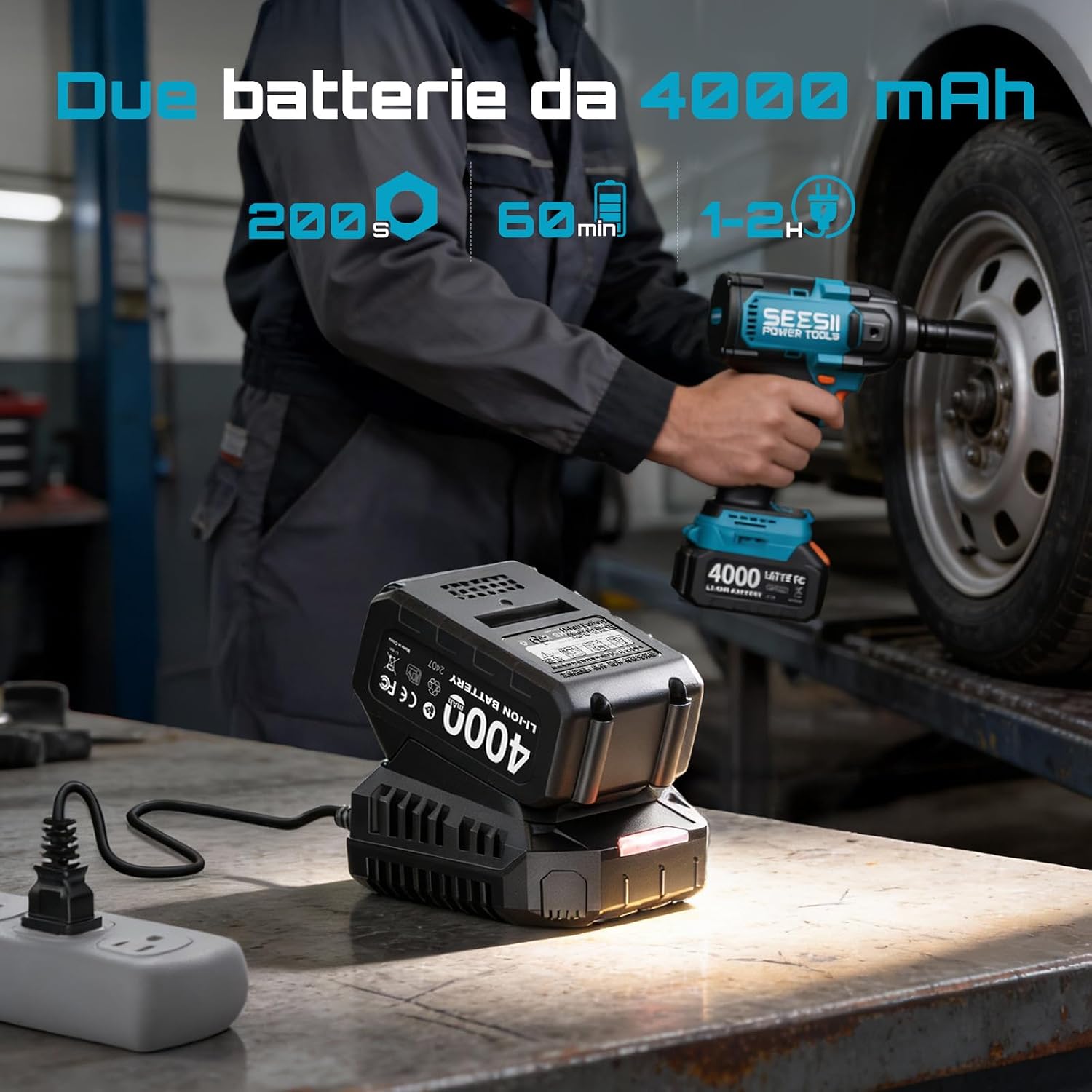
Figure 3: Charging the Battery Packs
4.2 Attaching the Battery Pack
Align the battery pack with the base of the impact wrench and slide it in until it clicks securely into place. To remove, press the release button on the battery pack and slide it out.
4.3 Installing Sockets and Accessories
Push the desired 1/2" square drive socket or accessory onto the anvil until it locks securely. Ensure the socket is fully seated before operation. To remove, pull the socket firmly off the anvil.
4.4 Attaching the Removable D-Handle
The D-handle can be attached to either side of the wrench for two-handed operation, providing better control and reducing fatigue. Slide the handle onto the designated mounting points and secure it firmly.
5. Operating Instructions
5.1 Power On/Off and Variable Speed Trigger
The tool is activated by pressing the variable speed trigger. The speed increases as you press the trigger further. Release the trigger to turn off the tool.
5.2 Forward/Reverse Rotation and Lock
Use the forward/reverse switch located above the trigger to select the rotation direction. Push the switch to the left for forward (tightening) and to the right for reverse (loosening). The center position locks the trigger to prevent accidental startup.

Figure 4: Forward/Reverse Switch Operation
5.3 Speed Control Settings
The impact wrench features 3 speed settings to match the application requirements. Adjust the speed using the dedicated speed selector button, typically located near the base of the handle or on the control panel. The available speeds are:
- Speed 1: 0-1400 RPM (Revolutions Per Minute) / 0-1800 IPM (Impacts Per Minute) - For delicate tasks or initial fastening.
- Speed 2: 0-1800 RPM / 0-2200 IPM - For general fastening and loosening.
- Speed 3: 0-2300 RPM / 0-2200 IPM - For maximum torque and stubborn fasteners.

Figure 5: 3-Speed Control in Action
5.4 Integrated LED Light
The integrated LED light illuminates the work area, improving visibility in dark or confined spaces. It activates automatically when the trigger is pressed.

Figure 6: Integrated LED Light for Enhanced Visibility
5.5 Belt Hook
The practical belt hook allows you to conveniently hang the tool on your belt when not in immediate use, keeping it accessible and freeing your hands.

Figure 7: Using the Belt Hook for Portability
5.6 Application Example
For tasks like changing a car tire, select the appropriate socket and speed setting. Use the reverse function to loosen lug nuts and the forward function to tighten them. Always finish tightening lug nuts with a torque wrench to the manufacturer's specifications.

Figure 8: Impact Wrench in use on a vehicle wheel
6. Maintenance
Regular maintenance ensures optimal performance and extends the life of your tool.
6.1 Cleaning
Keep the tool's ventilation openings clean and free from debris. Use a soft, damp cloth to clean the exterior. Do not use harsh chemicals or abrasive cleaners.
6.2 Battery Care
- Store batteries in a cool, dry place away from direct sunlight and extreme temperatures.
- Do not store fully discharged batteries for extended periods. Recharge them periodically.
- Do not attempt to open or modify battery packs.
6.3 Storage
When not in use, store the impact wrench, batteries, and charger in the provided carrying case in a dry, secure location out of reach of children.
7. Troubleshooting
| Problem | Possible Cause | Solution |
|---|---|---|
| Tool does not start | Battery not charged or improperly installed. Trigger lock engaged. | Ensure battery is fully charged and correctly inserted. Disengage the trigger lock. |
| Reduced power/torque | Low battery charge. Incorrect speed setting. | Recharge battery. Select a higher speed setting. |
| Excessive vibration or noise | Loose socket or accessory. Damaged internal components. | Ensure socket is securely attached. If problem persists, contact customer support. |
| Battery not charging | Charger not plugged in. Faulty battery or charger. | Check power connection. Try a different outlet. Contact customer support if issues continue. |
8. Specifications
| Feature | Specification |
|---|---|
| Brand | Seesii |
| Model Number | WH1-12 Ultra Pro |
| Voltage | 21 Volts |
| Max Loosening Torque | 1200 N·m (885 Ft-lbs) |
| Max Tightening Torque | 1000 N·m (737 Ft-lbs) |
| No-Load Speed | 0-2300 RPM |
| Impact Rate | 0-2200 IPM |
| Speed Settings | 3 (0-1400/1800/2300 RPM) |
| Drive Size | 1/2 inch Square |
| Battery Capacity | 4.0 Ah Lithium-Ion |
| Motor Type | Brushless |
| Item Weight | 2800 Grams (approx. 6.17 lbs) |
| Item Length | 11.81 Centimeters (approx. 4.65 inches) |
| Material | Plastic |
9. Warranty and Support
Seesii products are manufactured to high-quality standards. For warranty information, please refer to the documentation included with your purchase or visit the official Seesii website. If you encounter any issues or require technical assistance, please contact Seesii customer support through your retailer or the official brand channels.
Please retain your proof of purchase for warranty claims.