
Introduction
Thank you for choosing the GarveeHome Electric Blanket King. This manual provides essential information for the safe and efficient use, setup, operation, and maintenance of your new electric blanket. Please read all instructions carefully before use and retain this manual for future reference.
Important Safety Instructions
When using electrical appliances, basic safety precautions should always be followed to reduce the risk of fire, electric shock, and personal injury. This electric blanket is ETL certified and incorporates advanced safety features. However, adherence to these guidelines is crucial:
- Read All Instructions: Familiarize yourself with the entire manual before operating the blanket.
- Do Not Use with Infants or Persons Insensitive to Heat: This blanket is not suitable for use by infants, children, or any person who is unable to operate the controls or has reduced sensitivity to heat.
- Avoid Folding or Bunching: Do not use the blanket folded, bunched, or crumpled, as this can cause overheating.
- Inspect Regularly: Periodically inspect the blanket, cord, and controller for any signs of wear, damage, or malfunction. Do not use if damaged.
- Disconnect When Not in Use: Always unplug the blanket from the power outlet when not in use.
- No Sharp Objects: Do not insert pins or any other sharp objects into the blanket.
- Keep Dry: Do not use the blanket in a wet environment.
- Proper Power Source: Use only with the specified voltage and power outlet.
- Overheat Protection: The blanket is equipped with intelligent NTC&PTC heating wires that continuously monitor and regulate temperature in real-time to prevent overheating.
Setup
Follow these steps to set up your GarveeHome Electric Blanket:
- Unpack the Blanket: Carefully remove the electric blanket from its packaging.
- Spread the Blanket: Lay the blanket flat on your bed or desired surface, ensuring it is not folded or bunched.
- Connect the Controller: Locate the connection port on the blanket. Firmly plug the controller's connector into this port until it clicks securely into place. Ensure both controllers are connected for King size blankets.
- Plug into Power: Plug the power cord(s) from the controller(s) into a standard electrical outlet.
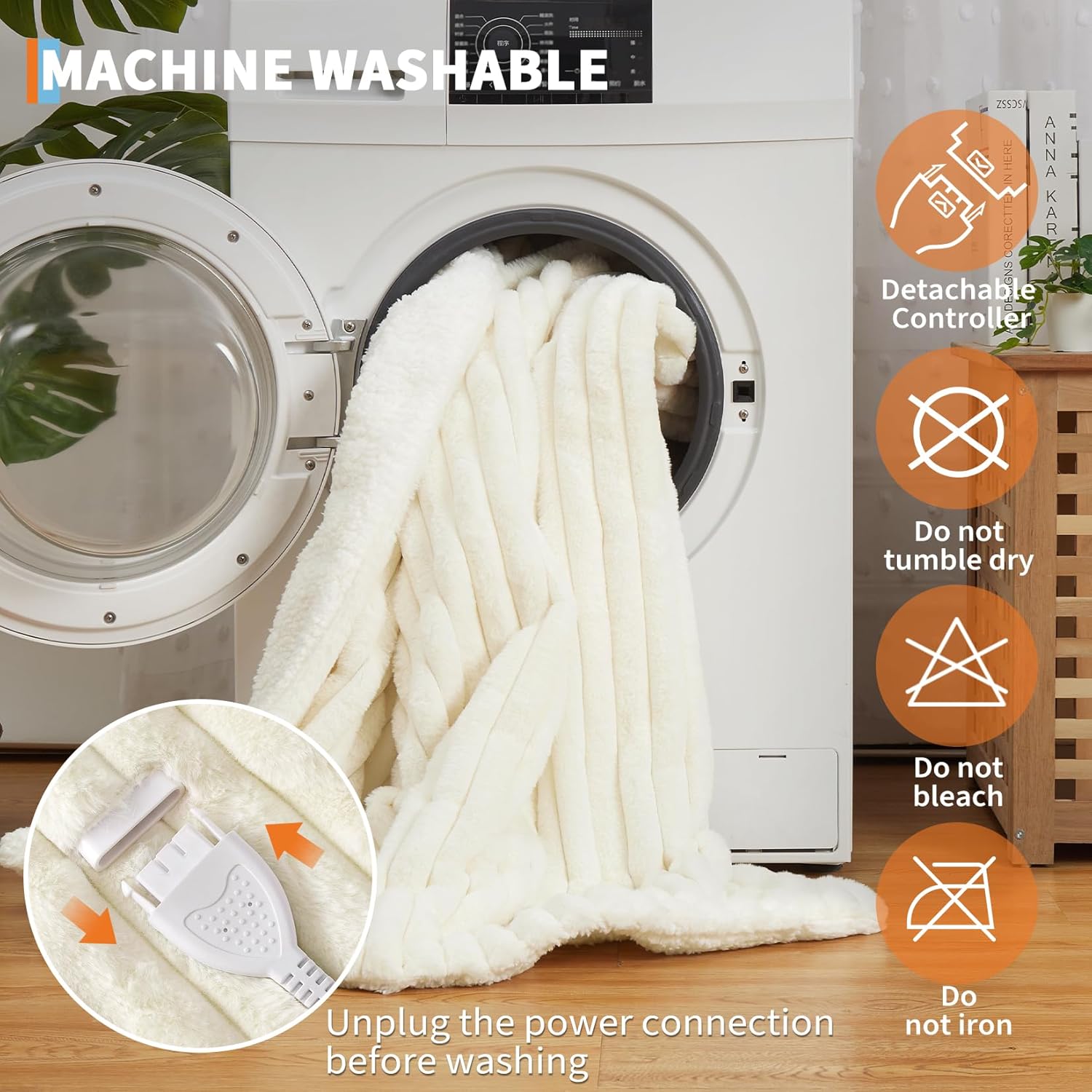
The image above illustrates how to detach the controller from the blanket. This connection point must be secure during operation.
Operating Instructions
Your GarveeHome Electric Blanket features dual controls for personalized comfort and multiple heat settings.
Powering On/Off
- To turn on, press the power button on the controller. The LED indicators will light up.
- To turn off, press and hold the power button until the LED indicators turn off.
Adjusting Heat Settings
- The blanket offers 4 adjustable heat settings.
- After powering on, repeatedly press the power button to cycle through the heat levels. The number of illuminated LED indicators corresponds to the selected heat level (1 for lowest, 4 for highest).
- The maximum temperature reaches 122°F.
Zoned Heating (King Size)
For King size blankets, two independent controllers are provided, allowing each user to adjust their side of the blanket to their preferred heat setting.
Auto-Off Timer
The blanket is designed with a 10-hour auto-off feature for safety and energy saving. After 10 hours of continuous operation, the blanket will automatically turn off.
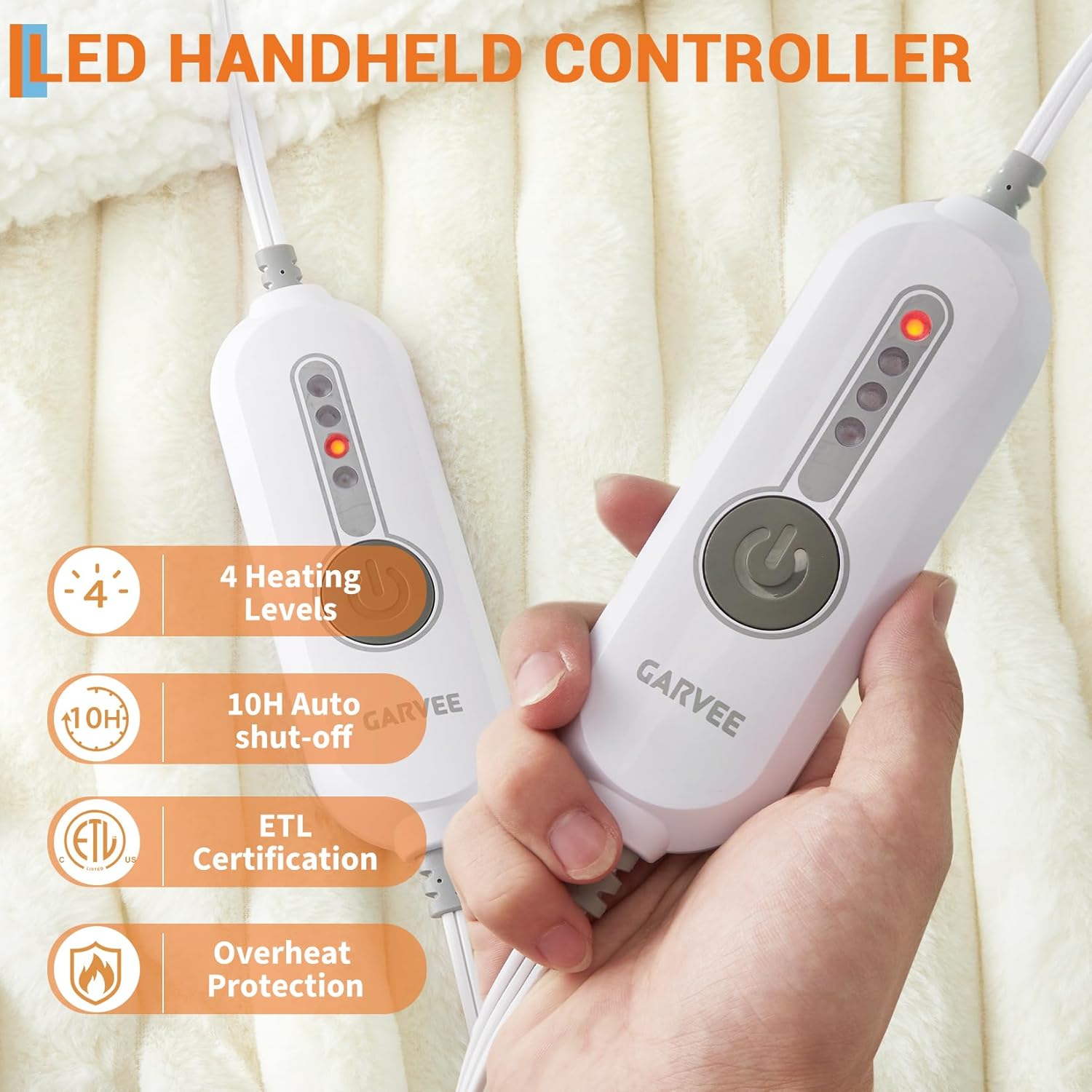
The image above displays the dual handheld controllers. Each controller allows independent adjustment of heat levels for different zones of the blanket.
Maintenance
Proper care ensures the longevity and performance of your electric blanket.
Cleaning Instructions
The GarveeHome Electric Blanket is machine washable. Follow these steps:
- Disconnect Power: Ensure the blanket is unplugged from the wall outlet.
- Detach Controller(s): Carefully disconnect the controller(s) from the blanket.
- Machine Wash: Place the blanket in a washing machine with cold water on a gentle cycle. Use a mild detergent.
- Rinse Thoroughly: Ensure all detergent is rinsed out.
- Air Dry: Gently stretch the blanket back to its original size and hang it to air dry completely.
- Do Not: Do not tumble dry, bleach, iron, or dry clean the electric blanket.

The image above visually summarizes the machine washing process and important care symbols for the electric blanket.
Storage
When not in use, especially during warmer months, store the blanket in a cool, dry place. Ensure it is completely dry before folding and storing. Do not place heavy objects on top of the blanket during storage.
Troubleshooting
If you encounter issues with your electric blanket, try these common troubleshooting steps:
- No Heat/Power:
- Ensure the power cord is securely plugged into a working electrical outlet.
- Verify that the controller is firmly connected to the blanket.
- Check if the power button on the controller has been pressed to turn the blanket on.
- Confirm the outlet is functional by plugging in another appliance.
- Uneven Heating:
- Ensure the blanket is spread flat and not folded or bunched, which can impede heat distribution.
- For King size, verify both controllers are set to the desired heat levels.
- Blanket Turns Off Unexpectedly:
- The blanket has a 10-hour auto-off safety feature. If it has been on for this duration, it will turn off automatically. Simply turn it back on if desired.
- The overheat protection system may have activated. Allow the blanket to cool down before attempting to restart.
If the problem persists after attempting these steps, please contact GarveeHome customer support.
Specifications
| Feature | Detail |
|---|---|
| Model Number | CXT_FBA_029YF31t |
| Size | King (90" x 100") |
| Material | Polyester (Faux Rabbit Fur & Sherpa) |
| Color | Beige |
| Heating Levels | 4 |
| Maximum Temperature | 122°F |
| Auto-Off Timer | 10 Hours |
| Safety Features | Overheat Protection (NTC&PTC heating wires), ETL Certified |
| Care Instructions | Machine Washable (cold water, gentle cycle), Air Dry |
| Item Weight | 10.58 Pounds |
Warranty & Support
For warranty information, product support, or any questions not covered in this manual, please contact GarveeHome customer service through the retailer where you purchased the product or visit the official GarveeHome website. Please have your model number (CXT_FBA_029YF31t) and purchase details ready when contacting support.