
Product Overview
The BRIKSMAX Light Kit is specifically engineered to illuminate your Lego 42210 2 Fast 2 Furious Nissan Skyline GT-R (R34) Car model. This kit transforms your static Lego creation into a dynamic display piece with vibrant LED lighting, enhancing its visual appeal and bringing it to life. Please note that the Lego building set itself is not included with this light kit.

Image: The BRIKSMAX Light Kit enhances the Lego 2 Fast 2 Furious Nissan Skyline GT-R (R34) Car model, showcasing illuminated headlights and a vibrant blue underglow, bringing the model to life.
Package Contents
Before beginning installation, please verify that all components listed below are present in your package:
- LED Light Kit (various light components and connecting wires)
- Paper Instructions (detailed step-by-step guide)
- User Guide
- AA Battery Box (batteries not included)
- USB Cable (for alternative power supply)

Image: A visual representation of the BRIKSMAX light kit's contents, showing the LED components, printed instructions, and the battery box, all neatly packaged.
Setup and Installation
This light kit is specifically designed for the Lego 42210 2 Fast 2 Furious Nissan Skyline GT-R (R34) Car. The Lego set is not included. For detailed installation, refer to the step-by-step instruction manual provided in your package. The following are general tips to assist with the process:
General Installation Tips:
- Preparation: Ensure your Lego model is fully assembled and stable before beginning the light kit installation.
- Careful Disassembly: Follow the instructions precisely when detaching Lego bricks to integrate the light wires. Avoid excessive force.
- Wire Routing: Route all wires neatly and discreetly to prevent damage and maintain the aesthetic integrity of your model. The design aims for minimal gaps and a slim fit.
- Secure Connections: Connect all light components and power sources firmly but gently. Avoid bending pins or stressing wires.
- Testing: Periodically test the lights during the installation process to ensure all connections are working correctly.

Image: This image illustrates the precise integration of the light kit's wires within the Lego structure, highlighting the slim fit design that protects wires from breakage and keeps the model tidy.

Image: A comparative view demonstrating the superior design of BRIKSMAX connectors, which are depicted as more secure, safer, and larger for easier installation compared to generic alternatives.
Operating Instructions
Once the light kit is fully installed and connected to a power source, you can operate the lights as follows:
- Power On/Off: The lights will activate automatically when connected to a power source (either the AA Battery Box or a USB power supply). To turn off the lights, simply disconnect the power source.
- Battery Installation: If using the AA Battery Box, open the battery compartment and insert the required AA batteries (not included) ensuring correct polarity as indicated inside the box.
- USB Power: For continuous power, connect the provided USB cable to any compatible USB power adapter (e.g., a phone charger, power bank, or computer USB port).
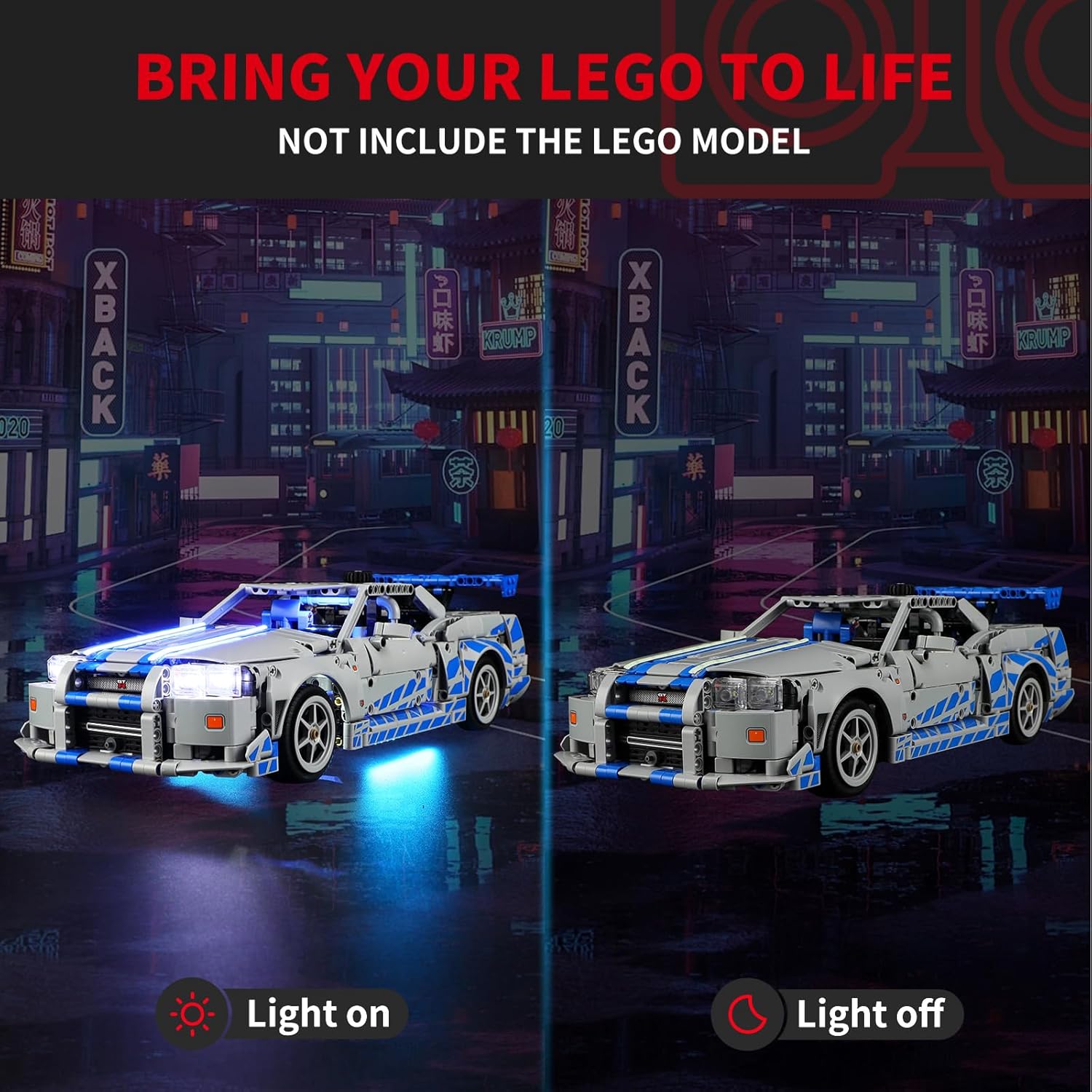
Image: A side-by-side comparison of the Lego Nissan Skyline GT-R R34 model, showing the dramatic difference between the light kit being off and fully illuminated, highlighting the enhanced visual appeal.
Maintenance
Proper maintenance will help ensure the longevity and optimal performance of your BRIKSMAX light kit:
- Cleaning: Use a soft, dry, lint-free cloth to gently wipe away dust from the LED components and wires. Avoid using any liquid cleaners or abrasive materials.
- Wire Inspection: Periodically inspect all wires to ensure they remain securely tucked away and are not pinched, frayed, or exposed. Proper wire management prevents damage.
- Battery Care: If you are using the battery box, remove the batteries if the light kit will not be used for an extended period (e.g., several weeks or months) to prevent potential battery leakage and corrosion.
- Storage: Store your illuminated Lego model in a cool, dry environment, away from direct sunlight or extreme temperatures, which can degrade plastic components and wiring over time.
Troubleshooting
If you encounter any issues with your BRIKSMAX Light Kit, please refer to the following troubleshooting table:
| Problem | Possible Cause | Solution |
|---|---|---|
| Lights do not turn on. | No power, incorrect battery installation, loose connection, damaged wire. | Ensure batteries are correctly inserted with proper polarity and are not depleted. If using USB, confirm the power source is active. Check all wire connections for tightness. Inspect wires for any visible damage or breaks. |
| Some lights are dim or flickering. | Low battery power, loose connection to specific lights, partial wire damage. | Replace batteries or switch to USB power. Gently re-seat the connections for the affected lights. If the issue persists, inspect the individual wires for damage. |
| Lights are not evenly distributed or appear misplaced. | Improper wire routing or incorrect light component placement during installation. | Refer to the original instruction manual for the precise placement of each light component and the recommended wire routing paths. Carefully adjust the components as needed. |
Specifications
- Product Name: BRIKSMAX Light Kit for Lego 42210 2 Fast 2 Furious Nissan Skyline GT-R (R34) Car
- Compatible Lego Model: 42210
- Product Dimensions (Packaging): 6.5 x 4.72 x 1.57 inches
- Item Weight: 0.352 ounces
- Material: Plastic
- Power Source Options: AA Batteries (not included) or USB Cable
- Included Components: LED Light Kit, Instructions, USB Cable, AA Battery Box
- Manufacturer Recommended Age: 8 years and up
Warranty and Support
BRIKSMAX is dedicated to providing high-quality products and excellent customer service. Your light kit is designed for durability and performance. If you encounter any issues or have questions regarding your product, please do not hesitate to contact BRIKSMAX directly.
BRIKSMAX offers a One-Year Replacement Promise for their products, ensuring customer satisfaction and support for any manufacturing defects or performance issues within the first year of purchase. For specific warranty claims or technical assistance, please refer to the contact information provided in your product packaging or visit the official BRIKSMAX store on Amazon:
