
Important Safety Information
Please read all instructions carefully before assembly and use. Keep this manual for future reference. Failure to follow these instructions may result in injury or product damage.
- Ensure all parts are present and undamaged before beginning assembly.
- Assemble the unit on a soft, clean surface to prevent scratches.
- Always use the correct tools for assembly.
- Do not overtighten screws, as this may damage the material.
- Keep children and pets away from the assembly area.
- Do not exceed the weight capacity of any shelf or component.
- For electrical components (power outlets, LED lights), ensure proper connection to a grounded outlet. Do not overload the power strip.
- Avoid exposing the unit to excessive moisture or direct sunlight.
Package Contents
Verify that all components listed below are included in your package. If any parts are missing or damaged, please contact customer support.
- Bakers Rack Frame and Shelves
- Hardware Pack (screws, bolts, etc.)
- Installation Manual
- Fabric Drawers (4 units)
- S-Hooks (12 units)
- LED Light Strip with Controller
Setup and Assembly
Assembly is required for this Bakers Rack. It is recommended that two adults assemble the unit to ensure safety and ease of construction. Please refer to the included Installation Manual for detailed, step-by-step instructions and diagrams.
General Assembly Steps:
- Unpack all components and lay them out on a protected surface.
- Identify each part using the labels provided in the manual.
- Attach the main frame components according to the manual's sequence.
- Secure all shelves, glass cabinets, wine rack, and goblet holder.
- Install the 12 S-hooks onto the designated bar.
- Insert the fabric drawers into their respective compartments.
- Attach the LED light strip and connect the power outlet unit.
- Place the assembled unit on a level, stable surface.
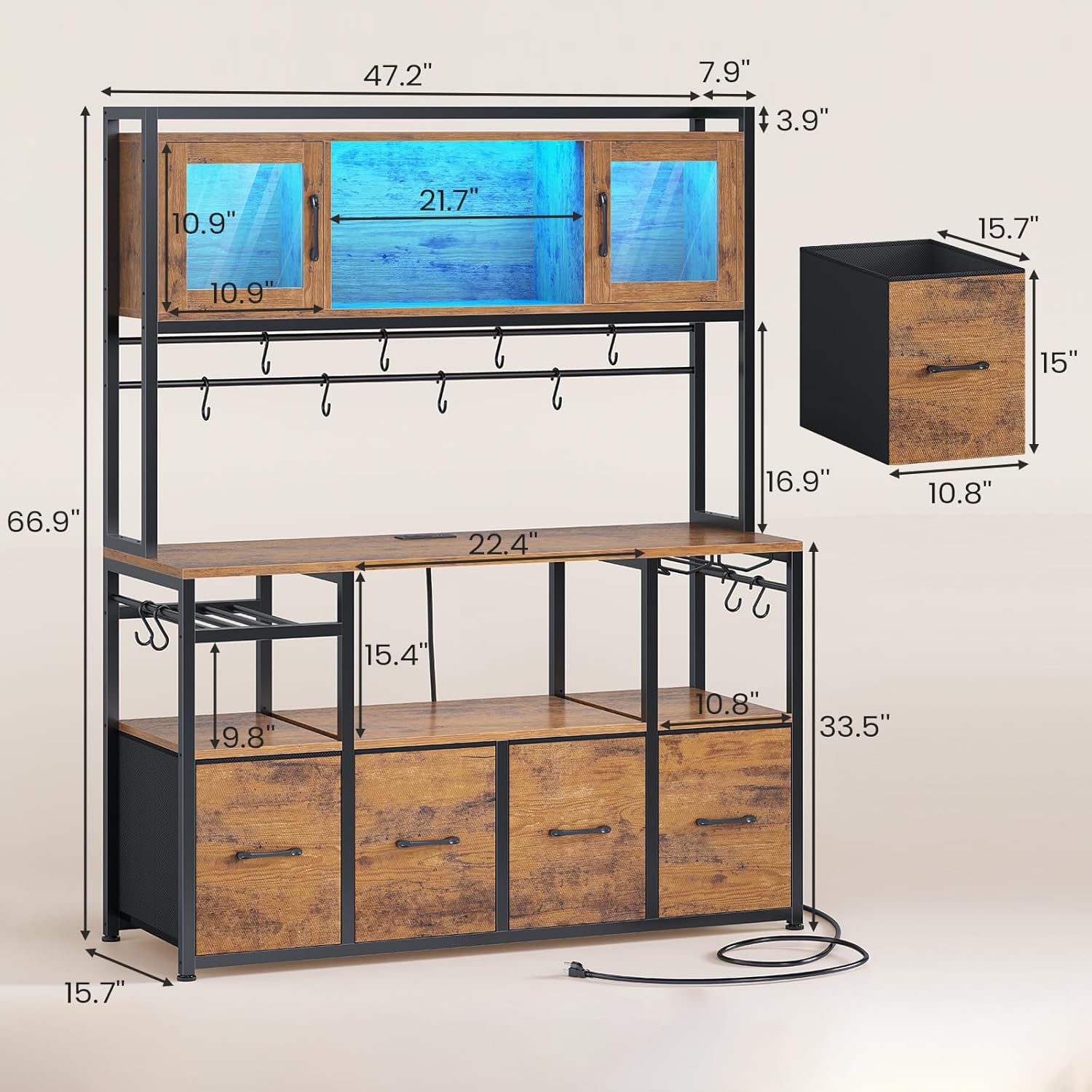
Image: Detailed dimensions of the Bakers Rack, including height, width, and depth of various sections.
Video: Official product video demonstrating the assembly and features of the Itaar Bakers Rack with Power Outlet.
Operating Instructions
Built-in Power Outlets and USB Charging Ports:
The Bakers Rack is equipped with 2 AC power outlets (125V/12A) and 2 USB charging ports (5V/2A) to power up to 4 devices simultaneously. The power cord is 5 feet long.
- Plug the Bakers Rack's main power cord into a standard grounded wall outlet.
- Connect your kitchen appliances (e.g., microwave, coffee maker, toaster) to the AC outlets.
- Use the USB ports to charge compatible devices like smartphones or tablets.
- Avoid overloading the power strip. Refer to the maximum wattage rating if available on the unit.

Image: Detail of the integrated power strip with 2 AC outlets and 2 USB charging ports.
RGB LED Light Strip:
The integrated RGB LED light strip offers over 60,000 colors and 29 flashing modes. It can be controlled via a mobile application or a key control. It also features a music sync function with a built-in sensitivity adjustable microphone, allowing the light color to change with sound and music rhythm.
- Connect the LED light strip to a USB port on the power strip or another compatible USB power source.
- Download the specified mobile application (refer to the LED light strip's separate instructions for app details).
- Use the app or the physical key control to select colors, modes, and adjust brightness.
- Activate the music sync function to have the lights respond to ambient sound.

Image: The Bakers Rack with its LED lights active, showcasing different color settings within the glass display cabinets.
Storage Features:
This unit provides extensive storage options including 6 shelves, 2 glass cabinets, 4 fabric drawers, a wine rack, a goblet holder, and 12 S-hooks.
- Glass Display Cabinets: Use the two clear acrylic cabinets on the top for displaying items or storing frequently used goods while keeping them dust-free.
- Worktop: The large 47.2" L x 15.7" W worktop is ideal for small appliances like microwaves, coffee makers, or toasters.
- Fabric Drawers: The four large fabric drawers on the bottom provide concealed storage for various kitchen items, protecting them from dust and maintaining a tidy appearance.
- Wine Rack & Goblet Holder: Store wine bottles horizontally in the dedicated rack and hang wine glasses from the goblet holder for easy access.
- S-Hooks: Utilize the 12 S-hooks for hanging mugs, utensils, or towels.

Image: A close-up view of the glass display cabinet, highlighting its contents and design.

Image: The four fabric storage drawers, shown open and filled with various kitchen supplies.
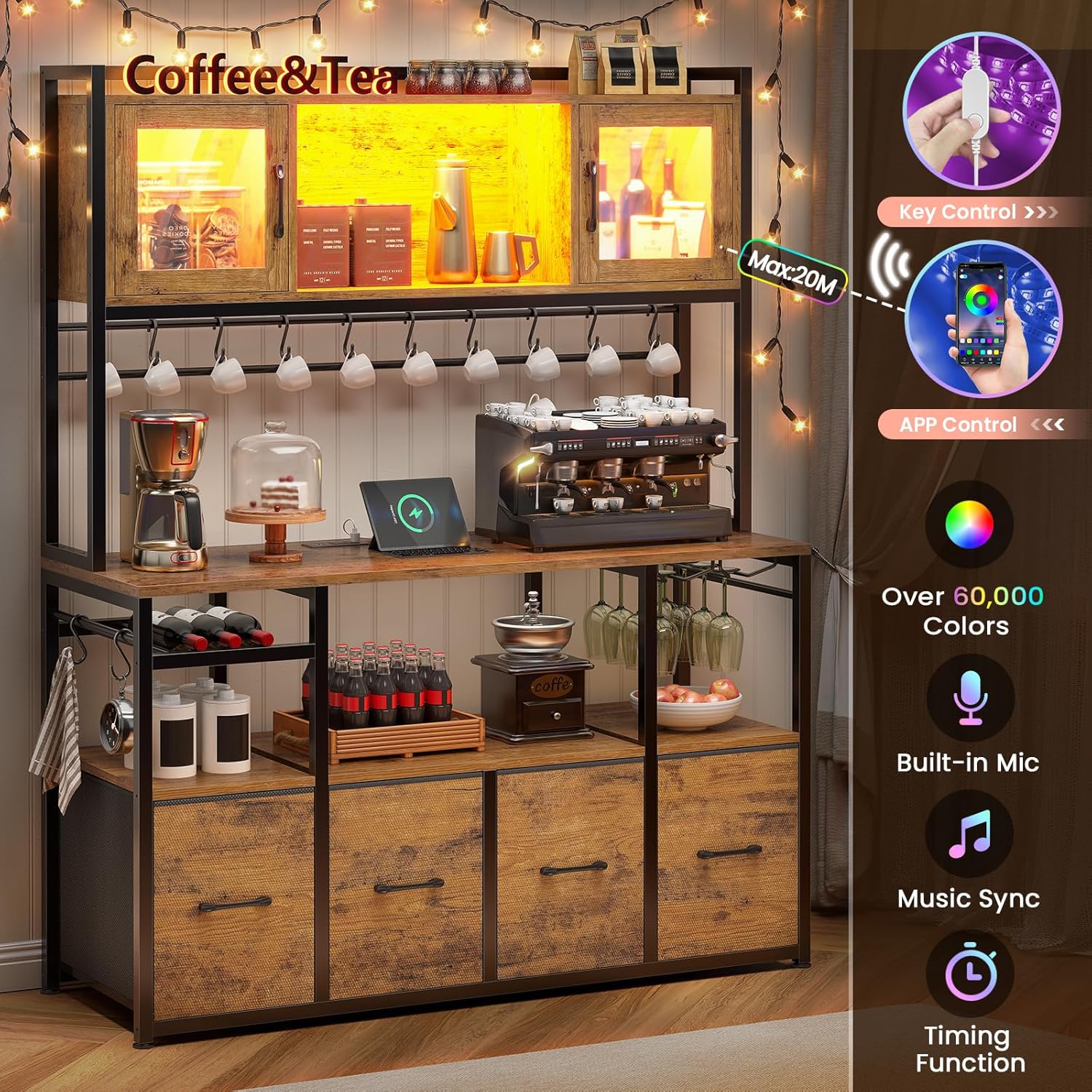
Image: Detail of the integrated wine rack and goblet holder, designed for convenient storage of bottles and glasses.
Video: Official product video showcasing the various storage features and overall design of the Itaar Bakers Rack.
Maintenance
Regular maintenance will help prolong the life and appearance of your Bakers Rack.
- Cleaning: Wipe surfaces with a soft, damp cloth. For stubborn stains, use a mild, non-abrasive cleaner. Avoid harsh chemicals that may damage the finish.
- Dusting: Regularly dust all surfaces to prevent buildup.
- Electrical Components: Ensure the power strip and LED lights are kept dry. Do not immerse in water. Periodically check the power cord for any signs of damage.
- Hardware: Periodically check all screws and bolts to ensure they remain tight. Retighten if necessary.
- Fabric Drawers: Spot clean fabric drawers with a damp cloth and mild detergent. Allow to air dry completely.
Troubleshooting
If you encounter any issues with your Itaar Bakers Rack, refer to the following common problems and solutions:
| Problem | Possible Cause | Solution |
|---|---|---|
| Unit is wobbly or unstable. | Loose hardware; uneven floor. | Check and tighten all screws and bolts. Ensure the unit is on a level surface. |
| Power outlets or USB ports not working. | Power cord not plugged in; circuit breaker tripped; overloaded outlets. | Ensure the main power cord is securely plugged into a working wall outlet. Check your home's circuit breaker. Reduce the number of devices plugged in. |
| LED light strip not illuminating. | USB connection loose; power source issue; remote/app not paired. | Check the USB connection. Ensure the power source is active. Refer to the LED light strip's specific instructions for pairing the remote or app. |
| Glass cabinet doors do not close properly. | Hinges misaligned; obstruction. | Adjust hinges as per assembly manual. Check for any items obstructing the door's path. |
If the problem persists after attempting these solutions, please contact customer support for further assistance.
Specifications
| Feature | Detail |
|---|---|
| Brand | Itaar |
| Model Number | 4287_1 |
| Material | Engineered Wood |
| Color | Rustic Brown |
| Product Dimensions (D x W x H) | 15.7"D x 47"W x 66.9"H |
| Item Weight | 74 Pounds |
| Number of Shelves | 6 |
| Special Features | Drawer, Glass Cabinet, Space Saving, Power Outlets, LED Light |
| Power Outlets | 2 AC Outlets (125V/12A), 2 USB Charging Ports (5V/2A) |
| Power Cord Length | 5 feet |
| LED Light | RGB, 60000+ colors, 29 modes, APP/Key control, Music Sync |
| Room Type | Dining Room, Kitchen, Living Room |
| Mounting Type | Floor Mount |
| Assembly Required | Yes |
Warranty and Support
Itaar is committed to providing high-quality products. If your Bakers Rack arrives damaged, scratched, or with missing parts, or if you encounter any issues during assembly or use, please do not hesitate to contact our customer service team.
We will provide a free replacement or offer a partial refund as appropriate. For support, please refer to the contact information provided with your purchase or visit the official Itaar website.