
Introduction
Thank you for choosing the Relybo R227 High Lumen LED Flashlight. This manual provides essential information for the safe and efficient operation, maintenance, and troubleshooting of your new flashlight. Please read it thoroughly before use and retain it for future reference.
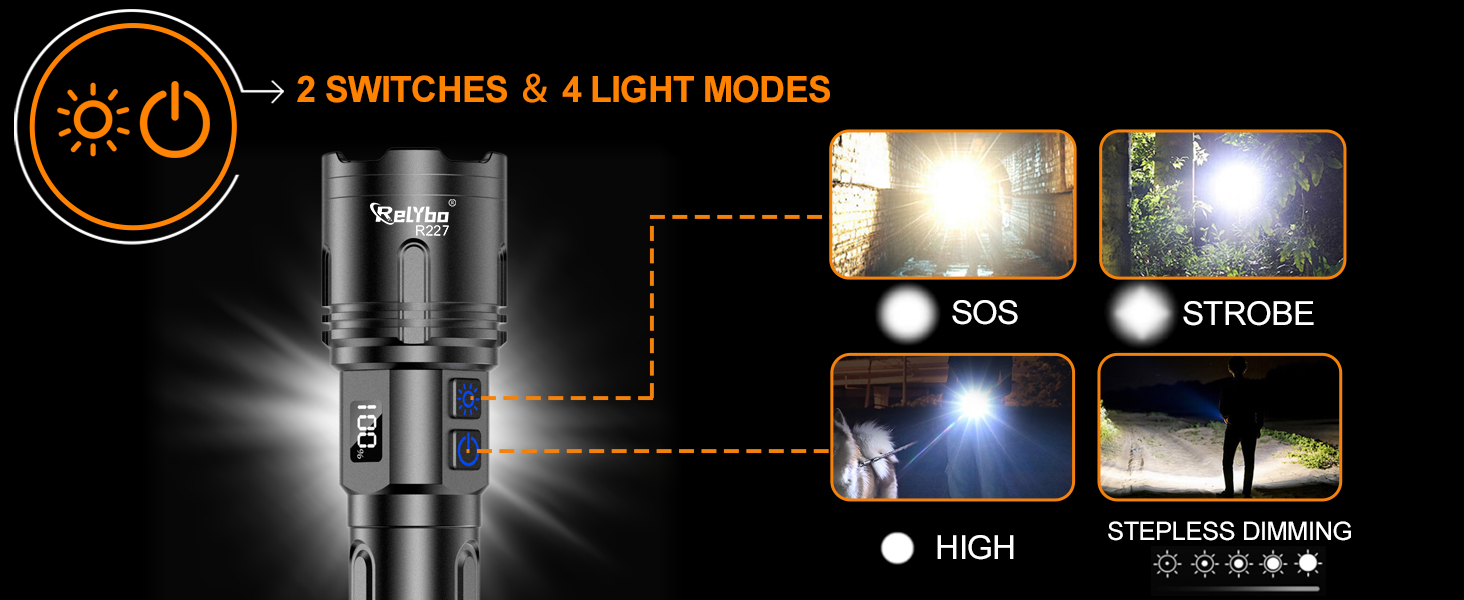
Image: The Relybo R227 flashlight demonstrating its super bright and wide-range illumination capability in a dark outdoor environment.
What's in the Box
Your Relybo R227 Super Bright Flashlight kit includes:
- 1 × Relybo R227 Super Bright Flashlight
- 1 × Rechargeable Battery
- 1 × USB-C Charging Cable
- 3 × AAA Batteries
- 1 × Lanyard
- 1 × Battery Holder & Battery Tube
- 1 × Gift Box
- 1 × User Manual

Image: All components of the Relybo R227 flashlight kit, including the flashlight, batteries, charging cable, and user manual, neatly arranged within its protective gift box.
Setup
Battery Installation
Your Relybo R227 flashlight supports two types of power sources: the included rechargeable battery or 3 AAA batteries (also included).
- Unscrew the tail cap of the flashlight.
- For Rechargeable Battery: Insert the provided rechargeable battery with the positive (+) end facing towards the flashlight head.
- For AAA Batteries: Place 3 AAA batteries into the provided battery holder (ensure correct polarity). Insert the battery holder into the flashlight with the positive (+) end facing towards the flashlight head.
- Securely screw the tail cap back onto the flashlight.
Video: This video demonstrates the two types of batteries that can be used with the Relybo R227 flashlight: a single rechargeable battery or three AAA batteries inserted into a special holder. It shows the process of inserting both options into the flashlight.
Charging the Rechargeable Battery
The flashlight features a USB-C charging port for convenient recharging.
- Locate the rubber cover on the side of the flashlight, near the control buttons. Lift the cover to expose the USB-C port.
- Connect the provided USB-C charging cable to the flashlight's USB-C port.
- Connect the other end of the USB-C cable to any standard USB power source (e.g., wall adapter, power bank, computer USB port).
- The LCD screen will display the battery percentage, indicating the charging status. Charging typically takes 3-5 hours.
- Once fully charged, disconnect the cable and securely close the rubber cover to maintain water resistance.
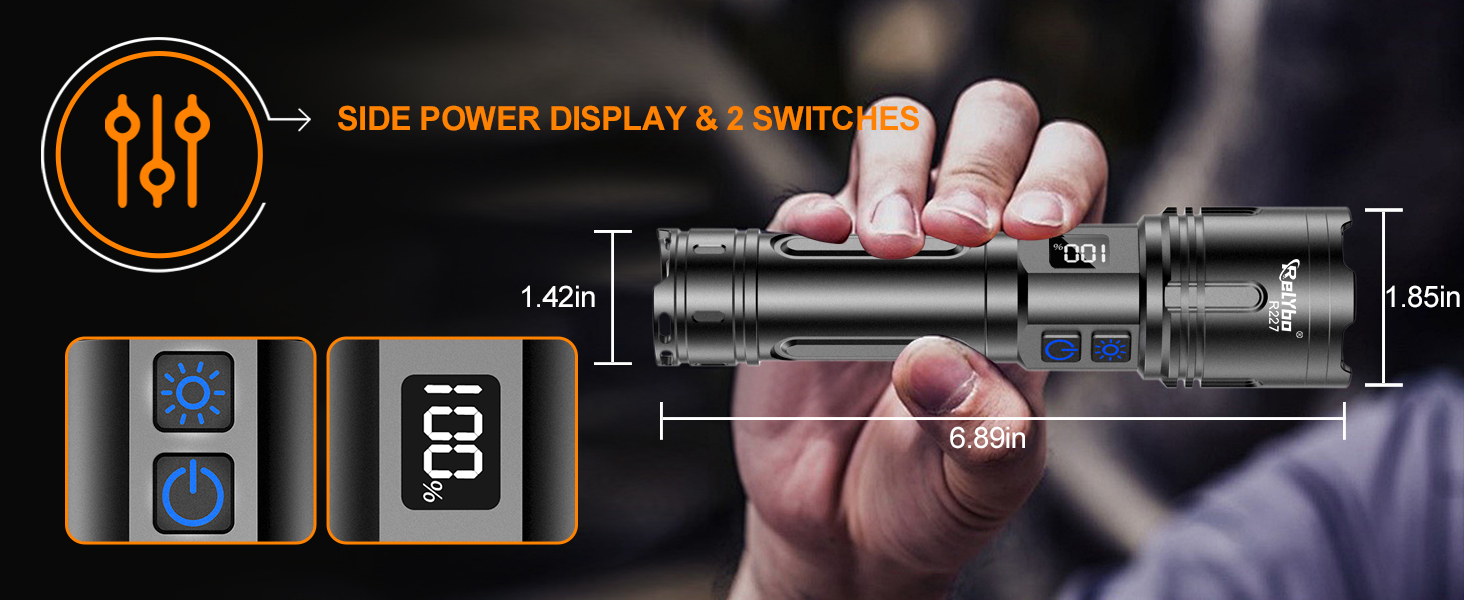
Image: The flashlight's side panel revealing the USB-C input for charging the device and a standard USB output port, illustrating its capability to charge external devices like a smartphone.
Operating Instructions
The Relybo R227 features intuitive dual-switch control for various lighting modes.
Dual Switch Control & 4 Lighting Modes
The flashlight is equipped with two switches:
- Bottom Switch (Power/Dimming):
- Press once to turn the flashlight ON/OFF.
- When ON, long-press the button to activate stepless dimming, allowing seamless brightness adjustment from 100 to 2600 lumens. Release the button at your desired brightness level.
- Top Switch (Tactical Modes):
- Press once to activate Strobe mode.
- Press again to activate SOS mode.
- Press a third time to turn off the tactical mode.
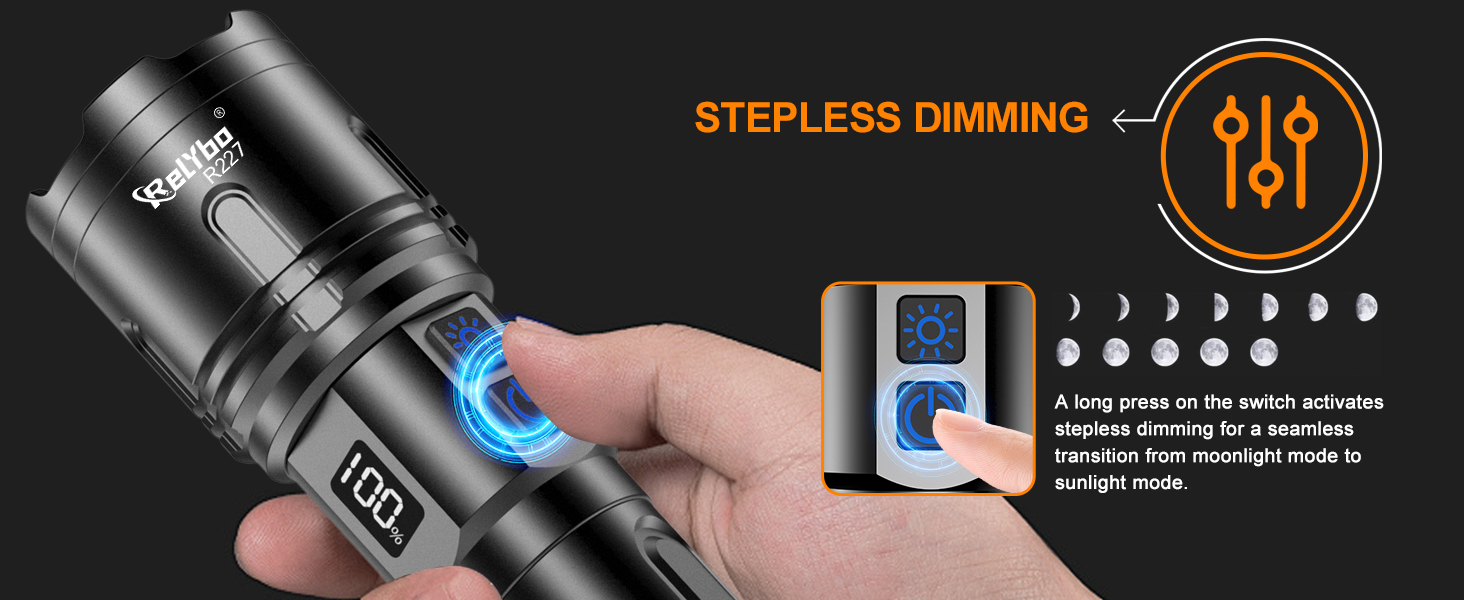
Image: A diagram showing the two control buttons on the Relybo R227 flashlight and how they activate the four distinct lighting modes: SOS, Strobe, High brightness, and Stepless Dimming.
Adjustable Focus
The flashlight head can be extended and retracted to adjust the beam focus:
- Pull the flashlight head outwards to narrow the beam for long-range spotlighting (up to 5,250 feet).
- Push the flashlight head inwards to widen the beam for broad area illumination (up to 3,230 sq ft).
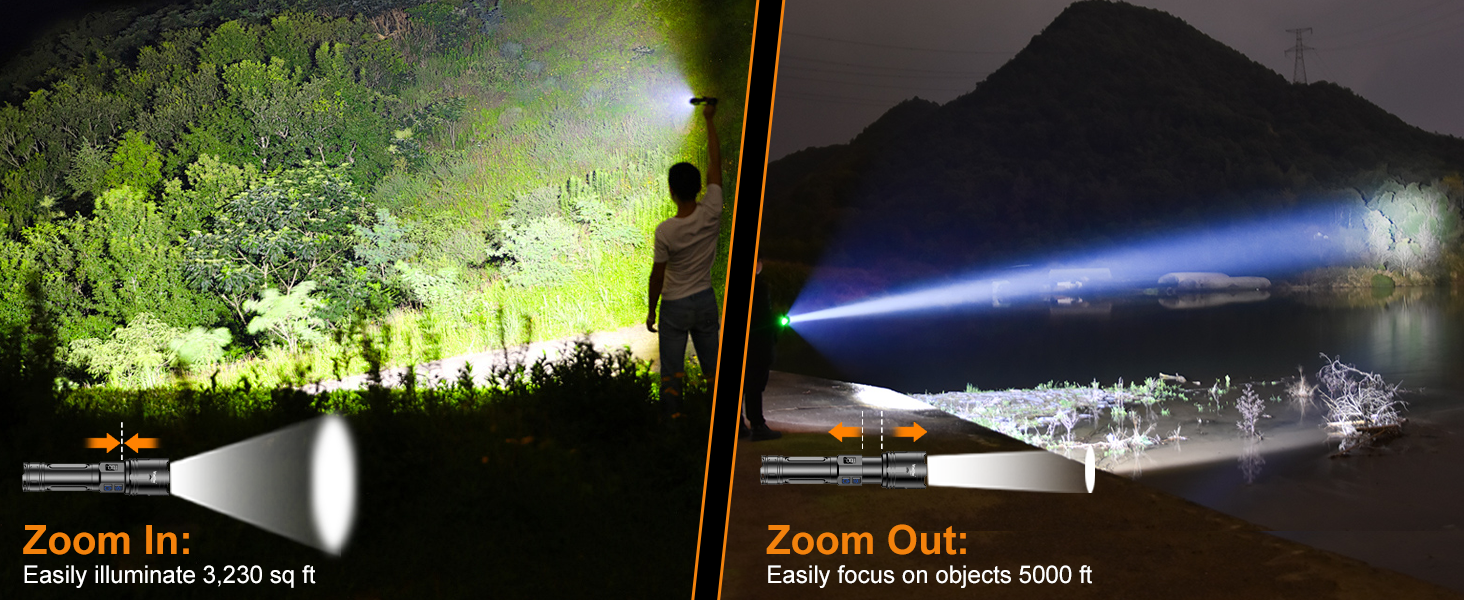
Image: Two scenarios demonstrating the adjustable focus: 'Zoom In' illuminates a 3,230 sq ft area, while 'Zoom Out' focuses on objects up to 5,000 feet away.
LCD Screen & USB Output (Power Bank Function)
The integrated LCD screen on the side of the flashlight displays the current battery percentage, allowing for easy monitoring of power levels.
In addition to charging the flashlight, the USB output port can be used as a power bank to charge other devices in emergency situations. Simply connect your device's charging cable to the USB output port on the flashlight.
Maintenance
Durability & Water Resistance
The Relybo R227 is crafted from rugged aviation-grade aluminum with a hardened anodized finish, providing superior impact and scratch resistance. It features an IPX6 waterproof rating and integrated sealed rubber rings, making it resistant to heavy rain and snow.

Image: The flashlight is shown enduring water spray, impacts, and cold temperatures, highlighting its IPX6 waterproof rating and robust construction for extreme environments.
General Care
- Keep the flashlight clean and dry. Wipe with a soft, damp cloth if necessary.
- Avoid disassembling the flashlight, as this may void the warranty and damage the device.
- Store the flashlight in a cool, dry place when not in use.
Troubleshooting
- Flashlight not turning on: Ensure batteries are correctly inserted with proper polarity. If using the rechargeable battery, ensure it is charged. If using AAA batteries, try replacing them.
- Light is dim: Recharge the rechargeable battery or replace the AAA batteries.
- Charging issue: Ensure the USB-C cable is securely connected to both the flashlight and the power source. Try a different USB-C cable or power source.
Specifications
| Feature | Detail |
|---|---|
| Brand | Relybo |
| Model Number | Relybo-R227-US |
| Light Source Type | LED (XHM90.2 chip) |
| Brightness | 100-2600 Lumens (Stepless Dimming) / 100000 Lumens (Max Output) |
| Long Range | Up to 5000 FT |
| Illumination Area | Up to 3230 sq ft |
| Power Source | Rechargeable Lithium Ion Battery / 3 AAA Batteries |
| Charging Port | USB-C Input |
| Output Port | USB Output (Power Bank Function) |
| Special Features | 2 Switches, Stepless Dimming, Adjustable Focus, Digital Power Display |
| Material | Aviation-grade Aluminum (Hardened Anodized Finish) |
| Water Resistance Level | IPX6 Waterproof |
| Product Dimensions | 2.05"D x 8.27"W x 5.12"H |
| Item Weight | 0.46 Pounds (7.4 ounces) |
Warranty and Support
Relybo products are designed for durability and performance. For warranty information, technical support, or customer service inquiries, please refer to the contact details provided in your product packaging or visit the official Relybo website.
Please retain your proof of purchase for any warranty claims.