
1. Introduction
Thank you for choosing the FEELLE Solar Charger. This portable power bank is designed to provide reliable power for your electronic devices, especially in outdoor and emergency situations. With its high capacity, multiple charging options, and durable construction, it is an essential companion for your adventures.

Figure 1: FEELLE Solar Charger T11X
2. Product Overview
2.1. Package Contents
- FEELLE Solar Charger (T11X)
- USB Charging Cable
- User Manual
2.2. Key Features
- High Capacity: 27000mAh battery for extended power.
- Integrated Cables: Built-in Type-C, Lightning, and USB-A cables for convenience.
- Multiple Outputs: Two USB-A output ports and one USB-C input/output port.
- Fast Charging: 15W QC 3.0 fast charging capability.
- Dual LED Flashlights: High-brightness LED lights with Steady, SOS, and Strobe modes.
- Solar Charging: Integrated solar panel for emergency and supplemental charging.
- Rugged Design: IP65 waterproof, dustproof, and shock-resistant for outdoor use.
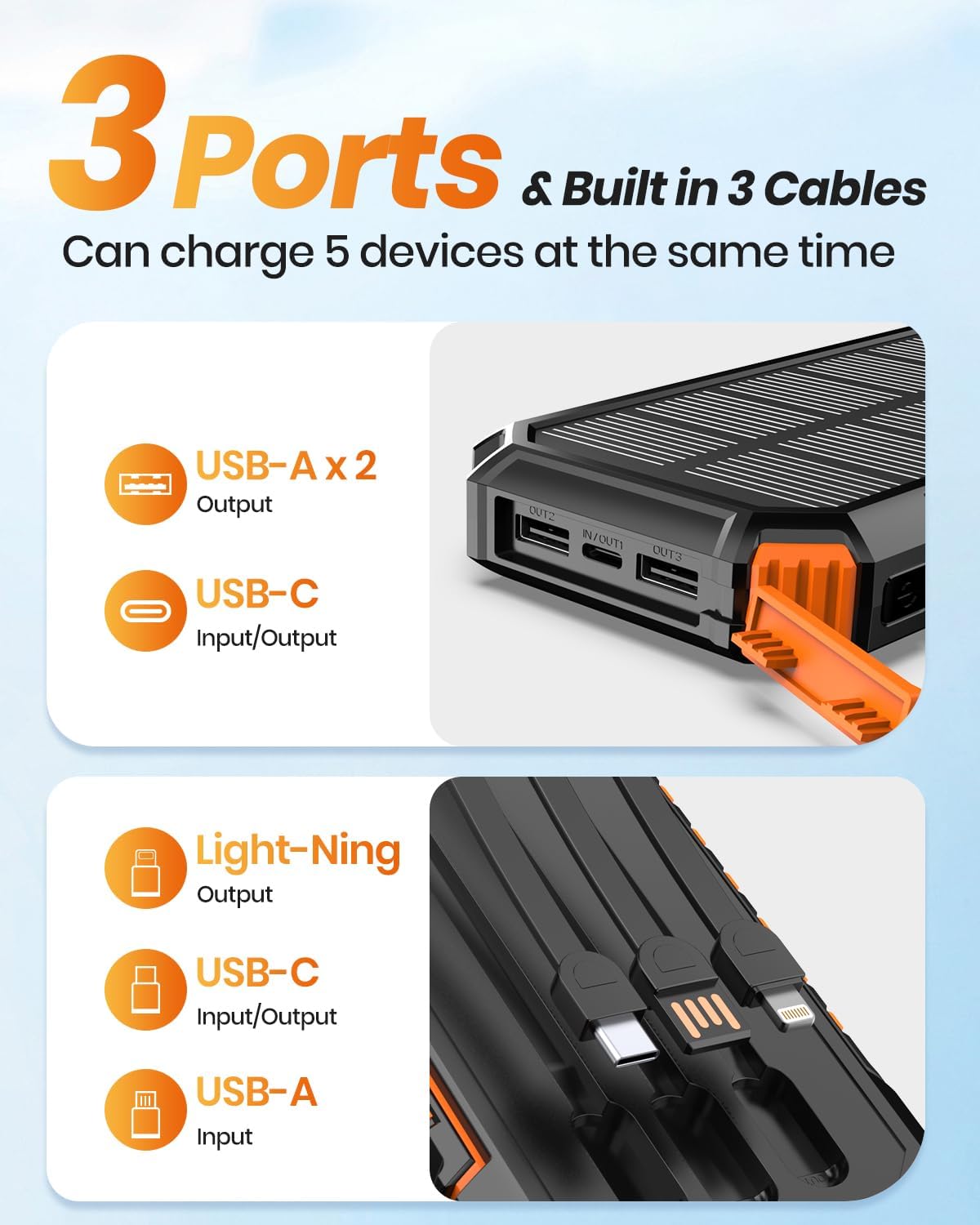
Figure 2: Built-in Cables and Ports
3. Setup
3.1. Initial Charging
Before first use, it is recommended to fully charge the power bank using a wall adapter. Connect the provided USB cable to the power bank's USB-C input port or use the built-in USB-A input cable, and connect the other end to a compatible USB wall adapter (not included). The LED indicators will illuminate to show charging progress.
A full charge via wall adapter typically takes 5-6 hours.
4. Operating Instructions
4.1. Charging the Power Bank
The power bank can be charged via two methods:
- Via Wall Adapter: Connect the power bank to a wall adapter using the built-in USB-A input cable or a USB-C cable (via the USB-C input/output port). This is the fastest and most efficient charging method.
- Via Solar Panel: Place the power bank in direct sunlight. The solar panel will convert sunlight into electricity to charge the internal battery. This method is primarily for emergency use or to maintain charge, as it is slower than wall charging. Ensure the solar panel is clean and unobstructed for optimal performance.

Figure 3: Charging the Power Bank (Solar and Wall)
4.2. Charging Your Devices
The FEELLE Solar Charger can charge up to 5 devices simultaneously.
- Using Built-in Cables: Pull out the integrated Type-C, Lightning, or USB-A cables and connect them directly to your compatible device.
- Using USB Ports: Connect your device's charging cable to one of the two USB-A output ports or the USB-C input/output port on the power bank.
The power bank features 15W QC 3.0 fast charging, allowing compatible devices to charge significantly faster than standard chargers.

Figure 4: 27000mAh Capacity Overview

Figure 5: 15W Fast Charging Capability
4.3. Using the Flashlight
The power bank is equipped with dual high-brightness LED flashlights. To activate or change modes:
- Press and hold the power button for approximately 3 seconds to turn the flashlight ON (Steady mode).
- Press the power button once more to switch to SOS mode (slow flashing).
- Press the power button a third time to switch to Strobe mode (fast flashing).
- Press and hold the power button again for approximately 3 seconds to turn the flashlight OFF.

Figure 6: Flashlight Modes
5. Maintenance
- Cleaning: Wipe the device with a soft, dry cloth. Do not use harsh chemicals or abrasive materials.
- Storage: Store the power bank in a cool, dry place away from direct sunlight and extreme temperatures. For long-term storage, charge the battery to about 50-75% every 3 months to prolong its lifespan.
- Environmental Protection: The power bank is IP65 rated, meaning it is protected against dust ingress and low-pressure water jets from any direction. While it is rugged, avoid prolonged submersion in water or exposure to heavy rain.
- Avoid Extreme Temperatures: Operate the device within its specified temperature range of -20°C to 60°C.

Figure 7: Durability Features (Shockproof, Waterproof, Dustproof)
6. Troubleshooting
- Device not charging: Ensure the power bank has sufficient charge. Check all cable connections. Try a different cable or port.
- Slow charging: Ensure your device supports fast charging and that the cable used is compatible. Solar charging is inherently slower and intended for supplemental power.
- Flashlight not working: Ensure the power bank has charge. Press and hold the power button for 3 seconds to activate.
- Power bank not charging: Ensure the charging source (wall adapter, sunlight) is active. Check the charging cable.
If issues persist, please refer to the warranty and support section.
7. Specifications
| Feature | Detail |
|---|---|
| Model Number | T11X |
| Battery Capacity | 27000mAh |
| Product Dimensions | 6.8 x 3.5 x 1.13 inches |
| Item Weight | 1.1 lbs (approx. 475g) |
| Input Ports | USB-C, Built-in USB-A |
| Output Ports | 2x USB-A, USB-C, Built-in Type-C, Built-in Lightning, Built-in USB-A |
| Fast Charging | 15W QC 3.0 |
| Special Features | Built-in Cables, Dust Resistant, Fast Charging, Flashlight, LED Indicator Lights, Solar Charging |
| Durability Rating | IP65 Waterproof, Dustproof, Shock-resistant |
| Operating Temperature | -20°C to 60°C |
8. Warranty and Support
For warranty information and customer support, please refer to the documentation included with your product or visit the official FEELLE website. Keep your purchase receipt as proof of purchase for any warranty claims.