
Introduction
The OMRON X4 Connect AFib Blood Pressure Monitor is designed for individuals who wish to monitor their blood pressure at home with ease and confidence. This device incorporates clinically advanced features and smart connectivity to support proactive cardiovascular health management.
Key features include:
- Bluetooth Connectivity: Automatically transfers readings to the OMRON connect app for easy tracking and sharing.
- Intelli Wrap Cuff: Ensures accurate measurements regardless of cuff positioning on the upper arm, minimizing common measurement errors.
- AFib Detection: An Atrial Fibrillation indicator helps detect early signs of this arrhythmia, a significant risk factor for stroke.
- 3 Consecutive Measurements: Enhances reliability by taking three successive measurements and calculating the average.
- Movement and Irregular Heartbeat Detection: Alerts the user to factors that may affect measurement accuracy.
- Memory for 2 Users: Stores up to 60 measurements for two distinct user profiles.
This monitor is clinically validated, including for use in individuals with diabetes or during pregnancy (pre-eclampsia).
Package Contents
Your OMRON X4 Connect AFib package includes:
- 1x OMRON X4 Connect AFib Blood Pressure Monitor
- 1x Intelli Wrap Cuff (22–42cm)
- 4x AA Batteries
- Instruction Manual
- Storage Case

Image: Contents of the OMRON X4 Connect AFib package.
Setup
- Install Batteries: Open the battery compartment and insert the 4 AA batteries provided, ensuring correct polarity.
- Download OMRON connect App: For smart tracking and data management, download the OMRON connect app to your smartphone.
- Prepare for Measurement:
- Rest for at least 5 minutes before measurement. Avoid eating, drinking, smoking, or exercising during this period.
- Sit comfortably with your back supported and your feet flat on the floor. Do not cross your legs.

Image: Activities to avoid before taking a blood pressure measurement.
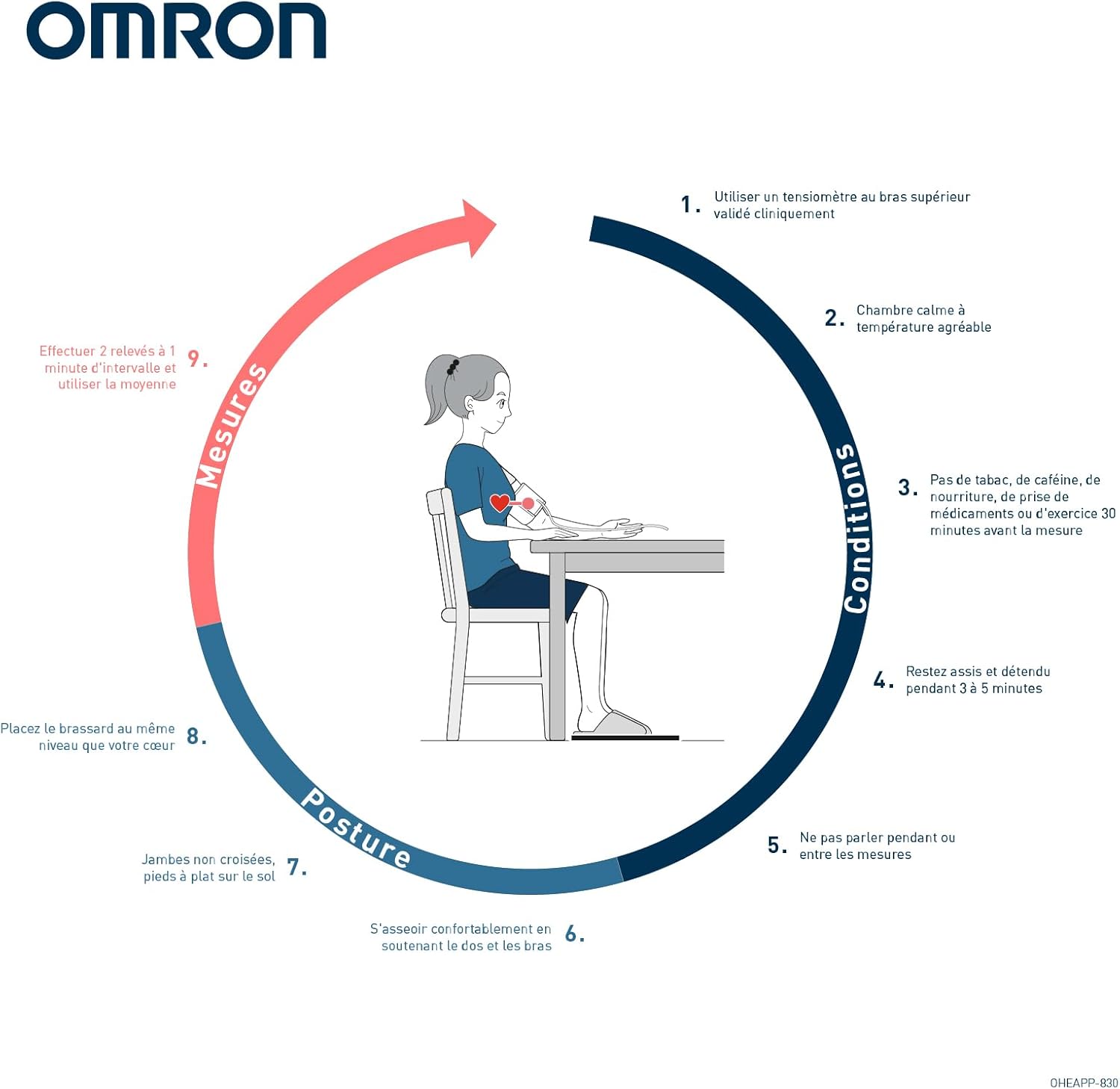
Image: Guide for correct posture and conditions during blood pressure measurement.
- Apply the Cuff: Place the Intelli Wrap cuff on your upper arm, ensuring it is 1 to 2 cm above your elbow. The cuff should be snug but not too tight.

Image: Correct placement of the Intelli Wrap cuff on the upper arm.

Image: The Intelli Wrap cuff provides accurate results regardless of its position on the arm.
Operating Instructions
- Start Measurement: Press the START/STOP button on the monitor. Keep your arm relaxed and at heart level during the measurement.
- View Results: Wait approximately 30 seconds for your blood pressure and pulse rate to appear on the screen. The monitor will also indicate if AFib or an irregular heartbeat is detected.
- Automatic Data Transfer: If connected via Bluetooth, your measurements will automatically synchronize with the OMRON connect app on your smartphone for easy tracking and analysis.
- Consistent Monitoring: For the most consistent results, take your measurements at the same time each day.
- Share Results: If your blood pressure readings consistently remain high, easily share your data with your healthcare professional via the OMRON connect app.

Image: OMRON X4 Connect AFib monitor and app interface.

Image: The monitor stores up to 60 memories for two different users.

Image: Smart blood pressure monitoring for better hypertension management.
Instructional Video
Video: This video demonstrates how to take a reliable blood pressure measurement at home using the OMRON X4 Connect AFib monitor, including proper preparation, cuff placement, and data synchronization with the OMRON connect app.
Maintenance
- Cleaning: Wipe the monitor and cuff with a soft, dry cloth. If necessary, use a cloth lightly dampened with water and a mild soap, then wipe dry. Do not use abrasive cleaners or immerse the device in water.
- Storage: Store the device and cuff in the provided storage case in a clean, dry place, away from direct sunlight, extreme temperatures, and humidity.
- Battery Replacement: Replace all four AA batteries when the low battery indicator appears on the display. Do not mix old and new batteries or different types of batteries.
Troubleshooting
| Problem | Possible Cause | Solution |
|---|---|---|
| No power / Display is blank | Batteries are dead or incorrectly inserted. | Replace all batteries with new ones, ensuring correct polarity. |
| Inaccurate readings | Incorrect cuff placement, movement during measurement, or not resting before measurement. | Ensure cuff is correctly placed 1-2 cm above the elbow. Remain still and silent during measurement. Rest for 5 minutes prior. |
| Cuff does not inflate | Cuff air plug is not securely inserted into the monitor. | Firmly insert the air plug into the air jack on the monitor. |
| Cannot connect to OMRON connect app | Bluetooth is off on the smartphone or monitor, or pairing issue. | Ensure Bluetooth is enabled on both devices. Follow the app's instructions for pairing. Restart both devices if necessary. |
If you encounter persistent issues not listed here, please refer to the full instruction manual or contact OMRON customer support.
Specifications
- Model Name: X4 Connect AFib
- Model Number: HEM-7196T1-FLEO
- Cuff Size: Intelli Wrap Cuff (22-42cm)
- Power Source: 4 AA Batteries (included)
- Display Type: LCD
- Dimensions (L x W x H): 16.5 x 9.8 x 7 cm
- Weight: 350 Grams
- Number of Users: 2
- Memory: 60 measurements per user
- Special Features: Bluetooth connectivity, Clinically validated, IntelliSense AFib Technology
- Manufacturer: OMRON Healthcare Co., Ltd
- Country of Origin: Vietnam
Warranty and Support
The OMRON X4 Connect AFib Blood Pressure Monitor comes with a 5-year warranty. For warranty claims, technical support, or any product-related inquiries, please refer to the contact information provided in the full instruction manual or visit the official OMRON website.
OMRON is the #1 brand recommended by cardiologists, ensuring high quality and reliability for your health monitoring needs.

Image: OMRON - #1 Brand Recommended by Cardiologists.


