
1. Introduction
Thank you for choosing the PEFUPEW FC01 Bluetooth 5.4 Over-Ear Headphones. This manual provides detailed instructions for setting up, operating, and maintaining your headphones to ensure optimal performance and longevity. Please read this manual thoroughly before use.
Package Contents
Verify that all items are present in your package:
- 1 x PEFUPEW FC01 Bluetooth Headphones
- 1 x 3.5mm Audio Cable
- 1 x USB-C Charging Cable
- 1 x User Manual

Image: The PEFUPEW FC01 headphones, a 3.5mm audio cable, a USB-C charging cable, and the user manual are neatly arranged, illustrating the package contents.
2. Product Overview
The PEFUPEW FC01 headphones feature an ergonomic design with soft protein earmuffs and an adjustable headband for comfort. They incorporate advanced features such as Active Noise Cancellation (ANC), Transparency Mode, a low-latency gaming mode, and a clear LED display for battery status.
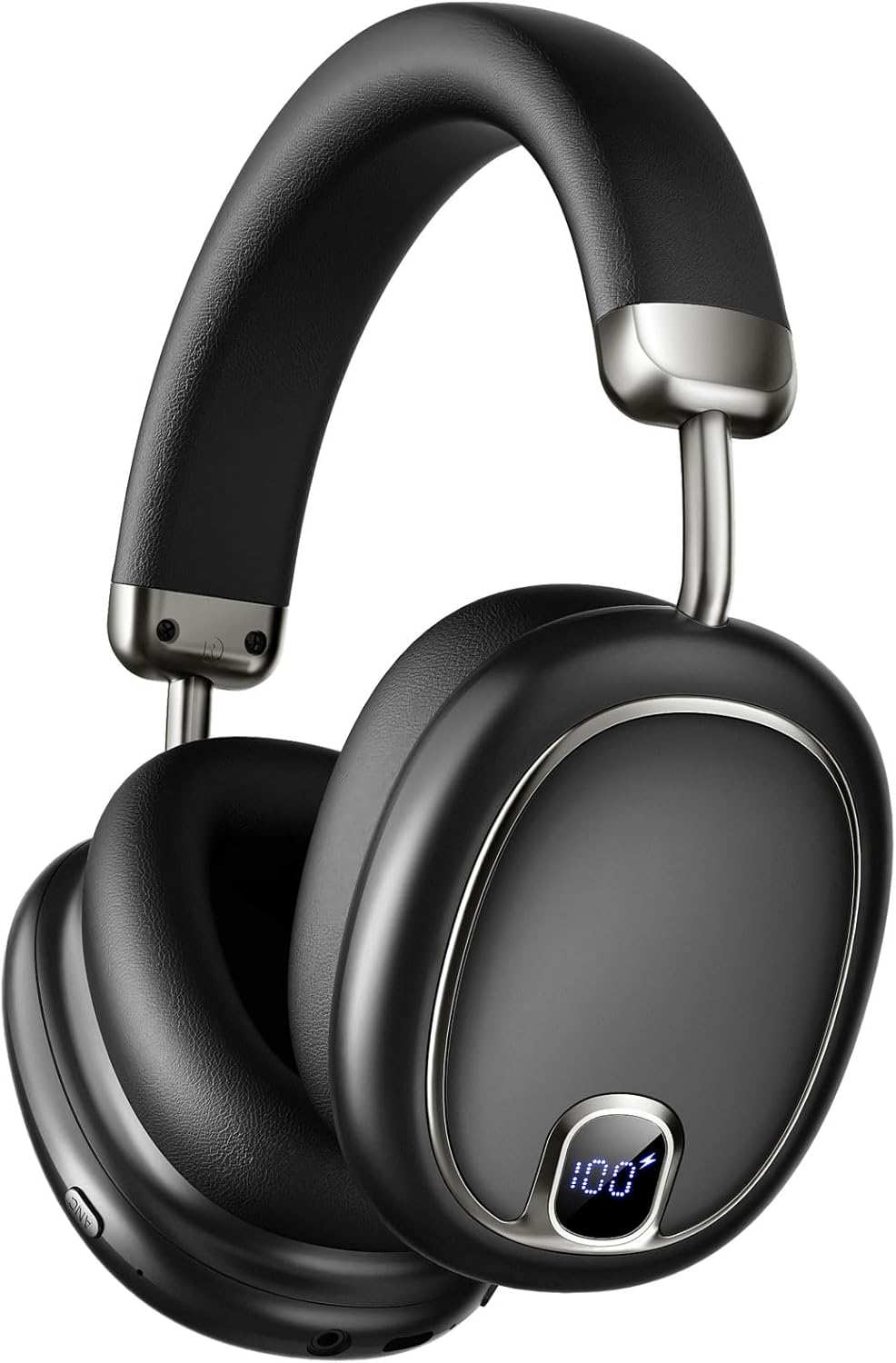
Image: A detailed front view of the PEFUPEW FC01 over-ear headphones, showcasing the sleek black design and the integrated LED battery display on the right ear cup.
Comfort and Design
- Comfortable Memory Foam: Ear cushions are made with soft protein leather for extended wear.
- Adjustable Headband: Allows for a customized fit.
- 90° Rotation Joints: Ear cups can rotate for flexible storage and fit.
- Lightweight Design: Weighs approximately 270g.

Image: An illustration highlighting the comfortable memory foam earcups, the adjustable headband mechanism, and the 90-degree rotatable joints of the PEFUPEW FC01 headphones, emphasizing user comfort and flexibility.
Audio Quality
The headphones feature 40mm dynamic drivers for high-fidelity stereo sound, delivering deep bass, balanced mids, and clear highs. They are designed to provide an immersive audio experience.

Image: A split image showing a close-up of the headphone's 40mm audio driver on one side and a person enjoying music with the headphones on the other, highlighting the 360° Spatial Audio and HiFi Stereo Sound Quality.
3. Setup
Charging the Headphones
Before first use, fully charge the headphones. A full charge takes approximately 1.5 hours.
- Connect the USB-C charging cable to the charging port on the headphones.
- Connect the other end of the cable to a USB power source (e.g., wall adapter, computer USB port).
- The LED display will show the charging progress. Once fully charged, the display will indicate 100%.

Image: The PEFUPEW FC01 headphones connected to a charging cable, with the LED display showing "100%" battery level. Text indicates 2 hours of charging provides 100 hours of playtime, and 80 hours with ANC on.
Power On/Off
- Power On: Press and hold the Power button for 3 seconds.
- Power Off: Press and hold the Power button for 3 seconds.
Bluetooth Pairing
To connect your headphones to a device via Bluetooth:
- Ensure the headphones are powered off.
- Press and hold the Power button for approximately 5 seconds until the LED indicator flashes blue and red, indicating pairing mode.
- On your device (smartphone, tablet, computer), enable Bluetooth and search for available devices.
- Select "PEFUPEW FC01" from the list of devices.
- Once connected, the LED indicator will show a solid blue light or flash slowly.
The headphones support Bluetooth 5.4 for stable and efficient connections and are compatible with a wide range of devices.

Image: An illustration demonstrating the extensive compatibility of the PEFUPEW FC01 headphones with various devices, including smartphones (iOS and Android), laptops, smart TVs, and tablets, supporting both Bluetooth 5.4 and 3.5mm Aux connections.
4. Operating Instructions
Button Functions
The headphones feature intuitive button controls located on the ear cups. Refer to the diagram below for specific functions:

Image: A detailed guide to the button functions on the PEFUPEW FC01 headphones, showing controls for power, volume, track navigation, call handling, voice assistant activation, and switching between ANC, Transparency, and Gaming modes.
- Power Button (O):
- Press and hold for 3 seconds: Power On/Off
- Press and hold for 2 seconds: Reject Call
- Press once: Answer/Hang up Call
- Press twice: Play/Pause Music
- Press three times: Activate Voice Assistant
- Volume Up (+) Button:
- Press once: Increase Volume
- Press and hold for 2 seconds: Next Track
- Volume Down (-) Button:
- Press once: Decrease Volume
- Press and hold for 2 seconds: Previous Track
- ANC Button:
- Press once: Toggle Transparency Mode
- Press twice: Toggle Gaming Mode
Active Noise Cancellation (ANC) & Transparency Mode
The headphones offer advanced noise control features:
- Active Noise Cancellation (ANC): Blocks up to 95% of external noise for an immersive listening experience.
- Transparency Mode: Allows ambient sounds to pass through, enabling you to hear your surroundings without removing the headphones.
To switch between modes, press the ANC button as described in the "Button Functions" section.

Image: A woman wearing the PEFUPEW FC01 headphones, illustrating the use of Transparency Mode. The image includes icons for Transparency Mode and the ANC button, with text stating "Less noise, more sound."

Image: A collage showing three different users benefiting from Hybrid Active Noise Cancellation: one gaming at home, another on a bus, and a third on an airplane, illustrating the headphones' ability to reduce various types of environmental noise by up to 35dB.
Pro Gaming Mode
Activate Pro Gaming Mode for ultra-low 15ms latency, ensuring perfect audio-video synchronization during gaming, video calls, or watching movies. This mode also enhances audio clarity by actively eliminating distracting ambient noise.
- Activation: Press the ANC button twice to toggle Gaming Mode.

Image: A user wearing the PEFUPEW FC01 headphones while playing a video game on a computer, demonstrating the Low Latency Game Mode. Icons indicate features like game mode on/off and low latency performance.
Hands-Free Calls & Voice Assistant
The headphones are equipped with four high-performance microphones for clear calls and support voice assistant activation.
- Answering/Ending Calls: Press the Power button once.
- Rejecting Calls: Press and hold the Power button for 2 seconds.
- Activating Voice Assistant: Press the Power button three times.

Image: A man wearing the PEFUPEW FC01 headphones, demonstrating the hands-free call feature by activating a voice assistant with the phrase "Hey Siri, call Mary." The image also highlights the built-in ENC microphone.
Wired Connection
For situations where Bluetooth is not available or preferred, you can use the included 3.5mm audio cable to connect the headphones to your device.
- Plug one end of the 3.5mm audio cable into the headphone's audio jack.
- Plug the other end into your audio source's 3.5mm jack.
- Note that some features like ANC may still function in wired mode, but Bluetooth-specific controls will not.
5. Care and Maintenance
- Cleaning: Use a soft, dry cloth to clean the headphones. Do not use abrasive cleaners or solvents.
- Storage: Store the headphones in a cool, dry place when not in use. Avoid extreme temperatures.
- Water Resistance: The headphones are waterproof. However, avoid prolonged exposure to water or submersion. Dry thoroughly if they get wet.
- Battery Care: To preserve battery life, charge the headphones regularly, even if not used frequently. Avoid fully discharging the battery for extended periods.
6. Troubleshooting
| Problem | Possible Solution |
|---|---|
| Headphones do not power on. | Ensure the headphones are charged. Connect to a power source using the USB-C cable. |
| Cannot pair with a device. |
|
| No sound or low volume. |
|
| ANC not working effectively. |
|
| Sound latency in gaming mode. | Ensure Gaming Mode is activated. Some devices or applications may have inherent latency. |
7. Specifications
| Feature | Detail |
|---|---|
| Model Name | FC01 |
| Bluetooth Version | 5.4 |
| Noise Control | Active Noise Cancellation (ANC) |
| Audio Driver Size | 40 mm Dynamic Driver |
| Impedance | 32 Ohm |
| Battery Life | Up to 100 hours (ANC off), Up to 80 hours (ANC on) |
| Charging Time | Approximately 1.5 hours |
| Headphones Jack | 3.5 mm |
| Water Resistance Level | Waterproof |
| Weight | 15.3 ounces (approx. 434g) |
| Compatibility | iOS, Android, TVs, Computers, Laptops, and most Bluetooth-enabled devices. |
8. Safety Information
- Do not disassemble or modify the headphones.
- Avoid exposing the headphones to extreme temperatures, direct sunlight, or fire.
- Do not use the headphones at high volume for extended periods to prevent hearing damage.
- Keep out of reach of children and pets.
- Dispose of batteries and electronic components responsibly according to local regulations.
9. Warranty and Support
PEFUPEW products are designed for reliability and performance. For warranty information or technical support, please refer to the contact details provided on the product packaging or visit the official PEFUPEW website.
For further assistance, please contact customer support with your product model (FC01) and purchase details.