
1. Introduction
The LISEN 0.5'' Ultra Slim MagSafe Power Bank (Model 2E448) is a versatile 10000mAh portable charging solution designed for iPhone and Apple Watch users. Its ultra-slim profile integrates multiple charging methods, including MagSafe wireless charging, Apple Watch wireless charging, and wired charging via a built-in USB-C cable and an additional USB-C port. This manual provides essential information for the safe and efficient use of your power bank.

Image: The LISEN Ultra Slim MagSafe Power Bank in Glacier Gray, simultaneously charging an iPhone via MagSafe and an Apple Watch on its dedicated charging pad. A built-in USB-C cable is also visible.
2. Setup and Initial Charging
2.1 Package Contents
Before use, ensure all items are present in the package:
- LISEN 0.5'' Ultra Slim MagSafe Power Bank (Model 2E448)
- USB-C to USB-C Braided Charging Cable (separate, rated up to 60W)
- User Manual (this document)

Image: The LISEN Power Bank and its accessories, including the separate braided USB-C cable, neatly arranged in its packaging.
2.2 Charging the Power Bank
To charge your LISEN Power Bank:
- Connect the built-in USB-C cable or the provided separate USB-C cable to the power bank's USB-C port.
- Connect the other end of the cable to a compatible USB-C wall adapter (not included) with an 18W or higher output for rapid replenishment.
- The digital display on the power bank will show the charging status and current battery percentage.
- The power bank is fully charged when the display shows 100%.

Image: The LISEN Power Bank connected to a wall adapter using its built-in USB-C cable, illustrating how to recharge the power bank itself.
3. Operating Instructions
3.1 MagSafe Wireless Charging (for iPhone)
The power bank supports MagSafe charging for compatible iPhone models (iPhone 12-17 series).
- Align your MagSafe-compatible iPhone with the magnetic charging area on the power bank. The magnets will securely attach the phone.
- Press the power button on the side of the power bank to initiate charging if it doesn't start automatically.
- The power bank delivers up to 7.5W for iPhone MagSafe charging.
- Note: For optimal performance and to prevent overheating, use with MagSafe-compatible cases or without a case. Non-MagSafe cases may cause heating and reduce charging efficiency.

Image: The LISEN Power Bank securely attached to the back of an iPhone via its strong magnetic connection, demonstrating MagSafe charging in use.
3.2 Apple Watch Wireless Charging
The power bank features a dedicated charging pad for Apple Watch.
- Place your Apple Watch (Ultra 2/Ultra/S11/S10/S9/S8/S7/S6/SE2/SE/S5/S4/S3) onto the designated circular charging area.
- Ensure the watch is properly aligned for charging to begin.
- Press the power button on the side of the power bank to initiate charging if it doesn't start automatically.
- The power bank provides 2.5W fast charging for Apple Watch.

Image: An Apple Watch placed on the integrated charging pad of the LISEN Power Bank, indicating active charging.
3.3 Wired Charging (USB-C Cable & Port)
The power bank offers two wired charging options:
- Built-in USB-C Cable: This integrated cable can be used to charge USB-C compatible devices, including iPhone 12-17 series, Samsung Galaxy series, and other Android devices. It supports up to 20W fast charging.
- USB-C Port: An additional USB-C port allows connection of external cables to charge a wider range of devices, such as iPhone 11/XR/X/8/7/6 Series, Samsung Galaxy, and other Android devices. This port also supports up to 20W fast charging.
To use wired charging:
- Connect the built-in USB-C cable or an external USB-C cable to your device.
- If using an external cable, plug it into the power bank's USB-C port.
- Press the power button on the side of the power bank to initiate charging if it doesn't start automatically.
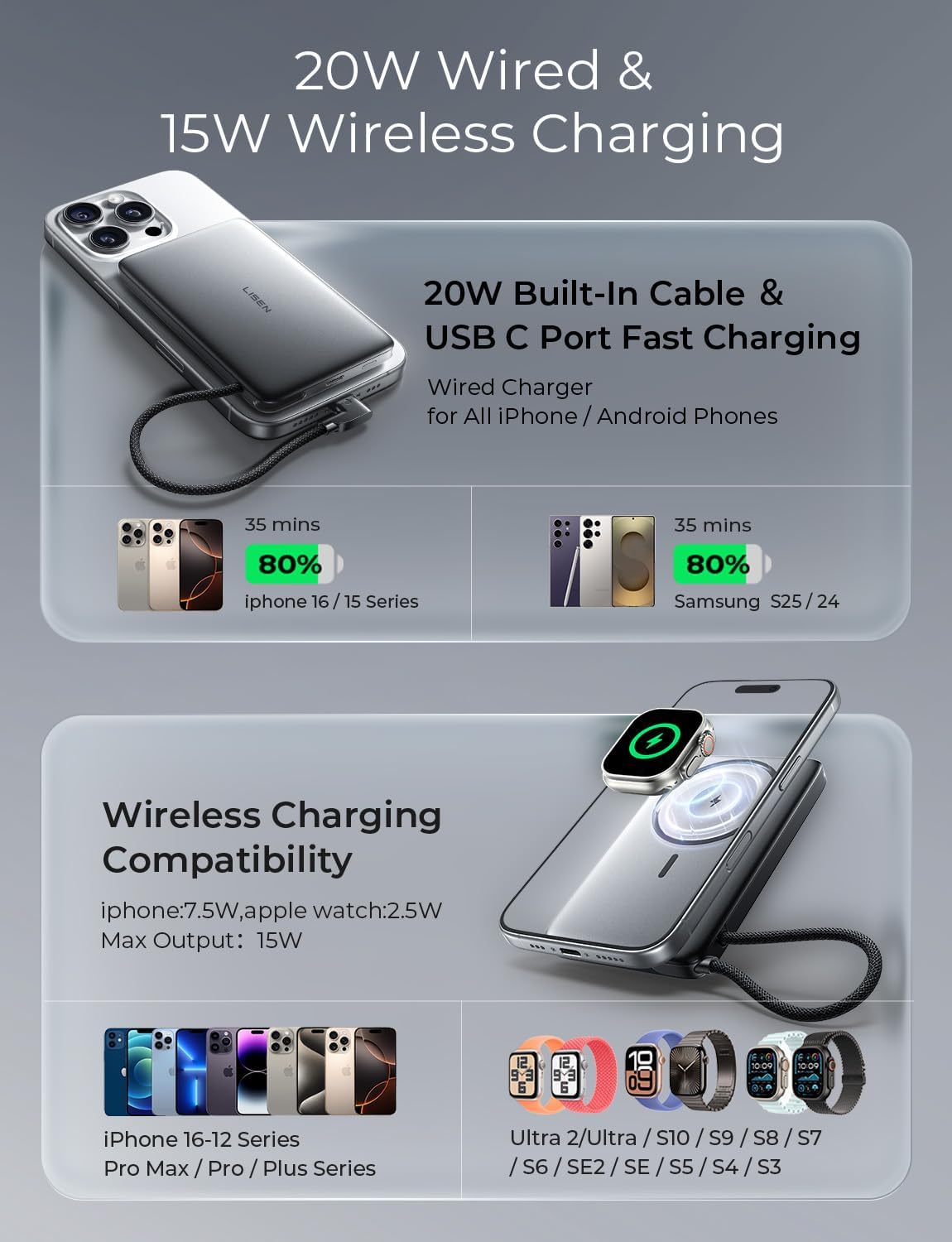
Image: A diagram illustrating the compatibility of the LISEN Power Bank with various iPhone and Apple Watch models for both wireless and wired charging.
3.4 Digital Display
The power bank features a small digital display that shows the remaining battery percentage and charging status. This allows for precise monitoring of the power bank's charge level.

Image: A close-up of the LISEN Power Bank highlighting its digital display, which shows the precise battery capacity percentage.
3.5 Simultaneous Charging
The power bank supports charging multiple devices simultaneously (e.g., iPhone via MagSafe, Apple Watch wirelessly, and another device via USB-C). When using wireless and wired charging at the same time, press the button on the bottom of the power bank to trigger charging. Note that simultaneous charging may reduce the overall charging speed for individual devices.
4. Maintenance
- Keep the power bank dry and away from moisture.
- Avoid exposing the power bank to extreme temperatures (hot or cold).
- Do not drop, disassemble, or attempt to repair the power bank yourself.
- Clean the surface with a soft, dry cloth. Do not use harsh chemicals or abrasive materials.
- Store in a cool, dry place when not in use.
5. Troubleshooting
5.1 Device Not Charging
- Ensure the power bank is sufficiently charged. Check the digital display.
- Press the power button on the side of the power bank to activate charging.
- Verify that your device is properly aligned on the MagSafe or Apple Watch charging area, or that the cable is securely connected.
- Check if your phone case is MagSafe compatible. Non-MagSafe cases can interfere with wireless charging.
- Try a different charging cable or port if using wired charging.
5.2 Overheating During Wireless Charging
- Overheating can occur if the phone is not properly aligned or if a non-MagSafe case is used. Ensure proper alignment and use a MagSafe-compatible case or no case.
- The power bank features NTC temperature control to prevent excessive heat. If it gets too hot, it may temporarily reduce charging speed or stop charging to protect your devices.
- If overheating persists, discontinue use and contact support.
5.3 Slow Charging Speed
- Simultaneous charging of multiple devices can reduce the charging speed for each individual device.
- Wireless charging is generally slower than wired charging.
- Charging speed may decrease after the power bank reaches 75% capacity.
- If the power bank detects high temperatures, it may reduce charging speed to maintain safety and device health.
- Ensure your wall adapter (when charging the power bank) provides sufficient power (18W or higher) for optimal recharge times.

Image: An iPhone screen displaying a "Slow Charger" notification. This can occur to manage charging speed and temperature, especially when heat is detected, without negatively impacting device safety or performance.
6. Specifications
| Feature | Detail |
|---|---|
| Model Number | 2E448 |
| Battery Capacity | 10000 mAh |
| Dimensions | 4.13 x 2.62 x 0.56 inches |
| Item Weight | 10.2 ounces |
| Wireless Output (MagSafe) | Up to 15W Max (7.5W for iPhone MagSafe) |
| Wireless Output (Apple Watch) | 2.5W |
| Wired Output (USB-C Built-in Cable) | Up to 20W |
| Wired Output (USB-C Port) | Up to 20W |
| Input (USB-C) | Up to 18W |
| Special Features | Built-in Cable, Digital Display, Fast Charging, Slim Design, Wireless Charging, NTC Temperature Control, Overcharge Protection |
| Material | Magnesium Aluminum Alloy |
| Color | Glacier Gray |
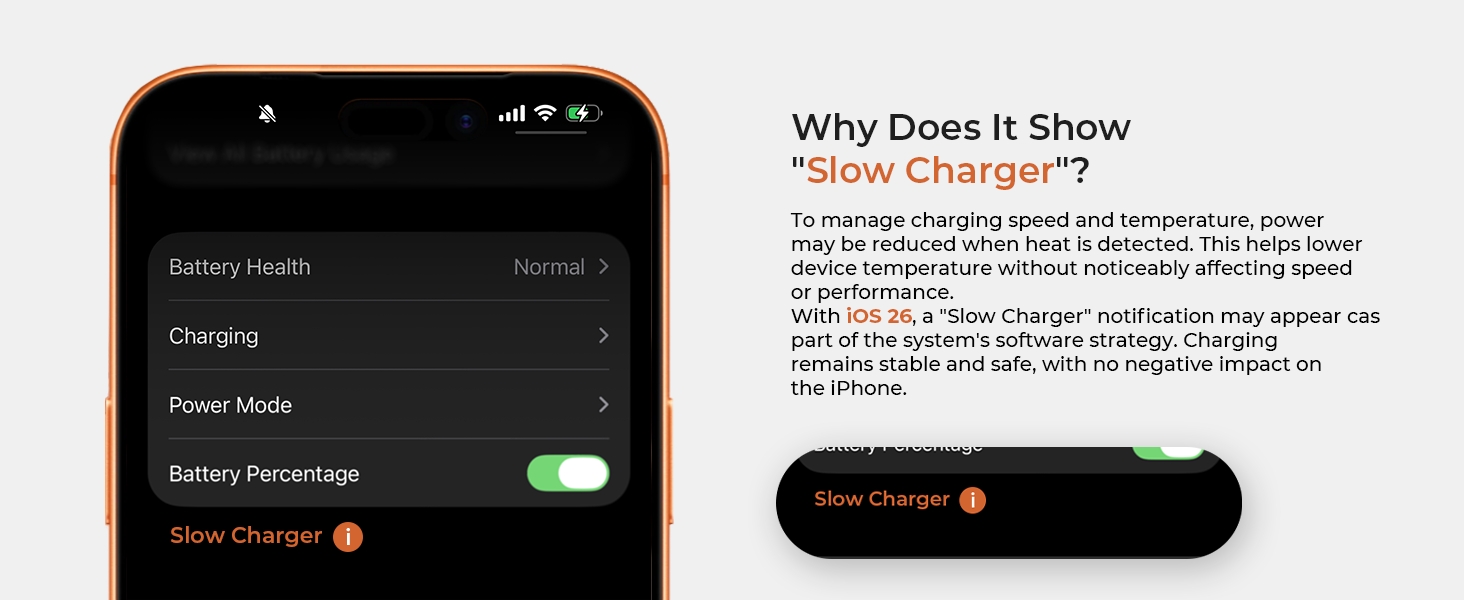
Image: A detailed table outlining the function parameters and specifications of the LISEN Power Bank, including capacity, dimensions, and charging outputs.
7. Safety Information
- This product is equipped with overcharge protection and NTC temperature control to ensure safe operation.
- Avoid placing metal objects between the power bank and your device during wireless charging, as this can cause heating.
- Do not expose the power bank to fire, water, or corrosive liquids.
- Keep out of reach of children.
- The power bank is CE certified and complies with international aviation standards, making it suitable for flight boarding.
8. Warranty and Support
LISEN is committed to providing high-quality products and customer satisfaction. For any questions, concerns, or support needs regarding your LISEN 0.5'' Ultra Slim MagSafe Power Bank, please contact LISEN customer service.
- Manufacturer: LISEN
- Support Email: support@lisen.com (as indicated on product packaging)
- Online Resources: For additional product information and support, visit the official LISEN website: LISEN Official Product Page

Image: The product packaging displaying contact information for LISEN customer support, including an email address.