
NNHUNYI X99 H5
NNHUNYI X99 H5 Motherboard Set Kit User Manual
Model: X99 H5 (Motherboard+CPU+RAM)
Introduction
This manual provides comprehensive instructions for the installation, operation, and maintenance of your NNHUNYI X99 H5 Motherboard Set Kit. This kit includes the X99 H5 motherboard, an LGA2011-3 Xeon E5 2630 V4 CPU, and 16GB DDR4 REG ECC Memory. Please read this manual thoroughly before proceeding with installation to ensure proper setup and optimal performance.
1. Setup and Installation
Follow these steps to correctly install your motherboard, CPU, and RAM.
1.1 Motherboard Overview

Figure 1.1: Overview of the NNHUNYI X99 H5 Motherboard with key component locations. Note the numbered DDR4 memory slots (#1, #2, #3, #4) and the M.2 NVMe slots, along with the CR2032 battery holder.
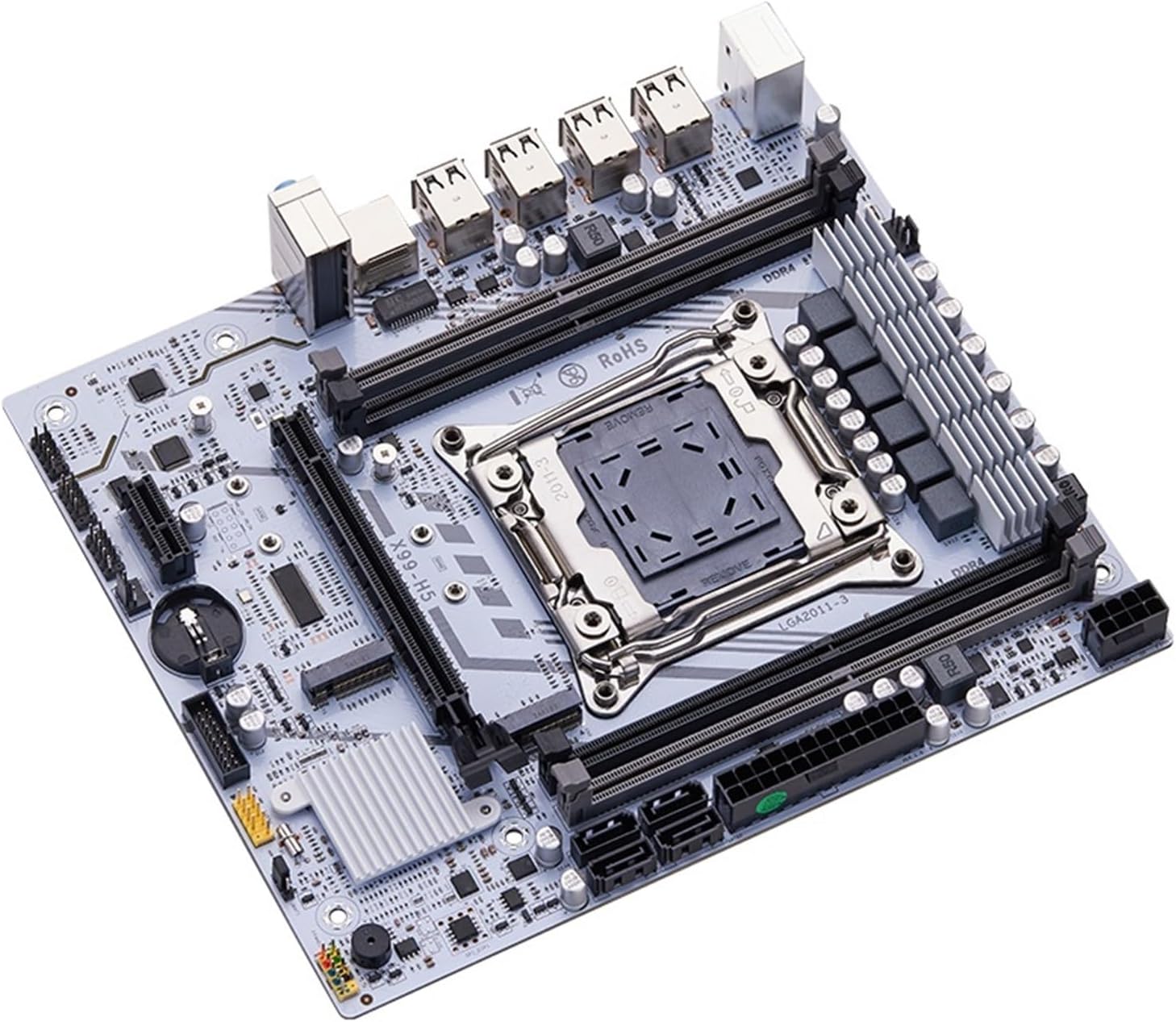
Figure 1.2: Angled view of the NNHUNYI X99 H5 Motherboard, showcasing its layout and cooling armor.
1.2 CPU Installation (LGA2011-3)
Carefully align the Xeon E5 2630 V4 CPU with the LGA2011-3 socket on the motherboard. Ensure the triangular markers on the CPU and socket match. Gently lower the CPU into the socket without forcing it. Once seated, close the CPU retention levers to secure the processor.

Figure 1.3: Top-down view highlighting the LGA2011-3 CPU socket area on the motherboard.
After CPU installation, apply thermal paste and install a compatible CPU cooler (not included in this kit) to ensure proper heat dissipation.
1.3 RAM Installation (DDR4)
The motherboard supports DDR4 memory. This kit includes 16GB DDR4 REG ECC Memory. The motherboard has 4 memory slots. For dual-channel operation, install memory modules into matching colored slots or as indicated in Figure 1.1 (slots #1 and #3, or #2 and #4). Open the clips at both ends of the DIMM slot, align the memory module notch with the slot key, and press down firmly until the clips snap into place.
1.4 Power Connections
Connect the 24-pin ATX power connector and the 8-pin CPU power connector from your power supply unit (PSU) to the corresponding ports on the motherboard. Refer to Figure 1.4 for power connector locations.

Figure 1.4: Power connectors (8pin DC, 24+8pin DC) and front panel headers on the motherboard.
Connect the front panel headers (Power LED, Power SW, HDD LED, Reset SW) to the motherboard as indicated in Figure 1.4. Ensure correct polarity for LED connections.
1.5 Storage Device Installation
The motherboard features two M.2 NVMe slots and four SATA 2.0 ports. Install your M.2 NVMe SSDs into the designated slots (refer to Figure 1.1). For SATA drives, connect them to the SATA 2.0 ports using SATA data cables and connect power from your PSU.
1.6 Rear I/O Panel Connections
Connect your peripherals to the rear I/O panel. This includes USB devices, PS/2 keyboard/mouse, Gigabit network cable, and audio devices.

Figure 1.5: Rear I/O panel showing PS/2 ports, USB ports, RJ45 network port, and audio jacks.
Important: A CR2032 battery needs to be installed in the battery holder on the motherboard for the system to start and maintain BIOS settings. (Refer to Figure 1.1 for battery location).
2. Operating Instructions
Once all components are installed and connected, you can power on your system.
2.1 First Boot
After assembly, connect your monitor, keyboard, and mouse. Power on the system. The system should display the BIOS/UEFI screen. You may need to press a specific key (e.g., DEL, F2) during startup to enter the BIOS settings.
2.2 BIOS/UEFI Configuration
In the BIOS/UEFI, you can configure boot order, enable/disable integrated peripherals, and monitor system status. Ensure your storage drive is recognized and set as the primary boot device for operating system installation.
2.3 Operating System Installation
Insert your operating system installation media (USB drive or DVD) and follow the on-screen prompts to install your preferred operating system. After installation, install all necessary drivers for the motherboard chipset, network, audio, and any other installed components.
3. Maintenance
Regular maintenance helps ensure the longevity and stable performance of your system.
- Dust Removal: Periodically clean dust from inside your computer case, especially from fans and heatsinks, using compressed air. Ensure the system is powered off and unplugged before cleaning.
- BIOS Updates: Check the manufacturer's website for BIOS/UEFI updates. Updates can improve compatibility, stability, and performance. Follow the update instructions carefully to avoid damaging the motherboard.
- Driver Updates: Keep your system drivers updated. Outdated drivers can lead to performance issues or instability.
- Component Checks: Occasionally check all cable connections (power, SATA, front panel) to ensure they are secure.
4. Troubleshooting
If you encounter issues, refer to the following common troubleshooting steps:
- No Power/No Boot:
- Ensure all power cables (24-pin ATX, 8-pin CPU) are securely connected.
- Verify the PSU is switched on and connected to a working power outlet.
- Check front panel connections (Power SW).
- Confirm the CR2032 battery is installed correctly.
- No Display:
- Ensure your monitor is connected to the correct graphics output (integrated or dedicated GPU).
- Reseat the RAM modules. Try booting with one RAM stick at a time.
- Reseat the CPU.
- System Instability/Crashes:
- Check CPU and GPU temperatures. Ensure adequate cooling.
- Run memory diagnostic tools to check for RAM errors.
- Update drivers and BIOS to the latest versions.
- Storage Not Detected:
- Check SATA data and power cable connections.
- Ensure M.2 SSDs are fully seated in their slots.
- Verify storage devices are enabled in BIOS/UEFI.
If problems persist, consult the manufacturer's support resources or a qualified technician.
5. Specifications
| Feature | Detail |
|---|---|
| Product Name | X99 Motherboard Set Kit (Motherboard+CPU+RAM) |
| Brand | NNHUNYI |
| Model | X99 H5 |
| Socket Type | LGA 2011-3 |
| Processor Compatibility | Xeon, Xeon E Series (Kit includes Xeon E5 2630 V4 CPU) |
| Memory Type Supported | DDR4 (Kit includes 16GB REG ECC Memory) |
| Number of Memory Slots | 4 |
| Maximum RAM Capacity | 128 GB |
| Memory Channel | Double |
| Storage Interfaces | 2x M.2 (NVMe), 4x SATA 2.0 |
| PCIe Slots | 1x PCIe x16, 1x PCIe x1 (PCI-E 3.0 standard) |
| Back I/O Ports | 1x RJ45 (Gigabit LAN), USB ports, Audio jacks, PS/2 ports |
| Form Factor | Micro-ATX |
| Special Features | Cooling Armor |
| Item Weight | 1.1 pounds |
| Country of Origin | China |
6. Warranty and Support
For warranty information and technical support, please contact NNHUNYI directly through their official website or the retailer from whom you purchased the product. Extended protection plans may also be available for purchase, offering additional coverage beyond the standard warranty.
Please retain your proof of purchase for any warranty claims.
Related Documents - X99 H5
 |
ZSUS X99 Motherboard Series: User Manual for LGA2011-3 Xeon Platforms Official user manual for ZSUS X99 series motherboards, including models X99, X99-8D3, and X99-8D4. This guide provides detailed specifications, installation instructions, and setup information for Intel LGA2011-3 Xeon E5 v3/v4 processors, DDR3/DDR4 ECC RAM, and NVMe M.2 storage. |
 |
MACHINIST X99-RS9 Motherboard User's Manual Comprehensive user manual for the MACHINIST X99-RS9 motherboard, detailing specifications, component overview, installation guides for CPU, RAM, expansion cards, internal and external connectors, and BIOS setup procedures. |
 |
MACHINIST X99 MD8 Motherboard User Manual This user manual provides detailed information for the MACHINIST X99 MD8 motherboard, covering specifications, component identification, installation procedures for CPU, memory, and expansion cards, connector pinouts, BIOS setup, and troubleshooting FAQs. It is designed for users building or upgrading PC systems with this E-ATX motherboard. |
 |
PANDL X99-2D4 Motherboard User Manual Comprehensive user manual for the PANDL X99-2D4 dual-socket motherboard, covering installation, BIOS settings, troubleshooting, and specifications. |
 |
HUANANZHI X99-ZD4 Motherboard User Manual Comprehensive user manual for the HUANANZHI X99-ZD4 motherboard, covering installation, BIOS settings, driver setup, and technical specifications. |
 |
X99 Dual Desktop Motherboard Specifications and Features Technical specifications and features for the X99 Dual Desktop Motherboard, supporting dual Intel 2011-pin processors, DDR4 memory, and high-speed storage interfaces. |
Ask a question about this manual
Ask about setup, troubleshooting, compatibility, parts, safety, or missing instructions. Manuals+ will review the question and use this page’s manual context to help answer it.