
Product Overview
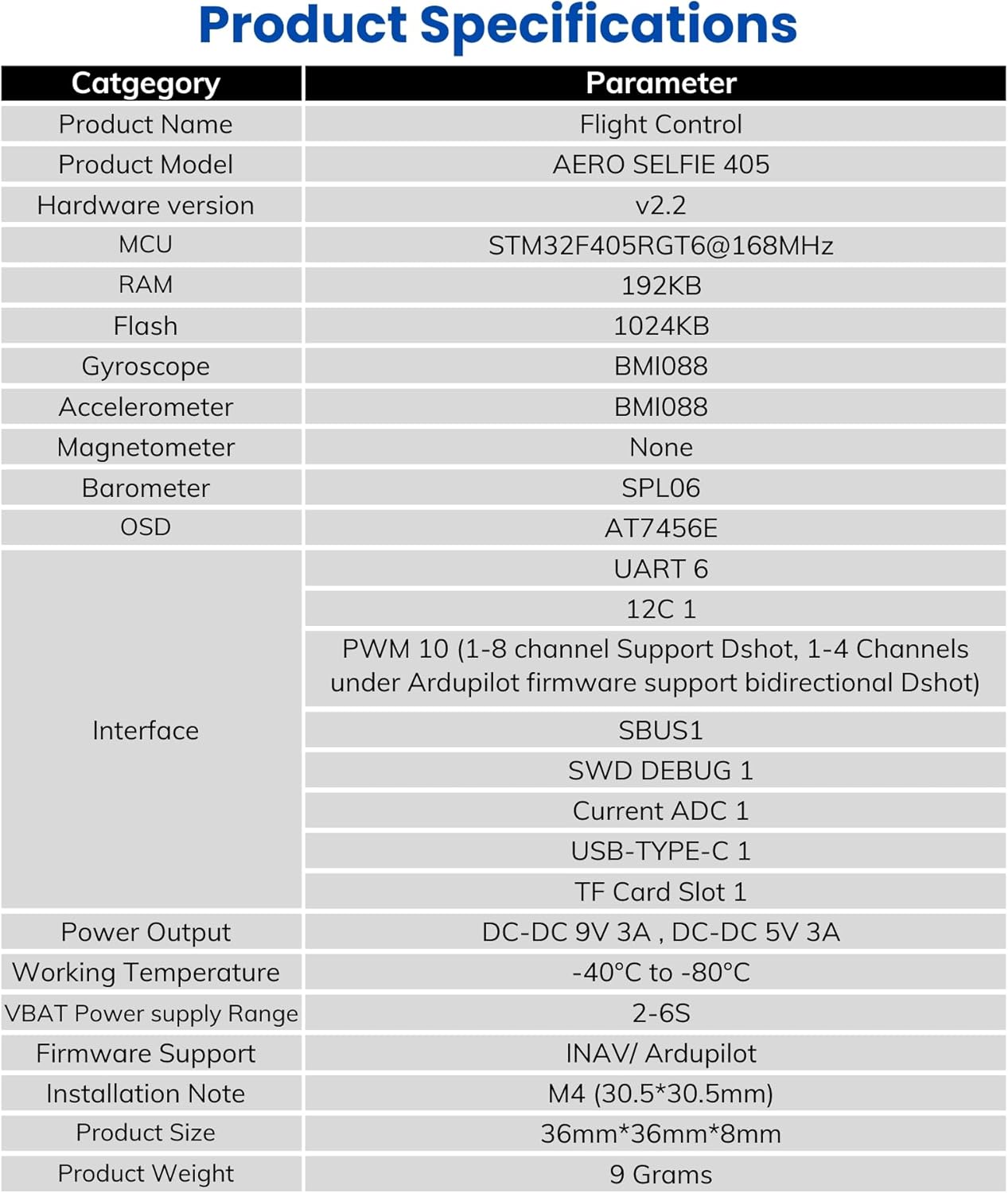
The AERO SELFIE F405 V2 Flight Controller is a high-performance solution engineered for FPV pilots, drone racers, and long-range enthusiasts. It supports Ardupilot, INAV, and Betaflight firmware, enabling flexible integration with a variety of flight styles and configurations. Powered by the STM32F405RGT6 32-bit processor running at 168MHz with 1MB flash memory and 192KB RAM, this controller offers responsive performance. Built with the Bosch BMI088 6-axis IMU sensor, it ensures precise orientation tracking with excellent vibration resistance and temperature stability. Additionally, the built-in SPL06 barometer delivers reliable altitude data, while the AT7456E OSD chip enables real-time telemetry overlay directly to your FPV feed. Connectivity is a standout feature, with 6 UART ports, 10 PWM outputs, 1 I2C, SBUS, and USB Type-C for seamless integration with GPS modules, telemetry, and other peripherals. The flight controller supports bidirectional DShot on select channels and includes dual DC-DC BECs (5V/3A and 9V/3A) to reliably power receivers, video transmitters, and accessories. The compact 36mm x 36mm x 8mm board with 30.5mm x 30.5mm mounting holes and lightweight 9g construction makes it ideal for both mini and larger drone frames. An onboard MicroSD slot allows for blackbox logging, helping users fine-tune flight performance and diagnose issues efficiently.
Key Features
- High-Performance IMU Sensor: Equipped with the Bosch BMI088 6-axis IMU for exceptional stability and vibration resistance, ensuring precise flight control ideal for FPV and long-range applications.
- Robust Processing Power: Features an STM32F405 processor running at 168MHz with 1MB flash memory, delivering superior performance for advanced flight dynamics and control.
- Versatile Connectivity Options: Offers 6 UART ports and 10 PWM outputs, supporting a wide range of peripherals.
- Dual DC-DC BEC Outputs: Provides 5V 3A and 9V 3A power outputs to efficiently power receivers, cameras, and video transmitters without compromising performance.
- Compact and Durable Design: With dimensions of 36mm x 36mm x 8mm and weighing just 9g, this flight controller is lightweight and designed for reliable operation in extreme temperatures (-40°C to 80°C).
Specifications
| Category | Parameter |
|---|---|
| Item Weight | 9 Grams (0.317 ounces) |
| Manufacturer | Shenzhen Ruijie Innovation Technology Co.,Ltd |
| Item Model Number | F405 v2 |
| Batteries Required | Yes |
| Included Components | 3,4,6,8 pin Cables with Silicon Grommets, Nuts and Screws |
| Brand | AERO SELFIE |
| Voltage | 5 Volts |
| Product Dimensions | 1.42"L x 1.42"W x 0.31"H |
| Material | Plastic |
Package Contents

The package includes the AERO SELFIE F405 30x30 Flight Controller, various SH 1.0mm cables (8PIN 50mm, 6PIN 150mm, 4PIN 75mm, 3PIN 85mm, 3PIN 100mm), 3*8mm Silicon Grommets (x5), M3 Nuts (x5), and M3*30 Inner Hexagon Screws (x5).
Hardware Layout
Top View

This image displays the top side of the AERO SELFIE F405 Flight Controller, highlighting the main processor, IMU, barometer, and various UART ports for peripheral connections.
Bottom View
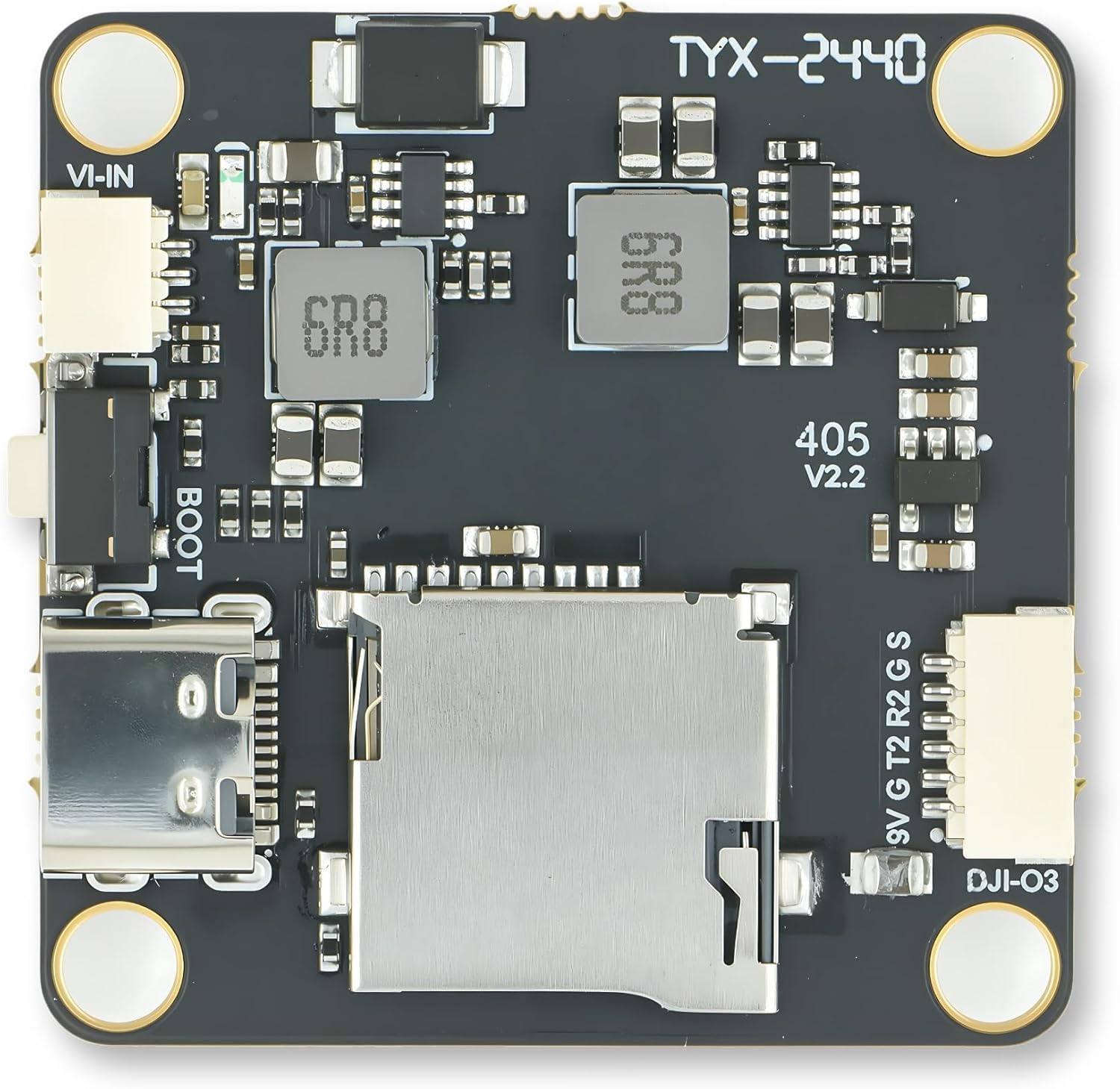
This image shows the bottom side of the flight controller, featuring the MicroSD card slot, USB Type-C port, boot button, and BECs.
Angled View

An angled perspective of the flight controller, providing a clearer view of its compact design and connector layout.
Dimensions

This diagram illustrates the physical dimensions of the AERO SELFIE F405 Flight Controller, measuring 36mm x 36mm x 8mm with 30.5mm x 30.5mm mounting holes.
Wiring Diagrams
Port Layout
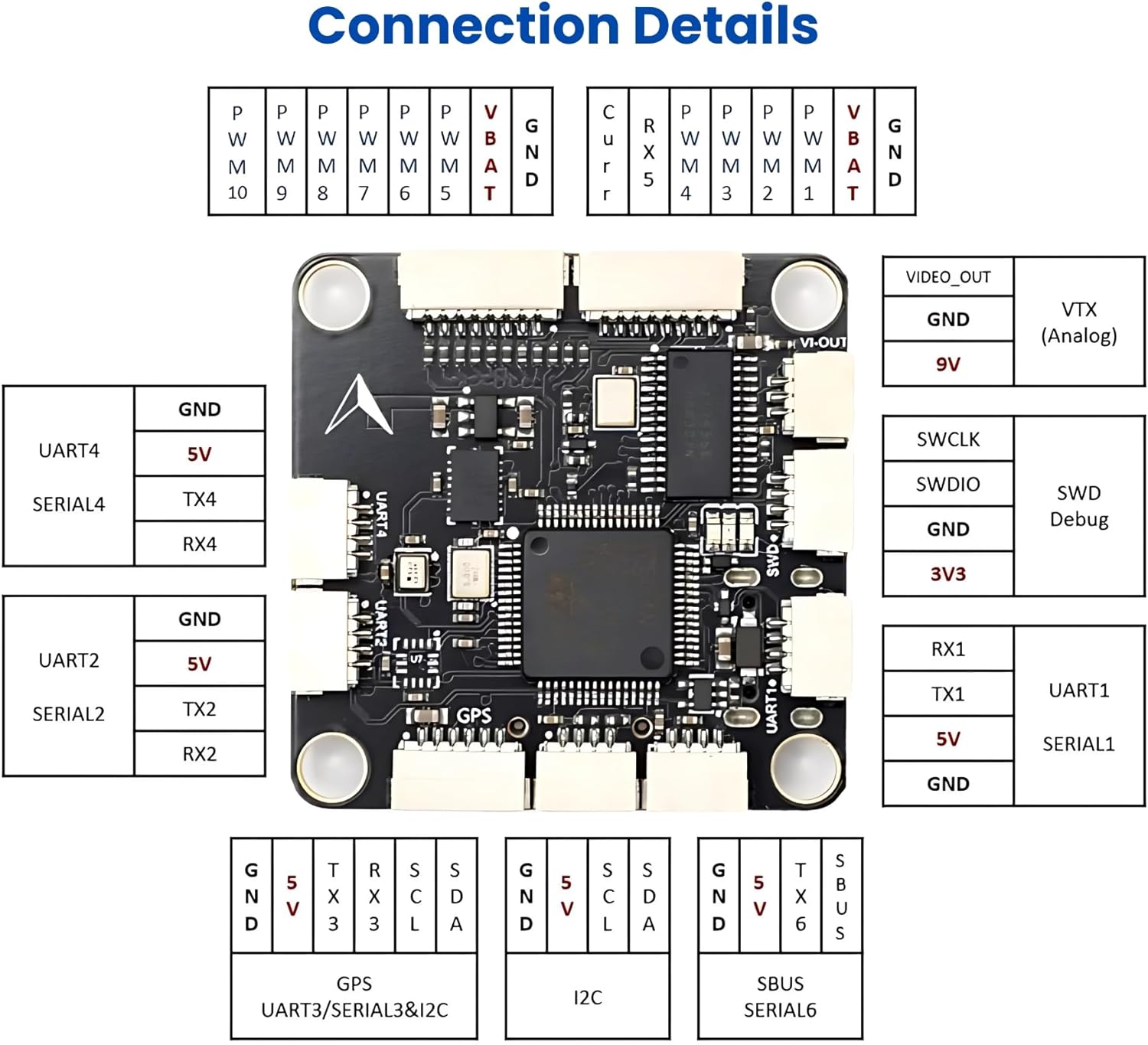
This diagram details the pinout and function of each port on the AERO SELFIE F405 Flight Controller, including UARTs, I2C, SBUS, and power outputs.
Typical Connection Diagram
A comprehensive wiring diagram showing how to connect the flight controller to an ESC, battery, GPS module, SBUS receiver, ELRS receiver, FPV analog camera, and image transmission module.
Ardupilot Setting Example

This image provides an example of Ardupilot settings for the flight controller, specifically for OSD_TYPE, SERIAL2_BAUD, and SERIAL2_PROTOCOL.
Firmware Flashing Guide
The AERO SELFIE F405 V2 Flight Controller supports multiple firmware platforms including ArduPilot, PX4, INAV, and Betaflight. This section provides general guidance on flashing these firmwares. Always ensure you download the correct firmware version for your specific flight controller model to avoid compatibility issues.
General Firmware Flashing Overview
This video provides a general overview of the firmware flashing process for MicoAir H743 series flight controllers, which shares similar steps with the F405. It covers installing DFU drivers, downloading firmware, and flashing using various tools like STM32CubeProgrammer, Mission Planner, QGroundControl, INAV Configurator, and Betaflight Configurator.
AERO SELFIE F405 Details
This video highlights the key features and specifications of the AERO SELFIE F405 Flight Controller, including its processor, sensors, connectivity options, and firmware compatibility.
Troubleshooting
Common Issues
- Flight Controller Not Detected: Ensure DFU drivers are correctly installed. Try a different USB port or cable. Verify the boot button is pressed during connection if required for DFU mode.
- Firmware Flashing Failure: Double-check that the downloaded firmware matches your specific flight controller model (e.g., F405 v2). Perform a full chip erase before flashing if using STM32CubeProgrammer. Ensure the correct bootloader is present for the chosen firmware (e.g., PX4 bootloader for PX4 firmware).
- No ESC Connection/Motor Beeps: Verify all wiring connections between the flight controller and ESC. Ensure the correct firmware is flashed and configured for your ESC type. Check for proper power cycling after flashing.
- Flight Controller LEDs Not Lighting Up: Confirm proper USB connection and power supply. If the board is new, it might be Dead On Arrival (DOA) and require replacement.
- Incorrect Sensor Readings/Flight Instability: Calibrate accelerometers and magnetometers in the respective configurator software (Betaflight, INAV, Mission Planner). Ensure the flight controller is mounted correctly and isolated from vibrations.
Solutions
- Driver Installation: Use Zadig for Windows DFU driver installation. Follow the steps in the "General Firmware Flashing Overview" video.
- Firmware Compatibility: Always download firmware from official sources (e.g., ArduPilot website, PX4 GitHub, MicoAir GitHub for Betaflight/INAV). Match the firmware version to your flight controller model. For ArduPilot, use files ending with "_with_bl.hex" for STM32CubeProgrammer flashing.
- Power Cycling: For ArduPilot, power cycle the flight controller twice after initial flashing to ensure proper detection by Mission Planner.
- Full Chip Erase: Always perform a full chip erase before flashing new firmware, especially when switching between different platforms (e.g., ArduPilot to Betaflight).
- External vs. Onboard Compass: When flashing INAV firmware, select the correct version that matches your drone's compass setup (onboard or external) to avoid conflicts.
Warranty and Support
This product is manufactured by Shenzhen Ruijie Innovation Technology Co.,Ltd. For warranty claims or technical support, please refer to the seller's return policy or contact AERO SELFIE directly through their official channels. Protection plans may be available for purchase separately.