
HUABAO A117
HUABAO A117 Bluetooth Karaoke Speaker User Manual
Model: A117
Introduction
Thank you for choosing the HUABAO A117 Bluetooth Karaoke Speaker. This portable PA system is designed to deliver high-quality audio with versatile connectivity and dynamic lighting effects. Please read this manual thoroughly before operating the device to ensure proper use and to maximize your experience.
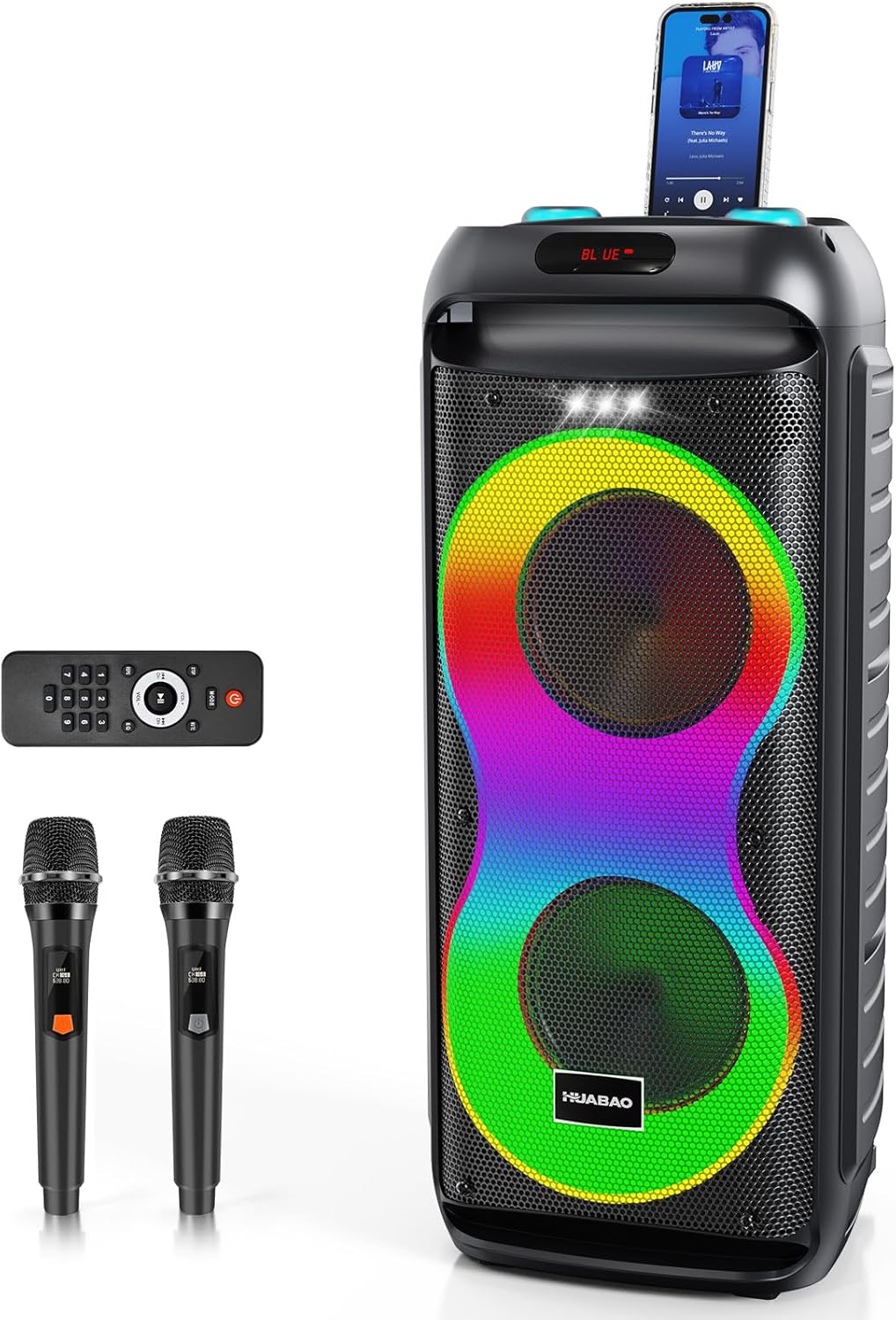
Image: The HUABAO A117 Bluetooth Karaoke Speaker, showcasing its main unit, two wireless microphones, and remote control. A smartphone is docked on top of the speaker.
Package Contents
Please check the package carefully to ensure all items are present and in good condition.
- 1 x HUABAO A117 Bluetooth Karaoke Speaker
- 2 x Wireless Microphones (rechargeable)
- 1 x Remote Control
- 1 x AUX Cable
- 1 x Type-C Charging Cable
- 1 x User Manual (this document)

Image: A visual representation of all items included in the HUABAO A117 package, laid out next to the speaker, with dimensions indicated for the speaker and microphones.
Product Overview
Speaker Components
The HUABAO A117 features a robust audio setup for clear and powerful sound.
- Dual 6.5-inch Woofers: For deep and resonant bass.
- High-Frequency Tweeter: For crisp and clear treble.
- 40W Output: Ensures high-definition audio performance.
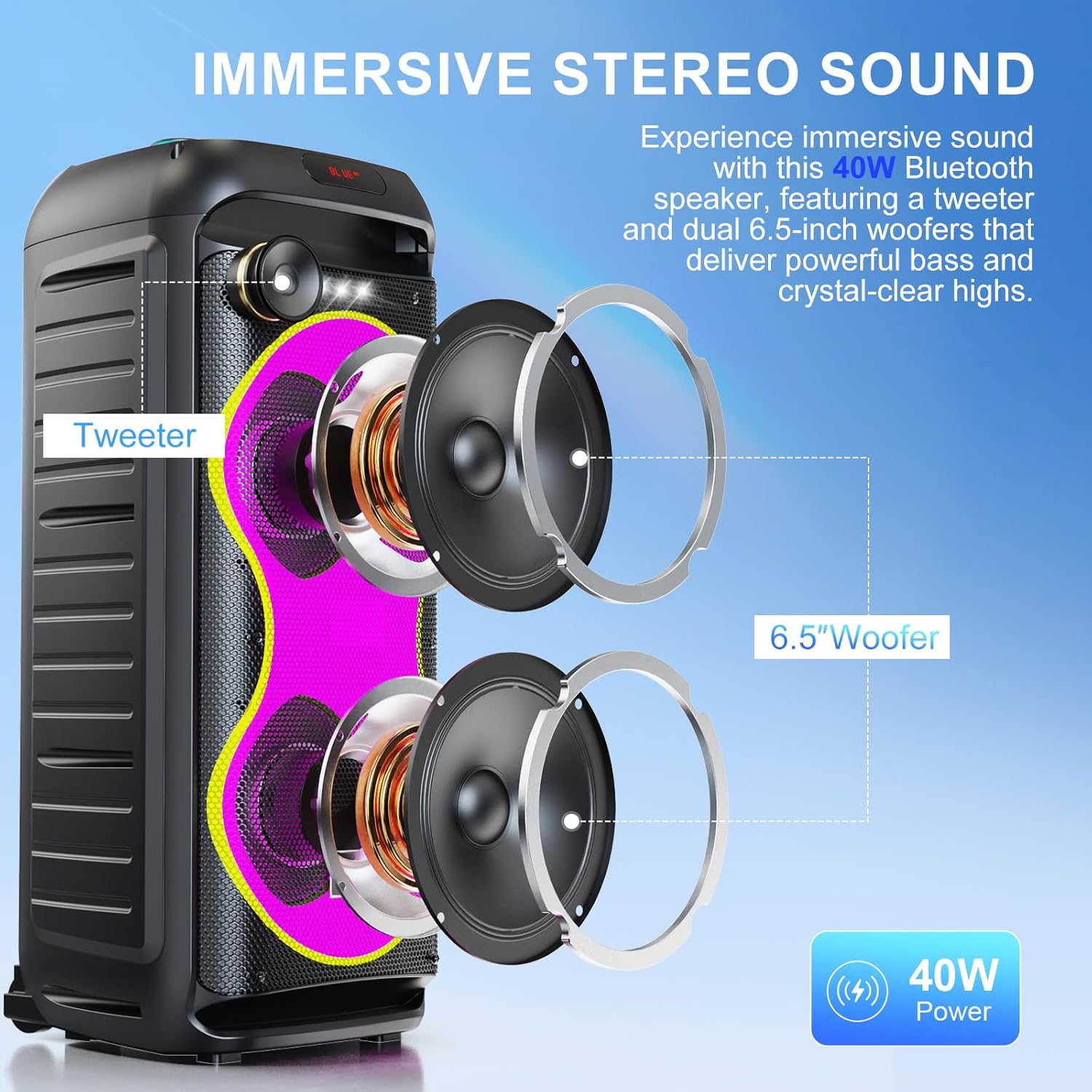
Image: An exploded view diagram of the speaker, highlighting the tweeter and two 6.5-inch woofers, illustrating the internal audio components.
Control Panel and Ports
The top panel provides access to all controls and input/output ports.

Image: A close-up view of the speaker's top control panel, showing the power switch, microphone inputs (MIC 1, MIC 2), AUX input, TF card slot, USB port, DC 9V IN charging port, and various control buttons for LED, Mode, Menu, and volume/mic volume knobs.
- ON/OFF Power Switch: To power the speaker on or off.
- MIC 1 / MIC 2 Inputs: 6.5mm jacks for wired microphones or instruments.
- AUX Input: 3.5mm jack for connecting external audio devices.
- TF Card Slot: For playing music directly from a TF (MicroSD) card.
- USB Port: For playing music directly from a USB drive or charging devices.
- DC 9V IN: Charging port for the speaker.
- LED Button: To cycle through LED light modes.
- MODE Button: To switch between input modes (Bluetooth, AUX, USB, TF Card).
- MENU Button: To access sound adjustment settings (treble, bass, mic echo).
- Volume Knobs: Separate controls for main volume and microphone volume.
- Playback Controls: Play/Pause, Previous Track, Next Track.
Setup
Charging the Speaker
Before first use, fully charge the speaker for optimal battery life. The speaker has a built-in 5400mAh rechargeable battery.
- Connect the provided Type-C charging cable to the DC 9V IN port on the speaker.
- Connect the other end of the charging cable to a suitable power adapter (not included) or USB power source.
- The charging indicator light will illuminate. Once fully charged, the light may change color or turn off, depending on the model.
- A full charge provides approximately 6-8 hours of continuous music playback.

Image: A group of people enjoying music on a beach with the HUABAO A117 speaker, emphasizing its long-lasting 5400mAh battery for extended outdoor use.
Microphone Setup
The package includes two rechargeable wireless microphones. Ensure they are charged before use.
- Wireless Microphones: Power on the microphones using their respective power buttons. They will automatically connect to the speaker.
- Wired Microphones/Instruments: If using wired microphones or instruments, connect them to the MIC 1 or MIC 2 6.5mm input jacks on the speaker's control panel.

Image: A detailed view of the MIC 1 and MIC 2 input jacks on the speaker, indicating where wired microphones or instruments can be connected.
Operating Instructions
Power On/Off
- To turn on the speaker, slide the ON/OFF switch to the "ON" position.
- To turn off the speaker, slide the ON/OFF switch to the "OFF" position.
Bluetooth Pairing
Connect your device wirelessly to the speaker.
- Turn on the speaker. It will automatically enter Bluetooth pairing mode, indicated by a flashing "BLUE" on the display.
- On your smartphone, tablet, or other Bluetooth-enabled device, go to the Bluetooth settings.
- Search for "HUABAO A117" (or similar name) in the list of available devices and select it to pair.
- Once paired, the speaker will emit a confirmation sound, and the "BLUE" indicator will stop flashing.

Image: A visual guide illustrating the multi-connectivity options of the HUABAO A117 speaker, including Bluetooth, TF card, USB, and AUX, compatible with phones, tablets, laptops, and smart TVs.
TWS (True Wireless Stereo) Pairing
For an immersive stereo experience, you can pair two HUABAO A117 speakers together.
- Ensure both speakers are turned on and in Bluetooth mode, but not yet paired with any device.
- On one of the speakers (this will be the primary speaker), long-press the "MODE" button until you hear a confirmation sound, indicating TWS pairing mode.
- The two speakers will automatically connect to each other. Once connected, a confirmation sound will be heard.
- Now, connect your Bluetooth device to the primary speaker as described in the "Bluetooth Pairing" section. Audio will play through both speakers in stereo.

Image: A graphic demonstrating the True Wireless Stereo (TWS) pairing function, showing two HUABAO A117 speakers wirelessly connected to each other via Bluetooth for a stereo sound experience.
USB/TF Card Playback
Play music directly from a USB drive or TF card.
- Insert a USB drive into the USB port or a TF card into the TF card slot.
- The speaker will automatically switch to USB or TF card mode and begin playing music. If not, press the "MODE" button to select the correct input.
- Use the playback controls (Play/Pause, Previous, Next) on the speaker or remote control to manage your music.
AUX Input
Connect external audio devices using the AUX cable.
- Connect one end of the provided AUX cable to the AUX input port on the speaker.
- Connect the other end to the audio output jack of your external device (e.g., MP3 player, laptop).
- Press the "MODE" button on the speaker until "AUX" is displayed.
- Control playback and volume from your connected device.
Microphone Usage
Use the included wireless microphones or connect wired ones for karaoke or public address.
- Ensure microphones are powered on and connected (wireless) or plugged in (wired).
- Adjust the microphone volume using the "MIC VOL" knob on the control panel.
- To adjust microphone echo, press the "MENU" button repeatedly until "ECHO" is displayed, then use the Previous/Next track buttons to increase or decrease the echo effect.
Sound Adjustments (Treble, Bass, Echo)
Customize your audio output.
- Press the "MENU" button to cycle through adjustable settings: "TRE" (Treble), "BAS" (Bass), "ECHO" (Microphone Echo).
- Once the desired setting is displayed, use the Previous (⏪) and Next (⏩) track buttons to adjust the level.
- The main volume can be adjusted using the "VOLUME" knob.
LED Light Modes
Enhance your audio experience with dynamic lighting.
- Press the "LED" button on the control panel or remote control to cycle through 7 different LED light modes.
- The speaker also features a top-mounted white strobe light for additional visual effects.
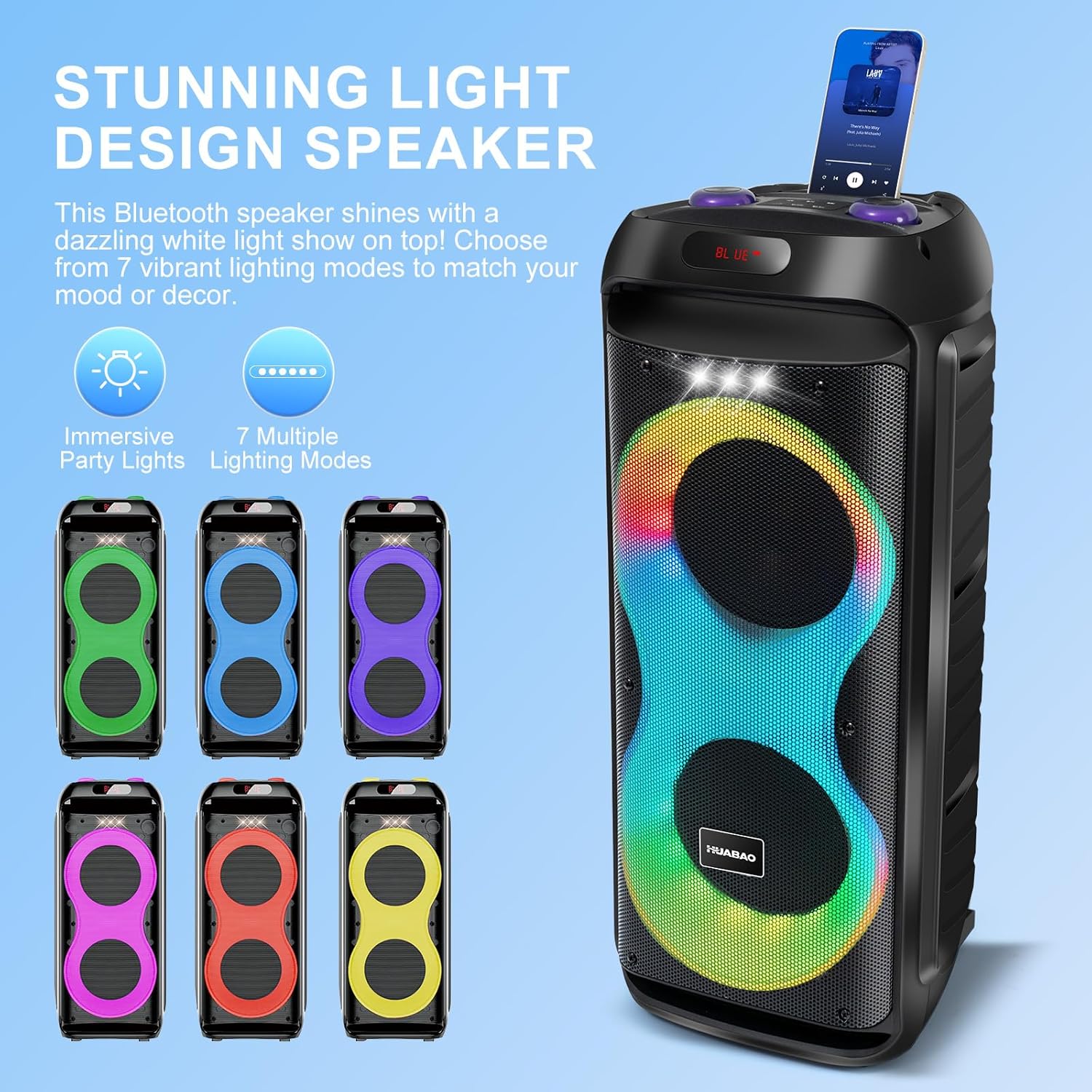
Image: The HUABAO A117 speaker showcasing its vibrant LED light display with multiple color patterns, illustrating the 7 available lighting modes.
Portability
The speaker is equipped with rolling wheels for easy transport.
- Utilize the integrated handle and smooth rolling wheels at the base to move the speaker effortlessly between locations.
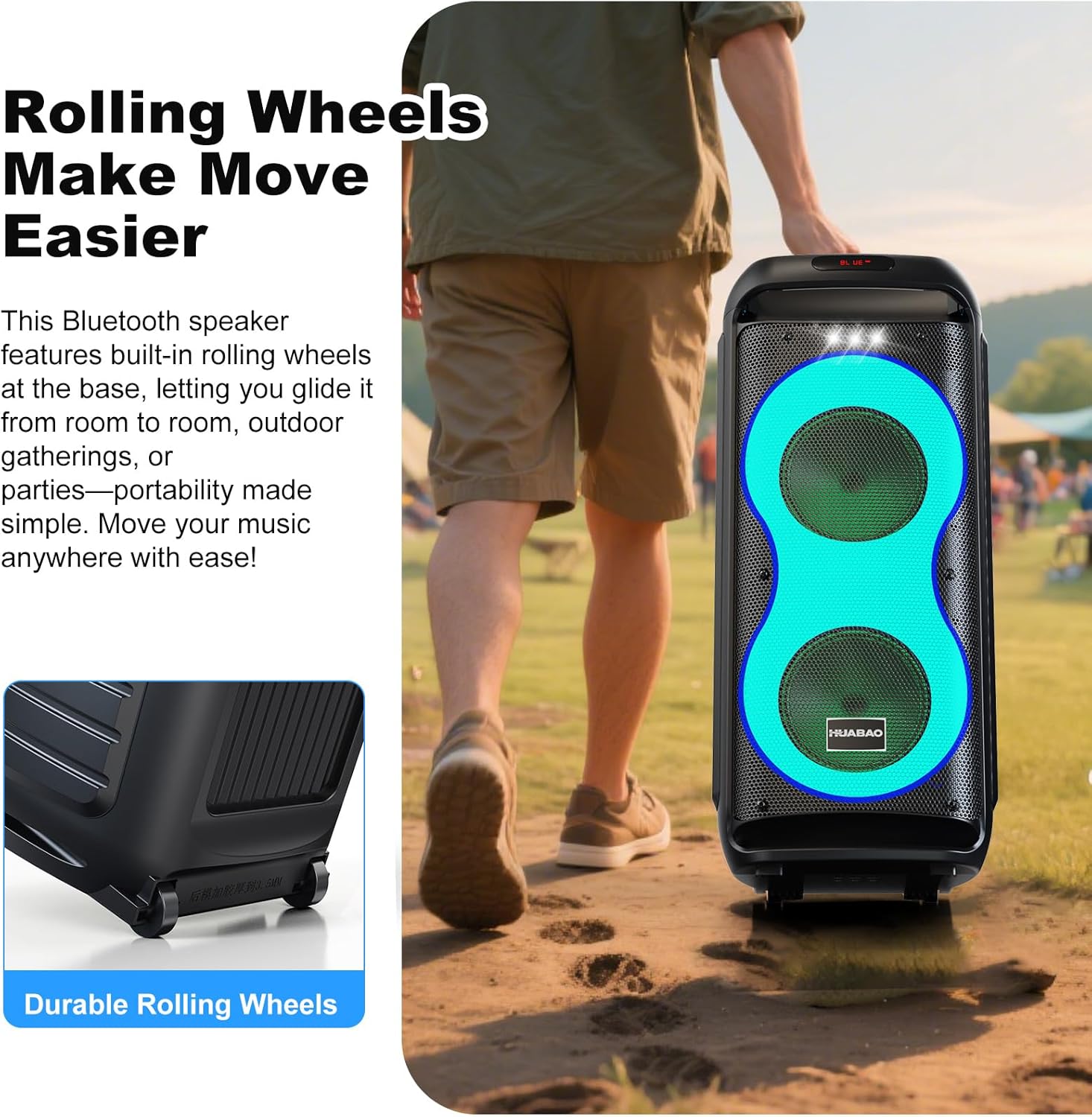
Image: A person pulling the HUABAO A117 speaker across an outdoor path, demonstrating the ease of transport provided by its durable rolling wheels.
Maintenance
- Cleaning: Use a soft, dry cloth to clean the speaker's exterior. Avoid using abrasive cleaners or solvents.
- Storage: Store the speaker in a cool, dry place away from direct sunlight and extreme temperatures when not in use.
- Battery Care: To prolong battery life, avoid fully discharging the battery frequently. Charge the speaker regularly, even if not in use for extended periods.
- Water Exposure: This speaker is not waterproof. Avoid exposing it to rain, splashes, or high humidity.
Troubleshooting
| Problem | Possible Cause | Solution |
|---|---|---|
| No power | Battery is depleted. | Charge the speaker using the provided Type-C charging cable. |
| No sound | Volume is too low or muted. Incorrect input mode selected. Device not paired (Bluetooth). | Increase the volume. Press the "MODE" button to select the correct input. Re-pair your Bluetooth device. |
| Bluetooth pairing failed | Speaker is already paired to another device. Device is too far. Bluetooth is off on your device. | Disconnect from other devices. Ensure speaker and device are within 10 meters. Turn on Bluetooth on your device. |
| Microphone not working | Microphone is off or uncharged. MIC VOL knob is too low. | Ensure microphones are powered on and charged. Increase the "MIC VOL" knob. |
| TWS pairing failed | Speakers are already connected to a device. Incorrect pairing procedure. | Ensure both speakers are in Bluetooth mode and not connected to any device before initiating TWS pairing. Follow TWS pairing steps carefully. |
Specifications
| Feature | Detail |
|---|---|
| Model Number | A117 |
| Brand | HUABAO |
| Output Power | 40W |
| Speaker Drivers | Dual 6.5-inch Woofers + 1 Tweeter |
| Connectivity | Bluetooth, AUX, USB, TF Card |
| Microphone Inputs | 2 x 6.5mm (for wired mics/instruments) |
| Wireless Microphones | 2 included, rechargeable |
| Battery Capacity | 5400mAh |
| Playtime | 6-8 hours (approx.) |
| LED Lights | 7 modes + strobe light |
| Portability | Rolling wheels, integrated handle |
| Product Dimensions (L x W x H) | 10.6 x 10.3 x 24.68 inches |
| Item Weight | 11.68 pounds |
Warranty and Support
HUABAO provides a 1-year warranty for this product, covering manufacturing defects from the date of purchase. Additionally, lifetime technical support is available.
If you encounter any issues or have questions regarding your HUABAO A117 speaker, please contact our customer support team for assistance. Refer to the product packaging or the official HUABAO website for contact information.
Ask a question about this manual
Ask about setup, troubleshooting, compatibility, parts, safety, or missing instructions. Manuals+ will review the question and use this page’s manual context to help answer it.