1. Introduction
Thank you for purchasing the COMHOMA Makeup Vanity Desk. This manual provides essential information for the safe assembly, operation, and maintenance of your new vanity desk. Please read these instructions carefully before use and retain them for future reference.
This vanity desk features a large mirror with adjustable LED lighting, ample storage with 5 drawers, and a convenient built-in charging station. It is designed to enhance your daily routine with functionality and style.

Image 1.1: Overview of the COMHOMA Makeup Vanity Desk in Pink.
This image displays the complete vanity desk setup, including the mirror with integrated lights, the desk with multiple drawers, and the accompanying stool. The desk is pink, showcasing its aesthetic design and functional components.
2. Safety Information
Please observe the following safety precautions to prevent injury or damage to the product:
- Ensure all parts are securely fastened before use. Loose connections can lead to instability.
- Do not overload drawers. Distribute weight evenly to maintain balance.
- Keep electrical components (charging station, mirror lights) away from water or excessive moisture.
- Use only the provided power cord and adapter. Do not use damaged cords or plugs.
- Unplug the vanity desk from the power outlet before cleaning or performing any maintenance.
- Keep small parts and packaging materials away from children to prevent choking hazards.
- Do not stand or sit on the vanity desk itself, other than the designated stool.
3. Package Contents
Before assembly, please verify that all components are present and undamaged. Refer to the detailed parts list included in your product packaging for exact quantities and identification. Typical components include:
- Vanity Desk Frame (various panels)
- Mirror with Integrated LED Lights
- 5 Drawers (various sizes)
- Vanity Stool
- Built-in Charging Station (pre-installed or separate unit)
- Assembly Hardware (screws, dowels, cam locks, etc.)
- Crystal-inspired Knobs for Drawers
- Power Adapter/Cord
- Assembly Instructions Manual
4. Setup and Assembly
Assembly of the COMHOMA Makeup Vanity Desk is designed to be straightforward. All parts and accessories are labeled to assist you. Please follow the step-by-step instructions provided in the separate assembly manual included in your product packaging.
Key Assembly Tips:
- Clear a spacious area for assembly.
- Identify all parts and hardware before beginning.
- Use appropriate tools as specified in the assembly manual.
- Do not overtighten screws to avoid damaging the wood.
- For the mirror installation, ensure the power cable is routed correctly and safely.
- The drawers are designed to be removable for convenience during assembly and cleaning.

Image 4.1: Dimensional diagram of the vanity desk and drawers.
This diagram provides detailed measurements for the vanity desk, including its overall height, width, and depth, as well as the dimensions of the mirror and individual drawers. This information is crucial for planning placement and understanding the product's scale.
5. Operating Instructions
5.1 LED Mirror Lighting
The vanity mirror features integrated LED lights with adjustable brightness and three color modes to suit your preference and lighting needs.
- Power On/Off: Locate the touch sensor on the mirror surface. Tap once to turn the lights on or off.
- Change Color Mode: With the lights on, tap the touch sensor repeatedly to cycle through the three color modes:
- Warm Yellow (2700K tungsten light simulation)
- Warm White
- Cool White (6500K daylight simulation)
- Adjust Brightness (Stepless Dimmable): To adjust brightness, press and hold the touch sensor. The brightness will gradually increase or decrease. Release when the desired brightness is achieved.
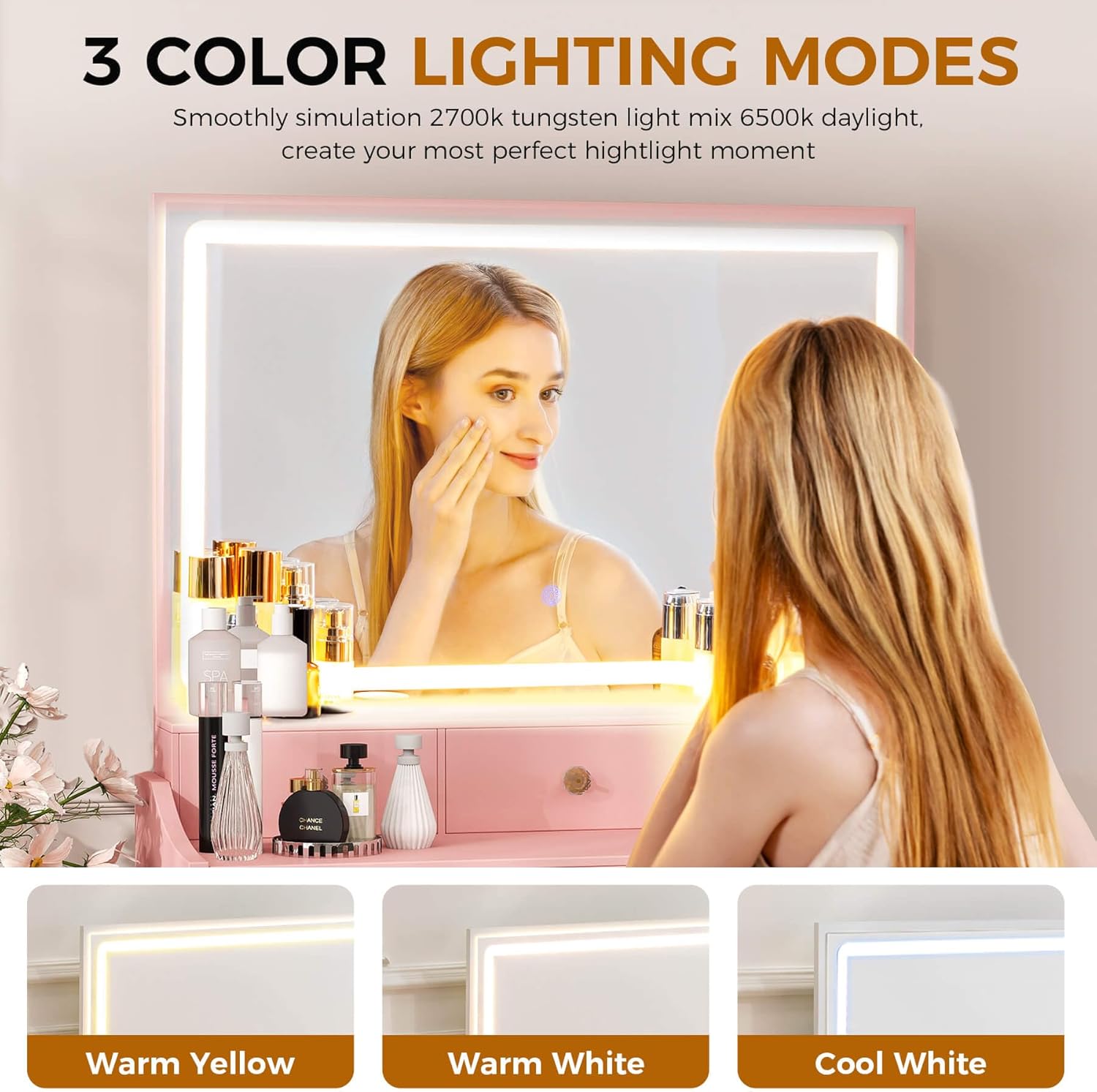
Image 5.1: Illustration of the three adjustable lighting modes.
This image demonstrates the three distinct color temperature options available for the LED mirror lights: Warm Yellow, Warm White, and Cool White. It shows how the lighting can be adjusted to create different ambiances or suit various makeup application needs.
5.2 Built-in Charging Station
The vanity desk is equipped with a built-in power strip for convenient charging of your electronic devices and powering beauty tools.
- AC Outlets: The charging station includes 2 standard 125V / 12A AC outlets. Plug in hair dryers, curling irons, or other small appliances.
- USB Ports: Two 5V / 2A USB ports are available for charging mobile phones, tablets, or other USB-powered devices.
- Ensure the vanity desk is plugged into a wall outlet for the charging station to function.
- Do not exceed the maximum power rating of the charging station.

Image 5.2: Close-up of the integrated charging station.
This image highlights the built-in power strip, showing its two standard AC outlets and two USB ports. It illustrates how the charging station provides convenient access to power for various electronic devices and beauty tools directly from the vanity desk.
5.3 Drawer Usage and Storage
The vanity desk features 5 drawers of varying sizes, providing ample storage for cosmetics, jewelry, and other personal items. The drawers are designed to be easily removable for cleaning or reorganization.
- Pull drawers out gently using the crystal-inspired knobs.
- To remove a drawer, pull it out fully and lift it slightly to disengage from the runners.
- To reinsert, align the drawer with the runners and push it in until it clicks into place.
- Utilize the different drawer sizes to organize items efficiently. The thickened top surface also provides space for decorative items.

Image 5.3: View of the vanity desk with drawers open, demonstrating storage capacity.
This image provides a clear view of the vanity desk's multiple drawers in an open position, showcasing their depth and capacity for organizing various cosmetic products, brushes, and personal accessories. It highlights the practical storage solutions offered by the design.
6. Maintenance
Proper care will ensure the longevity and appearance of your COMHOMA Makeup Vanity Desk.
- Cleaning the Surface: Wipe surfaces with a soft, damp cloth. Avoid abrasive cleaners or harsh chemicals that may damage the finish.
- Cleaning the Mirror: Use a glass cleaner and a lint-free cloth for the mirror. Spray cleaner onto the cloth, not directly onto the mirror, to prevent liquid from seeping into the electrical components.
- Drawer Maintenance: Periodically check drawer runners for smooth operation. If needed, a small amount of silicone spray can be applied to the runners.
- Electrical Components: Ensure the charging station and mirror lights are kept dry. Do not attempt to repair electrical components yourself.
- General Care: Avoid placing hot items directly on the surface. Use coasters or protective pads if necessary. Keep the vanity away from direct sunlight or extreme temperature changes to prevent warping or fading.
7. Troubleshooting
If you encounter issues with your vanity desk, please refer to the following common troubleshooting steps:
| Problem | Possible Cause | Solution |
|---|---|---|
| Mirror lights not turning on. |
|
|
| Charging station not working. |
|
|
| Drawers are stiff or difficult to open/close. |
|
|
| Knobs are loose. |
|
|
If the problem persists after trying these steps, please contact COMHOMA customer support.
8. Specifications
| Feature | Detail |
|---|---|
| Brand | COMHOMA |
| Model Number | B200 |
| Product Dimensions | 16"D x 31.5"W x 54.3"H (40.6cm D x 80cm W x 137.9cm H) |
| Item Weight | 57 pounds (25.85 kg) |
| Frame Material | Engineered Wood (MDF) |
| Color | Pink |
| Seat Material Type | Faux Leather (for stool) |
| Seat Height | 16 Inches (40.6 cm) |
| Mirror Lighting | LED, Stepless Dimmable, 3 Color Modes (Warm Yellow, Warm White, Cool White) |
| Charging Station | 2 x 125V/12A AC Outlets, 2 x 5V/2A USB Ports |
| Assembly Required | Yes |
9. Warranty and Support
COMHOMA is committed to providing high-quality products and customer satisfaction.
- Returns: This product is eligible for 30-day easy returns. Please refer to your purchase platform's return policy for detailed instructions.
- Customer Support: For any questions, concerns, or assistance with assembly or product functionality, please contact COMHOMA customer support. You can often find contact information on the brand's official store page or through your purchase platform.
- Online Resources: Visit the official COMHOMA store for additional product information and support: COMHOMA Store.