Introduction
Thank you for choosing the Magichome Universal Pop-Up Sink Stopper. This manual provides detailed instructions for the proper installation, operation, and maintenance of your new sink stopper. Please read this manual thoroughly before use to ensure optimal performance and longevity of the product.
This pop-up sink stopper is designed for bathroom sinks, lavabos, and bathtubs, featuring a universal fit for drain holes with an inner diameter of 34mm to 45mm. It includes an integrated anti-clogging strainer for convenience.
Product Features
- Universal Size: Compatible with drain holes having an inner diameter of 34mm to 45mm, suitable for various sink types.
- High-Quality Material: Constructed from durable copper and brass, ensuring robustness, rust resistance, and crack prevention.
- Integrated Strainer: Features an anti-clogging strainer to collect hair, jewelry, and other debris, preventing drain pipe blockages.
- Pop-Up Design: Allows for quick sealing and draining of water with a single press, offering more convenience than traditional strainers.
- Easy Installation & Cleaning: Can be installed by hand without tools. All components are removable for easy cleaning.
Setup and Installation
Before installation, please measure the inner diameter of your sink's drain hole to ensure it falls within the 34mm to 45mm range. No special tools are required for installation.
- Prepare the Drain: Ensure the existing drain area is clean and free from debris. Remove any old stopper or strainer.
- Insert the Stopper: Place the Magichome Pop-Up Sink Stopper directly into the drain hole. Ensure it sits flush with the sink surface.
- Secure (if applicable): The stopper is designed for a snug fit. Gently press down to ensure it is seated correctly. The included rubber gaskets will create a seal.
- Test for Leaks: Fill the sink with water and press the stopper down to seal. Observe for any leaks around the stopper. If leaks occur, adjust the stopper's position or check the gaskets.
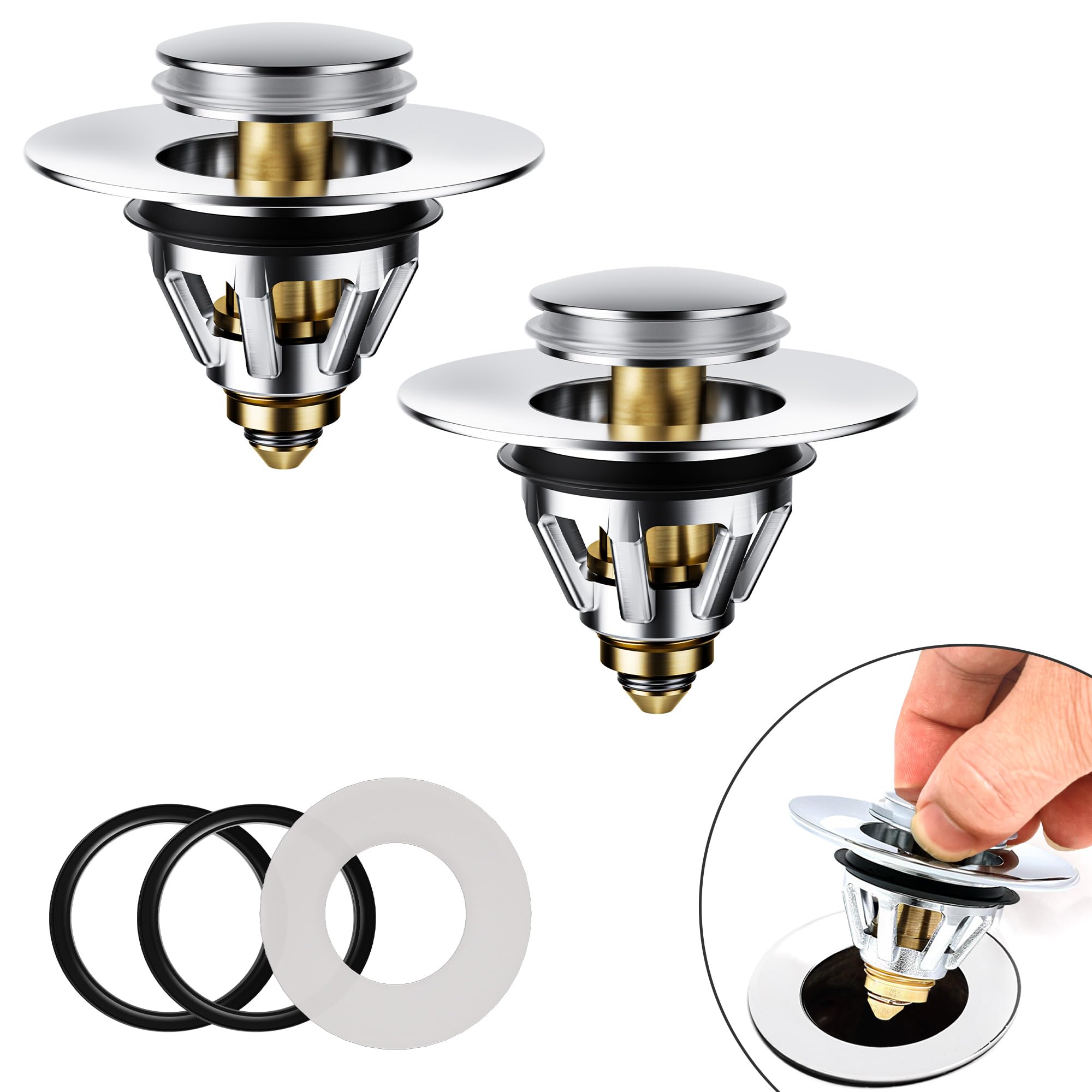
Image: Illustration of the Magichome Pop-Up Sink Stopper components and a simplified installation diagram.
Operating Instructions
The Magichome Pop-Up Sink Stopper features a simple push-button mechanism for controlling water flow.
- To Seal the Drain (Hold Water): Gently press down on the top cap of the stopper until it clicks into the closed position. This will seal the drain, allowing water to accumulate in the sink.
- To Drain Water: Press the top cap of the stopper again. It will pop up, opening the drain and allowing water to flow through.
Image: The Magichome Pop-Up Sink Stopper demonstrating its open and closed positions for water control.
Maintenance
Regular cleaning will ensure the efficient operation and hygiene of your sink stopper.
- Remove for Cleaning: The entire stopper assembly can be easily removed from the drain hole by simply pulling it out.
- Clean the Strainer: The integrated anti-clogging strainer can be detached from the main body. Remove any accumulated hair, debris, or residue from the strainer.
- Wash Components: Wash all components (stopper body, strainer, gaskets) with warm soapy water. Use a soft brush if necessary to remove stubborn grime.
- Rinse and Reassemble: Rinse all parts thoroughly with clean water. Ensure they are dry before reassembling and placing back into the drain.
- Frequency: It is recommended to clean the stopper and strainer at least once a month, or more frequently depending on usage.
Image: The Magichome Pop-Up Sink Stopper disassembled, highlighting the removable anti-clogging strainer for easy cleaning.
Troubleshooting
If you encounter issues with your Magichome Pop-Up Sink Stopper, refer to the following common problems and solutions:
| Problem | Possible Cause | Solution |
|---|---|---|
| Stopper does not seal properly / Leaks |
|
|
| Slow draining |
|
|
| Pop-up mechanism is stiff or stuck |
|
|
Specifications
| Brand | Magichome |
| Model Number | M-P10 |
| Material | Bronze, Plastic |
| Color | Silver |
| Item Weight | 220 grams |
| Package Dimensions | 14.8 x 7.7 x 4.8 cm |
| Universal Fit Diameter | 34mm to 45mm (inner drain hole) |
| UPC | 721295506083 |
Warranty and Support
Magichome products are manufactured to high-quality standards. While specific warranty details are not provided in this manual, standard consumer rights and return policies apply. For most purchases, a 30-day return/replacement policy is typically available through the retailer.
For product support, technical assistance, or inquiries regarding replacement parts, please contact your point of purchase or refer to the Magichome official website for customer service contact information.
Please retain your purchase receipt as proof of purchase for any warranty or support claims.


