
Introduction
This manual provides detailed instructions for the VINABTY Voice Remote Control, designed as a direct replacement for various OK. QLED TV models. This remote control features voice search capabilities, an ergonomic design, and durable construction for reliable performance. Please read this manual carefully to ensure proper setup and operation.
Setup
1. Battery Installation
The remote control requires two AAA batteries (not included). Follow these steps to install them:
- Open the battery compartment cover located on the back of the remote control.
- Insert two AAA batteries, ensuring the positive (+) and negative (-) terminals match the diagrams inside the compartment.
- Close the battery compartment cover securely.

Image: Rear view of the remote control with the battery cover removed, illustrating the correct placement for two AAA batteries.
2. Pairing with Your TV
This remote control is designed for easy use and typically requires no programming. However, for voice search functionality, it must be paired with your TV. Refer to your TV's user manual for specific pairing instructions for a new remote control. Generally, this involves:
- Ensure your TV is powered on.
- Navigate to the TV's settings menu, usually under 'Remotes & Accessories' or 'Bluetooth Settings'.
- Select 'Add new device' or 'Pair remote control'.
- Follow the on-screen prompts to complete the pairing process. This may involve holding down specific buttons on the remote.

Image: The VINABTY remote control positioned beside a television, highlighting its ready-to-use nature and material quality.
Operating Instructions
The VINABTY Voice Remote Control offers intuitive control over your OK. QLED TV. Below are the primary functions:
- Power Button (⏻): Turns the TV on or off.
- Number Buttons (0-9): Directly select TV channels.
- Navigation Pad (Up, Down, Left, Right, OK): Navigate through menus and confirm selections.
- Volume Up/Down (+/-): Adjust the TV volume.
- Channel Up/Down (P^/P˅): Change TV channels.
- Mute Button (🔇): Mute or unmute the TV audio.
- Back Button (←): Return to the previous screen or menu.
- Home Button (🏠): Access the TV's home screen or smart hub.
- Voice Control Button (🎤): Press and hold to activate voice search or commands (requires successful pairing).
- Quick Access Buttons: Dedicated buttons for popular streaming services like Netflix, YouTube, Prime Video, and Google Play for direct access. A USB button is also included for media playback.
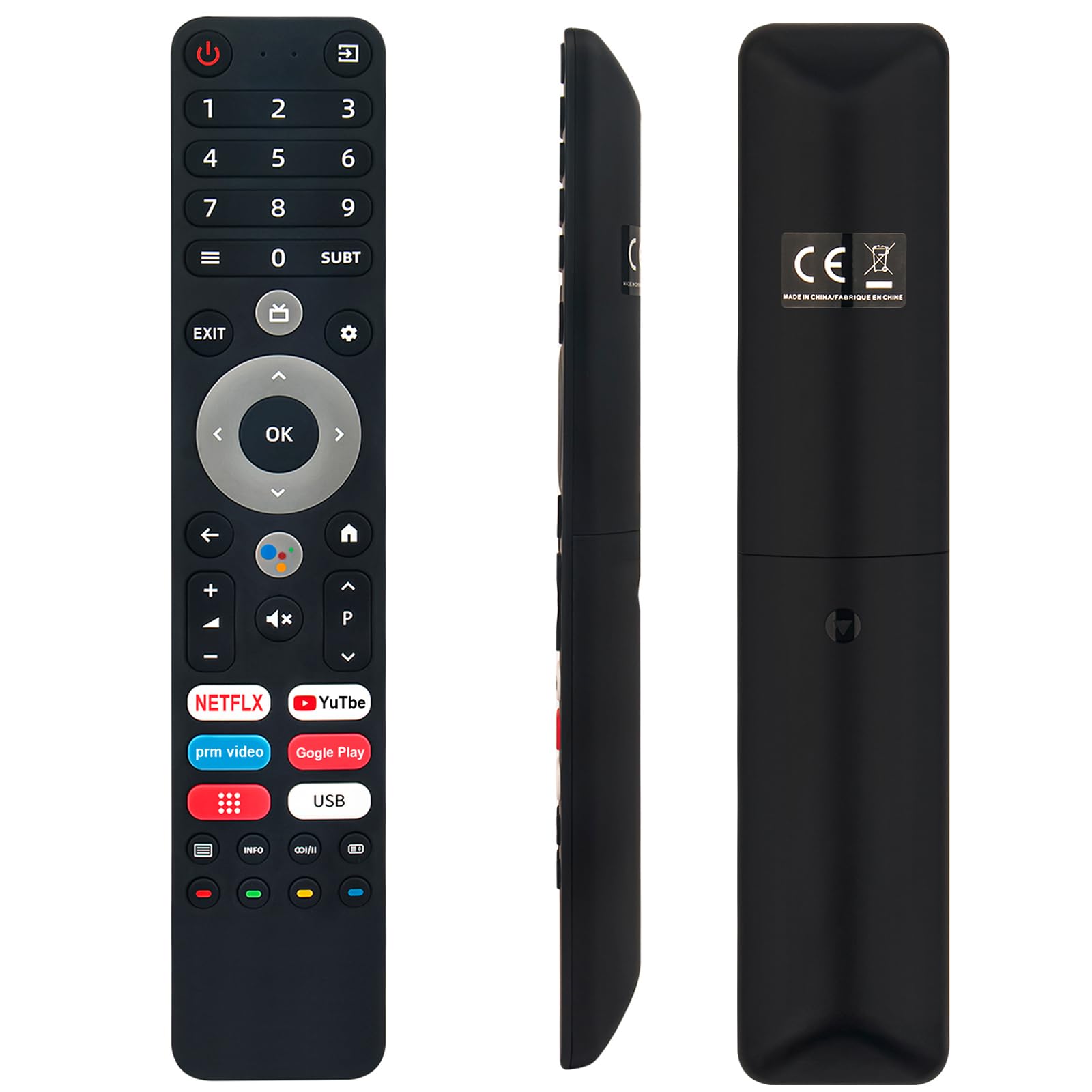
Image: The remote control with a visual emphasis on the voice command button, indicating its functionality.
Maintenance
To ensure the longevity and optimal performance of your VINABTY Voice Remote Control, follow these maintenance guidelines:
- Cleaning: Use a soft, dry cloth to clean the remote control. Avoid using liquid cleaners, aerosols, or harsh chemicals, as these can damage the surface or internal components.
- Battery Replacement: Replace batteries when the remote's response becomes sluggish or it stops functioning. Always replace both batteries at the same time with new ones of the same type (AAA).
- Storage: Store the remote control in a cool, dry place away from direct sunlight, extreme temperatures, and high humidity. If the remote will not be used for an extended period, remove the batteries to prevent leakage.
- Handling: Avoid dropping the remote control or subjecting it to strong impacts, as this can damage internal circuitry.
Troubleshooting
If you encounter issues with your VINABTY Voice Remote Control, try the following solutions:
- Remote Not Responding:
- Check if the batteries are correctly installed and not depleted. Replace them if necessary.
- Ensure there are no obstructions between the remote control and the TV's infrared receiver.
- Confirm the remote is pointed directly at the TV.
- Voice Control Not Working:
- Verify that the remote control is successfully paired with your TV. Refer to the 'Pairing with Your TV' section or your TV's manual.
- Ensure your TV's internet connection is stable, as voice commands often rely on online services.
- Buttons Not Working:
- Clean the remote control, especially around the buttons, to remove any dirt or debris that might be causing sticking.
If these steps do not resolve the issue, please contact customer support for further assistance.
Specifications
| Feature | Detail |
|---|---|
| Brand | VINABTY |
| Compatible Models | OK. QLED TV OTV 55AU-5023C, OTV43AU-5023C, OTV50AU-5023C, OTV 43AU-5023C, OTV 50AU-5023C |
| Connectivity Technology | Infrared |
| Maximum Range | 10 Meters |
| Battery Type | 2 x AAA (not included) |
| Material | ABS (body), Soft Rubber (buttons) |
| Color | Black |
| Dimensions (L x W x H) | 18 cm x 3 cm x 1.5 cm (approx. 7.09 x 1.18 x 0.59 inches) |
| Weight | 60 Grams |
| Special Features | Voice Control, No Programming Required, Ergonomic Design |

Image: The remote control displayed with its precise length and width measurements.
Support
For any questions regarding the VINABTY Voice Remote Control, or if you are unsure about its compatibility with your specific TV model, please contact our customer support team. We are committed to providing assistance and ensuring your satisfaction.
If you received a remote control that does not function as expected, or if you require further technical support, please reach out to us via email. We will respond promptly to address your concerns.