
THERUN XBD400
THERUN Walking Pad Treadmill User Manual
Model: XBD400
1. Introduction
Thank you for choosing the THERUN Walking Pad Treadmill. This manual provides essential information for the safe and effective operation, maintenance, and troubleshooting of your new fitness equipment. Please read this manual thoroughly before initial use and keep it for future reference.
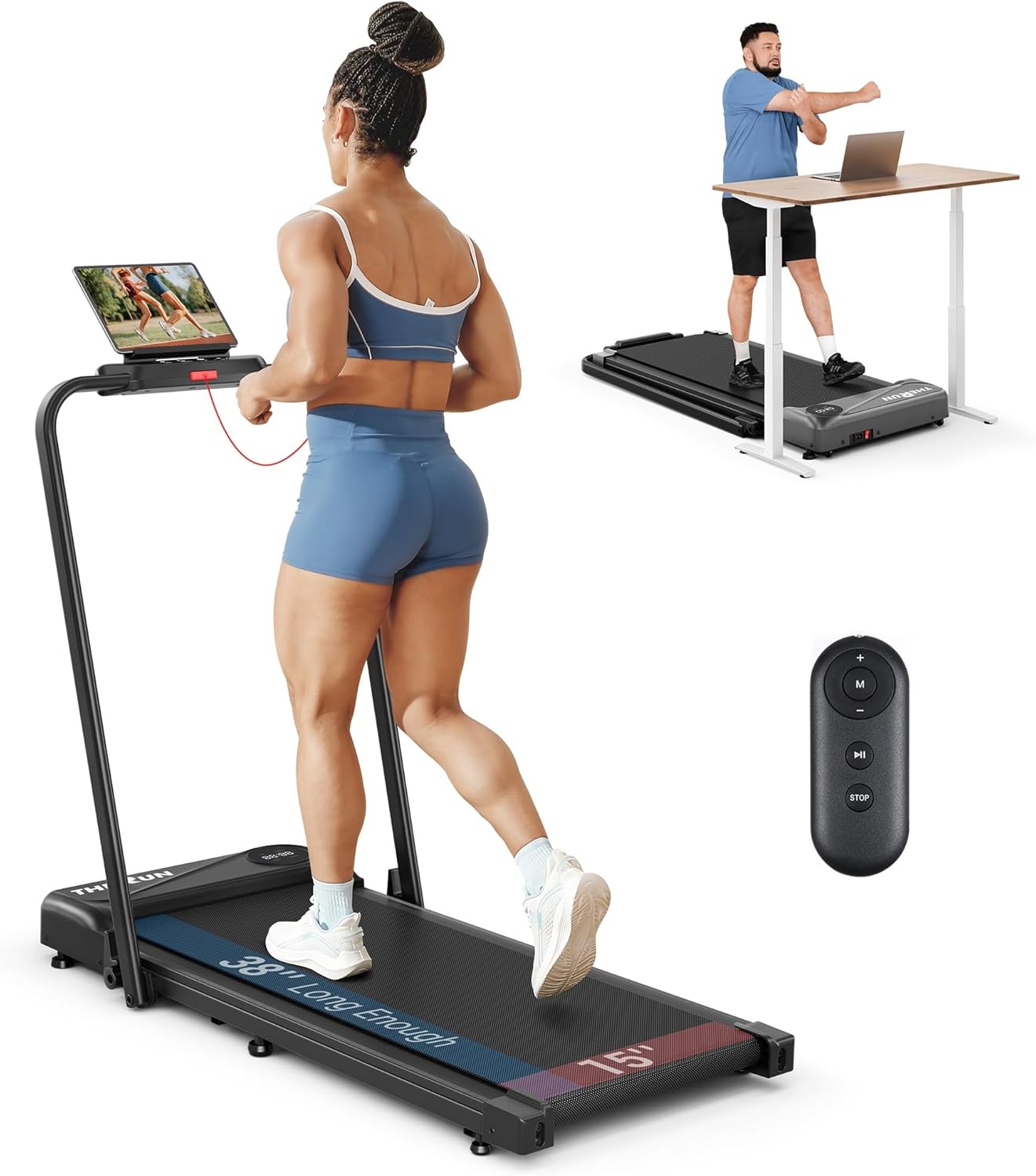
Image: The THERUN Walking Pad Treadmill showcasing its versatile 2-in-1 design, functioning as both a traditional treadmill with a handle and a compact walking pad for under-desk use.
2. Important Safety Information
To ensure your safety and prolong the life of your treadmill, please adhere to the following guidelines:
- Always ensure the red safety lock is secured before operating the treadmill. An E07 error code indicates the safety lock is not engaged.
- Keep children and pets away from the treadmill during operation.
- Place the treadmill on a flat, stable surface.
- Wear appropriate athletic footwear.
- Do not use the treadmill if you feel dizzy, faint, or experience any pain.
- Unplug the treadmill from the power outlet when not in use or before cleaning/maintenance.
- Maximum weight recommendation: 300 Pounds.
3. Package Contents
Upon unboxing, please verify that all components are present:
- THERUN Walking Pad Treadmill Unit
- Remote Control
- Safety Lock Key
- Power Cord
- User Manual (this document)
- Allen Wrench (for adjustments)
- Silicone Oil (for lubrication)

Image: The treadmill's box with its contents laid out, including the remote control, fitness guide, and unpacking instructions, indicating ease of setup.
4. Setup and Assembly
The THERUN Walking Pad Treadmill arrives fully assembled. Follow these steps for initial setup:
- Unpack: Carefully remove the treadmill from its packaging.
- Position: Place the treadmill on a level surface.
- Handlebar Setup (Optional for Treadmill Mode):
- Push the quick-release key and raise the armrest to the desired position.
- Fasten the quick-release wrench to secure the handlebar.
- Secure the red safety lock to the designated slot on the handlebar. This is crucial to prevent an E07 error code and enable operation in treadmill mode.
- Power Connection: Plug the power cord into a grounded electrical outlet.
- Power On: Locate the main power switch (usually at the front base) and turn it on.

Image: Step-by-step visual guide for setting up the handlebar, including pushing the quick-release key, fastening the wrench, and securing the red safety lock.
5. Operating Instructions
Your THERUN treadmill offers two primary modes: Walking Pad Mode and Treadmill Mode.
5.1 Control Methods
The treadmill can be controlled via the LED touch screen on the handlebar (if raised) or the included remote control.

Image: Illustration of the two control methods: the integrated LED touch screen on the handlebar and the handheld remote control.
5.2 Walking Pad Mode (Handlebar Folded)
- Ensure the handlebar is folded down.
- Speeds range from 0.6 to 3.8 mph.
- Use the remote control to start, stop, and adjust speed.
5.3 Treadmill Mode (Handlebar Raised)
- Ensure the handlebar is raised and the red safety lock is secured.
- Speeds range from 0.6 to a maximum of 6.2 mph.
- Control speed and start/stop using either the LED touch screen or the remote control.
5.4 Display Metrics
The LED display on the running board shows real-time workout data:
- Speed: Current speed in miles per hour (mph).
- Distance: Total distance covered.
- Time: Duration of your workout.
- Calories: Estimated calories burned.

Image: The treadmill's LED display, clearly showing workout metrics such as distance, speed, time, and calories burned.
5.5 Official Product Video: Operation Overview
Video: Official THERUN video demonstrating the 2-in-1 functionality and various operating modes of the walking pad treadmill.
6. Maintenance
Regular maintenance ensures optimal performance and longevity of your treadmill:
- Cleaning: Wipe down the treadmill with a damp cloth after each use. Avoid abrasive cleaners.
- Lubrication: Lubricate the running belt every few months with the provided silicone oil. Lift the belt manually and apply drops as close to the center as possible.
- Belt Adjustment: If the running belt becomes off-center, refer to the user manual for instructions on how to adjust it using the Allen wrench.
7. Troubleshooting
Common issues and their solutions:
| Problem | Possible Cause | Solution |
|---|---|---|
| Treadmill not starting / E07 error code | Safety lock not secured. | Ensure the red safety lock is firmly placed in its designated slot on the handlebar. |
| Treadmill randomly stopping / E02 error code | Motor issue or extended intense workout at high speeds. | Reduce workout intensity. If the issue persists, contact customer support. |
| Running belt off-center | Normal wear and tear, belt needs adjustment. | Use the provided Allen wrench to adjust the belt according to the detailed instructions in the full user manual. |
8. Specifications
- Brand: THERUN
- Model Name: THERUN 2.5HP Treadmill (XBD400)
- Color: Carbon Black
- Product Dimensions: 39"D x 22.8"W x 49"H
- Item Weight: 43.43 Pounds
- Material: Alloy Steel
- Maximum Speed: 6.2 Miles per Hour
- Special Feature: Portable, Foldable
- Maximum Horsepower: 2.5 Horsepower
- Power Source: Corded Electric
- Metrics Measured: Speed, Distance, Time, Calories Burned
- Maximum Weight Recommendation: 300 Pounds
- UPC: 840325633350
9. Warranty and Support
The THERUN Walking Pad Treadmill comes with a 1-year warranty. For any product support, inquiries, or to purchase extra accessories/damaged parts, please refer to the contact information provided in your included user manual or visit the official THERUN website.

Image: Information on THERUN's after-sales service, including availability of a treadmill mat, fitness guide, and extra parts.
Ask a question about this manual
Ask about setup, troubleshooting, compatibility, parts, safety, or missing instructions. Manuals+ will review the question and use this page’s manual context to help answer it.