
A'Gold FN-BT2
User Manual: A'Gold FN-BT2 Wireless Bluetooth Earphones
Model: FN-BT2 | Brand: A'Gold
Introduction
Thank you for choosing the A'Gold FN-BT2 Wireless Bluetooth Earphones. These earphones are designed to provide a high-quality audio experience with the convenience of wireless connectivity. Featuring Bluetooth 5.3, stereo sound, and noise-cancelling technology, they are perfect for music listening on the go. This manual will guide you through the setup, operation, maintenance, and troubleshooting of your new earphones.
The product is certified by ANATEL, ensuring safety and originality.
Package Contents
- A'Gold FN-BT2 Wireless Bluetooth Earphones (Left and Right)
- Charging Case
- Protective Case (Black)
- User Manual (this document)
- Charging Cable

Image: Front view of the A'Gold FN-BT2 earphone retail box, showing the white earphones inside their charging case, along with product features like 4 hours battery life and Bluetooth V5.3.
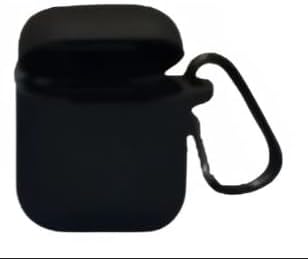
Image: A black protective silicone case with a carabiner clip, designed to fit the A'Gold FN-BT2 earphone charging case, shown with its lid open.
Setup
1. Initial Charging
Before first use, ensure both the earphones and the charging case are fully charged. Place the earphones into the charging case. Connect the charging case to a power source using the provided charging cable. The charging case takes approximately 1 hour for a full charge (can be faster with a 20W charger).
The charging case provides over 4 full charges for the earphones, and its battery can last up to 3 days on a single charge.
2. Pairing with a Bluetooth Device
- Ensure the earphones are in the charging case and the case lid is open.
- On your mobile phone or other Bluetooth-enabled device, go to the Bluetooth settings.
- Enable Bluetooth.
- Search for available devices. You should see "FN-BT2" or "A Gold FN-BT2" in the list.
- Select "FN-BT2" to connect. Once connected, you will hear an audible confirmation, and the device will show "Connected".
- The earphones will automatically reconnect to the last paired device when taken out of the case, if Bluetooth is enabled on the device.
Operating Instructions
Basic Functions (Touch Control)
The A'Gold FN-BT2 earphones feature touch controls for easy operation. The specific touch areas are located on the outer surface of each earbud.
| Action | Function |
|---|---|
| Single Tap (Left/Right Earbud) | Play/Pause Music, Answer/End Call |
| Double Tap (Right Earbud) | Next Track |
| Double Tap (Left Earbud) | Previous Track |
| Triple Tap (Left/Right Earbud) | Activate Voice Assistant (Siri, Google Assistant, etc.) |
| Long Press (Left/Right Earbud) | Reject Call |
Note: Specific touch functionalities may vary slightly depending on your connected device and operating system.
Wearing the Earphones
Gently insert each earbud into your ear canal. Adjust for a comfortable and secure fit. The earphones are designed for intra-auricular placement.
Maintenance
Cleaning
- Regularly clean the earphones and charging case with a soft, dry, lint-free cloth.
- Do not use abrasive cleaners, alcohol, or chemical solvents.
- Ensure charging contacts on both earphones and case are clean and free of debris.
Storage
When not in use, store the earphones in their charging case to protect them and keep them charged. Store in a cool, dry place away from direct sunlight and extreme temperatures.
Water Resistance
The earphones are water-resistant. However, they are not waterproof. Avoid submerging them in water or exposing them to heavy rain. Dry them thoroughly if they get wet before placing them back in the charging case.
Troubleshooting
| Problem | Possible Cause | Solution |
|---|---|---|
| Earphones not pairing | Bluetooth off on device, earphones not in pairing mode, interference. | Ensure Bluetooth is on. Place earphones in case, close and open lid to re-enter pairing mode. Move closer to device. Forget device on phone and re-pair. |
| No sound from one earbud | Low battery, earbud not properly seated in case, connection issue. | Ensure both earbuds are charged. Clean charging contacts. Try re-pairing both earbuds. |
| Charging case not charging | Faulty cable, power source issue, dirty charging port. | Try a different charging cable and power adapter. Clean the charging port on the case. |
| Poor sound quality / Disconnections | Distance from device, interference, low battery. | Move closer to your device. Avoid strong electromagnetic interference. Ensure earphones are fully charged. |
Specifications
- Model Name: FN-BT2
- Bluetooth Version: 5.3
- Connectivity Technology: Wireless (Bluetooth)
- Earphone Type: In-Ear (Intra-auricular)
- Noise Control: Active Noise Cancellation (ANC)
- Frequency Response: 20 Hz
- Sensitivity: 98.0 dB
- Impedance: 32 Ohm
- Control Type: Touch Screen
- Material: Plastic
- Color: White
- Earphone Battery Life: Up to 4 hours (continuous playback)
- Charging Case Battery Life: Approximately 3 days (standby/multiple charges)
- Charging Time (Case): Approximately 1 hour
- Water Resistance Level: Water Resistant
- Product Weight: 150 Grams
- ANATEL Certification: 14933-22-15069
Warranty and Support
This product comes with a manufacturer's warranty of 30 days from the date of purchase. Please retain your proof of purchase for warranty claims.
For technical support, warranty inquiries, or further assistance, please contact your retailer or the manufacturer's customer service. Refer to the product packaging for contact details.
For more information, you may visit the product page on Amazon: Amazon Product Page
Related Documents - FN-BT2
 |
Master & Dynamic MW08 Sport User Manual: Active Noise-Cancelling True Wireless Earphones Comprehensive user manual for the Master & Dynamic MW08 Sport true wireless earphones. Learn about controls, fit, charging, pairing, world volume modes, maintenance, troubleshooting, and warranty. |
 |
TOZO T6S Noise Cancelling True Wireless Earphones User Manual Comprehensive user manual for the TOZO T6S noise-cancelling true wireless Bluetooth earphones, covering setup, usage, app features, specifications, and troubleshooting. |
 |
Tiklands BX30 Wireless Earbuds User Guide and Manual Official user guide for the Tiklands BX30 wireless Bluetooth earbuds. Learn how to connect, operate, reset, troubleshoot, and find safety information. Includes warranty activation details. |
 |
Nakamichi TW018ENC+ Environmental Noise Cancelling True Wireless Earphones Quick Start Guide Get started quickly with the Nakamichi TW018ENC+ true wireless earphones. This guide covers features, pairing, controls, charging, specifications, and safety information for your noise-cancelling earbuds. |
 |
Urbanista Santiago Active Noise Cancelling Earphones User Manual Get started with your Urbanista Santiago Active Noise Cancelling Earphones. This user manual provides setup instructions, touch controls, charging information, and troubleshooting tips for optimal use. |
 |
Sundmars Sports Wireless Earphones User Manual - Pairing, Controls, and Charging User manual for Sundmars Sports Wireless Earphones (Speed FL1). Covers pairing, multifunction button controls, volume adjustments, charging, and proper disposal. |
Ask a question about this manual
Ask about setup, troubleshooting, compatibility, parts, safety, or missing instructions. Manuals+ will review the question and use this page’s manual context to help answer it.