
IDEALHOUSE ZCU0524tH5g
IDEALHOUSE Electric Power Lift Recliner Chair User Manual
Model: ZCU0524tH5g
Brand: IDEALHOUSE
Introduction
Thank you for choosing the IDEALHOUSE Electric Power Lift Recliner Chair. This manual provides essential information for the safe and efficient use, assembly, operation, and maintenance of your new recliner. Please read this manual thoroughly before use and retain it for future reference.

Image: The IDEALHOUSE Electric Power Lift Recliner Chair, brown, with side pockets and cup holders, positioned in a comfortable living room environment.
Safety Information
To ensure your safety and prolong the life of your recliner, please adhere to the following guidelines:
- Weight Limit: Do not exceed the maximum weight capacity of 300 lbs (approximately 136 kg). Exceeding this limit can cause damage to the chair and potential injury.
- Assembly: Ensure all parts are securely attached and tightened according to the assembly instructions before initial use.
- Environment: Keep the chair away from water, excessive moisture, and direct heat sources. Do not use the chair in wet or damp conditions.
- Children and Pets: Keep children and pets away from the chair's moving parts, especially during operation, to prevent entanglement or injury.
- Power Cord: Do not place the power cord under the chair or in areas where it could be pinched or damaged. Avoid tripping hazards.
- Unplugging: Always unplug the chair from the power outlet before cleaning or performing any maintenance.
- Operation: Do not attempt to stop the chair's movement manually during operation. Allow the motor to complete its cycle.
Product Features
Effortless Power Lift and Recline
This recliner is equipped with a powered lift function designed to assist users in standing up or sitting down with minimal physical effort. The quiet motor allows for smooth transitions between various positions using the included remote control. You can recline for relaxation, watch television, or extend the footrest for leg support, reducing strain on your back and knees.

Image: An elderly woman demonstrating the power lift function, easily transitioning from a seated to a standing position with the assistance of the recliner.
Customizable Reclining Experience
The electric controls allow for independent adjustment of the backrest and footrest, providing a highly customizable reclining experience. Whether you prefer an upright sitting position, a relaxed lounge, or a full lay-flat recline, the chair adapts to your comfort needs, making it suitable for various activities and relaxation preferences.

Image: A visual representation of the recliner's "Infinite Position" capability, illustrating its ability to adjust from an upright position to a full lay-flat recline.
Timeless Style and Practical Details
This recliner features a classic design with a sleek brown PU leather cover, a wide seat, and generous padding on the back, seat, and armrests for enhanced comfort. The slightly elevated headrest provides gentle neck support. For added convenience, the chair includes integrated side pockets for storing books or remotes, and cup holders to keep beverages within reach. The smooth PU leather surface is easy to clean.

Image: A detailed view of the recliner's practical features, including two USB charge ports, two cup holders, and two side pockets, along with overstuffed armrests.
Soft Comfort and Reliable Support
Experience superior comfort with thick cushions filled with dense sponge, providing an optimal balance of softness and firm support. The durable PU leather finish is designed for wear resistance and is simple to wipe clean. A reinforced frame ensures the chair's stability and longevity, offering a secure and relaxing place for daily use.
Setup and Assembly
The IDEALHOUSE Electric Power Lift Recliner Chair is designed for user-friendly assembly. All necessary parts and clear instructions are included to facilitate a quick setup.
Assembly Steps:
- Unpack Components: Carefully remove all parts from the packaging. Verify that all components listed in the parts list are present. The chair typically arrives in two boxes: Box 1 contains the base, right armrest, accessories, and manual; Box 2 contains the backrest and left armrest.
- Attach Backrest: Align the metal brackets on the backrest with the corresponding slots on the chair base. Slide the backrest down firmly until it clicks into place.
- Connect Armrests: Attach the armrests to the sides of the chair base, ensuring they are securely fastened.
- Connect Wiring: Locate the electrical connections for the motor and remote control. Connect them securely according to the diagrams in the included instruction sheet.
- Final Check: Before plugging in, ensure all connections are secure and all parts are properly aligned.

Image: An illustrative diagram showing the recliner's assembly, typically involving two main boxes for the base, armrests, backrest, and accessories.
Operating Instructions
Your IDEALHOUSE Power Lift Recliner is operated via a wired remote control. Ensure the chair is plugged into a functional power outlet before use.
Remote Control Functions:
- Lift Button: Press and hold this button to slowly raise the chair to an upright, tilted position, assisting you in standing up. Release the button to stop at any desired height.
- Recline Button: Press and hold this button to recline the backrest and extend the footrest. Continue holding to reach a fully reclined or lay-flat position. Release the button to stop at any desired angle.
- Return to Upright: To return to the standard sitting position, press and hold the appropriate button on the remote (often the opposite of the recline button, or a dedicated "sit" button if available).
Important: Operate the chair smoothly. Avoid rapid changes in position. Do not allow children to play with the remote control or operate the chair unsupervised.

Image: A visual sequence demonstrating the chair's various operational positions, from fully reclined to upright and the assisted lift position.
Maintenance
Regular maintenance will help keep your IDEALHOUSE recliner in optimal condition.
- Cleaning the PU Leather:
- For general cleaning, wipe the surface with a soft, damp cloth.
- For spills, wipe immediately with a clean, dry cloth. For stubborn stains, use a mild soap solution on a damp cloth, then wipe clean with a fresh damp cloth and dry thoroughly.
- Avoid using harsh chemicals, abrasive cleaners, or solvents, as these can damage the PU leather.
- Frame and Mechanism: Periodically check all bolts and screws to ensure they are tight. Do not lubricate the reclining mechanism unless specifically instructed by customer support.
- Power Cord: Inspect the power cord regularly for any signs of damage. If damaged, discontinue use and contact customer support for replacement.
- Dusting: Regularly dust the chair with a soft, dry cloth to prevent dust buildup.
Troubleshooting
If you encounter issues with your recliner, refer to the following common problems and solutions:
| Problem | Possible Cause | Solution |
|---|---|---|
| Chair does not operate (no movement). | Power cord unplugged; power outlet not working; remote control cable disconnected; motor malfunction. | Ensure power cord is securely plugged into a working outlet. Check all cable connections between the remote, motor, and power supply. Test the outlet with another device. If issues persist, contact customer support. |
| Chair moves slowly or with difficulty. | Weight exceeding limit; obstruction in mechanism; low voltage. | Ensure user weight is within the specified limit (300 lbs). Check for any objects obstructing the reclining mechanism. Verify power supply is stable. |
| Unusual noises during operation. | Loose components; mechanism friction. | Check for any loose bolts or screws and tighten them. If the noise persists or is severe, discontinue use and contact customer support. |
| Remote control unresponsive. | Cable disconnected; remote malfunction. | Ensure the remote control cable is firmly connected to the chair's wiring harness. If the remote is damaged, a replacement may be needed. |
If you are unable to resolve an issue using this guide, please contact IDEALHOUSE customer support for assistance.
Specifications
| Feature | Detail |
|---|---|
| Brand | IDEALHOUSE |
| Model Name | GG-L-d6VXbDdziZ_jCqtOQ5fY (Item model number: ZCU0524tH5g) |
| Color | Brown |
| Product Dimensions (D x W x H) | 31.1"D x 37.8"W x 42.13"H |
| Overall Size (approx.) | 32 x 39 x 42 inches |
| Seat Depth | 24 inches |
| Item Weight | 100 pounds (approx. 45.36 kg) |
| Fill Material | Sponge |
| Back Style | Solid Back |
| Arm Style | Rounded |
| Reclining Position Count | 3 (Adjustable to infinite positions) |
| Included Components | Arm Pad |
| UPC | 199414235716 |
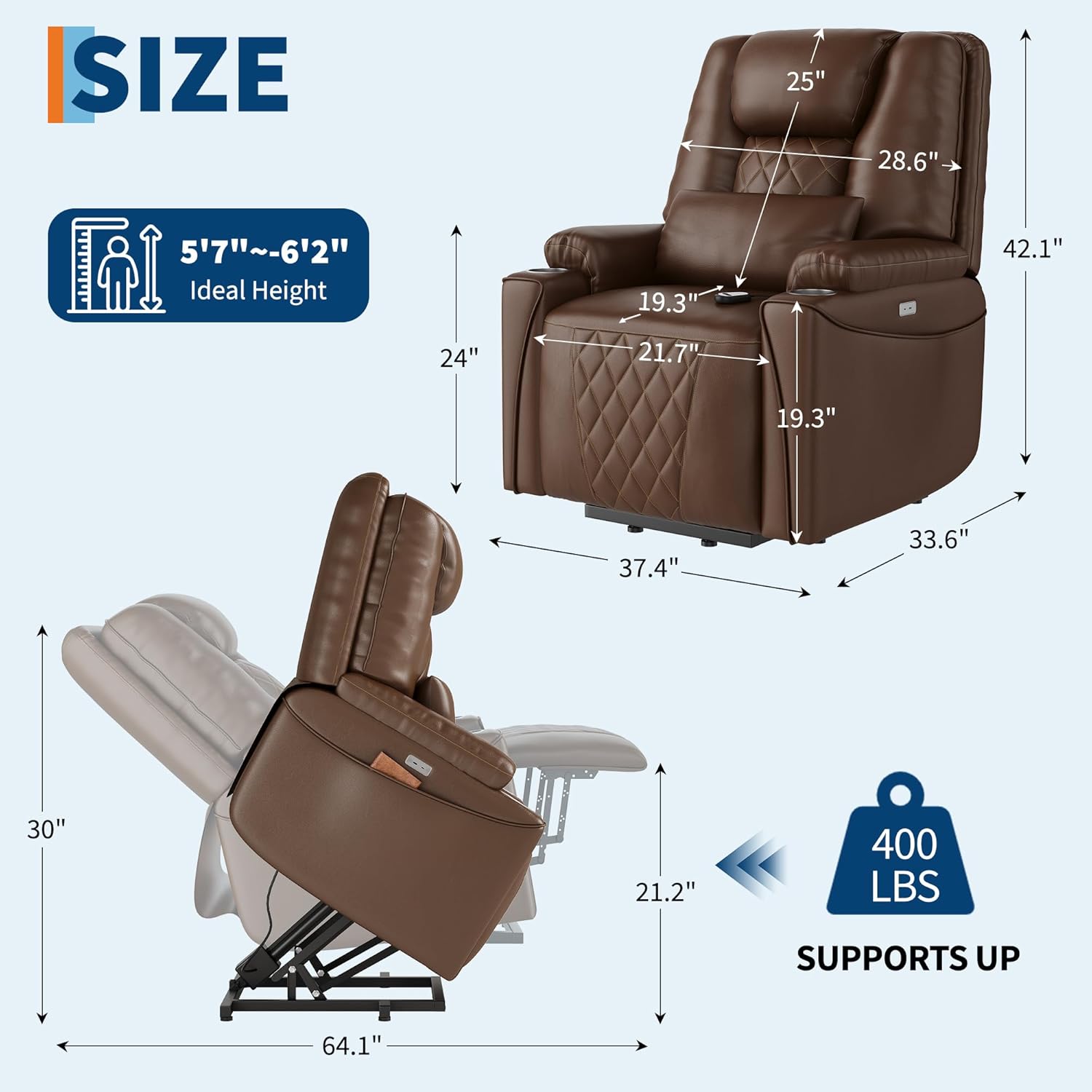
Image: A comprehensive diagram illustrating the dimensions of the recliner in both upright and fully reclined positions, along with its 400 lbs weight support capacity.
Warranty and Support
IDEALHOUSE is committed to providing high-quality products and customer satisfaction. For specific warranty details regarding your Electric Power Lift Recliner Chair, please refer to the warranty card included with your purchase or visit the official IDEALHOUSE website.
If you require technical assistance, have questions about assembly, operation, or need to report a defective part, please contact IDEALHOUSE Customer Support. Have your model number (ZCU0524tH5g) and purchase date ready when contacting support.
Customer Support: Refer to your product packaging or the IDEALHOUSE brand store on Amazon for contact information.
Online Resources: Visit the IDEALHOUSE Store on Amazon for additional product information and support.
Ask a question about this manual
Ask about setup, troubleshooting, compatibility, parts, safety, or missing instructions. Manuals+ will review the question and use this page’s manual context to help answer it.