
1. Introduction
This manual provides essential information for the safe and efficient installation, operation, and maintenance of the ZHRCLY VEICHI AC310-T3-030G/037P Frequency Converter. This device is designed to control the speed and torque of AC induction motors by varying the frequency and voltage of the power supplied to the motor. Please read this manual thoroughly before using the product.
2. Safety Information
WARNING: Improper installation or operation can lead to serious injury or death. Only qualified personnel should install, operate, and maintain this equipment.
- Always disconnect power before performing any installation, wiring, or maintenance.
- Ensure proper grounding of the frequency converter and the motor.
- Do not touch electrical components immediately after power-off, as residual voltage may be present. Wait for capacitors to discharge.
- Protect the unit from moisture, dust, corrosive gases, and direct sunlight.
- Verify that the input voltage matches the specifications of the frequency converter.
- Install the unit in a well-ventilated area to prevent overheating.
3. Product Overview
The ZHRCLY VEICHI AC310-T3-030G/037P is a robust frequency converter designed for industrial applications. It features a user-friendly control panel for easy configuration and monitoring.
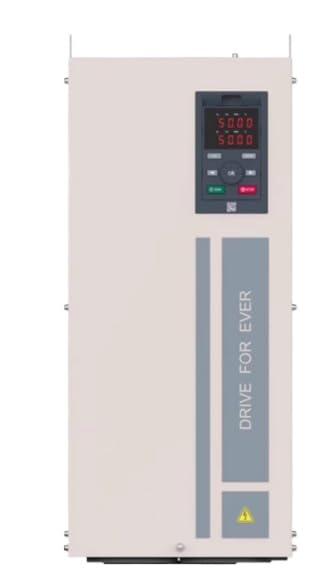
Figure 1: Front view of the ZHRCLY VEICHI AC310-T3-030G/037P Frequency Converter. The image displays the main unit with a digital control panel at the top right, featuring a red LED display showing numerical values (e.g., "50.00", "50.00") and several control buttons (e.g., "RUN", "STOP", "UP", "DOWN", "OK", "ESC"). Below the control panel, a vertical grey stripe with "DRIVE FOR EVER" text is visible, along with a yellow warning triangle symbol at the bottom right.
4. Setup
4.1 Unpacking and Inspection
- Carefully remove the frequency converter from its packaging.
- Inspect the unit for any signs of physical damage incurred during shipping. If damage is found, contact your supplier immediately.
- Verify that all components listed in the packing list are present.
4.2 Mounting
Mount the frequency converter vertically on a sturdy, non-flammable surface. Ensure adequate clearance around the unit for proper ventilation and heat dissipation. Refer to the product's technical drawings for specific mounting dimensions and hole patterns (not provided in this general manual).
4.3 Wiring
CAUTION: All wiring must comply with local and national electrical codes. Use appropriate wire gauges and circuit protection.
- Power Input (R, S, T): Connect the three-phase AC power supply to the designated input terminals.
- Motor Output (U, V, W): Connect the motor's three-phase windings to the output terminals.
- Grounding (PE): Connect the ground terminal of the frequency converter to a reliable earth ground.
- Control Terminals: Connect external control signals (e.g., start/stop, speed reference, fault reset) to the control terminals as required by your application. Refer to the detailed wiring diagram in the full product manual for specific terminal assignments.
4.4 Initial Power-Up
- Before applying power, double-check all wiring connections for correctness and security.
- Ensure no tools or foreign objects are inside the unit.
- Apply power to the frequency converter. The control panel display should illuminate.
- Observe the display for any error codes. If an error occurs, refer to the Troubleshooting section.
5. Operating Instructions
5.1 Control Panel Overview
The control panel (refer to Figure 1) allows for local operation and parameter setting. Key elements include:
- Digital Display: Shows operating status, frequency, current, voltage, and parameter values.
- RUN Button (Green): Initiates motor operation.
- STOP Button (Red): Halts motor operation.
- UP/DOWN Arrows: Adjust frequency, parameter values, or navigate menus.
- OK/ENTER Button: Confirms selections or enters parameter editing mode.
- ESC Button: Exits menus or cancels operations.
5.2 Basic Operation
- Power On: Ensure the unit is powered on and the display is active.
- Set Frequency: Use the UP/DOWN arrows to set the desired output frequency (motor speed).
- Start Motor: Press the RUN button. The motor should begin to accelerate to the set frequency.
- Stop Motor: Press the STOP button. The motor will decelerate and stop.
5.3 Parameter Settings
The frequency converter has numerous parameters for advanced configuration (e.g., acceleration/deceleration times, motor parameters, control modes). Access these parameters via the control panel using the OK/ENTER button to enter the menu and UP/DOWN arrows to navigate. Refer to the comprehensive programming manual for detailed parameter descriptions and settings (not included in this basic manual).
6. Maintenance
WARNING: Disconnect all power before performing any maintenance procedures.
6.1 Regular Inspection
- Periodically check for loose connections, damaged wiring, or signs of overheating (discoloration, burnt smell).
- Inspect cooling fans for proper operation and ensure air vents are not obstructed.
- Check for excessive dust or debris accumulation inside the unit.
6.2 Cleaning
Use a soft, dry cloth or compressed air to remove dust from the exterior and cooling fins. For internal cleaning, it is recommended to consult a qualified technician.
6.3 Environmental Considerations
Ensure the operating environment remains within the specified temperature and humidity ranges to prolong the life of the unit.
7. Troubleshooting
This section provides general guidance for common issues. For detailed error codes and advanced troubleshooting, refer to the full product manual.
| Problem | Possible Cause | Solution |
|---|---|---|
| No power to the unit / Display is off | No input power; Blown fuse/breaker; Loose wiring. | Check power supply; Inspect fuses/breakers; Verify all power connections. |
| Motor does not run when RUN is pressed | Incorrect parameter settings; Motor wiring error; External stop signal active. | Check motor wiring (U, V, W); Verify parameter settings (e.g., control mode); Check external control signals. |
| Overload fault displayed | Motor overloaded; Incorrect motor parameters; Insufficient acceleration time. | Reduce motor load; Verify motor parameters (current, power); Increase acceleration time. |
| Overvoltage/Undervoltage fault | Unstable input power; Incorrect input voltage. | Check input power supply stability; Ensure input voltage matches converter rating. |
8. Specifications
| Feature | Detail |
|---|---|
| Model Number | AC310-T3-030G/037P |
| Power Rating | 30KW |
| Input Voltage | 380V (Three-Phase) |
| Manufacturer | Original factory |
| Approximate Package Dimensions | 2 x 2 x 2 inches (5.08 x 5.08 x 5.08 cm) (Note: These dimensions are for packaging and may not reflect the actual unit size for a 30KW industrial converter.) |
| Approximate Item Weight | 4.41 Pounds (2 kg) (Note: This weight is for the item as packaged and may not reflect the actual unit weight for a 30KW industrial converter.) |
| ASIN | B0F9TD61PX |
9. Warranty and Support
For warranty information and technical support, please refer to the documentation provided with your purchase or contact the seller directly. Ensure you have your model number (AC310-T3-030G/037P) and purchase details available when seeking support.


