Product Overview
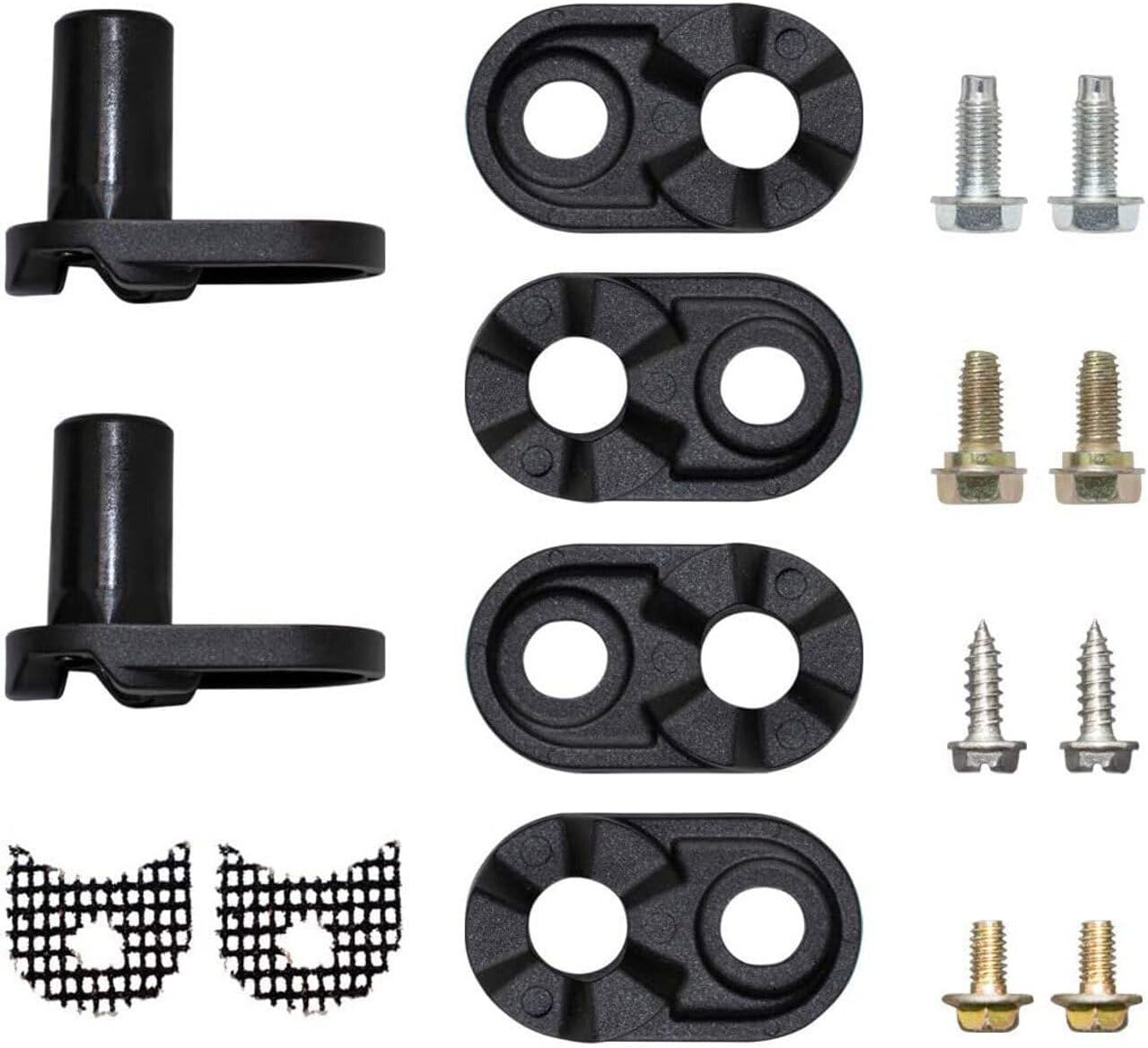
This kit provides replacement parts for the Kenmore 106.8275910 OEM Refrigerator Door Cam. It includes essential components designed to restore proper door function and alignment.
Key Features:
- Direct replacement parts for Kenmore 106.8275910 refrigerator models.
- Designed to address issues with refrigerator door closing or alignment.
- Includes necessary components for a complete repair.
- Ensures proper door operation and seal integrity.
Specifications
| Manufacturer | Fricparts |
| Part Number | FRIC-PL-APP-TP-22052025-020687 |
| Compatible Model | Kenmore 106.8275910 |
| Color | Black/White |
| Item Package Quantity | 1 |
| Number Of Pieces | 1 (kit) |
Setup and Installation
This door cam kit is designed as a replacement part for specific Kenmore refrigerator models. Proper installation is crucial for the correct functioning of your appliance door.
Safety Precautions:
- Always disconnect power to the refrigerator before attempting any repairs or installations. Unplug the appliance from the wall outlet or turn off the circuit breaker.
- Wear appropriate personal protective equipment, such as gloves, to prevent injury.
- If you are unsure about any step, consult a qualified appliance repair technician.
Installation Steps (General Guidance):
Note: These are general instructions. Always refer to your specific Kenmore refrigerator's service manual or a reputable repair guide for detailed, model-specific instructions. Appliance parts can look similar, so verify compatibility before proceeding.
- Prepare the Area: Clear any items from around the refrigerator door. Have a clean, well-lit workspace.
- Access the Door Hinge: Depending on your refrigerator model, you may need to remove trim pieces or covers to access the door hinges where the cam kit is located.
- Support the Door: The refrigerator door is heavy. Have someone assist you in supporting the door while you work on the hinges, or use appropriate lifting tools.
- Remove Old Components: Carefully remove the old or damaged door cam components and any associated pins or screws. Note their orientation and position for reassembly.
- Install New Cam Kit: Place the new door cam components in the correct position on the hinge. Ensure they are properly aligned.
- Secure Components: Use the provided screws and fasteners to secure the new cam kit. Do not overtighten.
- Reassemble: Reattach any trim pieces or covers that were removed.
- Test Door Operation: Gently open and close the refrigerator door several times to ensure it swings smoothly and closes completely and seals properly. Adjust if necessary.
- Restore Power: Once installation is complete and verified, reconnect power to the refrigerator.
Operating Considerations
After successful installation of the door cam kit, the refrigerator door should operate smoothly and close securely. The primary function of the door cam is to assist the door in closing properly and to maintain its alignment.
- Ensure the door closes completely without manual assistance.
- Check that the door seal (gasket) makes full contact with the refrigerator frame when closed, preventing air leaks.
- The door should not sag or rub against the refrigerator frame.
Maintenance
Regular maintenance of your refrigerator door components can extend their lifespan and ensure efficient operation.
- Periodic Inspection: Periodically inspect the door hinges and cam kit for any signs of wear, cracks, or damage.
- Cleaning: Keep the area around the door hinges clean and free of debris. Use a soft, damp cloth to wipe away dust or spills. Avoid harsh chemicals that could damage plastic components.
- Lubrication (if applicable): Some door cam designs may benefit from a light application of food-grade silicone grease to the moving parts to ensure smooth operation. Consult your refrigerator's manual or a technician before applying any lubricants.
- Avoid Overloading: Do not overload refrigerator door shelves, as excessive weight can put undue stress on the door hinges and cam system.
Troubleshooting
If you experience issues with your refrigerator door after installing the new cam kit, consider the following common problems and solutions:
| Problem | Possible Cause | Solution |
|---|---|---|
| Door does not close completely or swings open. |
|
|
| Door sags or rubs. |
|
|
| Door makes noise when opening/closing. |
|
|
If the problem persists after attempting these troubleshooting steps, it is recommended to contact a certified appliance repair technician or the product seller for further assistance.
Warranty Information
This product is a replacement part. Warranty coverage, if any, is typically provided by the seller or the manufacturer of the replacement part, not by the original appliance manufacturer (Kenmore).
Please refer to the purchase documentation or contact the seller directly for specific warranty terms and conditions, including duration and coverage details. Keep your proof of purchase for any warranty claims.
Customer Support
For technical assistance, installation queries, or to report a defective part, please contact the seller from whom you purchased this Kenmore Refrigerator Door Cam Kit.
When contacting support, please have the following information ready:
- Your order number or proof of purchase.
- The model number of the part: FRIC-PL-APP-TP-22052025-020687
- A detailed description of the issue you are experiencing.


