
remred afdgfg3435
Sticktune Mini Speaker User Manual
Brand: remred | Model: afdgfg3435
1. Introduction
The Sticktune Mini Speaker is a compact, portable bone conduction Bluetooth speaker designed for versatile audio experiences. It transforms various surfaces into sound systems, offering unique sound customization and True Wireless Stereo (TWS) capabilities for immersive audio. This manual provides essential information for setup, operation, maintenance, and troubleshooting.

Figure 1: Sticktune Mini Speaker (Red) and included accessories.
2. What's Included
Upon unboxing your Sticktune Mini Speaker, please verify that all components are present:
- 1 × Sticktune Mini Speaker
- 1 × Carrying Bag
3. Key Features
- Bone Conduction Technology: Transforms any hollow surface (tables, boxes, guitars) into a speaker, providing a unique audio experience.
- Sound Customization: The speaker adapts its tone based on the surface it's placed on, allowing for varied sound effects.
- True Wireless Stereo (TWS): Pair two Sticktune Mini Speakers for 360° surround sound, ideal for movies, games, or parties.
- Compact and Powerful: Small enough for portability, yet capable of reaching 115dB maximum power on resonant surfaces.
- Adjustable Bass: Customize the sound output for crisp highs or rich bass.
- Extended Battery Life: Up to 12 hours of playtime on a single charge.
- IPX5 Waterproof: Splash-proof design suitable for outdoor use and wet environments.
- Multi-functional: Supports music playback, calls, podcasts, games, and FM radio.

Figure 2: The compact size and aviation-grade aluminum finish of the speaker.

Figure 3: Illustration of the speaker's 360-degree sound capability.
4. Setup Guide
4.1 Charging the Speaker
Before first use, fully charge the speaker. Use a standard USB Type-C cable (not included) and a 5V/0.4A power adapter.
- Connect the Type-C cable to the charging port on the speaker.
- The indicator light will flash red during charging.
- The red light will turn off when fully charged. If powered on and in playback state, the blue light resumes working state.
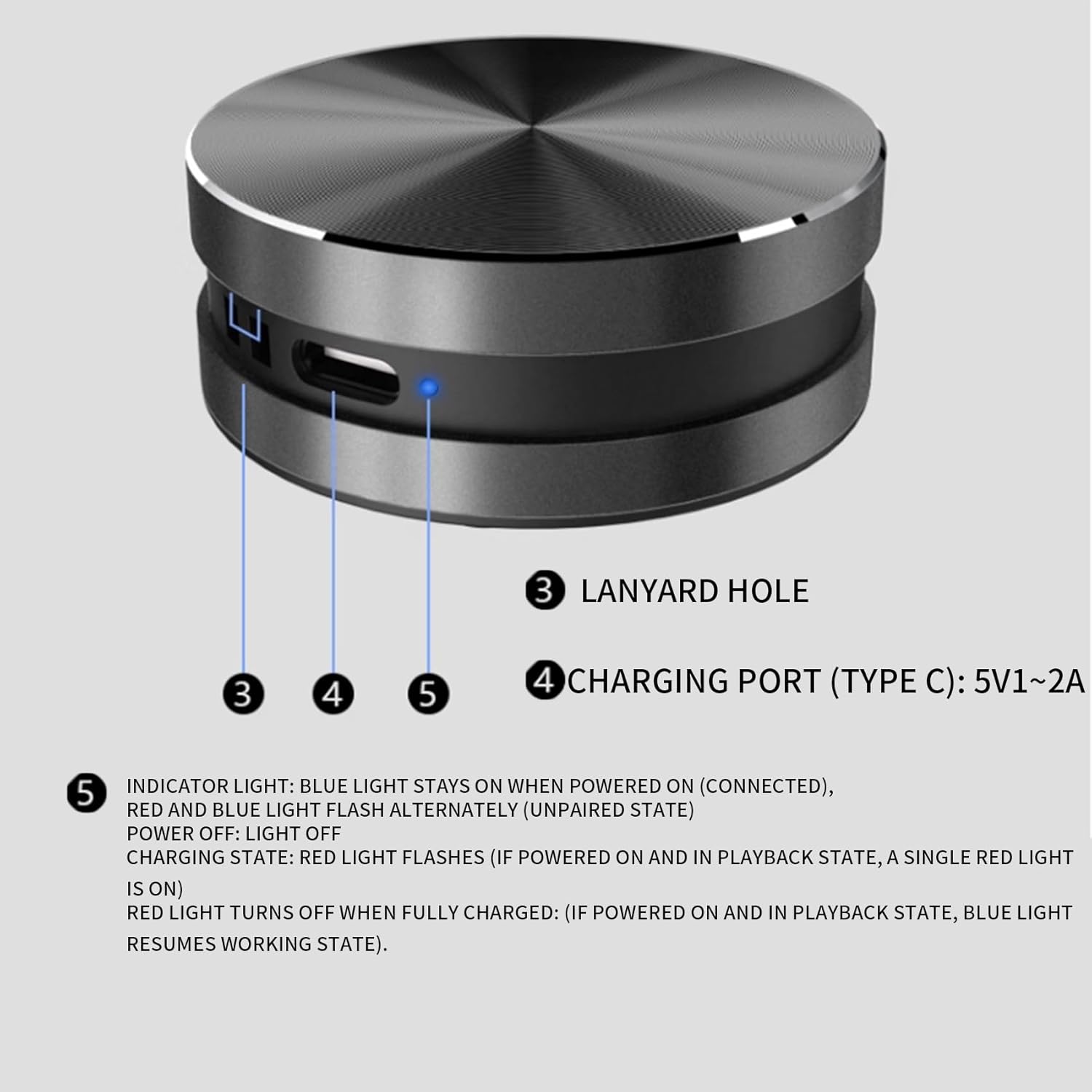
Figure 4: Charging port and indicator light location.
4.2 Power On/Off
- To Power On: Long press the Volume Up / Power button (labeled '2' in Figure 5) for approximately 2 seconds. The indicator light will turn blue.
- To Power Off: Long press the Volume Up / Power button (labeled '2' in Figure 5) for approximately 2 seconds. The indicator light will turn off.
4.3 Bluetooth Pairing
The speaker uses Bluetooth 5.0 for stable connections.
- Ensure the speaker is powered on. The red and blue lights will flash alternately, indicating it's in unpaired state and ready for pairing.
- On your device (smartphone, tablet, computer), enable Bluetooth and search for available devices.
- Select "Sticktune Mini Speaker" from the list of found devices.
- Once connected, the blue indicator light will stay on.
4.4 True Wireless Stereo (TWS) Pairing
To achieve 360° surround sound, you can pair two Sticktune Mini Speakers together:
- Ensure both speakers are powered off.
- Power on both speakers simultaneously. They will automatically attempt to pair with each other.
- Once paired, one speaker will act as the left channel and the other as the right channel.
- Connect your device to one of the paired speakers via Bluetooth as described in Section 4.3.

Figure 5: TWS pairing for stereo sound.
5. Operating Instructions
5.1 Button Functions

Figure 6: Speaker button functions.
- Button 1 (Left):
- Short Press: Volume Down
- Long Press (approx. 2 seconds): Disconnect Bluetooth
- Button 2 (Right):
- Short Press: Volume Up
- Long Press (approx. 2 seconds): Power On/Off
5.2 Surface-Dependent Sound
The unique bone conduction technology allows the speaker to produce different sound characteristics based on the surface it is placed on. Experiment with various materials to discover unique audio effects:
- Glass: May produce clearer, more resonant tones.
- Wood: Often results in warmer, richer bass.
- Hollow Plastic/Cardboard Boxes: Can amplify volume and bass significantly, reaching up to 115dB.
- Dashboard: Can provide a unique sound profile in a vehicle.

Figure 7: The speaker's suction cup base for secure placement on various surfaces.
5.3 FM Radio Function
The speaker includes a built-in FM radio. To activate and use the FM radio:
- Ensure the speaker is powered on and not connected to Bluetooth.
- The speaker will automatically scan and tune into available FM stations.
- Use the Volume Up/Down buttons for fine-tuning or changing stations.
6. Maintenance and Care
- Water Resistance: The speaker is IPX5 waterproof, meaning it can withstand splashes and light rain. Do not submerge the speaker in water. Ensure the charging port cover is securely closed when exposed to water.
- Cleaning: Wipe the speaker with a soft, dry, or slightly damp cloth. Avoid using harsh chemicals or abrasive cleaners.
- Storage: Store the speaker in a cool, dry place away from direct sunlight and extreme temperatures.
- Battery Care: To prolong battery life, avoid fully discharging the battery frequently. Charge the speaker regularly, even if not in use for extended periods.
7. Troubleshooting
| Problem | Possible Cause | Solution |
|---|---|---|
| Speaker does not power on. | Low battery; Power button not pressed correctly. | Charge the speaker fully. Long press the Power button for 2 seconds. |
| No sound or low volume. | Volume too low; Speaker not connected; Incorrect surface. | Increase volume on speaker and connected device. Re-pair Bluetooth. Try placing on a different, hollow surface. |
| Cannot pair with Bluetooth device. | Speaker not in pairing mode; Device Bluetooth off; Interference. | Ensure speaker is flashing red/blue. Turn device Bluetooth off/on. Move closer to speaker. Disconnect other Bluetooth devices. |
| TWS pairing fails. | Speakers not powered off before TWS attempt; Too far apart. | Ensure both speakers are off, then power on simultaneously. Keep speakers close during pairing. |
| Poor FM radio reception. | Weak signal; Environmental interference. | Move to an open area. Try different locations. |
8. Specifications
| Attribute | Detail |
|---|---|
| Product Dimensions | Height: 26 mm, Diameter: 40 mm (approx. 2"D x 3"W x 2"H) |
| Product Weight | 65 grams |
| Main Control Chip | Bluetooth 5.0 (supports TWS) |
| Frequency Response | 20Hz ~ 20KHz full-range output |
| Channel | Dual-channel, 2 independent bone conduction transducers |
| Output Power | 3W audio output |
| Audio Decoding | Supports MP3/AC3/AAC/WAV and other types |
| Bone Conduction Transducer | Built-in enhanced magnetic core and high-performance coil |
| Microphone | Omnidirectional microphone (for calls) |
| FM Radio | Built-in FM enhanced IC |
| Charging Interface | TYPE C, 5V/0.4A charging current |
| Battery | Polymer lithium battery, 300 mAh, 3.7-4.2V |
| Waterproof Rating | IPX5 |
| Model Name | Speaker |
| Item Model Number | afdgfg3435 |
9. Warranty and Support
For warranty information or technical support, please contact the manufacturer, remred, through their official channels or the retailer from whom the product was purchased. Please retain your proof of purchase for warranty claims.
For further assistance, refer to the contact information provided with your product packaging or visit the official remred website.