
Pxdiiry RSCX-9800 Compatible Charger Cord
USB Charger Cord for Hatteker RSCX-9800 Trimmer & Electric Shaver Razor
Model: RSCX-9800 Compatible Charger Cord
Introduction
This manual provides essential information for the safe and effective use of your Pxdiiry USB Charger Cord, specifically designed for compatibility with the Hatteker RSCX-9800 Trimmer and Electric Shaver Razor. Please read this manual thoroughly before using the product to ensure proper operation and longevity.
Safety Information
Always adhere to the following safety guidelines to prevent damage to the product, the connected device, or personal injury:
- Do not expose the cord to water or excessive moisture.
- Avoid extreme temperatures.
- Do not attempt to modify or repair the cord. Refer to qualified personnel for service.
- Ensure the charging port of your device is clean and free of debris before connecting the cord.
- Use only with compatible devices as specified.
- Unplug the cord from the power source when not in use or during electrical storms.
Setup
Follow these steps to set up your USB charger cord:
- Inspect the Cord: Carefully uncoil the USB charger cord. Check for any visible damage, kinks, or frayed wires. If any damage is observed, do not use the cord.
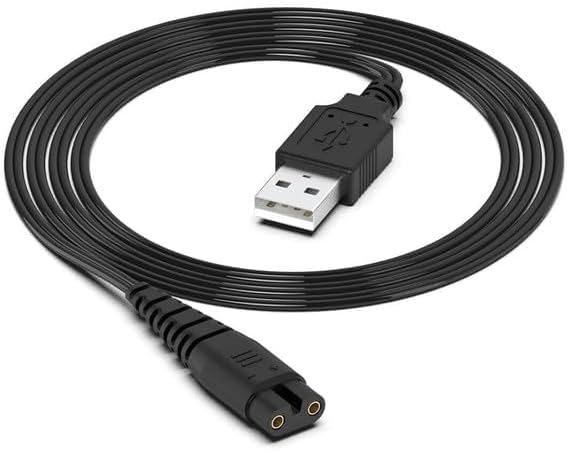
Image: The Pxdiiry USB charger cord, neatly coiled, showcasing its durable black cable and standard USB-A connector on one end, and the two-prong charging connector on the other.
- Identify the Device Charging Port: Locate the charging port on your Hatteker RSCX-9800 Trimmer or Electric Shaver Razor. Ensure it matches the two-prong connector of the USB charger cord.

Image: A visual guide illustrating the shaver's charging interface and the corresponding two-prong charging cable interface. It emphasizes the importance of verifying compatibility before purchase and use.
- Select a Power Source: The USB charger cord can be powered by various USB-compatible devices.

Image: This diagram displays common USB power sources compatible with the charger cord, including a wall charger adapter, a power bank, a personal computer (PC), and a car charger.
Operating Instructions
To charge your Hatteker RSCX-9800 Trimmer or Electric Shaver Razor:
- Connect the two-prong end of the USB charger cord firmly into the charging port of your Hatteker RSCX-9800 device.
- Insert the USB-A end of the charger cord into a compatible USB power source (e.g., a USB wall adapter, computer USB port, power bank, or car charger).
- Ensure the power source is active. The device should indicate that it is charging (e.g., via an LED indicator on the shaver).
- Allow the device to charge fully. Refer to your Hatteker RSCX-9800 device's manual for specific charging times and indicators.
- Once charging is complete, disconnect the USB-A end from the power source first, then gently remove the two-prong connector from your device.
Note: While the image  mentions "Wahl Razor Charger", this specific product is designed for Hatteker RSCX-9800 compatibility. Always verify the connector type for your specific device.
Maintenance
Proper maintenance ensures the longevity and performance of your USB charger cord:
- Cleaning: Use a dry, soft cloth to wipe the cord and connectors. Do not use liquid cleaners or abrasive materials.
- Storage: Store the cord in a cool, dry place away from direct sunlight and extreme temperatures. Avoid tightly coiling or bending the cord sharply, which can damage internal wires.
- Handling: Always pull from the plug head, not the cable, when disconnecting from a device or power source.
Troubleshooting
| Problem | Possible Cause | Solution |
|---|---|---|
| Device not charging. |
|
|
| Slow charging. |
|
|
Specifications
| Feature | Detail |
|---|---|
| Brand | Pxdiiry |
| Model Compatibility | Hatteker RSCX-9800 Trimmer & Electric Shaver Razor |
| Connector Type | USB-A to 2-Prong Charging Connector (Male-to-Male) |
| Color | Black |
| Material | High-quality raw materials for durability and stable performance. |
| Safety Features | Multiple safety certifications, prevents overload and short circuit. |
| Power Design | Low power design, energy-saving. |
Warranty Information
This Pxdiiry product is manufactured with high-quality standards. For specific warranty terms and conditions, please refer to the product packaging or contact the manufacturer directly. Typically, defects in materials and workmanship are covered for a limited period from the date of purchase.
Support
If you encounter any issues or have questions regarding your Pxdiiry USB Charger Cord, please contact the seller or manufacturer through the platform where the purchase was made. Provide your order details and a clear description of the issue for prompt assistance.
Ask a question about this manual
Ask about setup, troubleshooting, compatibility, parts, safety, or missing instructions. Manuals+ will review the question and use this page’s manual context to help answer it.