
Tensky IDW13
Tensky Smart Watch User Manual
Model: IDW13
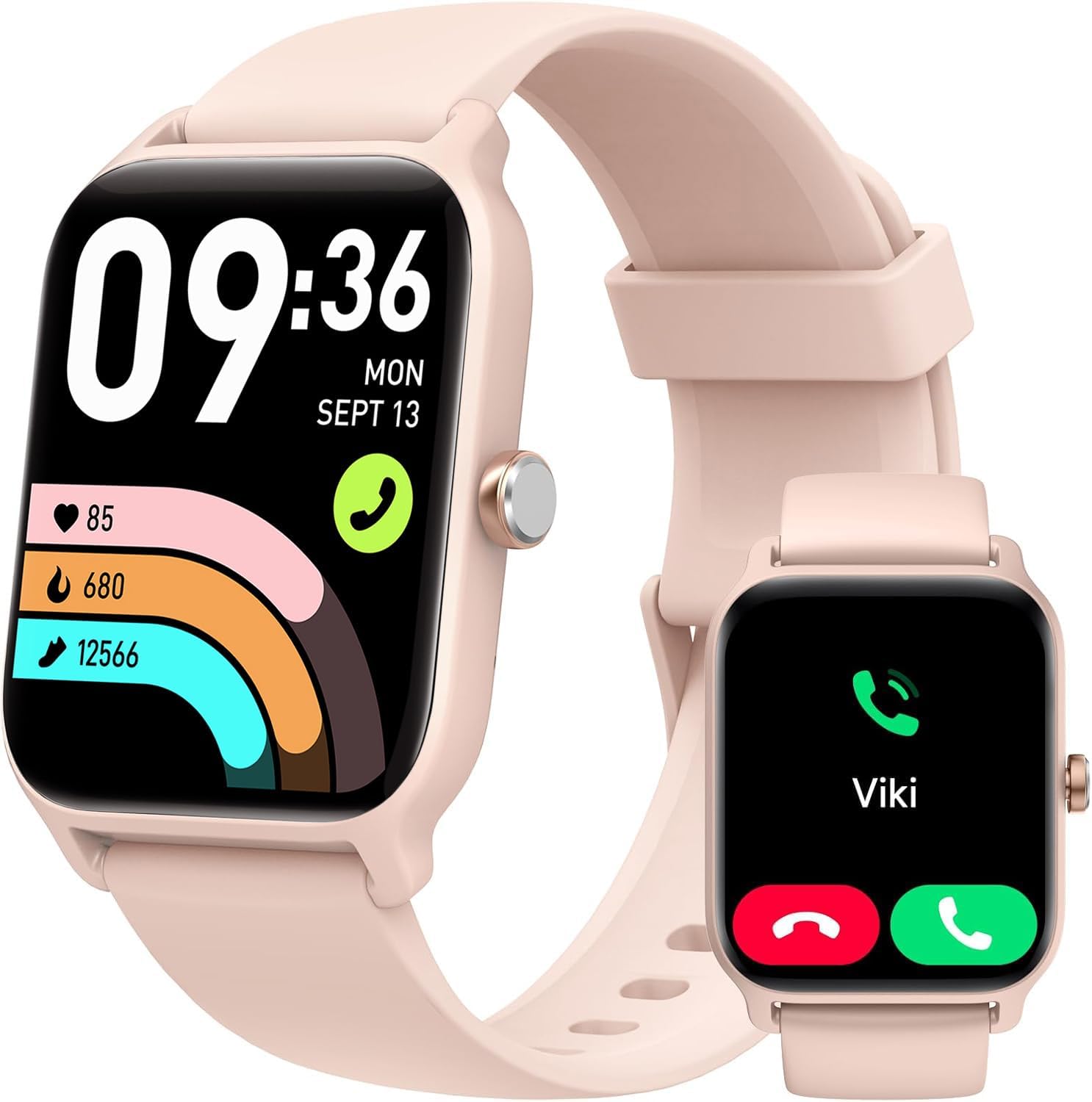
The Tensky Smart Watch, featuring a vibrant display and comprehensive health tracking capabilities.
1. Setup Guide
1.1 What's in the Box
- Smart Watch *1
- Original Watch Strap *1
- Magnetic Charging Cable *1
- User Manual *1

Illustration of the Tensky Smart Watch and its included accessories.
1.2 App Download & Pairing
To unlock the full potential of your Tensky Smart Watch, download the VeryFit app on your smartphone. The app is compatible with iOS 9.0+ and Android 6.0+ devices.
- Search for "VeryFit" in your phone's app store (App Store for iOS, Google Play for Android) and download the application.
- Ensure your phone's Bluetooth is turned on.
- Open the VeryFit app and follow the on-screen instructions to search for and bind your device. The device ID is typically "IDW13".
- Confirm the binding on both your phone and the watch.

Visual guide for downloading and linking the VeryFit app to your smartwatch.
1.3 Customizing Your Watch Face
Personalize your smartwatch by choosing from over 100 watch faces available in the VeryFit app. You can also customize the watch face with your favorite photos to express your personality.

The Tensky Smart Watch offers a wide variety of watch faces and DIY options.
2. Operating Instructions
2.1 Communication Features
Stay connected with the Tensky Smart Watch's communication capabilities:
- Bluetooth Calling: Answer, reject, or make clear calls directly from your smartwatch. Equipped with Bluetooth 5.3 and high-quality speakers for improved call clarity and stability.
- Alexa Built-in: Use voice commands to set alarms, check the weather, control music, and manage smart devices.
- Message Notifications: Receive notifications from various apps like Text, Facebook, WhatsApp, Instagram, X, Telegram, TikTok, Skype, and more. (Note: Message reply is not supported.)

The Tensky Smart Watch integrates Alexa, Bluetooth calling, and smart notifications for an intelligent life.

Utilize the built-in Alexa voice assistant for convenient control and information.

Receive real-time notifications from your favorite social media and messaging apps.

Enjoy hands-free calling directly from your wrist with enhanced clarity.
2.2 Health Monitoring
The Tensky Smart Watch provides comprehensive health tracking:
- Heart Rate Monitoring: Continuously and accurately track your heart rate 24/7.
- Blood Oxygen (SpO2) Measurement: Conveniently check your blood oxygen saturation at any time.
- Sleep Tracking: Automatically monitors your sleep status (deep sleep, light sleep, wakefulness) and provides a comprehensive analysis of sleep quality.
- Stress Monitoring: Helps you concentrate and offers breathing exercises to relax if stress levels are high.
- Women's Health Management: Track your menstrual cycle and predict fertile periods.

Monitor your sleep, heart rate, and blood oxygen levels for a healthier lifestyle.

Detailed sleep analysis helps you improve your sleep habits.

Continuous heart rate tracking for proactive health management.

Quick and easy blood oxygen saturation checks.

Manage stress levels with guided breathing exercises.

Track and manage your menstrual cycle directly from the watch.
2.3 Fitness Tracking
The Tensky Smart Watch is designed for better fitness:
- 100+ Sports Modes: Choose from a wide variety of sport modes including walking, running, football, cycling, and more.
- Activity Tracking: Tracks steps, exercise duration, distance, and calorie consumption. View previous week's health analysis in the VeryFit app.
- IP68 Waterproof: Suitable for daily use such as hand washing or in the rain. (Note: Not for hot water or sauna.)

Engage in over 100 sports modes and track your exercise with precision.

Explore a wide range of sports modes to suit your activity preferences.

Monitor your daily activity including calories, heart rate, distance, and steps.

The IP68 waterproof rating allows for daily wear, but avoid hot water and saunas.
2.4 Other Useful Functions
The Tensky Smart Watch includes additional practical features:
- Weather Forecast
- Music Control
- Camera Control
- Alarm Clock Setting
- Stopwatch
- Timer
- Find Phone
- Sedentary Reminder
- Brightness Adjustment (5 levels)

A variety of daily functions enhance convenience and smart living.

Explore additional features like Find Phone, Weather, Camera Control, and more.
2.5 Display and Battery
- Display: 1.8-inch HD touch screen with 5 levels of adjustable brightness for clear visibility in various lighting conditions.
- Battery Life: Equipped with a 300mAh large-capacity battery.
- Charging Time: Approximately 2 hours
- Heavy Use: 7-10 days
- Daily Use: Up to 12 days
- Standby Time: Up to 30 days

Experience a clear and responsive 1.8-inch HD screen with adjustable brightness.

Benefit from extended battery life for prolonged usage.
3. Maintenance
3.1 Cleaning and Care
- Regularly clean the watch screen and strap with a soft, damp cloth.
- Avoid using harsh chemicals or abrasive materials, as these can damage the watch.
- Ensure the charging contacts on the back of the watch are clean and dry before charging.
3.2 Charging Your Device
Use the provided magnetic charging cable to charge your Tensky Smart Watch. Align the magnetic pins on the cable with the charging contacts on the back of the watch. The watch will indicate when it is charging.
4. Troubleshooting
4.1 Common Issues and Solutions
| Issue | Possible Cause | Solution |
|---|---|---|
| Cannot connect to phone / Frequent disconnections | Bluetooth off, app not running in background, distance too far, interference. | Ensure Bluetooth is on. Keep the VeryFit app running. Keep watch within phone's immediate vicinity. Reconnect manually via Bluetooth if needed. |
| Health tracking (HR, steps) inaccurate or not working | Watch not worn correctly, sensor obstruction, software glitch. | Ensure the watch is worn snugly on the wrist. Clean the sensor area. Check for app updates or perform a watch restart. A system upgrade may resolve tracking issues. |
| Notifications not received | App permissions, notification settings, app not running. | Check notification permissions for the VeryFit app on your phone. Ensure notifications are enabled within the VeryFit app settings. Keep the app running in the background. |
| Watch not charging | Improper cable connection, dirty contacts, faulty cable/charger. | Ensure the magnetic charging cable is correctly aligned and securely attached. Clean the charging contacts on both the watch and cable. Try a different USB power source. |
| Short battery life | High usage of features, high brightness, frequent notifications. | Reduce screen brightness. Limit background app refresh. Disable unnecessary notifications. Ensure watch is fully charged. |
5. Specifications
| Feature | Detail |
|---|---|
| Brand | Tensky |
| Model Number | IDW13 |
| Screen Size | 1.85 Inches |
| Operating System | Android & iOS |
| Connectivity Technology | Bluetooth |
| Battery Capacity | 300 Milliamp Hours |
| Battery Cell Composition | Lithium Polymer |
| Item Weight | 4.6 ounces |
| Waterproof Rating | IP68 |
| Special Features | Activity Tracker, Alarm Clock, Notifications, Phone Call, Time Display |
6. Warranty and Support
Tensky is committed to providing quality products and excellent customer service.
- Lifetime Support: Access to lifetime support and satisfied solutions.
- 24 Hours Quick Service: Quick service available via email.
- 30 Days Return Policy: 30 days no reason to return policy.
- 2 Years Free Replacement: Enjoy a 2-year free replacement policy.
Tensky's commitment to customer satisfaction and product quality.
For further assistance or inquiries, please contact Tensky customer support through the contact information provided in your product packaging or on the official Tensky website.
Related documentsIDW13


Ask a question about this manual
Ask about setup, troubleshooting, compatibility, parts, safety, or missing instructions. Manuals+ will review the question and use this page’s manual context to help answer it.