
Introduction
Thank you for choosing the Generic GT21 Y13 Smart Watch. This manual provides essential information for setting up, operating, and maintaining your device. Please read it thoroughly to ensure proper use and to maximize the watch's features.
Package Contents
- 1 x GT21 Y13 Smart Watch
- 1 x USB Charging Cable
- 1 x Instruction Manual
Product Overview
The GT21 Y13 Smart Watch features a 1.7-inch 240x280 screen with full-screen touch and a side key for navigation. It is designed for daily wear, offering various health and communication functions.
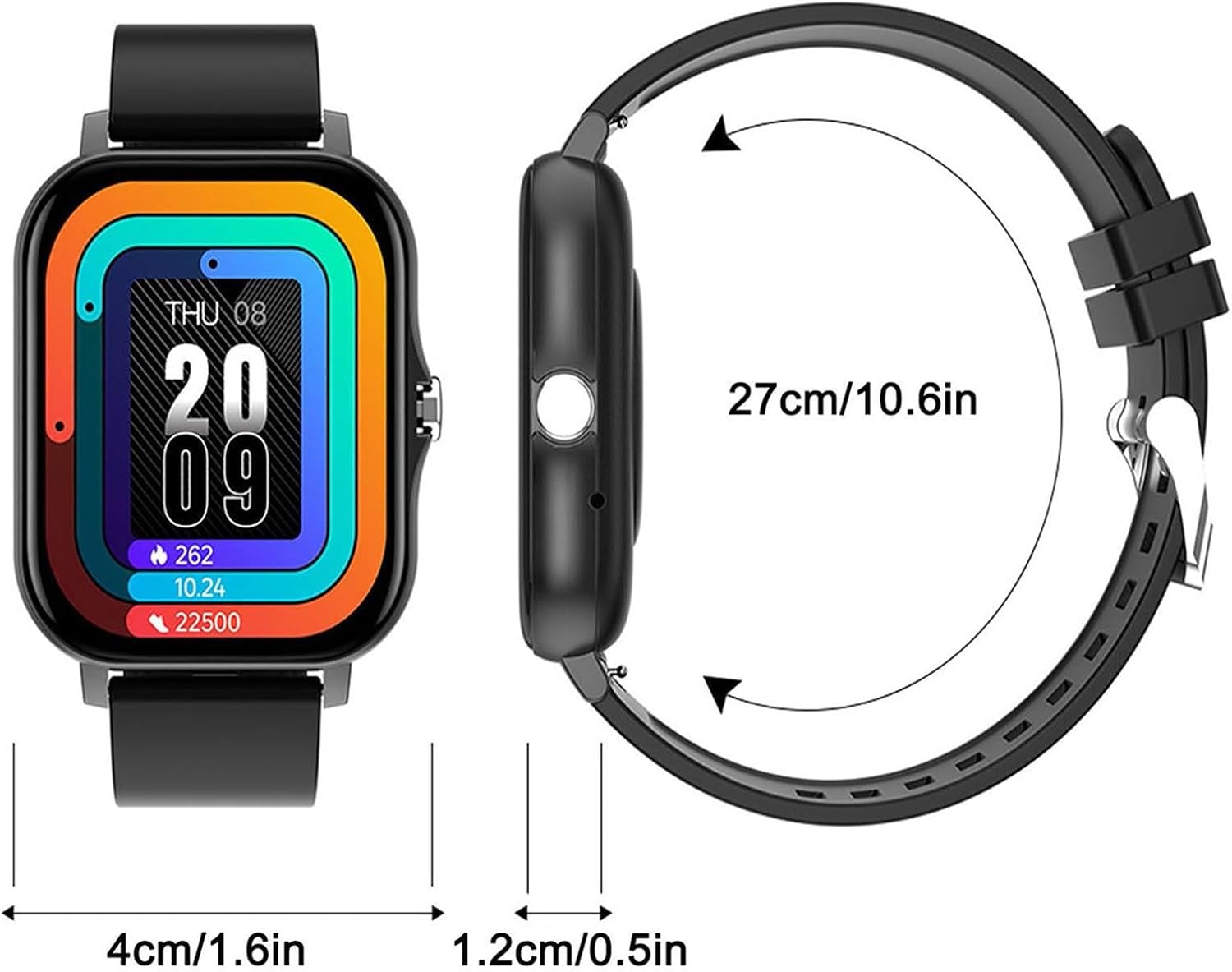
Image: Front and side view of the GT21 Y13 Smart Watch, showing dimensions. The watch face measures 4cm (1.6in) wide, and the watch body is 1.2cm (0.5in) thick. The total circumference of the watch with the strap is 27cm (10.6in).

Image: A person wearing the GT21 Y13 Smart Watch on their wrist. The watch features a 1.69-inch slim and light design with a gold-colored frame and a beige strap.
Setup
1. Charging the Smart Watch
Before initial use, fully charge the smart watch. Connect the provided USB charging cable to the charging port on the back of the watch and a standard USB power source.

Image: The magnetic USB charging cable for the smart watch. It features a circular magnetic connector that attaches to the watch's charging pins and a standard USB-A connector for power.

Image: The GT21 Y13 Smart Watch connected to its charging cable, displaying a battery icon with a charging indicator. The image also indicates a normal use battery life of 5 days and a standby life of 15 days.
- Charging time: Approximately 1.5 hours.
- Working time: Around 3 days on a full charge.
2. Power On/Off
- To Power On: Press and hold the side key until the screen illuminates.
- To Power Off: Navigate to the power off option in the watch settings or press and hold the side key, then confirm power off.
3. App Installation and Pairing
To unlock the full functionality of your smart watch, download the companion mobile application. Search for the app name (usually found in the manual or on the watch screen during initial setup) in your smartphone's app store (Google Play Store for Android, Apple App Store for iOS).
- Download and install the app on your smartphone.
- Open the app and follow the on-screen instructions to create an account or log in.
- Ensure Bluetooth is enabled on your smartphone.
- In the app, search for your GT21 Y13 Smart Watch and select it to pair.
- Confirm the pairing request on both your phone and the watch.
Operating Instructions
Basic Functions
- Date and Week Display: View current date and day of the week on the main interface.
- Step Counter: Tracks your daily steps.
- Calories: Estimates calories burned based on activity.
- Distance: Measures distance covered.
- Stopwatch: Use for timing activities.
- Information Storage: Stores activity data and notifications.
- Brightness Adjustment: Adjust screen brightness via watch settings.
- Device Reset: Option to reset the device to factory settings.
Modes and Interface
- Message Push: Receive notifications from your paired smartphone.
- Sleep Monitoring: Tracks sleep patterns.
- Photo Control: Remotely control your phone's camera.
- Music Control: Control music playback on your phone.
- Full Screen Touch & Rotary Key: Navigate the interface using touch gestures and the side rotary key.
- UI Switching: Six different main interface designs can be switched.
Alerts and Notifications
The watch can display various alerts and notifications from your connected smartphone.

Image: A person wearing the GT21 Y13 Smart Watch, which displays the time (10:08) and date (MON 08). Speech bubbles around the watch indicate various functions like "Call Juliana", "How's weather today?", "Play music", "Okay", and "Today is cloudy, 20°C", demonstrating its notification and voice command capabilities.
- Call Reminder: Notifies you of incoming calls.
- Message Notifications: Displays SMS, QQ, and WeChat messages.
- Sedentary Reminder: Prompts you to move after periods of inactivity.
- Alarm Reminder: Vibrates or alerts for set alarms.
Special Functions
- WeChat Sports Connect: Integrates with WeChat for sports data sharing.
- Set Sports Goal: Define and track personal fitness goals.
- Share Fitness Information: Share your activity data.
- Alarm Clock: Set multiple alarms.
- Raise Hand Bright Screen: Screen automatically turns on when you raise your wrist.
- Find Phone/Bracelet: Locate your paired phone or watch.
- Call Rejection: Decline incoming calls directly from the watch.
- Shaking: May refer to gesture controls or remote camera trigger.
Language Settings
- Bracelet Language: Supports English, French, Spanish, Portuguese, Russian, German, Dutch, Turkish, Malaysian, Polish, Czech, Slovak, Simplified Chinese.
- APP Language: Supports English, Simplified Chinese, Traditional Chinese, Dutch, Russian, French, German, Portuguese, Spanish, Turkish, Japanese, Polish, Malaysian, Thai, Czech, Slovak.
Maintenance
- Cleaning: Wipe the watch and strap regularly with a soft, dry cloth. For stubborn dirt, use a slightly damp cloth and mild soap, then dry thoroughly.
- Water Resistance: The watch has an IP67 rating, meaning it is protected against dust and can withstand immersion in water up to 1 meter for 30 minutes. It is suitable for daily use, such as hand washing or light rain, but not recommended for swimming or showering with hot water.
- Storage: Store the watch in a cool, dry place when not in use.
- Avoid Chemicals: Do not expose the watch to strong chemicals, detergents, or solvents, as these can damage the materials.

Image: The GT21 Y13 Smart Watch with water splashing around it, illustrating its water resistance feature. The watch has a gold-colored frame and a beige strap.
Troubleshooting
- Watch not turning on: Ensure the watch is fully charged. Connect it to the charger for at least 30 minutes.
- Cannot pair with phone:
- Ensure Bluetooth is enabled on your phone and the watch.
- Make sure the watch is within the Bluetooth range of your phone.
- Restart both the watch and your phone.
- Try unpairing and re-pairing the device through the app.
- Inaccurate step count: Ensure the watch is worn snugly on your wrist. Calibrate step tracking in the app if available.
- Notifications not received:
- Check if the watch is properly connected to the app.
- Verify that notification permissions are granted to the app on your phone.
- Ensure notification settings are enabled within the watch app.
- Short battery life:
- Reduce screen brightness.
- Disable unnecessary features or frequent heart rate monitoring if applicable.
- Ensure the watch is fully charged each time.
Specifications
| Model Name | GT21 Y13, 45800 |
| Screen | 1.7 inches, 240x280 resolution |
| Control Mode | Full screen touch + side key, mobile APP control |
| Battery Capacity | 3.7V/180mAh |
| FLASH Memory | 512KB+16M |
| Charging Time | Approximately 1.5 hours |
| Working Time | Around 3 days |
| Shell Material | Alloy + ABS |
| Water Resistance Rating | IP67 |
| Item Dimensions (L x W x H) | 19.69 x 19.69 x 19.69 inches (Note: This dimension seems to be for packaging or a general placeholder, refer to product overview image for actual watch dimensions) |