
1. Introduction
This manual provides detailed instructions for the assembly, operation, and maintenance of your MAHANCRIS FCBK5901 3-Drawer Mobile File Cabinet. Designed for home and office use, this vertical filing cabinet features three non-woven fabric drawers, adjustable hanging rods for A4/Letter-sized documents, and smooth-rolling casters for mobility. The spacious top surface can accommodate office equipment such as printers or scanners. Please read this manual thoroughly before assembly and use to ensure proper function and safety.

Image 1.1: The MAHANCRIS FCBK5901 3-Drawer Mobile File Cabinet.
2. Safety Information
Please observe the following safety guidelines to prevent injury or damage to the product:
- Weight Capacity: Do not exceed the maximum weight capacity limit of 65 lb (29.5 kg) on the top surface.
- Drawer Care: Do not wash non-woven fabric drawers. Spot clean only.
- Mobility: Use caution when moving the cabinet on wheels to prevent tipping, especially when drawers are loaded. Ensure wheels are locked when the cabinet is in a stationary position.
- Assembly: Always follow the provided assembly instructions for safe and correct installation. Ensure all parts are securely fastened before use.
- Drawer Stoppers: Each drawer includes a stopper mechanism to prevent it from being fully pulled out. Do not force drawers beyond their intended stop point.
3. Package Contents
Before beginning assembly, please verify that all components are present and undamaged. The package should contain:
- 1 x MAHANCRIS FCBK5901 File Cabinet (main frame and top board)
- 3 x Non-Woven Fabric Drawers
- 1 x Accessory Kit (including screws, casters, adjustable hanging rods, and any necessary tools)
- 1 x Detailed Illustrated Instruction Manual
If any parts are missing or damaged, please contact MAHANCRIS customer support for assistance.
4. Setup & Assembly
Assembly of the MAHANCRIS FCBK5901 file cabinet is designed to be straightforward. All parts are clearly labeled, and a detailed illustrated manual is included. Follow these general steps:
- Unpack Components: Carefully remove all parts from the packaging and lay them out on a clean, soft surface to prevent scratches. Verify against the package contents list.
- Assemble Frame: Connect the metal frame components according to the illustrated manual, ensuring all screws are tightened securely.
- Attach Casters: Install the four smooth-rolling casters to the base of the frame. Ensure the two lockable wheels are positioned as indicated in the manual for easy access.
- Install Top Board: Secure the engineered wood top board to the assembled frame.
- Prepare Drawers: Insert the adjustable hanging rods into the designated slots within the non-woven fabric drawers.
- Insert Drawers: Slide the assembled fabric drawers into the frame. Ensure they engage with the internal stoppers.

Image 4.1: Product dimensions for assembly reference.

Image 4.2: Detail of a lockable caster wheel.
Video 4.1: Official MAHANCRIS Mobile Filing Cabinet overview, demonstrating features and assembly process.
5. Operating Instructions
5.1 Using the Drawers
The file cabinet features three non-woven fabric drawers designed for organizing documents. Each drawer is equipped with adjustable hanging rods suitable for both A4 and Letter-sized files.
- Opening/Closing: Gently pull the handle to open a drawer. Push it back in until it is fully closed.
- File Organization: Utilize the adjustable hanging rods to suspend your A4 or Letter-sized files. Ensure files are evenly distributed to prevent strain on the drawer fabric.
- Drawer Stoppers: The integrated stoppers prevent drawers from being accidentally pulled out completely. To remove a drawer for cleaning or rearrangement, lift the front slightly and pull past the stopper, following the detailed instructions in the assembly manual if needed.

Image 5.1: Anti-fall drawers with adjustable hanging rods for A4 and Letter-sized files.
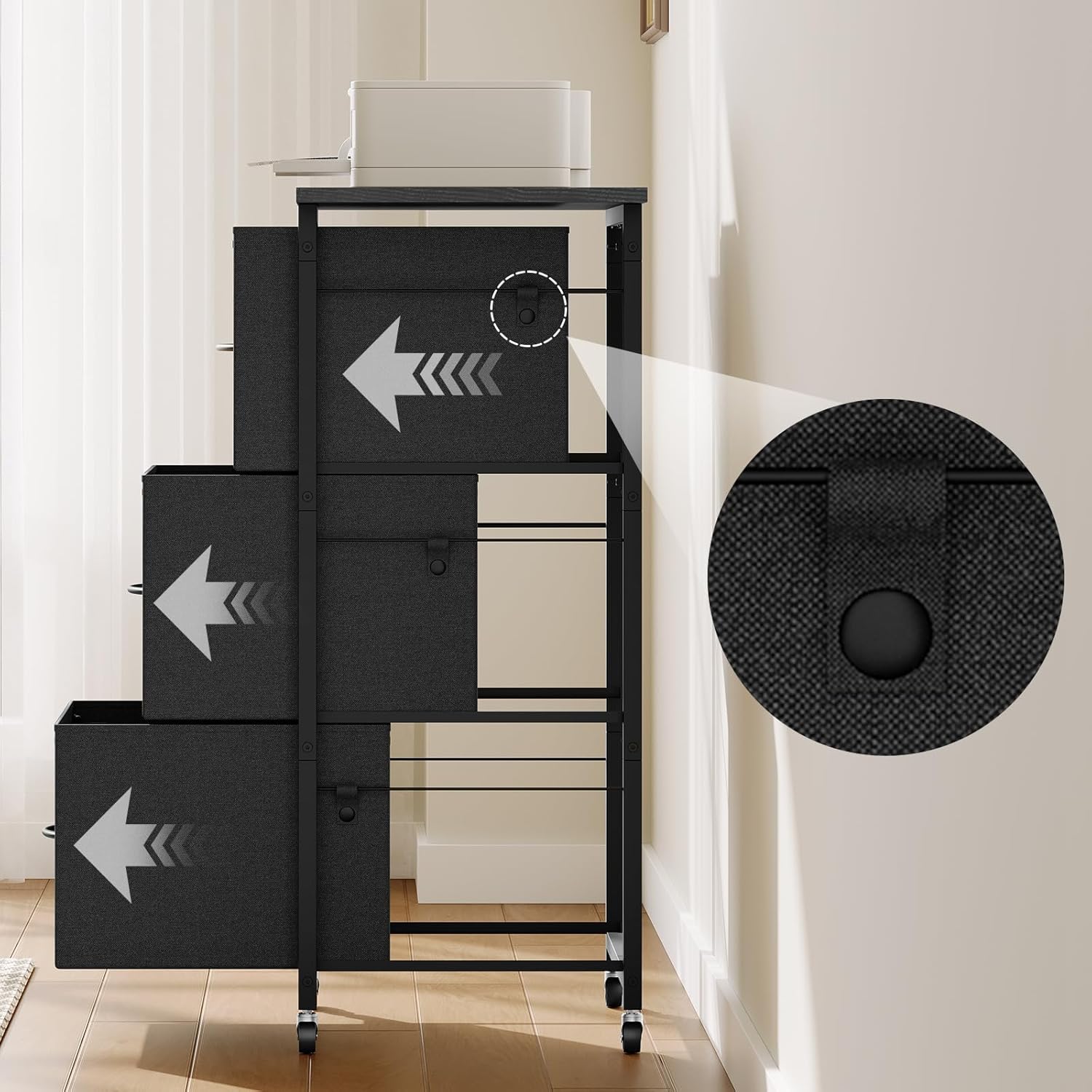
Image 5.2: Detail of the drawer stopper for safety.
5.2 Using the Top Surface
The sturdy top surface measures 15.6"D x 21.2"W and is designed to hold various office equipment.
- Placement: Place printers, scanners, or other office accessories on the top surface. Ensure the total weight does not exceed 65 lb (29.5 kg).
- Stability: For optimal stability, distribute weight evenly on the top surface.

Image 5.3: Spacious top surface accommodating a printer.
5.3 Mobility and Locking
The cabinet is equipped with four smooth-rolling casters for easy movement. Two of these casters are lockable.
- Moving the Cabinet: Unlock the two lockable casters by pressing down on the lever. Gently push the cabinet to its desired location.
- Securing the Cabinet: Once in position, press down on the levers of the two lockable casters to secure the cabinet and prevent unintended movement.
6. Maintenance
Proper care will extend the life and appearance of your file cabinet.
- Cleaning the Top Surface and Frame: Wipe the engineered wood top and metal frame with a soft, damp cloth. Avoid harsh chemicals or abrasive cleaners.
- Cleaning Fabric Drawers: The non-woven fabric drawers should not be washed. For spills or stains, spot clean with a mild detergent and a damp cloth. Allow to air dry completely.
- Caster Maintenance: Periodically check the casters for debris (hair, dust) and clean as needed to ensure smooth rolling.
- Hardware Check: Occasionally check all screws and fasteners to ensure they remain tight. Retighten if necessary.

Image 6.1: Construction of the premium fabric drawers.
7. Troubleshooting
If you encounter any issues with your MAHANCRIS FCBK5901 file cabinet, refer to the following common problems and solutions:
| Problem | Possible Cause | Solution |
|---|---|---|
| Drawers are difficult to open or close. | Overloaded drawer; debris in drawer runners; misaligned frame. | Reduce drawer contents. Check for and remove any obstructions. Ensure the cabinet is on a level surface and the frame is assembled correctly. |
| Cabinet is unstable or wobbles. | Uneven floor; loose frame connections; casters not locked. | Ensure the cabinet is on a flat, level surface. Check and tighten all frame screws. Verify that the lockable casters are engaged. |
| Casters do not roll smoothly. | Debris (hair, dust) caught in casters; casters are locked. | Clean any debris from the caster wheels. Ensure lockable casters are in the unlocked position for movement. |
| Drawer falls out when pulled. | Drawer stopper not engaged or damaged; drawer pulled with excessive force. | Ensure the drawer is correctly inserted and the stopper mechanism is functional. Avoid pulling drawers with excessive force. If the stopper is damaged, contact support. |
If the problem persists after attempting these solutions, please contact MAHANCRIS customer support.
8. Specifications
Key specifications for the MAHANCRIS FCBK5901 3-Drawer Mobile File Cabinet:
- Brand: MAHANCRIS
- Model Number: FCBK5901
- Color: Black
- Material: Engineered Wood, Metal (Frame), Non-Woven Fabric (Drawers)
- Product Dimensions (D x W x H): 15.6" x 21.2" x 38.6" (39.5 cm x 54 cm x 98 cm)
- Item Weight: 16.1 Pounds (7.3 kg)
- Number of Drawers: 3
- Recommended Uses: Files & Folders, Printer Stand
- Additional Features: Wheeled, Adjustable Hanging Rods (A4/Letter size), Drawer Stoppers
- Maximum Weight Capacity (Top Surface): 65 Pounds (29.5 kg)
- Installation Type: Freestanding
- Assembly Required: Yes

Image 8.1: MAHANCRIS FCBK5901 in an office environment, highlighting its versatility.
9. Warranty & Support
MAHANCRIS is committed to providing high-quality products. For specific warranty details, please refer to the documentation included with your purchase or visit the official MAHANCRIS website.
Customer Support:
If you have any questions, require assistance with assembly, or need to report missing/damaged parts, please contact MAHANCRIS customer support through the retailer where you purchased the product or via the contact information provided on the MAHANCRIS official website.
Please have your model number (FCBK5901) and purchase date ready when contacting support.