
Product Overview
This manual provides detailed instructions for the ApexNexus 3-in-1 Portable Incline Treadmill, Model 970NX. This versatile fitness equipment is designed for home use, offering walking, jogging, and running modes with an adjustable manual incline. Its compact and foldable design makes it suitable for small spaces, while the quiet motor ensures a peaceful workout environment.
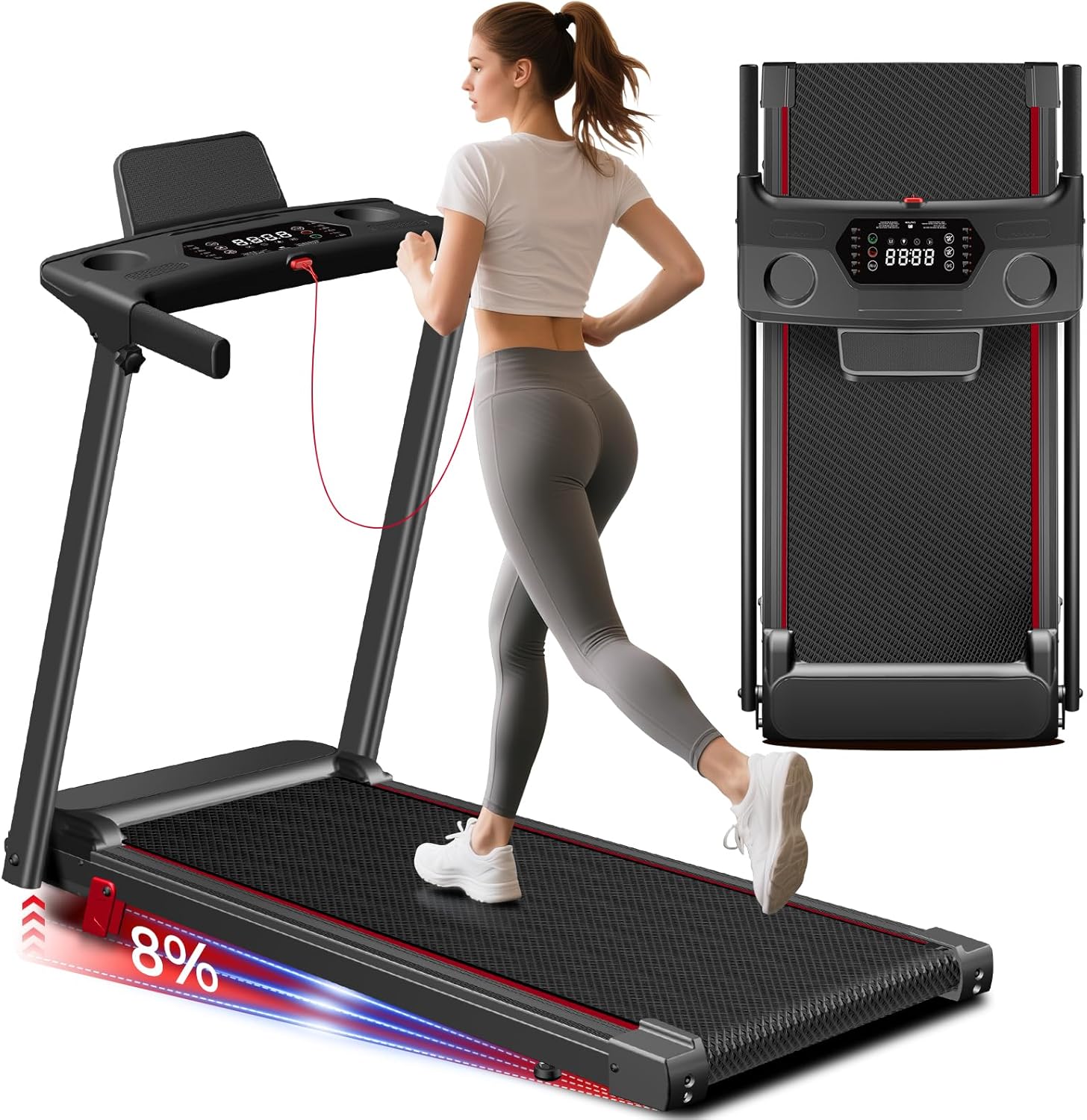
Figure 1: ApexNexus 3-in-1 Portable Incline Treadmill in its unfolded, ready-to-use state.
Key Features:
- 8% Manual Incline: Simulates uphill walking for increased calorie burn and muscle engagement.
- LED Display with Smart Memory: Tracks speed, time, calories, and distance. Automatically saves data when paused for seamless workout continuation.
- 3.0HP Whisper-Quiet Brushless Motor: Supports users up to 300 LBS with speeds from 0.6-6.2 MPH, operating below 50 dB.
- Space-Saving Foldable Design: Easily disassembles and folds for compact storage under a bed or in a closet, featuring built-in wheels for portability.
- 6-Layer Cushioning System: Provides a comfortable and stable running surface (38" x 15") with enhanced shock absorption to reduce joint impact.
Setup Instructions
The ApexNexus 3-in-1 Portable Incline Treadmill comes largely pre-assembled. Follow these steps to prepare your treadmill for use:
- Unboxing: Carefully remove the treadmill and all components from the packaging. Ensure all parts listed in the 'Packing Includes' section are present.
- Unfolding: Place the treadmill on a flat, stable surface. Lift the console unit until it locks into the upright position.
- Securing Handles: Locate the spring-loaded screws at the base of the console arms. Unscrew them to release the arms, then pull the arms up until they click into place. Re-tighten the screws to secure the handles.
- Attaching Covers: Place the provided plastic covers over the motor area at the front of the treadmill.
- Manual Incline Adjustment: The treadmill features an 8% manual incline. To activate, locate the red levers at the rear base of the treadmill. Flip these levers to raise the rear of the running deck, creating the incline. Ensure both sides are adjusted evenly.
- Power Connection: Plug the power cord into a grounded electrical outlet.
- Safety Key: Insert the red safety key into its designated slot on the console. The treadmill will not operate without the safety key in place.

Figure 2: The treadmill can be easily unfolded for use and folded for compact storage.

Figure 3: All components included in the packaging for assembly and maintenance.
Operating Instructions
Familiarize yourself with the control panel and its functions before starting your workout.

Figure 4: The LED display provides real-time workout data and smart memory features.
Control Panel Functions:
- LED Display: Shows real-time data for speed, time, calories burned, and distance. Features a smart memory function that saves your data when paused.
- Start/Pause Button: Press to start or pause your workout.
- Stop Button: Press to immediately stop the treadmill.
- Speed +/- Buttons: Adjust the treadmill speed incrementally (0.6-6.2 MPH).
- Quick Speed Buttons: Directly select speeds of 2, 4, or 6 MPH.
- Mode Button (M): Cycle through different workout modes (e.g., manual, preset programs).
- Program Button (P): Select from 12 different preset running programs (P1-P12) or target-based programs (H1-H3 for time, distance, calories).
- Pulse Sensors: Integrated into the handrails to monitor your heart rate during exercise.
- USB & AUX Ports: For charging devices or connecting external audio.
- Cup Holders & Phone/Tablet Slot: Conveniently located for your water bottle and mobile devices.
Workout Modes:
- Walking Mode: Speeds from 0.6-2.5 MPH.
- Jogging Mode: Speeds from 2.5-4 MPH.
- Running Mode: Speeds from 4-6.2 MPH.

Figure 5: The treadmill supports various exercise intensities from walking to running.
Safety Key:
The safety key must be inserted into the console for the treadmill to operate. Attach the clip of the safety key to your clothing before starting your workout. In case of an emergency, pulling the safety key will immediately stop the treadmill.
Video 1: Official product video demonstrating the ApexNexus Treadmill with Incline features.
Maintenance
Regular maintenance ensures the longevity and optimal performance of your treadmill.
Lubrication Schedule:
Apply the provided lubricant under the running belt according to the following schedule:
- Usage < 3 Hours/Week: Every 60 days
- Usage 4-5 Hours/Week: Every 45 days
- Usage > 5 Hours/Week: Every 30 days
Belt Adjustment:
The running belt can be adjusted using the provided tool if it becomes misaligned or too loose/tight. Refer to the user manual for detailed instructions on belt tensioning.

Figure 6: Instructions for adjusting the running belt and the recommended lubrication schedule.
Cleaning:
Wipe down the treadmill surfaces with a damp cloth after each use. Avoid using abrasive cleaners or solvents.
Troubleshooting
If you encounter any issues with your treadmill, please refer to the following common solutions:
- Treadmill Not Starting: Ensure the power cord is securely plugged into a grounded outlet and the power switch is on. Verify that the safety key is correctly inserted into the console.
- Unusual Noise: Check if the running belt is properly lubricated according to the maintenance schedule. Ensure all assembly screws are tightened. If the noise persists, contact customer support.
- Belt Slipping/Sticking: The running belt may require adjustment or lubrication. Follow the maintenance instructions for belt adjustment and lubrication.
- Display Not Working: Check the power connection and ensure the treadmill is turned on. If the issue persists, contact customer support.
Specifications
| Feature | Detail |
|---|---|
| Brand | ApexNexus |
| Model Name | 970NX |
| Color | Black |
| Product Dimensions (Unfolded) | 46.5"D x 22.8"W x 40"H |
| Folded Size | 46.5"L x 22.8"W x 5.5"H |
| Item Weight | 41 Pounds |
| Material | Carbon Steel |
| Maximum Speed | 6.2 Miles per Hour |
| Minimum Speed | 0.6 Miles per Hour |
| Maximum Incline Percentage | 8% (Manual) |
| Maximum Horsepower | 3.0 HP |
| Maximum Weight Recommendation | 300 Pounds |
| Display Type | LED |
| Metrics Measured | Calories Burned, Distance, Speed, Time |
| Special Features | Compact Design, Foldable, Lightweight, Manual Incline, Portable |
Warranty & Support
Your ApexNexus 3-in-1 Portable Incline Treadmill comes with a 1-year warranty. For any product-related inquiries, technical assistance, or warranty claims, please contact our dedicated customer service team. We offer 24/7 support via Amazon to ensure your complete satisfaction.
Important Safety Information
- Always read the user manual carefully before using the product.
- Ensure the treadmill is placed on a flat, stable surface before operation.
- Always stand on the side rails before starting the unit.
- Attach the safety key clip to your clothing during operation.
- Remove the safety key when the unit is not in use or unattended.
- Keep children and pets away from the treadmill during operation and when stored.
- Do not use the treadmill if you feel dizzy, faint, or experience any pain. Consult a physician.