
1. Introduction and Overview
The Hidrate Spark PRO 2 Smart Tumbler is designed to assist users in maintaining optimal hydration levels throughout the day. This 30 oz (887 ml) insulated stainless steel tumbler integrates advanced technology to automatically track water intake, provide customizable hydration reminders, and synchronize data with a dedicated mobile application. Its double-wall vacuum insulation keeps beverages cold for up to 24 hours or hot for 4 hours.
Key features include:
- Automatic hydration tracking via SipSense sensor technology.
- Bluetooth connectivity for syncing with the free HidrateSpark app.
- Customizable 360-degree glow and optional sound reminders.
- Compatibility with Apple Find My for location tracking.
- Durable, recycled 18/8 stainless steel construction.
- Splash-resistant lid with straw and ergonomic carry handle.
- USB-C rechargeable sensor with up to 21 days of battery life.

2. Product Components
The Hidrate Spark PRO 2 Smart Tumbler consists of several key components that work together to provide its functionality:
- Tumbler Body: The main insulated vessel, made from recycled 18/8 stainless steel.
- Smart Sensor: Located at the base of the tumbler, this component contains the SipSense technology for tracking water intake, the LED lights for glow reminders, and the USB-C charging port.
- Straw Lid: A splash-resistant lid designed for sipping with a straw, featuring a dual-position slider.
- Straw: Reusable straw for use with the lid.
- USB-C Charging Cable: For recharging the smart sensor.
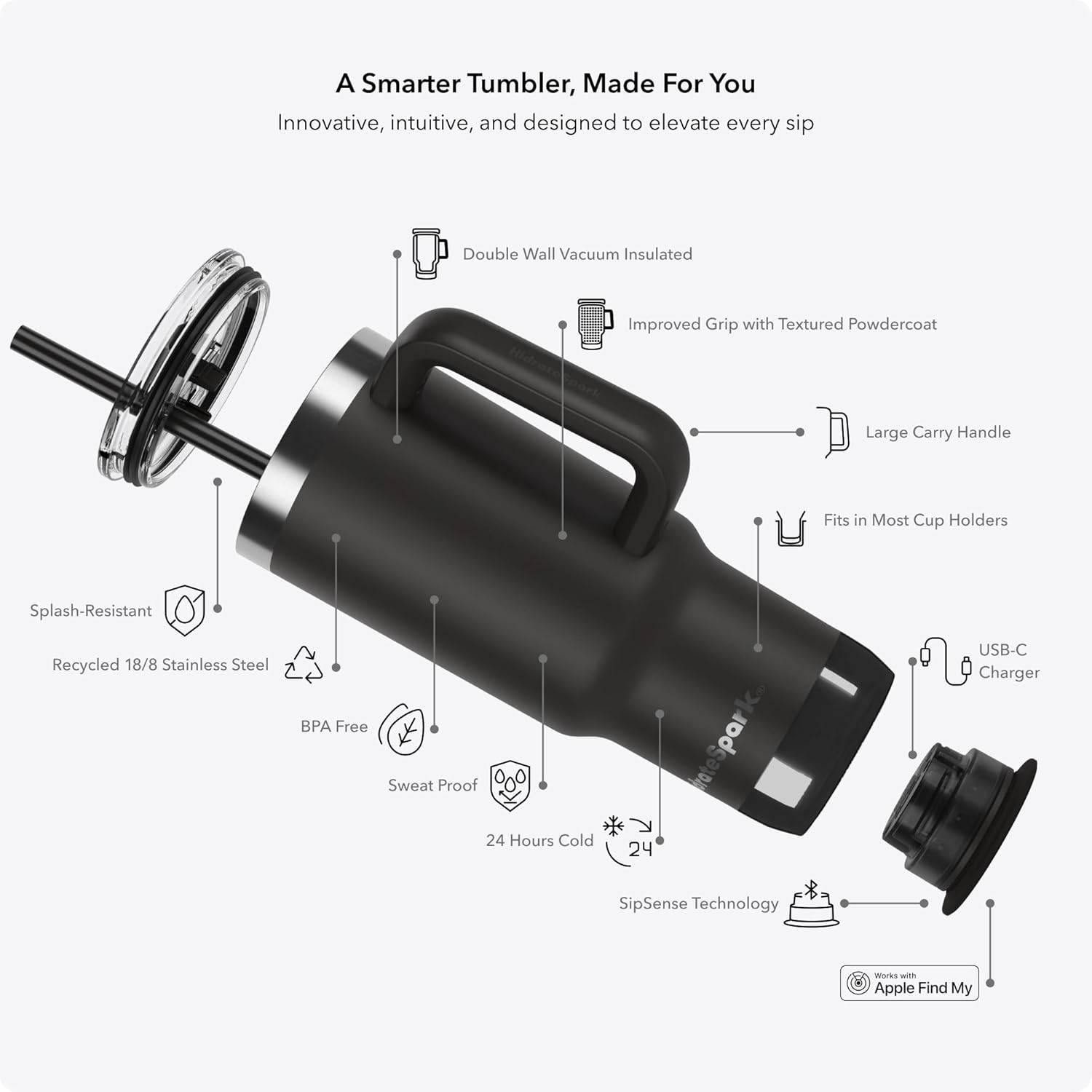

3. Setup Guide
- Charge the Smart Sensor:
Before first use, fully charge the smart sensor located at the base of the tumbler. Connect the provided USB-C charging cable to the sensor and a power source. The sensor's lights will indicate charging status and turn solid when fully charged. A full charge provides up to 21 days of battery life.

Image 3.1: The smart sensor detached from the tumbler, showing its USB-C charging port and the charging cable connected. This image also illustrates the Bluetooth connectivity and Apple Find My integration. - Download the HidrateSpark App:
Download the free HidrateSpark app from the Apple App Store or Google Play Store. Create an account and set up your personal hydration goals.
- Pair Your Tumbler:
Open the HidrateSpark app and follow the on-screen instructions to pair your PRO 2 Smart Tumbler via Bluetooth. Ensure Bluetooth is enabled on your mobile device and the tumbler's sensor is charged and active.
- Assemble the Tumbler:
Insert the smart sensor firmly into the base of the tumbler. Attach the straw lid and insert the straw. Ensure all components are securely in place before filling with liquid.
4. Operating Instructions
4.1. Tracking Water Intake
The Hidrate Spark PRO 2 uses SipSense technology to automatically track your water intake. The sensor at the base of the tumbler measures the volume of liquid consumed with each sip. This data is then wirelessly synced to your HidrateSpark app.
- Ensure the sensor is properly installed and charged.
- Keep your mobile device with the HidrateSpark app open and within Bluetooth range for real-time syncing. If out of range, the tumbler will store data and sync once reconnected.
- For accurate tracking, avoid placing the tumbler on uneven surfaces or moving it excessively while drinking.
4.2. Hydration Reminders
The tumbler provides visual and auditory reminders to help you stay hydrated:
- Glow Reminders: The 360-degree LED lights at the base of the tumbler will glow in a customizable pattern and color when it's time to drink.
- Sound Reminders: Optional sound alerts can be enabled and customized through the app to provide an auditory cue.
- App Notifications: The HidrateSpark app will also send notifications to your paired mobile device and Apple Watch (if applicable) as reminders.

4.3. Apple Find My Integration
The Hidrate Spark PRO 2 is compatible with Apple Find My. If you misplace your tumbler, you can use the Apple Find My app on your iPhone, iPad, Mac, or Apple Watch to locate it on a map.
- Ensure your tumbler is paired with your Apple device and Find My is enabled for the tumbler.
- Open the Apple Find My app to view the last known location of your tumbler.
5. HidrateSpark App Features
The free HidrateSpark app is central to managing your hydration and tumbler settings:
- Personalized Hydration Goals: Set and adjust your daily water intake goals based on your activity level, body type, and environment.
- Progress Tracking: View your daily, weekly, and monthly hydration progress, including detailed history of sips.
- Customizable Reminders: Personalize the glow color, pattern, timing, sound type, frequency, and volume of your tumbler's reminders.
- Challenges and Friends: Participate in hydration challenges and connect with friends to motivate each other.
- Trophies: Earn virtual trophies for reaching hydration milestones.
- Multiple Bottle Management: Manage multiple HidrateSpark bottles from a single app interface.

6. Maintenance and Care
Proper care ensures the longevity and optimal performance of your Hidrate Spark PRO 2 Smart Tumbler:
- Hand Wash Only: The tumbler body, lid, and straw should be hand washed with warm, soapy water. Do not use abrasive cleaners or scrubbers.
- Sensor Care: The smart sensor is water-resistant but should not be submerged for extended periods. Wipe it clean with a damp cloth. Ensure the charging port is dry before charging.
- Drying: Allow all components to air dry thoroughly before reassembly or storage.
- Storage: Store the tumbler with the lid off to prevent moisture buildup and odors.
- Do Not Freeze: Do not place the tumbler in the freezer, as this can damage the insulation and electronic components.
- Do Not Microwave: The tumbler is made of stainless steel and contains electronic components; it is not safe for microwave use.
7. Troubleshooting
If you encounter issues with your Hidrate Spark PRO 2 Smart Tumbler, refer to the following common solutions:
| Problem | Possible Solution |
|---|---|
| Tumbler not syncing with app |
|
| Sensor not tracking sips accurately |
|
| Glow or sound reminders not working |
|
| Tumbler cannot be located with Apple Find My |
|
For further assistance, please refer to the support section within the HidrateSpark app or visit the official Hidrate Spark website.
8. Specifications
| Feature | Detail |
|---|---|
| Model Name | HidrateSpark PRO 2 |
| Model Number | HI-30T-02 |
| Brand | Hidrate Spark |
| Capacity | 30 oz (887 Milliliters) |
| Material | Recycled 18/8 Stainless Steel |
| Insulation | Double-wall vacuum insulated (24 hours cold, 4 hours hot) |
| Dimensions (W x H) | 3.9" x 9.47" |
| Weight | 1.23 pounds (0.56 Kilograms) |
| Battery Type | 1 Lithium Metal battery (included) |
| Battery Life | Up to 21 days per charge |
| Charging | USB-C |
| Special Features | SipSense Technology, Bluetooth Sync, Apple Find My, Glow & Sound Reminders, BPA-Free |
| Care Instructions | Hand Wash Only |
9. Safety Information
- Do not microwave the tumbler or any of its components.
- Do not place the tumbler in the freezer.
- Hand wash only. Do not put the tumbler or sensor in a dishwasher.
- Keep the smart sensor away from extreme temperatures.
- Ensure the USB-C charging port is dry before connecting the charging cable.
- This product contains a lithium metal battery. Dispose of the product and battery according to local regulations.
- Keep out of reach of small children.
10. Warranty and Support
For detailed warranty information and customer support, please visit the official Hidrate Spark website or contact their customer service directly. Information regarding product registration, warranty claims, and technical assistance can be found there.
Official Website: www.hidratespark.com
