
Introduction
This user manual provides comprehensive instructions for the setup, operation, and maintenance of your SWZEC Pirewaire Amory 5 Mini Smartwatch. Please read this manual carefully before using the device to ensure optimal performance and longevity.
The SWZEC Pirewaire Amory 5 Mini Smartwatch features an ultra-sharp 1.19-inch AMOLED display, offering brilliant visuals with vibrant colors. Its Always-On function ensures that all important information is always visible without needing to activate the watch. This display guarantees first-class visibility in any situation, whether in bright sunlight or in the dark.

Figure 1: Front view of the SWZEC Pirewaire Amory 5 Mini Smartwatch, showcasing its sleek design and vibrant display.
What's in the Box
Upon opening the package, please ensure all the following components are present:
- 1 x SWZEC Pirewaire Amory 5 Mini Smartwatch
- 1 x Charging Cable
- 1 x User Manual (this document)

Figure 2: The SWZEC Pirewaire Amory 5 Mini Smartwatch displayed with its charging cable, representing the typical contents of the product package.
Product Features
The SWZEC Pirewaire Amory 5 Mini Smartwatch is equipped with advanced features designed to enhance your daily life:
- Ultra-Sharp AMOLED Display: A 1.19-inch display for vibrant colors and clear visuals.
- Always-On Function: Keep essential information visible at all times without activating the screen.
- Bluetooth Connectivity: Seamlessly connect to your smartphone for notifications and data synchronization.
- USB Charging: Convenient charging via the included USB cable.
- Long-lasting Battery: Powered by a 380 mAh alkaline battery for extended use.
- Fitness Tracking: Monitor your daily activities and progress.
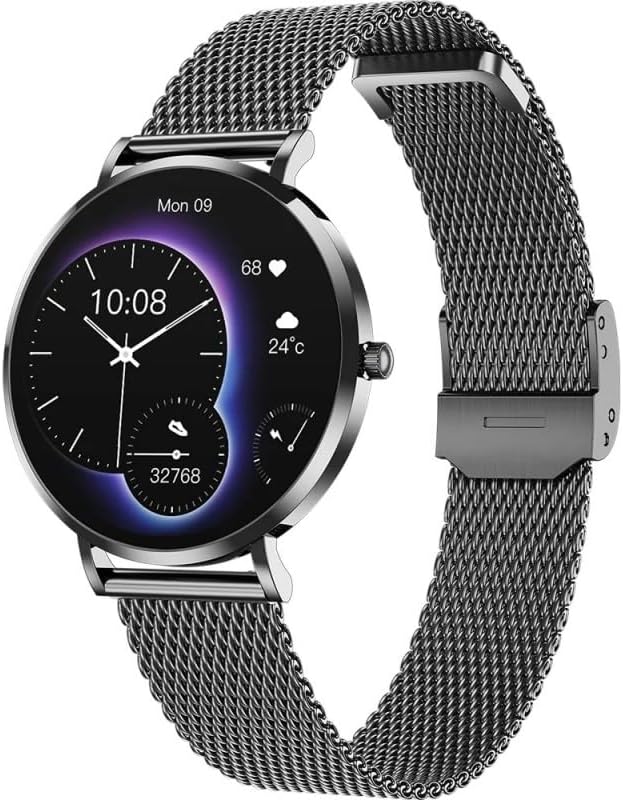
Figure 3: The SWZEC Pirewaire Amory 5 Mini Smartwatch featuring its elegant black mesh strap and round display.

Figure 4: A detailed view of the smartwatch display, showing time, date, heart rate, and weather information.
Setup Guide
1. Charging the Device
Before first use, fully charge your smartwatch. Connect the included charging cable to the charging contacts on the back of the watch and plug the USB end into a compatible USB power adapter (not included) or a computer's USB port. The display will indicate charging status.

Figure 5: The back of the smartwatch, highlighting the optical sensors and magnetic charging pins.
2. Initial Power On
Once charged, press and hold the side button for a few seconds until the SWZEC logo appears on the screen. The watch will then boot up.
3. Pairing with Your Smartphone
- Ensure Bluetooth is enabled on your smartphone.
- Download and install the official SWZEC companion app from your smartphone's app store (iOS App Store or Google Play Store).
- Open the app and follow the on-screen instructions to create an account or log in.
- In the app, navigate to the device pairing section and select "Add New Device".
- Select "SWZEC Amory 5 Mini" from the list of available devices.
- Confirm the pairing request on both your smartphone and the smartwatch if prompted.
Once paired, the watch will synchronize time and other settings with your phone.
Operating Your Smartwatch
Navigating the Interface
- Touchscreen Gestures:
- Swipe Up/Down: Scroll through menus or notifications.
- Swipe Left/Right: Access different widgets or quick settings.
- Tap: Select an item or open an application.
- Tap and Hold: Customize watch faces (if applicable).
- Side Button:
- Short Press: Return to the previous screen or watch face.
- Long Press: Power on/off or access power options.
Display Functions
The AMOLED display provides clear access to various functions:
- Time and Date: Always visible with the Always-On function.
- Activity Tracking: View steps taken, distance covered, and calories burned.
- Heart Rate Monitoring: Access real-time heart rate data.
- Weather: Get current weather updates (requires phone connection).
- Notifications: Receive alerts for calls, messages, and app notifications from your paired smartphone.
Using Fitness Tracking
The Amory 5 Mini Smartwatch can track various fitness metrics. Ensure the watch is worn snugly on your wrist for accurate readings. Access the fitness tracking features through the main menu or dedicated widgets. You can view your daily progress directly on the watch or in more detail via the companion app.

Figure 6: The smartwatch being worn during a workout, demonstrating its use for fitness tracking.
Care and Maintenance
- Cleaning: Regularly wipe the watch screen and body with a soft, lint-free cloth. For stubborn smudges, slightly dampen the cloth with water. Avoid using harsh chemicals or abrasive materials.
- Strap Care: Clean the mesh strap with a soft brush and mild soap solution if necessary, then rinse thoroughly and dry completely before reattaching to the watch.
- Water Resistance: While the watch may have some water resistance, avoid prolonged submersion or exposure to hot water, steam, or high-pressure water jets. Refer to the product specifications for exact water resistance ratings.
- Battery Care: To prolong battery life, avoid fully discharging the battery frequently. Charge the device when the battery level is low. Store the watch in a cool, dry place when not in use for extended periods.
- Storage: Store the smartwatch in a cool, dry environment away from direct sunlight and extreme temperatures.
Troubleshooting Common Issues
If you encounter any issues with your SWZEC Pirewaire Amory 5 Mini Smartwatch, please refer to the following common solutions:
| Problem | Possible Solution |
|---|---|
| Device not powering on | Ensure the device is fully charged. Connect it to the charger for at least 30 minutes. If it still doesn't power on, try a different charging cable or power adapter. |
| Cannot connect to smartphone |
|
| Display is unresponsive or frozen | Perform a force restart by pressing and holding the side button for approximately 10-15 seconds until the device reboots. |
| Battery draining quickly |
|
Technical Specifications
| Feature | Specification |
|---|---|
| Model Number | 11ddd142-0421-4e1b-ac09-61dc2ab887a7 |
| Display Type | AMOLED |
| Display Size | 1.19 inches |
| Connectivity Technology | Bluetooth, USB |
| Wireless Communication Standard | Bluetooth |
| Battery Capacity | 380 mAh |
| Battery Composition | Alkaline |
| Special Feature | Always-On Display |
| Included Components | 1 x Smartwatch, 1 x Charging Cable, 1 x User Manual |
| Product Dimensions (Packaging) | 16.2 x 10.8 x 2.1 cm |
| Item Weight (Packaging) | 160 Grams |
| Manufacturer | SWZEC |
| Country of Origin | China |

Figure 7: Size comparison between the Amory 5 (1.32 inches) and Amory 5 Mini (1.19 inches) displays.
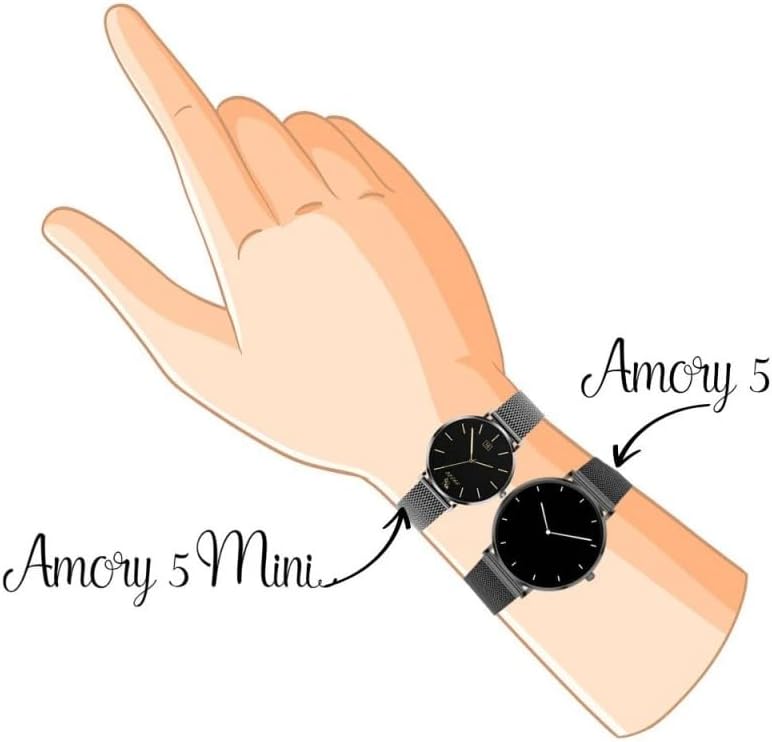
Figure 8: Visual comparison of the Amory 5 and Amory 5 Mini smartwatches when worn on a wrist, illustrating their relative sizes.
Warranty and Support
Your SWZEC Pirewaire Amory 5 Mini Smartwatch comes with a Limited Warranty. Please refer to the warranty card included in your product packaging for specific terms and conditions, including coverage duration and what is covered.
For technical support, troubleshooting assistance beyond this manual, or warranty claims, please contact SWZEC customer service through the contact information provided on the official SWZEC website or through your point of purchase. Please have your model number (11ddd142-0421-4e1b-ac09-61dc2ab887a7) and proof of purchase ready when contacting support.