
1. Introduction
The HOYOA HY-1427U1 150W Power Inverter converts 20V DC power from compatible Dewalt 20V MAX batteries into 110-120V AC power, along with USB-C and USB-A outputs. This portable device is designed to power and charge various electronic devices and small appliances in outdoor, travel, and emergency situations.
2. Safety Instructions
- Read All Instructions: Before using the inverter, read and understand all safety warnings and operating instructions.
- Battery Compatibility: Use only with specified Dewalt 20V MAX Lithium-Ion batteries. Using incompatible batteries may result in fire, electric shock, or injury.
- Ventilation: Ensure adequate ventilation around the inverter during operation to prevent overheating. Do not cover the ventilation openings.
- Avoid Moisture: Do not expose the inverter to rain, moisture, or wet conditions.
- Overload Protection: Do not exceed the rated output power of 150W. Overloading the inverter may cause damage to the unit and connected devices.
- Children and Pets: Keep the inverter out of reach of children and pets.
- Storage: Store the inverter in a dry, cool place away from direct sunlight when not in use. Remove the battery if storing for extended periods.
- Disassembly: Do not attempt to disassemble or modify the inverter. Refer all servicing to qualified personnel.
3. Product Overview
Familiarize yourself with the components and features of your HOYOA 150W Power Inverter.

Image 1: Front view of the HOYOA 150W Power Inverter, highlighting the AC outlet, USB-C, USB-A ports, LED light, and control buttons.
- AC Outlet: 110-120V AC, 60Hz, 150W Max.
- USB-C Port: Power Delivery (PD) 65W output.
- USB-A Port: 18W output.
- LED Work Light: Integrated light with multiple brightness settings.
- Battery Interface: Compatible with Dewalt 20V MAX batteries.
- Power Button: Activates/deactivates the inverter.
- Light Button: Controls the LED work light.
- Foldable Hook: For convenient hanging and storage.
4. Setup
- Insert Battery: Align a compatible Dewalt 20V MAX battery with the inverter's battery slot and slide it in until it clicks securely into place. Ensure the battery is fully charged for optimal performance.
- Power On: Press and hold the Power Button for approximately 2 seconds to turn on the inverter. The indicator lights will illuminate, confirming the unit is active.
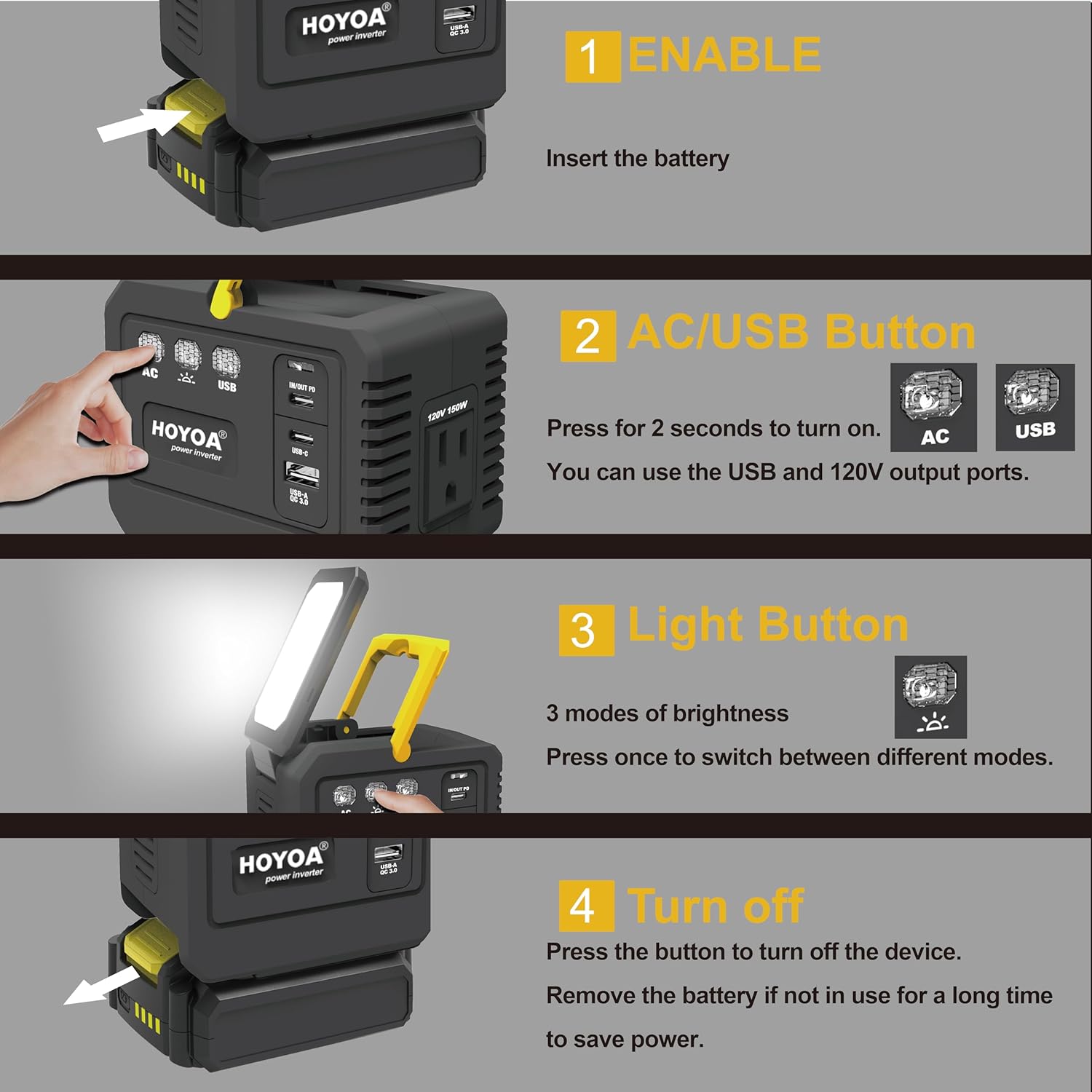
Image 2: Visual guide demonstrating battery insertion and power activation.
5. Operating Instructions
5.1 Using AC Outlet and USB Ports
- Once the inverter is powered on, connect your device's power cable to the appropriate AC outlet, USB-C port, or USB-A port.
- Ensure the total power consumption of all connected devices does not exceed 150W.
- The inverter will automatically provide power to the connected devices.
5.2 Using the LED Work Light
- Press the Light Button once to turn on the LED work light.
- Press the Light Button repeatedly to cycle through different brightness levels (e.g., Low, Medium, High).
- To turn off the LED light, cycle through all brightness levels or press and hold the Light Button.
5.3 Powering Off
To turn off the inverter, press and hold the Power Button for approximately 2 seconds until the indicator lights turn off. Remove the battery if the inverter will not be used for an extended period.

Image 3: Illustration of the inverter powering a laptop, phone, and fan, demonstrating its versatility.
6. Compatibility
The HOYOA HY-1427U1 Power Inverter is compatible with a wide range of Dewalt 20V MAX Lithium-Ion batteries, including:
- DCB205 (5.0Ah)
- DCB206 (6.0Ah)
- DCB204 (4.0Ah)
- DCB200 (2.0Ah)
- DCB203 (3.0Ah)
- Other standard Dewalt 20V MAX models.
Using official Dewalt batteries ensures stable and reliable power output.

Image 4: Visual representation of compatible Dewalt 20V MAX battery packs.
7. Features
- 150W DC to AC Power: Converts 20V DC battery power to 110-120V AC, suitable for laptops, small tools, and household electronics.
- Multiple Output Options: Includes 1 AC outlet, 1 USB-C PD 65W port, and 1 USB-A 18W port for simultaneous charging.
- Integrated LED Work Light: Provides hands-free illumination with adjustable brightness, useful for various tasks and emergencies.
- Foldable Hook: Allows for easy storage and convenient hanging during use.
- Advanced Safety Protections: Equipped with overvoltage, short circuit, reverse polarity, overcurrent, overload, and overtemperature protection for safe operation.

Image 5: Overview of the inverter's safety features, including overvoltage, short circuit, and overload protection.
8. Specifications
| Feature | Specification |
|---|---|
| Model | HY-1427U1 |
| Rated Voltage | 20V DC |
| AC Output | 110-120V AC, 60Hz, 150W Max |
| USB-C Output | PD 65W (5V/3A, 9V/3A, 12V/3A, 15V/3A, 20V/3.25A) |
| USB-A Output | 18W (5V/3A, 9V/2A, 12V/1.5A) |
| LED Light Output | Up to 400 Lumens (multiple modes) |
| Dimensions | 11.68 x 7.62 x 8.64 cm |
| Weight | 480 g |
9. Maintenance
- Cleaning: Use a soft, dry cloth to clean the exterior of the inverter. Do not use abrasive cleaners or solvents.
- Storage: When not in use, store the inverter in a cool, dry place. Remove the battery for long-term storage.
- Battery Care: Follow the manufacturer's instructions for charging and maintaining your Dewalt 20V MAX batteries.
10. Troubleshooting
| Problem | Possible Cause | Solution |
|---|---|---|
| Inverter does not turn on | Battery not inserted correctly or discharged. | Ensure battery is securely clicked into place. Charge the battery if it is low. |
| No power output from AC/USB ports | Inverter is overloaded or device is incompatible. | Reduce the load on the inverter. Check device power requirements. Ensure inverter is fully powered on. |
| LED light not working | Light button not pressed correctly or unit is off. | Press the Light Button to activate. Ensure the inverter is powered on. |
| Inverter shuts down unexpectedly | Overload, overheating, or low battery. | Reduce load, allow unit to cool, or replace/recharge battery. |
11. Official Product Video
Video 1: A brief demonstration of the HOYOA USB Charger Adapter for Dewalt 20V Battery, showcasing its features and ease of use.
12. Warranty and Support
For warranty information, technical support, or any inquiries regarding your HOYOA HY-1427U1 Power Inverter, please contact HOYOA customer service through the following channels:
- Amazon Message: Use the Amazon messaging system to contact the seller directly.
- Email: hoyoa2020@outlook.com
- Social Media: @Hoyoa Power Tools (Facebook), @hoyoa_official (Instagram)
Please have your model number (HY-1427U1) and purchase details ready when contacting support.