
1. Introduction
The Dszuu M168 Rechargeable Flashlight is a high-performance lighting device designed for versatility and durability. Featuring an advanced P70 LED chip, it delivers powerful illumination suitable for various environments, from everyday tasks to demanding outdoor activities. This manual provides essential information for the safe and effective use of your flashlight.
2. Safety Information
- Store the flashlight in a cool place and avoid direct sunlight to prevent damage to internal components.
- Keep the flashlight out of the reach of children to prevent accidental injury.
- Do not shine the light directly into eyes, as the high lumen output can cause temporary vision impairment.
3. Package Contents
Verify that all items are present in your package:
- 1 × Dszuu M168 Rechargeable Flashlight
- 1 × USB Charging Cable (Type-C)
- 1 × User Manual
- 1 × Lanyard
4. Product Overview
Familiarize yourself with the main components of your Dszuu M168 Flashlight:

Image: Flashlight Structure Diagram
- Ultra Bright LED Chip: The primary light source.
- Telescopic Zoom: Adjustable head for spotlight or floodlight.
- Power Switch: Controls power and mode selection.
- LCD Battery Power Display: Shows real-time battery percentage (0-100%).
- Charging Port (USB-C): Input for recharging the flashlight.
- USB Output Port: Functions as a power bank for external devices.
- Anti-Slip Texture: Provides a secure grip.
- Tail Cover: Protects the rear end of the flashlight.
- Wrist Strap: For secure carrying and preventing drops.
5. Setup
5.1 Initial Charging
Before first use, fully charge your Dszuu M168 Flashlight.
- Locate the USB-C charging port on the flashlight body.
- Connect the provided USB-C cable to the flashlight's charging port.
- Connect the other end of the USB-C cable to a compatible USB power source (e.g., wall adapter, computer USB port).
- The LCD display will show the charging progress. A full charge typically takes 4-6 hours.
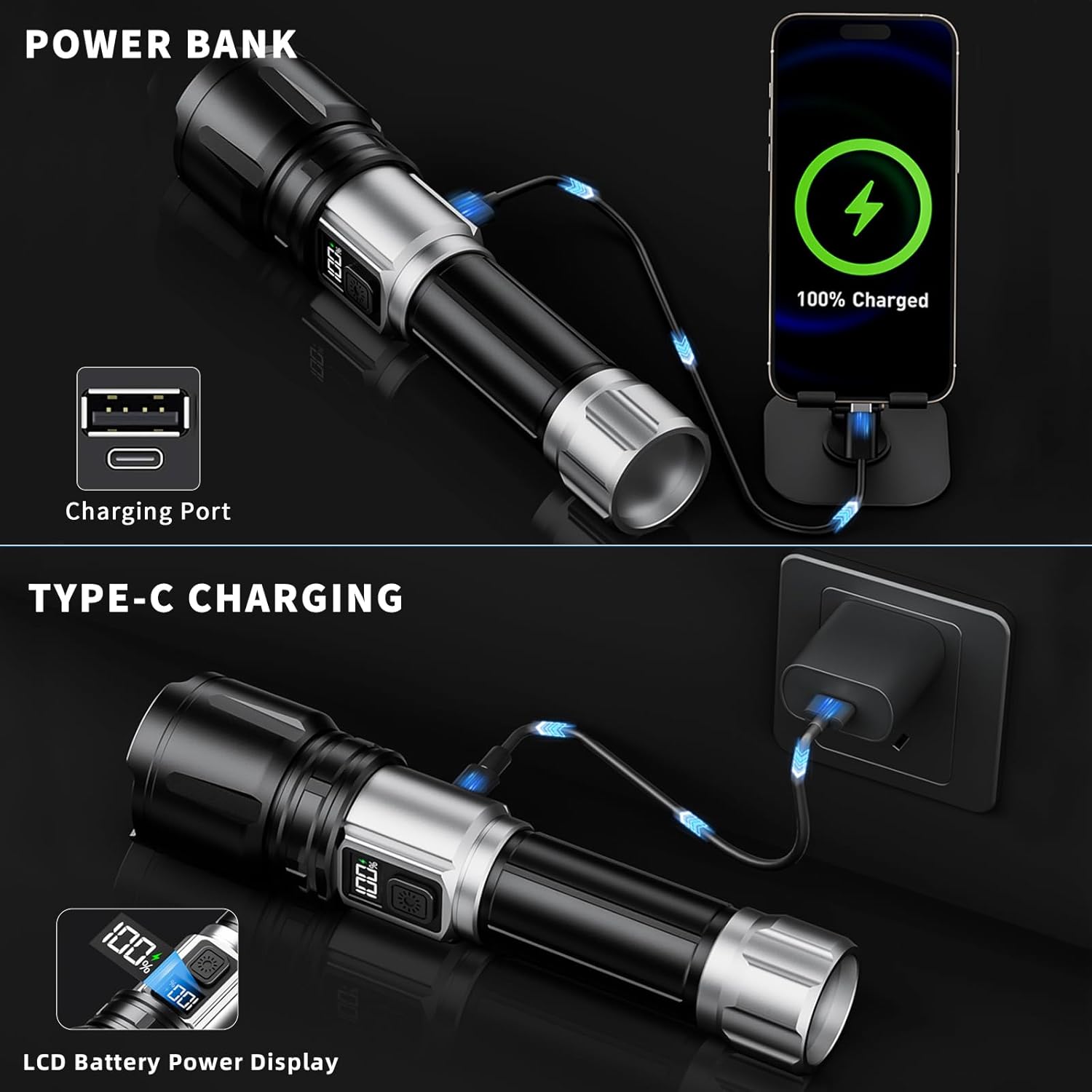
Image: USB-C Charging and Power Bank Function
5.2 Battery Information
The Dszuu M168 Flashlight features a built-in rechargeable Lithium Polymer battery. This battery is an integrated component and is not designed for user replacement.
6. Operating Instructions
6.1 Power On/Off
- To turn the flashlight ON, press the power switch once.
- To turn the flashlight OFF, press and hold the power switch for 2 seconds from any mode.
6.2 Lighting Modes
The flashlight offers 6 lighting modes:

Image: Four Lighting Modes (High, Medium, Low, SOS)
- Main Lighting Modes: High, Medium, Low, Strobe. Press the power switch repeatedly (after turning on) to cycle through these modes.
- Telescopic Zoom Modes: Spotlight, Floodlight.
6.3 Adjusting Zoom
The flashlight features a telescopic head to adjust the beam focus:
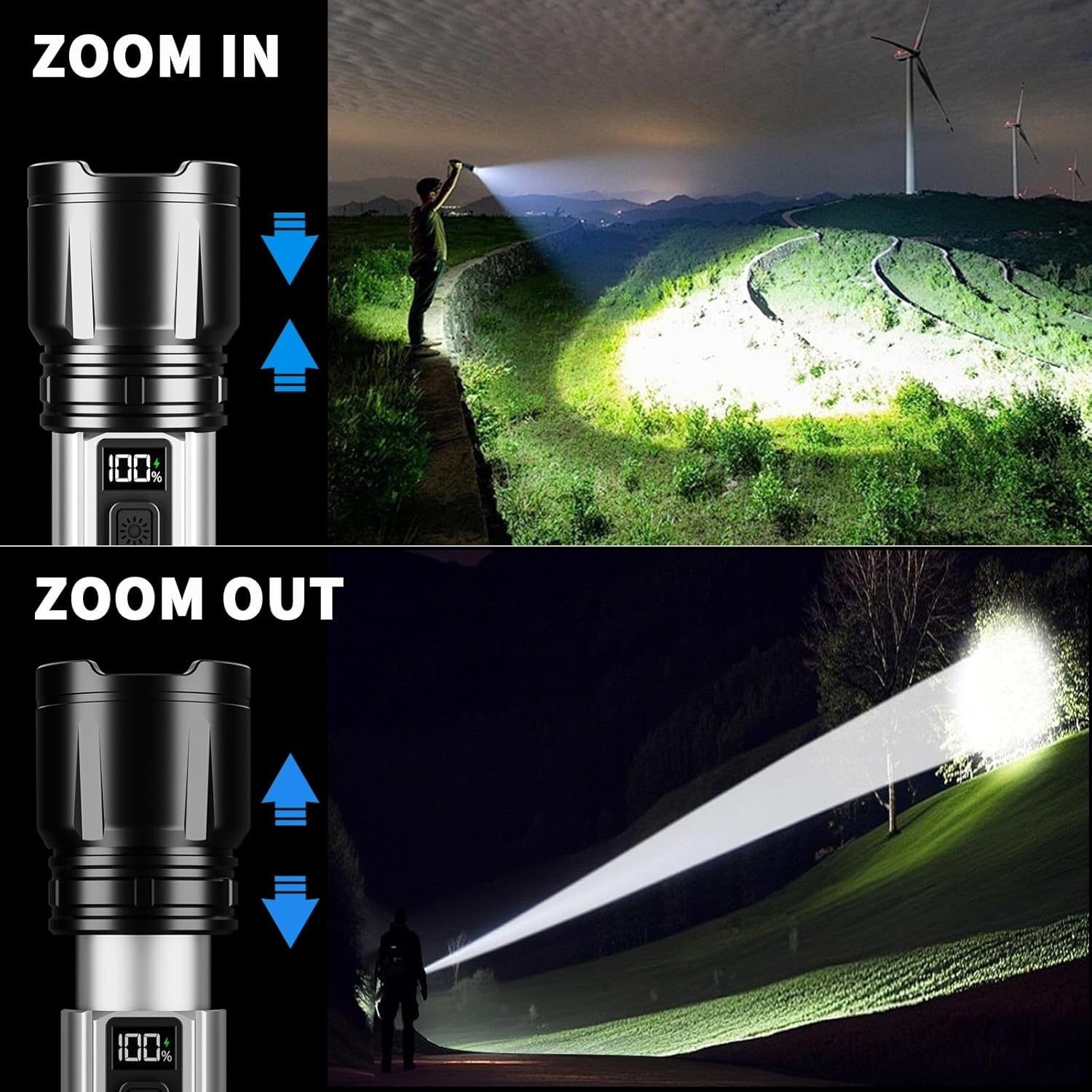
Image: Zoom In/Out Functionality
- To activate Spotlight mode (long-distance, narrow beam), pull the flashlight head forward.
- To activate Floodlight mode (broad-area, wide beam), push the flashlight head back.
6.4 Power Bank Function
The flashlight can be used to charge other small electronic devices:
- Open the protective cover of the USB output port.
- Connect your device's charging cable to the flashlight's USB output port.
- The flashlight will begin charging your device.
7. Maintenance
7.1 Cleaning
- Wipe the flashlight body with a soft, damp cloth.
- Do not use abrasive cleaners, solvents, or harsh chemicals, as these can damage the finish or internal components.
- Keep the lens clean for optimal light output. Use a lens cleaning cloth if necessary.
7.2 Storage
- Store the flashlight in a cool, dry place away from direct sunlight and extreme temperatures.
- If storing for extended periods (over 3 months), charge the battery every 3-6 months to maintain battery health and prevent deep discharge.
7.3 Water Resistance

Image: IPX7 Waterproof Feature
The Dszuu M168 Flashlight is rated IPX7 waterproof, meaning it is protected against immersion in water up to 1 meter for 30 minutes. Ensure the USB-C charging port cover is securely closed before exposing the flashlight to water or harsh weather conditions.
8. Troubleshooting
If you encounter issues with your flashlight, refer to the following common problems and solutions:
| Problem | Possible Cause | Solution |
|---|---|---|
| Flashlight does not turn on | Low or depleted battery. | Check the LCD display for battery level. Recharge the flashlight fully. |
| Light is dim or flickers | Low battery. Dirty lens. | Recharge the flashlight. Clean the lens gently with a soft cloth. |
| Flashlight not charging | Improper cable connection. Faulty cable or adapter. Power source issue. | Ensure USB-C cable is securely connected. Try a different USB-C cable or power adapter. Verify the power outlet is active. |
| Power bank function not working | Flashlight battery too low. Device not compatible. | Ensure flashlight has sufficient charge. Try charging a different device. |
If the problem persists after trying these solutions, please contact Dszuu customer support.
9. Specifications
| Model | M168 |
| Light Source | P70 LED Chip |
| Brightness | Up to 990,000 Lumens (manufacturer stated) |
| Beam Range | Up to 4,921 feet (1500 meters) |
| Battery Type | Built-in Lithium Polymer |
| Runtime | Up to 18 hours (Low mode) |
| Charging Port | USB-C Fast Charging |
| Charging Time | 4-6 hours (full charge) |
| Output Port | USB-A (Power Bank Function) |
| Water Resistance | IPX7 |
| Material | Aerospace-grade Aluminum |
| Dimensions (L x W x H) | 170 x 30 x 40 mm (6.7 x 1.2 x 1.6 inches) |
| Weight | 330 g (0.73 lbs) |
| Special Features | LCD Digital Power Display, Telescopic Zoom, 6 Lighting Modes (High, Medium, Low, Strobe, Spotlight, Floodlight), Power Bank Function. |
10. Warranty and Support
10.1 Warranty Information
The Dszuu M168 Rechargeable Flashlight comes with a 10-year replacement guarantee. This warranty covers manufacturing defects and ensures a worry-free experience with your product.
10.2 Customer Support
For any questions, technical assistance, or warranty claims, please contact Dszuu customer support. Our professional team is available to assist you.
- Refer to the contact information provided in your product packaging.
- Visit the official Dszuu website for support resources and contact details.