
FBGlek2990k
Liitokala LII-600 Intelligent Battery Charger User Manual
Model: LII-600 (FBGlek2990k)
1. Introduction
The Liitokala LII-600 is an advanced 4-channel intelligent battery charger designed for various cylindrical Li-ion and NiMH batteries. It features independent recharging, discharge, capacity detection, and repair functions. With its LCD display and intuitive controls, it offers both automatic and manual operating modes, providing precise control over the charging and discharging process. Built-in safety features include anti-reverse connection, short-circuit protection, overcharge protection, and temperature control.
2. Safety Information
- Read all instructions carefully before use.
- Operate only with the supplied AC adapter. Using an incorrect adapter may damage the charger or batteries.
- Disconnect the power supply before making or breaking connections to the battery.
- Ensure adequate ventilation during charging. Batteries can produce explosive gases. Prevent flames and sparks.
- Do not charge damaged or leaking batteries.
- Keep the charger away from water, moisture, and high temperatures.
- This charger is designed for rechargeable batteries only. Do not attempt to charge non-rechargeable batteries.
- Keep out of reach of children.
3. Package Contents
- Liitokala LII-600 Battery Charger
- Power Adapter (12.0V/5.0A)
- Power Cable

Figure 3.1: Liitokala LII-600 charger, power adapter, and power cable.
4. Product Overview
4.1. Front Panel and Display
The front panel features four independent battery slots (CH1-CH4) and an LCD display that provides real-time information on each channel's status, including voltage, capacity, current, and operating mode. Below the display are touch-sensitive buttons for mode selection and current adjustment.

Figure 4.1: Detailed view of the LCD display panel and touch controls.
- Touch Display Slots (1-4): Select individual channels.
- Battery Slot Display: Shows selected channel.
- Rechargeable Battery Type: Indicates NiMH/NiCd (1.2V) or Li-ion (3.7V).
- AUTO/MANUAL: Indicates automatic or manual current adjustment.
- Select Current: Displays selected charge/discharge current.
- Currently Displayed: Shows the current value.
- Charging Progress: Battery icon and percentage.
- Voltage, Capacity, Internal Resistance, Operating Hours, Temperature: Detailed battery information.
- MODE Button: Selects operating mode (CHARGE, DISCHARGE, TEST, REPAIR).
- CURRENT Button: Adjusts charge/discharge current.
4.2. Side and Bottom Features
The charger is designed with practical features for ease of use and safety, including sliding battery compartments, cooling holes, and anti-slip feet.
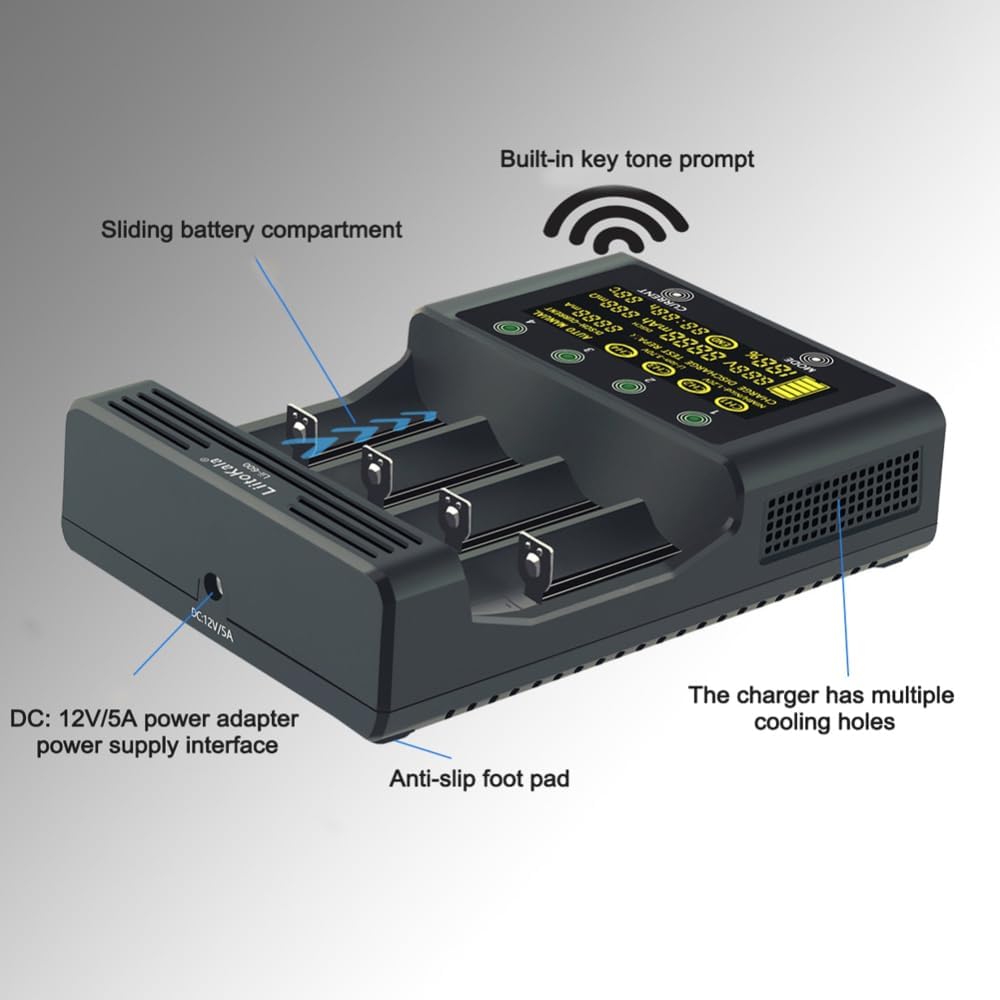
Figure 4.2: Side view highlighting key physical features.
- Sliding Battery Compartment: Accommodates various battery sizes.
- DC 12V/5A Power Adapter Interface: For connecting the power supply.
- Cooling Holes: Ensures proper heat dissipation during operation.
- Anti-slip Foot Pad: Provides stability on surfaces.
- Built-in Key Tone Prompt: Provides audio feedback for operations.

Figure 4.3: Bottom view showing product specifications and safety warnings.
5. Setup
- Place the Liitokala LII-600 charger on a stable, flat, and well-ventilated surface.
- Connect the supplied power adapter to the DC 12V/5A power interface on the side of the charger.
- Plug the power adapter into a suitable electrical outlet. The LCD display will illuminate, indicating the charger is powered on.
- Insert the rechargeable battery into one of the four independent slots, ensuring correct polarity (+ and -). The charger will automatically detect the battery type (Li-ion or NiMH) and display its current voltage.
6. Operating Modes
The LII-600 offers two main working modes: AUTO and MANUAL, along with four functional modes: CHARGE, DISCHARGE, TEST, and REPAIR. Each of the four channels operates independently.
6.1. AUTO Mode (Automatic Current Selection)
In AUTO mode, the charger intelligently selects the optimal charging or discharging current based on the battery's internal resistance and type. This is the default mode for convenience.
- Insert a battery. The charger will automatically detect it and enter AUTO mode.
- The display will show "AUTO" and the automatically selected current.
- The charging/discharging process will begin automatically.
6.2. MANUAL Mode (Manual Current Selection)
MANUAL mode allows users to select specific charge or discharge currents. This is useful for specific battery requirements or faster/slower charging.
- Insert a battery. Within 8 seconds, press the MODE button to cycle through the functional modes (CHARGE, DISCHARGE, TEST, REPAIR).
- While in the desired functional mode, press the CURRENT button to select the desired current. Available charge currents: 250mA / 500mA / 1000mA / 1500mA / 2000mA / 2500mA / 3000mA. Available discharge currents: 250mA / 500mA / 750mA.
- After selecting the current, the process will begin. If no button is pressed for 8 seconds, the charger will default to AUTO mode.
6.3. Functional Modes
- CHARGE Mode: Recharges the battery. The display shows charging progress, voltage, and current.
- DISCHARGE Mode: Discharges the battery to a safe level. Useful for conditioning NiMH batteries or preparing Li-ion batteries for storage.
- TEST Mode (Capacity Detection): Measures the actual capacity of the battery.
- Insert battery, select TEST mode using the MODE button.
- Select desired discharge current using the CURRENT button.
- The charger will first fully charge the battery, then discharge it to measure capacity, and finally recharge it. The measured capacity will be displayed.

Figure 6.1: Example of a capacity test in progress.
- REPAIR Mode (Zero Volt Activation): Attempts to reactivate deeply discharged batteries (zero volt activation). This mode applies a small current to bring the battery voltage to a detectable level, after which normal charging can proceed. Note: Not all deeply discharged batteries can be recovered.
7. Supported Battery Types
The Liitokala LII-600 is compatible with a wide range of cylindrical rechargeable batteries:
- Li-ion Batteries (3.7V): 26650, 22650, 26500, 18650, 18490, 17670, 17500, 17355, 16340 (RCR123), 14500, 10440.
- NiMH/NiCd Batteries (1.2V): AA, AAA, A, SC sizes.
8. Maintenance
- Clean the charger and battery contacts regularly with a dry, soft cloth to ensure optimal connection.
- Do not use abrasive cleaners or solvents.
- Store the charger in a cool, dry place away from direct sunlight and extreme temperatures when not in use.
- Ensure the ventilation holes are not blocked during operation.
9. Troubleshooting
| Problem | Possible Cause | Solution |
|---|---|---|
| Charger not powering on. | Power adapter not connected or faulty; power outlet issue. | Ensure power adapter is securely connected. Try a different power outlet. Verify the adapter is the original supplied one. |
| Battery not detected or "NULL" displayed. | Incorrect battery insertion; battery is non-rechargeable or severely damaged; poor contact. | Re-insert battery, ensuring correct polarity. Clean battery contacts and charger contacts. Try the REPAIR mode for deeply discharged batteries. Do not attempt to charge non-rechargeable batteries. |
| Charging/Discharging stops prematurely. | Battery fully charged/discharged; battery fault; overheating. | Check display for "END" or error codes. Ensure proper ventilation. If battery is faulty, discontinue use. |
| Display shows abnormal readings. | Poor contact; internal fault. | Remove and re-insert battery. Clean contacts. If issue persists, contact customer support. |
10. Specifications
| Feature | Detail |
|---|---|
| Model | LII-600 |
| Input Voltage | DC 12.0V / 5.0A |
| Li-ion Charging Current | 4.20V @ 250mA / 500mA / 1000mA / 1500mA / 2000mA / 2500mA / 3000mA * 4 channels |
| NiMH/NiCd Charging Current | 1.48V @ 250mA / 500mA / 1000mA * 4 channels |
| Discharge Current | 250mA / 500mA / 750mA |
| Termination Method | Constant Voltage Charging (Li-ion) |
| Compatible Battery Types | Li-ion (3.7V): 26650, 22650, 26500, 18650, 18490, 17670, 17500, 17355, 16340, 14500, 10440 NiMH/NiCd (1.2V): AA, AAA, A, SC |
| Product Dimensions | 16.5 x 11.5 x 4 cm |
| Safety Features | Anti-reverse connection, Short-circuit protection, Overcharge protection, Temperature control, Zero-volt activation |
11. Warranty and Support
For warranty information or technical support, please refer to the documentation provided with your purchase or contact the seller directly. Keep your purchase receipt as proof of purchase.
Seller: ranzivoo
For further assistance, please visit the product page on Amazon.ca or contact Amazon customer service.