
Introduction
This manual provides detailed instructions for the assembly, operation, and maintenance of your iabifo U Shaped Gaming Desk. Please read these instructions carefully before beginning assembly and retain this manual for future reference. Proper assembly and care will ensure the longevity and optimal performance of your desk.
Product Features
- Ergonomic U-Shaped Design: Configurable as a U-shaped or L-shaped desk to fit various room layouts and user preferences.
- Integrated Power Outlets: Equipped with 2 AC outlets (125V/12A) and 2 USB ports (1 Type-C 5V/2A, 1 USB 5V/2A) for convenient device charging.
- Customizable LED Lighting: Features an LED strip with adjustable colors and brightness for an enhanced environment.
- Elevated Monitor Stand: Detachable monitor stand designed for ergonomic viewing.
- Ample Storage: Includes multiple shelves, a computer host rack, and fabric drawers for organized storage.
Package Contents
Before assembly, verify that all components listed in the packing list are present and undamaged. If any parts are missing or damaged, please contact customer support.
- Desk panels (various sizes)
- Metal frame components
- Fabric drawers
- Power outlet strip with USB ports
- LED light strip with controller
- Assembly hardware (screws, bolts, tools)
- Instruction manual
Setup and Assembly Instructions
Assembly requires careful attention to detail. It is recommended to have two people for certain steps. All parts are clearly labeled. Follow the included detailed instructions step-by-step.
1. Unpacking and Preparation
- Clear a spacious area for assembly.
- Lay out all components on a soft, clean surface to prevent scratches.
- Identify all hardware and match them with the parts list.
2. Frame Assembly
Assemble the metal frame components according to the diagrams in the separate assembly guide. Ensure all screws are tightened securely but do not overtighten until all sections are aligned.
3. Desk Panel Installation
Attach the desk panels to the assembled frame. The desk is reversible, allowing for U-shaped or L-shaped configurations. Decide on your preferred layout before securing the panels.

Figure 1: Desk Configurations and Dimensions. This image illustrates the two primary assembly configurations (U-shaped and L-shaped) with detailed dimensions for each section, aiding in planning your setup.
4. Storage and Accessories Installation
- Install the fabric drawers into their designated compartments.
- Attach the computer host rack and any additional shelves.
- Mount the elevated monitor stand.
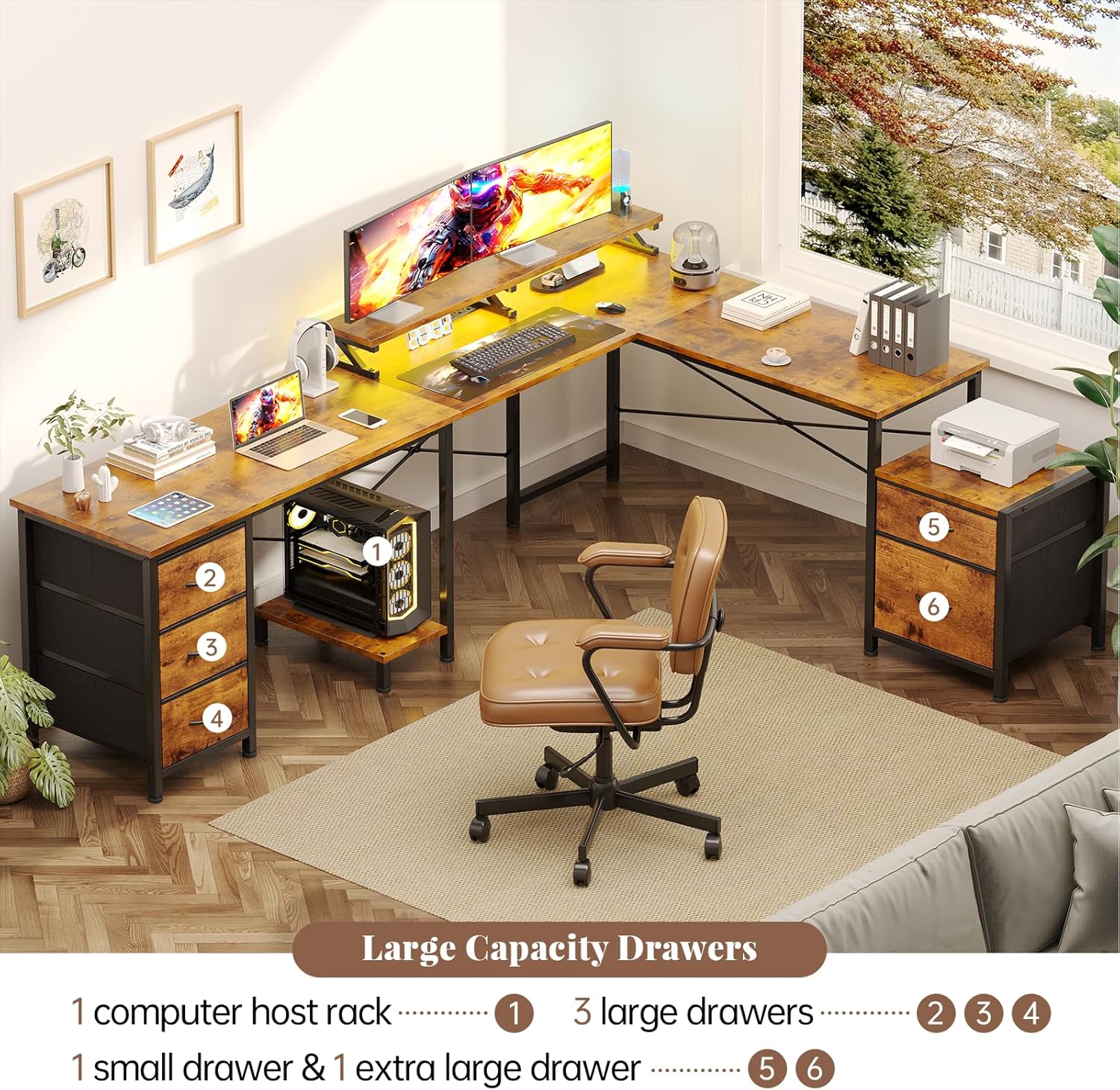
Figure 2: Storage Features. This image provides an overhead view of the desk, clearly showing the placement and capacity of the fabric drawers and the dedicated computer host rack.
5. Power Outlet and LED Light Installation
- Secure the power outlet strip into its recessed position on the desk.
- Attach the LED light strip to the underside of the monitor stand or desired location.
- Connect the LED light strip to its controller and power source.

Figure 3: Integrated Power Outlets. A detailed view of the recessed power strip, showing two standard AC outlets, one USB-A port, and one USB-C port for convenient device connectivity.

Figure 4: LED Lighting Control. This image displays the desk with its LED lights active, alongside the remote control and a smartphone screen illustrating the app interface for managing light colors and effects.
Operating Instructions
Power Outlets and USB Ports
- Plug the desk's main power cord into a standard wall outlet.
- Use the 2 AC outlets for devices requiring standard power.
- Use the USB-A and USB-C ports for charging compatible electronic devices.
- Do not exceed the maximum load capacity of 12A for the AC outlets.
LED Lights
- The LED lights can be controlled via the included remote control or a dedicated smartphone application.
- Refer to the LED light strip's separate instruction sheet for pairing the remote or app.
- Adjust colors, brightness, and lighting modes as desired.
Maintenance
- Cleaning: Wipe the desk surfaces with a soft, damp cloth. Avoid harsh chemicals or abrasive cleaners.
- Hardware: Periodically check all screws and bolts to ensure they remain tight. Retighten if necessary.
- Electrical Components: Keep the power outlets and LED lights dry. Do not expose to liquids.
- Fabric Drawers: Spot clean fabric drawers with a mild detergent if needed.
Troubleshooting
| Problem | Possible Cause | Solution |
|---|---|---|
| LED lights not working or remote unresponsive. | Loose connection, dead remote battery, remote not paired. | Check all cable connections. Replace remote battery. Refer to LED light instructions for pairing. Try controlling via smartphone app if available. |
| Desk feels unstable or wobbly. | Loose hardware, uneven floor. | Ensure all screws and bolts are fully tightened. Adjust the leveling feet on the desk legs to compensate for uneven surfaces. |
| Parts do not align during assembly. | Mislabeled parts, incorrect orientation. | Double-check part numbers against the assembly diagram. Ensure components are oriented correctly before tightening. If issues persist, contact customer support. |
| Power outlets/USB ports not functioning. | Desk not plugged in, circuit breaker tripped, faulty unit. | Ensure the desk's power cord is securely plugged into a working wall outlet. Check your home's circuit breaker. If still not working, contact customer support. |
Specifications
| Feature | Detail |
|---|---|
| Brand | iabifo |
| Model Number | B0F9KNPF93 |
| Desk Design | Computer Desk (U-shaped / L-shaped reversible) |
| Product Dimensions | 47.2"D x 80.7"W x 29.5"H |
| Color | Rustic Brown |
| Material Type | Engineered Wood, Metal Frame |
| Power Outlets | 2 AC Outlets (125V/12A) |
| USB Ports | 1 Type-C (5V/2A), 1 USB-A (5V/2A) |
| Special Feature | LED Lights, Elevated Monitor Stand, Storage Shelves, Fabric Drawers |
Customer Support
For any questions, missing parts, or issues with your iabifo U Shaped Gaming Desk, please contact our customer support team. We are committed to assisting you within 18 hours.
Please refer to your purchase documentation or the seller's contact information for specific support channels.