
RXCWWZQQ TP.MS638.PC822
TP.MS638.PC822 Dual Core WiFi Network 4K Motherboard User Manual
Model: TP.MS638.PC822 | Brand: RXCWWZQQ
1. Introduction
This manual provides essential information for the installation, operation, and maintenance of the RXCWWZQQ TP.MS638.PC822 Dual Core WiFi Network 4K Motherboard. This motherboard is designed as a replacement component for compatible televisions, specifically tested for LG screens, and supports 4K resolution and WiFi network connectivity. It operates within a voltage range of 110V to 180V at 360mA.
Proper installation and care can help restore TV functionality, extend the lifespan of your television, and ensure a stable viewing experience by reducing crashes or lagging phenomena.
2. Product Overview and Components
The TP.MS638.PC822 motherboard integrates various components necessary for television operation, including processing units, network modules, and input/output interfaces.

Figure 2.1: Front View of the TP.MS638.PC822 Motherboard. This image displays the primary components and connectors on the top side of the motherboard, including various chips, capacitors, heat sinks, and input/output ports such as USB and HDMI. The model number "TP.MS638.PC822" is visible on the board.

Figure 2.2: Rear View of the TP.MS638.PC822 Motherboard. This image shows the underside of the motherboard, revealing solder points and circuit traces. It also indicates mounting points for securing the board within a television chassis.
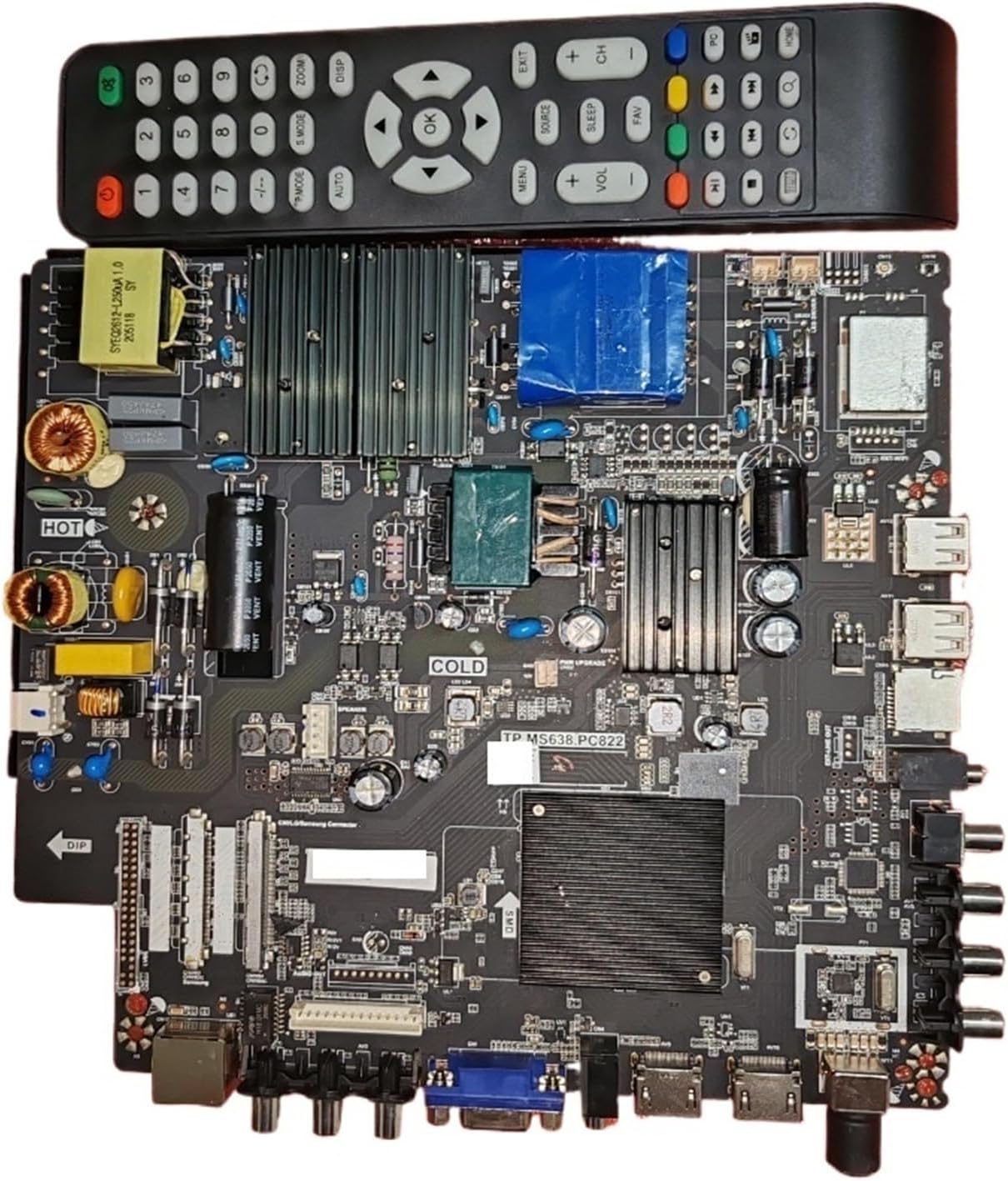
Figure 2.3: TP.MS638.PC822 Motherboard with Remote Control. This image provides a size reference for the motherboard by showing it alongside a typical television remote control. It highlights the compact nature of the board while still showcasing its various components and ports.
Key Features:
- Dual Core Processor: For efficient performance.
- Integrated WiFi Network: Enables wireless connectivity.
- 4K Resolution Support: Capable of displaying ultra-high definition content.
- Wide Voltage Compatibility: Operates between 110V and 180V at 360mA.
- Compatibility: Specifically designed and tested for LG screens.
3. Setup and Installation
Installation of the TP.MS638.PC822 motherboard requires technical proficiency. It is recommended that installation be performed by a qualified technician. Ensure the television is disconnected from all power sources before beginning.
Installation Steps:
- Power Disconnection: Unplug the television from the main power outlet and disconnect all external devices.
- Access TV Interior: Carefully remove the back panel of the television to access the existing motherboard. Refer to your specific TV model's service manual for panel removal instructions.
- Remove Old Motherboard: Disconnect all cables and screws securing the old motherboard. Note the orientation and connection points for reassembly.
- Install New Motherboard: Position the TP.MS638.PC822 motherboard in the designated slot. Ensure proper alignment with mounting holes. Secure it with the appropriate screws.
- Connect Cables: Reconnect all cables (power, display, audio, input/output) to their corresponding ports on the new motherboard. Ensure all connections are firm and correctly seated.
- Verify Compatibility: Confirm that your TV screen is compatible, especially if it is an LG screen, for optimal performance.
- Close TV Panel: Carefully reattach the back panel of the television.
- Initial Power-Up: Reconnect the TV to power. Observe for proper boot-up and display.
Important: Static electricity can damage electronic components. Use anti-static precautions during installation.
4. Operating Instructions
Once installed, the TP.MS638.PC822 motherboard functions as the core processing unit of your television. Its operation is integrated with the TV's existing firmware and remote control.
Basic Operation:
- Power On/Off: Use the TV's remote control or power button to turn the television on or off.
- Input Selection: Use the "Input" or "Source" button on your remote to switch between connected devices (e.g., HDMI, USB).
- Network Connectivity: Access the TV's settings menu to configure WiFi network connections. The integrated WiFi module allows for wireless internet access.
- 4K Content Playback: Ensure your connected devices and content sources support 4K resolution to utilize the motherboard's full display capabilities.
For detailed instructions on specific TV functions, refer to your television's original user manual.
5. Maintenance
The TP.MS638.PC822 motherboard is designed for long-term reliability. Minimal maintenance is required, but adhering to general electronic device care practices can extend its lifespan.
Care Guidelines:
- Dust Prevention: Keep the television's ventilation openings clear of dust and debris to ensure proper airflow and prevent overheating.
- Temperature Control: Operate the TV in a well-ventilated area, away from direct sunlight or heat sources.
- Power Surges: Consider using a surge protector to safeguard the motherboard and other TV components from electrical fluctuations.
- Cleaning: If the TV's interior needs cleaning, ensure it is unplugged and use compressed air or a soft, dry brush to remove dust. Do not use liquid cleaners directly on the motherboard.
6. Troubleshooting
This section addresses common issues that may arise after motherboard replacement. If problems persist, consult a professional technician.
| Problem | Possible Cause | Solution |
|---|---|---|
| TV does not power on after installation. | Loose power connection, incorrect installation, faulty power supply. |
|
| No display or distorted image. | Loose display cable, incompatible screen, incorrect settings. |
|
| WiFi not connecting or unstable. | Incorrect network settings, interference, router issues. |
|
| TV crashes or lags frequently. | Overheating, software issues, component instability. |
|
7. Specifications
| Attribute | Detail |
|---|---|
| Model Number | TP.MS638.PC822 |
| Brand | RXCWWZQQ |
| Compatibility | TVs, specifically tested for LG screens |
| Features | Dual Core, WiFi Network, 4K Support |
| Operating Voltage | 110V - 180V |
| Current | 360mA |
| Package Dimensions | 0.39 x 0.39 x 0.39 inches |
| Item Weight | 1.76 ounces |
| Country of Origin | China |
8. Warranty and Support
For information regarding warranty coverage, please refer to the purchase documentation or contact your retailer. This product is intended as a replacement part, and specific warranty terms may vary.
For technical support or further inquiries, please contact the seller or manufacturer directly. Ensure you have your product model number (TP.MS638.PC822) and purchase details available when seeking support.
Note: Unauthorized repair or modification of the motherboard may void any applicable warranty.
Ask a question about this manual
Ask about setup, troubleshooting, compatibility, parts, safety, or missing instructions. Manuals+ will review the question and use this page’s manual context to help answer it.