
VEVOR 800W Bluetooth PA System
VEVOR Portable PA System Instruction Manual
Model: 800W Bluetooth PA System
Brand: VEVOR
1. Product Overview
The VEVOR 800W Portable PA System is designed for small to medium-scale indoor performances, banquets, religious services, training sessions, and outdoor events. It features 800W peak power, a 6-channel mixer, dual 10" speakers, and multiple input options including USB, SD, and Bluetooth connectivity. The system is engineered to provide clear, powerful audio with minimal distortion.

Image 1: Complete VEVOR Portable PA System components including two speakers, mixer, microphone, remote, and cables.
2. What's in the Box
- 1 x PA System (Mixer Unit)
- 2 x Speakers (10-inch)
- 2 x Speaker Stands
- 1 x Wired Microphone
- 1 x 4.92 ft Cable
- 2 x 19.69 ft IEC Power Cables
- 1 x Remote Control
- User Manual

Image 2: Visual representation of all included components and their approximate dimensions.
3. Setup Instructions
3.1 Speaker Assembly
- Unfold the speaker stands and ensure they are stable on a flat surface.
- Adjust the height of the speaker stands to your desired level. The adjustable height ranges from 52.76 to 63.78 inches (134 cm to 162 cm). Secure the height with the fastener adjustment.
- Carefully mount each speaker onto the top pole of its respective stand. Ensure the speaker is securely seated.

Image 3: Speaker stands with adjustable height feature for optimal sound projection.
3.2 Mixer and Speaker Connections
- Connect the power cord to the AC INPUT port on the back of the mixer unit. Plug the other end into a suitable power outlet.
- Connect the provided speaker cables from the "SPEAKER OUTPUTS" on the back of the mixer unit to the "SPEAKER IN 8OHM" input on the back of each speaker. Ensure a secure connection.
- Connect the wired microphone to any available MIC input (XLR or 1/4" TRS) on the mixer's channels.
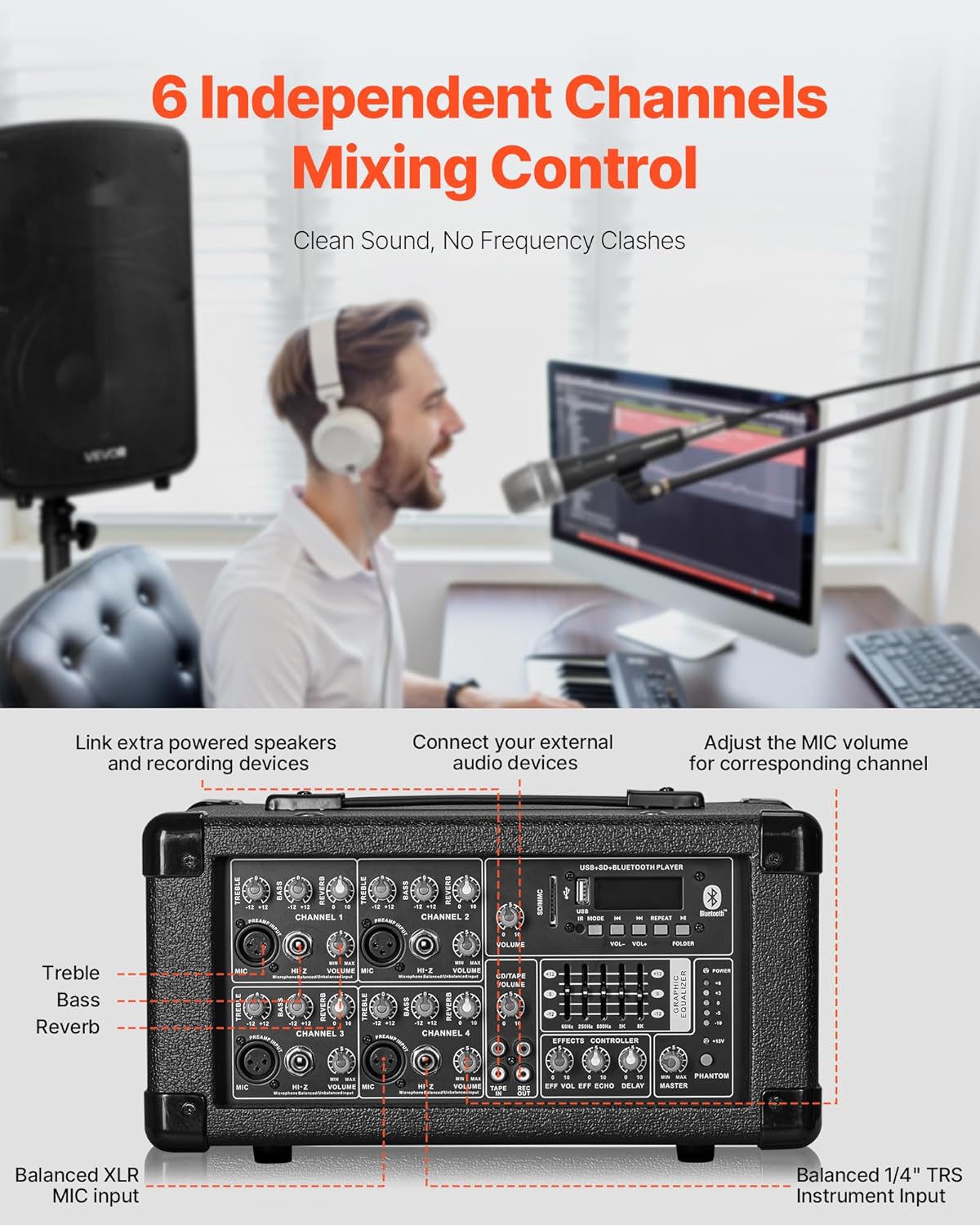
Image 4: Detailed view of the mixer's input and control panel.
3.3 Remote Control Setup
The remote control requires two AAA batteries (not included). Insert the batteries into the remote control unit, observing the correct polarity.
4. Operating Instructions
4.1 Powering On and Basic Audio
- Adjust the MASTER volume knob to a low setting before playing any audio to prevent sudden loud sounds.
- For microphone use, speak into the microphone and slowly increase the VOLUME knob for the corresponding channel until the desired level is reached. Adjust TREBLE, BASS, and REVERB knobs for optimal sound.
4.2 Bluetooth Connectivity
- Press the 'MODE' button on the mixer's media player section until "BLUE" appears on the display, indicating Bluetooth mode.
- On your Bluetooth-enabled device (e.g., smartphone, tablet), search for "Bluetooth" or "VEVOR PA System" in the Bluetooth settings.
- Select the PA system to pair. Once paired, you can stream audio wirelessly. The wireless range is up to 32.81 ft (10 m).

Image 5: The PA system supports Bluetooth 5.0 for wireless audio streaming and includes a remote control for convenience.
4.3 USB/SD Playback
Insert a USB drive or SD/MMC card containing audio files into the respective slot on the mixer's media player section. The system will automatically detect and begin playing the audio. Use the control buttons (IR MODE, VOL+/-, REPEAT, FOLDER) to navigate and control playback.
4.4 Channel and Master Controls
- TREBLE/BASS: Adjust high and low frequencies for each channel.
- REVERB: Controls the amount of echo effect for each channel.
- VOLUME: Adjusts the individual volume level for each channel.
- GRAPHIC EQUALIZER: Use the sliders to fine-tune the overall frequency response of the main output.
- EFFECTS CONTROLLER: Adjust ECHO and DELAY for the master effects.
- MASTER: Controls the overall output volume of the PA system.
- PHANTOM: Button to enable/disable phantom power for condenser microphones (if applicable).
5. Maintenance
- Cleaning: Wipe down the mixer and speakers with a soft, dry cloth. Avoid using abrasive cleaners or solvents.
- Storage: Store the PA system in a cool, dry place away from direct sunlight and extreme temperatures.
- Cable Care: Ensure cables are not kinked or pinched. Roll them loosely when storing to prevent damage.
- Speaker Protection: The speakers feature a durable PP cabinet designed to be shockproof and wear-resistant. However, avoid dropping or subjecting them to excessive impact.
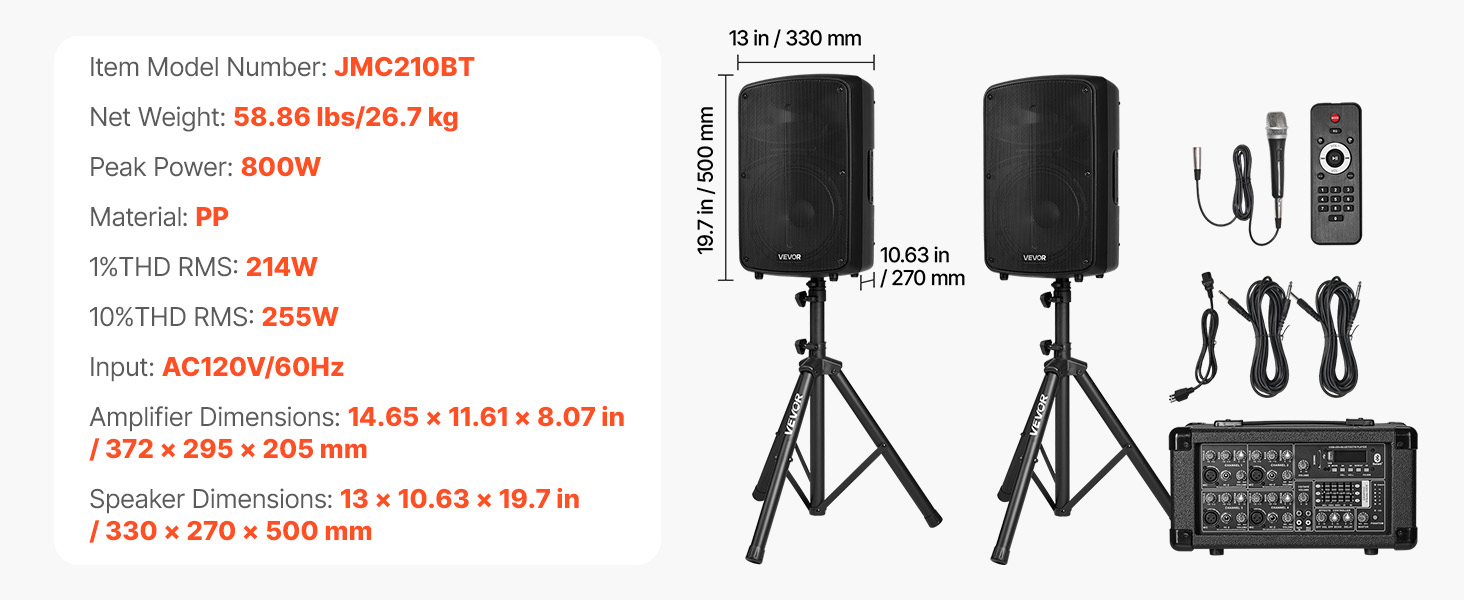
Image 6: The speaker's robust PP cabinet ensures durability and protection.
6. Troubleshooting
| Problem | Possible Cause | Solution |
|---|---|---|
| No Power | Power cord not connected; Power switch off; No power from outlet. | Ensure power cord is securely connected. Turn power switch ON. Check power outlet with another device. |
| No Sound Output | Volume knobs too low; Speaker cables disconnected; Incorrect input selected. | Increase MASTER and channel volume. Check speaker cable connections. Ensure correct input mode (Bluetooth, USB, SD) is selected. |
| Distorted Sound | Volume too high; Input signal too strong; Incorrect equalizer settings. | Reduce MASTER or channel volume. Lower input signal level. Adjust graphic equalizer settings. |
| Bluetooth Pairing Issues | Device too far; Bluetooth not enabled on mixer/device; Interference. | Move device closer to mixer. Ensure Bluetooth mode is active on mixer and device. Reduce interference from other wireless devices. |
7. Specifications
| Feature | Detail |
|---|---|
| Model Number | 800W Bluetooth PA System (JMC210BT) |
| Peak Power | 800W |
| RMS Power | 214W (1% THD) |
| Number of Channels | 6 |
| Speaker Size | Dual 10-inch speakers |
| Connectivity Technology | Bluetooth 5.0, USB, SD, XLR, 1/4" TRS |
| Adjustable Stand Height | 52.76 to 63.78 inches (134 cm to 162 cm) |
| Product Dimensions (Mixer) | 14.65 x 11.61 x 8.07 inches (372 x 295 x 205 mm) |
| Product Dimensions (Speaker) | 13 x 10.63 x 19.7 inches (330 x 270 x 500 mm) |
| Item Weight | 58.9 pounds (26.7 kg) |
| Material | PP (Polypropylene) |
| UPC | 197988882343 |
8. Warranty and Support
For warranty information, technical support, or service inquiries, please refer to the official VEVOR website or contact VEVOR customer support directly. The product may also include a detailed user manual in PDF format for additional information.
You can visit the VEVOR Store on Amazon for more product details and support resources.
Ask a question about this manual
Ask about setup, troubleshooting, compatibility, parts, safety, or missing instructions. Manuals+ will review the question and use this page’s manual context to help answer it.