
1. Introduction
This manual provides essential information for the safe and effective operation and maintenance of your HOMCOM 2-in-1 Electric Folding Treadmill. This versatile fitness equipment is designed for both running and walking, offering a convenient solution for home and office use. Please read this manual thoroughly before initial use and retain it for future reference.

Image 1.1: The HOMCOM 2-in-1 Electric Folding Treadmill in use, demonstrating its dual functionality for running and walking.
2. Safety Instructions
To ensure safe operation and prevent injury, please adhere to the following safety guidelines:
- Always place the treadmill on a flat, stable surface. Ensure there is adequate clear space around the treadmill (at least 2 meters behind and 0.6 meters on each side).
- Keep children and pets away from the treadmill during operation.
- Do not operate the treadmill if it has a damaged cord or plug, or if it is not working properly.
- Always attach the safety key clip to your clothing before starting the treadmill. The safety key is a crucial safety feature that will stop the treadmill immediately if detached.
- Wear appropriate athletic footwear and clothing. Avoid loose clothing that could get caught in moving parts.
- Consult a physician before starting any new exercise program.
- Do not exceed the maximum user weight capacity (not specified in provided data, refer to product labeling if available).
- Unplug the treadmill from the power outlet when not in use, before cleaning, or before performing any maintenance.
3. Package Contents
Carefully unpack all components and verify that you have received the following items:
- HOMCOM 2-in-1 Electric Folding Treadmill Unit
- Safety Key
- Remote Control
- User Manual (this document)
If any items are missing or damaged, please contact customer service immediately.
4. Setup
The HOMCOM treadmill is designed for easy setup. Follow these steps to prepare your treadmill for use:
- Unpacking: Remove the treadmill from its packaging and place it on a flat, level surface.
- Unfolding (if in folded state):
- Gently lift the armrest support into the upright position until it locks securely.
- Ensure all locking mechanisms are engaged before proceeding.
- Placement: Position the treadmill in an area with sufficient space for safe operation, away from walls or furniture.
- Power Connection: Plug the power cord into a grounded electrical outlet.

Image 4.1: Treadmill dimensions for proper placement.
5. Operating Instructions
Your HOMCOM treadmill offers two primary modes of operation:
5.1. Running Mode (1-10 km/h)
This mode is activated when the armrest support is in the upright position.
- Ensure the armrest is fully upright and locked.
- Attach the safety key clip to your clothing and place the magnetic end onto the designated area on the console.
- Press the "Start" button on the console or remote control. The treadmill will begin at a low speed.
- Use the speed adjustment buttons on the console or remote control to increase or decrease your speed (1-10 km/h).
- To stop, press the "Stop" button or pull the safety key.
5.2. Walking Pad Mode (up to 6 km/h)
This mode is activated when the armrest support is folded down.
- Fold down the armrest support until it is flat.
- Attach the safety key clip to your clothing and place the magnetic end onto the designated area on the console.
- Press the "Start" button on the remote control. The treadmill will begin at a low speed.
- Use the speed adjustment buttons on the remote control to increase or decrease your speed (up to 6 km/h).
- To stop, press the "Stop" button or pull the safety key.
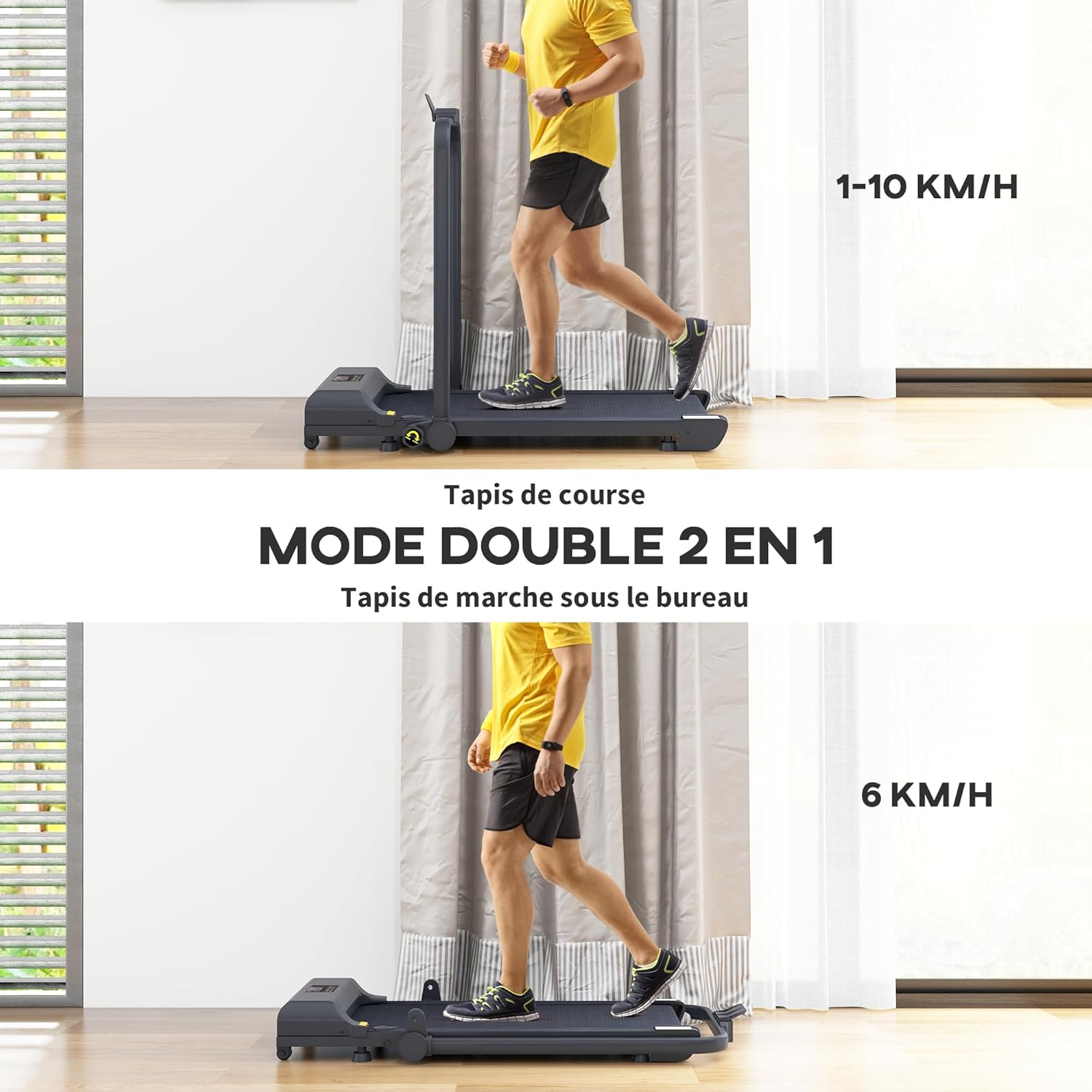
Image 5.1: Dual mode operation: Running (1-10 km/h) and Walking (up to 6 km/h).
5.3. Console and Remote Control
The LED display shows key metrics such as time, distance, speed, and calories burned. The remote control provides convenient access to start, stop, and speed adjustments during your workout.

Image 5.2: LED display and remote control for easy operation.
5.4. Shock Absorption System
The treadmill features a five-layer shock absorption system designed to reduce impact on your joints and minimize noise during use, providing a comfortable and quiet workout experience.
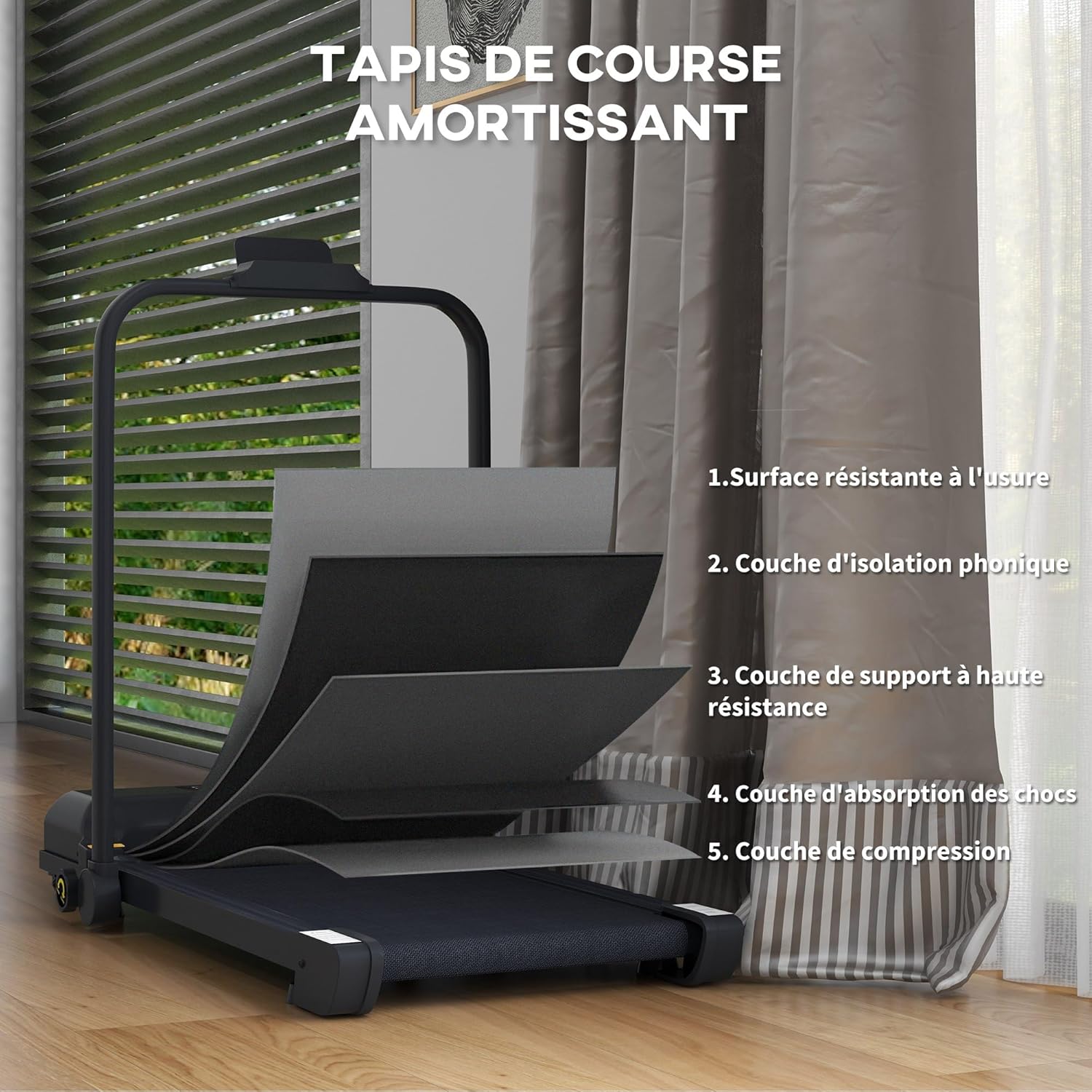
Image 5.3: Five-layer shock absorption system for comfort and quiet operation.
6. Maintenance
Regular maintenance ensures the longevity and optimal performance of your treadmill.
- Cleaning: Wipe down the treadmill surfaces with a damp cloth after each use. Avoid abrasive cleaners or solvents.
- Lubrication: The running belt requires periodic lubrication to reduce friction and extend its lifespan. Refer to specific instructions for your model regarding lubrication frequency and type of lubricant. (Note: Lubricant type and frequency not specified in provided data. Consult product packaging or manufacturer for details.)
- Belt Tension and Alignment: Periodically check the running belt for proper tension and alignment. If the belt slips or drifts to one side, adjust it according to the instructions provided in the full product manual or by contacting customer support.
- Storage: The treadmill is designed to be portable and foldable for easy storage.
- To fold, ensure the treadmill is off and unplugged. Gently lower the armrest support.
- Utilize the integrated wheels to move the treadmill to a suitable storage location. It can be stored flat under furniture with a thickness of 11 cm.

Image 6.1: Easy portability with integrated wheels.

Image 6.2: Foldable design for compact storage.
7. Troubleshooting
If you encounter issues with your treadmill, refer to the following common problems and solutions:
| Problem | Possible Cause | Solution |
|---|---|---|
| Treadmill does not start. | Power cord unplugged, safety key not in place, power switch off. | Ensure power cord is securely plugged in, safety key is correctly placed, and power switch is on. |
| Running belt slips. | Belt tension too loose, belt needs lubrication. | Adjust belt tension (refer to full manual), lubricate the belt. |
| Unusual noise during operation. | Loose components, motor issue, belt friction. | Check for loose screws, lubricate belt if needed. If noise persists, discontinue use and contact customer service. |
| Display not working. | Loose connection, power issue. | Check power connection. If issue persists, contact customer service. |
For issues not listed here, or if solutions do not resolve the problem, please contact HOMCOM customer support.
8. Specifications
| Feature | Detail |
|---|---|
| Brand | HOMCOM |
| Model Number | A90-367V90BK |
| Color | Black |
| Dimensions (L x W x H) | 130L x 59W x 96H cm |
| Folded Dimensions (Thickness) | 11 cm (for storage under furniture) |
| Item Weight | 22.4 Kilograms |
| Material | Alloy Steel |
| Motor Power | 2.5 Horsepower |
| Max Speed (Running Mode) | 10 Kilometers per hour |
| Max Speed (Walking Mode) | 6 Kilometers per hour |
| Display Type | LED |
| Metrics Displayed | Calories burned, Distance, Time, Speed |
| Power Source | Electric Cord |
| Special Features | Shock absorber, With wheels, Foldable, Portable, LED screen |
| Recommended Uses | Home, Office |
| Target Audience | Adult |
9. Warranty and Support
Information regarding the product warranty is not available in the provided data. For warranty details, technical support, or to purchase replacement parts, please contact HOMCOM customer service directly or visit their official website. Keep your purchase receipt as proof of purchase for any warranty claims.
You can often find support contact information on the product packaging or through the retailer where you purchased the item.