Diyife HMK25 Waterproof Rechargeable Kitchen Scale User Manual
Model: HMK25
1. Product Overview
The Diyife HMK25 kitchen scale is a versatile and durable weighing instrument designed for various kitchen and household tasks. It features IP67 full waterproofing, a high accuracy of 0.1g, and a maximum capacity of 10kg (22lb). The scale offers multiple power supply options, an adjustable LCD display, and convenient functions like tare and piece counting.
IP67 Waterproof Design: Fully submersible for easy cleaning, resistant to dust and moisture.
High Accuracy: Measures with 0.1g precision, up to 10kg/22lb capacity.
Multiple Units: Supports 10+ units including g, oz, lb:oz, ml, and more.
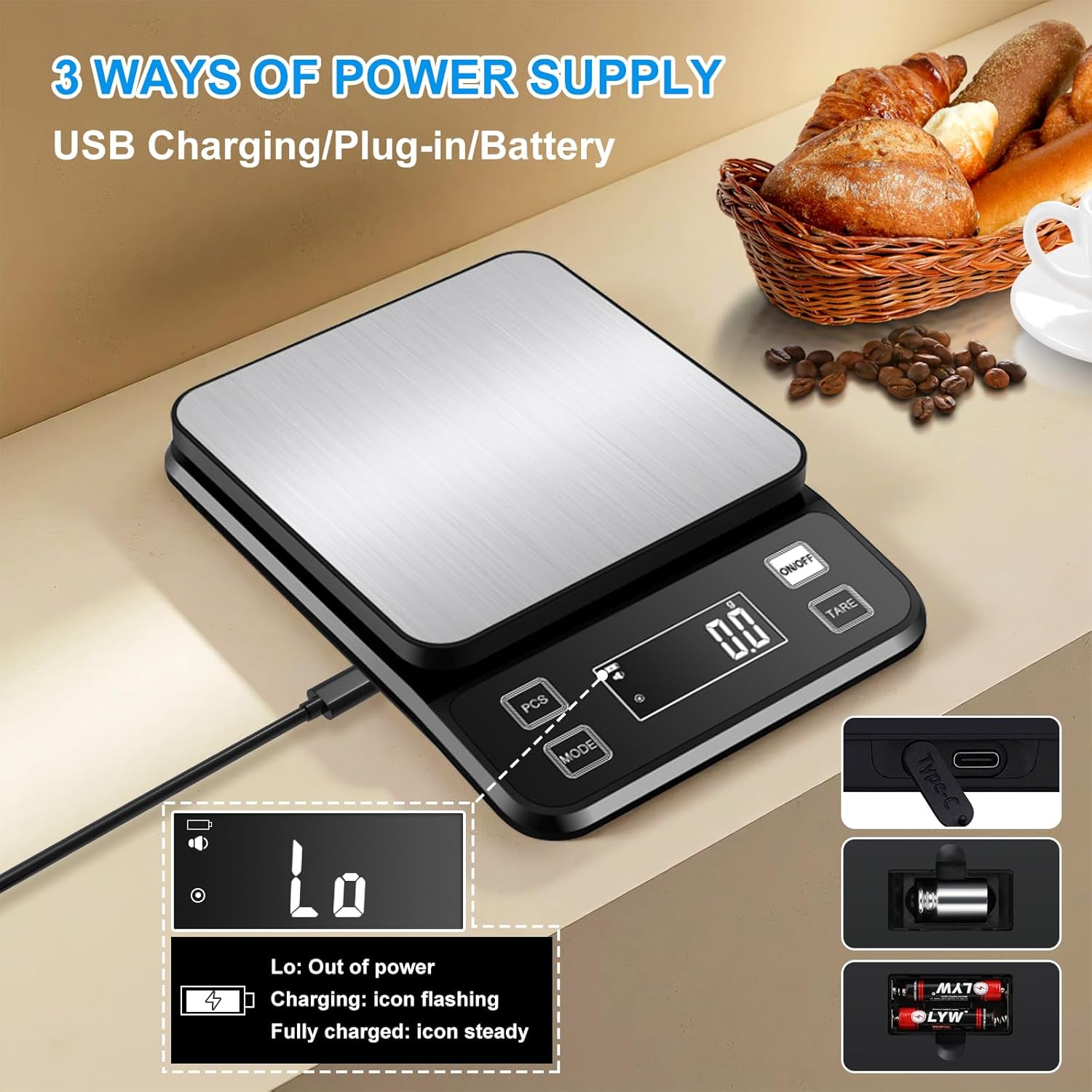
Triple Power Supply: Rechargeable via Type-C USB, plug-in use, or 2x AAA batteries.
Adjustable LCD Display: Large, backlit display with adjustable brightness for clear reading.
Smart Standby Mode: Customizable auto-off times (OFF, 1, 3, 5, 10, 30 minutes) to conserve battery.
Image: Multifunctional Kitchen Scale with various feature icons.
2. Setup
2.1 Power Supply
The Diyife HMK25 scale offers three power options:
USB Type-C Charging: Connect the provided Type-C cable to the scale and a USB power source for charging the internal rechargeable battery.
Direct Plug-in Use: The scale can be operated directly while connected via the Type-C cable.
AAA Batteries: Install 2 AAA batteries (included) into the battery compartment located on the underside of the scale. Ensure correct polarity.
A single charge of the internal battery can provide several months of daily use.
Image: Three ways to power the scale: USB charging, plug-in, or AAA batteries.
2.2 Initial Use
Place the scale on a flat, stable surface. Press the "ON/OFF" button to power on the scale. The display will show "0.0" or "0.00" indicating it's ready for use.
3. Operating Instructions
3.1 Unit Conversion
Press the "MODE" button to cycle through the available measurement units. The scale supports over 10 units, including grams (g), ounces (oz), pounds:ounces (lb:oz), milliliters (ml), kilograms (kg), and more. Select the desired unit before weighing.
Image: The scale supports 10 different units for various measurement needs.
Video: Instructions on how to turn the sound on or off for the scale.
3.4.2 Adjust Standby Time
While in setting mode ("C1-10"), press "TARE" to cycle through settings until "C-1" is displayed.
Press "MODE" to adjust the standby time. Options include 1, 3, 5, 10, or 30 minutes. "Off" disables the standby time.
3.4.3 Set Automatic Shutdown Time
While in setting mode ("C1-10"), press "TARE" to cycle through settings until "C5-5" is displayed.
Press "MODE" to set the automatic shutdown time. Options include 0, 1, 2, 3, 5, 10, or 30 minutes. "0" means no automatic shutdown. The default is 5 minutes.
3.4.4 Adjust Screen Brightness
While in setting mode ("C1-10"), press "TARE" to cycle through settings until "C6-2" is displayed.
Press "MODE" to adjust the screen brightness. There are three brightness settings available.
Image: Adjustable LCD Display with three brightness settings.
4. Maintenance
4.1 Cleaning
The Diyife HMK25 kitchen scale is IP67 waterproof, allowing for direct rinsing under water. This makes cleaning simple and efficient.
Before Cleaning: Ensure to remove any AAA batteries and the 50g calibration weight from their compartments before immersing the scale in water.
Rinsing: The scale can be directly rinsed under running water.
Drying: Wipe the scale clean with a soft cloth. The smart drainage port design prevents water buildup.
Surface: The 304 stainless steel platform is scratch-resistant and easy to wipe clean.
Image: IP67 Waterproof design with professional drainage ports.
Image: Easy to store and clean features, including a hook hole and direct rinsing capability.
Image: Dimensions and accuracy details of the scale.
7. Warranty and Support
For any questions, concerns, or technical support regarding your Diyife HMK25 kitchen scale, please refer to the contact information provided in the included instruction manual or visit the official Diyife support website.
Ask a question about this manual
Ask about setup, troubleshooting, compatibility, parts, safety, or missing instructions. Manuals+ will review the question and use this page’s manual context to help answer it.