
1. Introduction
This manual provides essential information for the safe and efficient operation of your Jadeshay 3.7KW Variable Frequency Drive (VFD). This device is designed to convert single-phase 220V input into three-phase 220V output, enabling precise speed control and energy optimization for various industrial motors. Please read this manual thoroughly before installation and operation.
2. Product Overview
2.1 Key Features
- Motor Power Adjustment: Enables precise control over motor power.
- Variable Speed Control: Achieves variable motor speed for energy efficiency.
- Voltage Fluctuation Reduction: Helps stabilize the electrical grid.
- High Performance: Offers high power, high torque, high precision, and a wide speed control range.
- Efficient Cooling: Features a powerful DC cooler for quiet operation and effective heat dissipation.
- Stable Output: Provides continuous and stable pure sine wave output with integrated Automatic Voltage Regulation (AVR).
- Advanced Design: Incorporates IPM and IGBT module design for improved efficiency and low heat generation.
- Communication Port: Equipped with a 485 communication port for enhanced connectivity and control.
- User-Friendly: Easy to use with convenient wiring, simple parameter debugging via a knob, and a high-definition display.
- Broad Application: Suitable for fans, pumps, CNC machine tools, ball mills, injection molding machines, crushers, conveyor belts, and textile equipment.
2.2 Technical Specifications
| Specification | Value |
|---|---|
| Brand | Jadeshay |
| Model Number | OAYNAOKOO-ST110403 |
| Material | Flame-retardant ABS plastic |
| Color | Monochrome (White) |
| Rated Input Voltage | Single-phase 220V AC |
| Rated Output Voltage | Three-phase 220V AC |
| Output Current | 16A |
| Rated Power | 3.7KW |
| Operating Frequency | 50 Hz |
| Output Frequency | 0-999 Hz |
| Installation Method | Wall mount, Cabinet mount |
| Cooling Method | Air-cooled, with fan control |
| Protection Rating | IP20 |
| Dimensions | 32 x 25 x 17 cm |
| Weight | 2620 Grams |
| Components Included | Frequency Converter |
3. Safety Information
WARNING: Read the user manual before operation. Risk of electrical shock. Wait 10 minutes after removing power before servicing.
- Ensure proper grounding to prevent electrical shock.
- Do not connect AC power to output terminals (U, V, W).
- Always disconnect power and wait at least 10 minutes for capacitors to discharge before performing any maintenance or wiring.
- Installation and maintenance should only be performed by qualified personnel.
- Ensure the VFD is installed in a well-ventilated area, free from excessive dust, moisture, and corrosive gases.
4. Setup and Installation
4.1 Physical Installation
The Jadeshay VFD can be mounted on a wall or inside a cabinet. Ensure adequate space for ventilation around the unit.
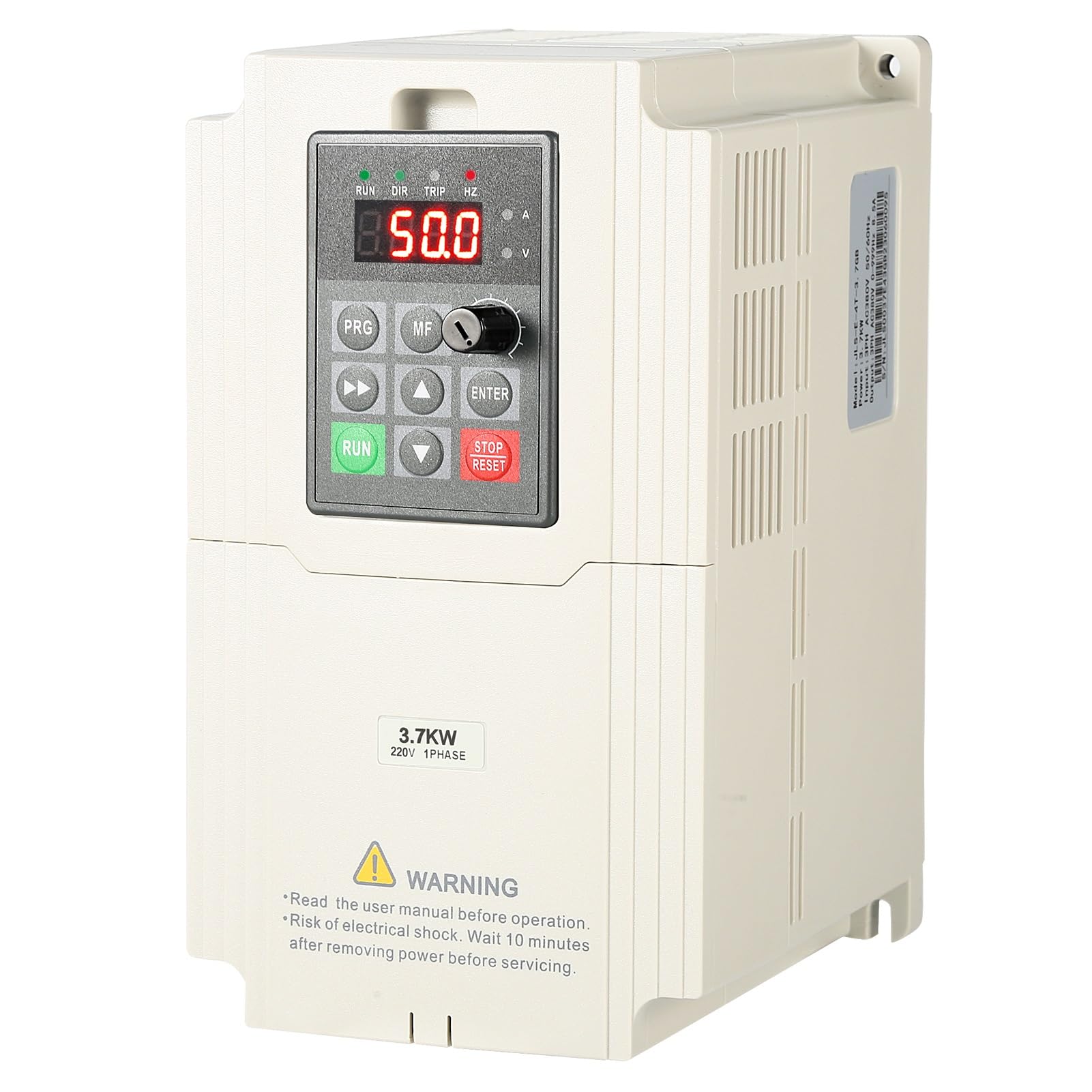
Figure 4.1: Front view of the Jadeshay 3.7KW Variable Frequency Drive.

Figure 4.2: Rear view of the VFD, showing the cooling fan for heat dissipation.
4.2 Wiring Instructions
Carefully follow the wiring diagrams below. Ensure all connections are secure and correct before applying power.

Figure 4.3: Basic wiring diagram for single-phase 220V power supply, ground wire, and three-phase motor connection. The VFD has a built-in braking resistor, and an external one can be connected at P+/PB if required.

Figure 4.4: Detailed wiring schematic showing connections for three-phase power, multi-function terminal input, analog input, and R485 communication. This diagram is crucial for advanced installations.
For a visual guide on wiring and parameter setting, refer to the video below:
Video 4.1: Demonstration of wiring connections and basic parameter setup for a Variable Frequency Drive. This video, though from a different brand (MOLLOM), illustrates the general process applicable to similar VFDs.
5. Operating Instructions
5.1 Control Panel Overview
The VFD features an intuitive control panel for easy operation and monitoring.

Figure 5.1: Detailed view of the VFD's operation interface, highlighting the status indicators, multifunction key, menu, shift key, up/down selection keys, run key, stop/reset button, enter button, speed knob, electric current display, and voltage display.
5.2 Basic Operation
- Power On: Ensure all wiring is correct and secure before applying power. The display will light up.
- Start Motor: Press the RUN button to start the motor.
- Stop Motor: Press the STOP/RESET button to stop the motor.
- Adjust Speed/Frequency: Use the speed knob on the control panel to adjust the output frequency (0-999Hz), which in turn controls the motor speed.

Figure 5.2: The speed knob allows for stepless speed regulation from 0 to 999Hz, providing precise control over motor operation.
Watch the video below for a demonstration of the VFD's operation and speed control:
Video 5.1: A Jadeshay VFD demonstrating motor speed control by adjusting the frequency. This video shows the device in action, controlling a motor's rotational speed.
5.3 Parameter Setting
The VFD allows for various parameter adjustments to optimize performance for specific motor types and applications. Refer to the detailed parameter list in the full user manual for comprehensive settings. The video in Section 4.2 also demonstrates parameter setting.
- Press the PRG button to enter the parameter setting mode.
- Use the Up and Down arrow keys to navigate through parameters.
- Use the SHIFT key to move between digits when setting values.
- Use the speed knob to change parameter values.
- Press ENTER to confirm and save the setting.
6. Maintenance
Regular maintenance ensures the longevity and optimal performance of your VFD.
- Cleaning: Keep the VFD clean and free from dust. Use a soft, dry cloth for cleaning. Do not use liquid cleaners.
- Ventilation: Ensure the cooling fan and ventilation openings are clear of obstructions to prevent overheating.
- Connections: Periodically check all wiring connections for tightness and signs of wear or corrosion.
- Environmental Conditions: Operate the VFD within its specified environmental conditions (temperature, humidity) to prevent damage.

Figure 6.1: Illustration of the VFD's cooling system, showing air circulation to reduce heat and ensure stable, long-term operation.
7. Troubleshooting
If you encounter issues with your VFD, refer to the following basic troubleshooting steps. For complex problems, consult a qualified technician or contact customer support.
- No Power: Check the input power supply and all connections. Ensure the VFD is properly connected to a 220V single-phase source.
- Motor Not Running: Verify that the RUN button has been pressed. Check motor wiring (U, V, W) and ensure it matches the VFD output. Confirm motor parameters are correctly set in the VFD.
- Overload/Fault Indication: If a fault code appears on the display, refer to the full user manual for specific code meanings and corrective actions. Disconnect power, wait 10 minutes, and check for any mechanical issues with the motor or load.
- Incorrect Speed: Adjust the speed knob. Check frequency settings in the parameters if the knob does not provide the desired range.
- Unusual Noise/Vibration: Stop the motor immediately. Check motor mounting, load balance, and VFD parameters.
8. Warranty and Support
Warranty information for the Jadeshay 3.7KW Variable Frequency Drive is not available in this document. Please refer to the product packaging, the manufacturer's official website, or contact your retailer for detailed warranty terms and customer support options.