
1. Important Safety Instructions
Please read and understand all safety instructions before operating the YONHAN 15-Amp 12V/24V Smart Battery Charger. Failure to follow these instructions may result in electric shock, fire, or serious injury.
- Ventilation: Operate the charger in a well-ventilated area. Do not operate in an enclosed space.
- Eye Protection: Always wear eye protection when working near batteries.
- Spark Prevention: Avoid creating sparks near the battery. Batteries can produce explosive gases.
- Connection Order: Connect the output clips to the battery terminals in the correct order (positive to positive, negative to negative). Disconnect in reverse order.
- Power Disconnection: Always disconnect the AC power from the charger before connecting or disconnecting the battery clips.
- Damaged Charger: Do not operate the charger if it has been dropped, damaged, or exposed to moisture.
- Children: Keep the charger and batteries out of reach of children.
- LiFePO4 Batteries: WARNING: Do not charge LiFePO4 batteries (14.6V/29.6V ±0.2V) without a Battery Management System (BMS).
2. Product Overview
The YONHAN 15-Amp 12V/24V Smart Battery Charger is a fully-automatic device designed to charge and maintain various types of 12V and 24V batteries, including Lead-acid, LiFePO4, AGM, and GEL batteries. It features intelligent pulse repair and a multi-stage charging process to optimize battery life and performance.

Figure 2.1: YONHAN 15-Amp Smart Battery Chargers (Red and Black models).
2.1 Key Features
- Fully-automatic operation for 12V and 24V batteries.
- Supports Lead-acid, LiFePO4, AGM, and GEL battery types.
- 15-Amp high-capacity rapid charging.
- Intelligent pulse repair function to restore battery performance.
- Automatic trickle charging to maintain full battery charge without overcharging.
- Multi-mode selection via touch switch (Car/Boat, LiFePO4, AGM/GEL, Motorcycle, Repair).
- Clear LCD display showing temperature, voltage, current, and charging status.
- Weather-resilient design for various environmental conditions.

Figure 2.2: Charger compatibility with multiple battery types.
3. Setup and Connection
3.1 Unpacking and Inspection
Carefully remove the charger from its packaging. Inspect the unit for any signs of damage. If any damage is found, do not use the charger and contact customer support.
3.2 Connecting to a Battery
- Ensure the charger is disconnected from the AC power outlet.
- Identify the positive (+) and negative (-) terminals on your battery. The positive terminal is usually marked with a plus sign and is larger in diameter. The negative terminal is marked with a minus sign.
- Connect the red positive (+) alligator clip from the charger to the positive (+) terminal of the battery.
- Connect the black negative (-) alligator clip from the charger to the negative (-) terminal of the battery.
- Ensure both connections are secure and free from corrosion.

Figure 3.1: Proper connection of the charger to a car battery.
3.3 Connecting to Power
- After connecting the battery clips, plug the charger's AC power cord into a standard 110-230V AC (50-60Hz) wall outlet.
- The charger will power on, and the LCD display will illuminate.
4. Operating Instructions
4.1 Understanding the Display
The LCD display provides real-time information about the charging process and battery status.

Figure 4.1: Visual display of battery information.
- Temperature Display: Shows the ambient temperature. The charger adjusts charging based on temperature (Winter/Summer modes).
- Voltage Display: Shows the current battery voltage.
- Current Display: Shows the charging current in Amperes.
- Finish Display ("FUL"): Indicates that the battery is fully charged.
- Pulse Display ("PUL"): Indicates the pulse repair mode is active.
- Power Off Display ("OFF"): Indicates the system is powered off or in standby.
- Reverse/Abnormal Display ("E--"): Indicates incorrect connection or a fault.
- Desulfurization Display ("dFS"): Indicates the desulfurization process is active.
- Battery Level Indicator: Graphic representation of the battery's charge level (20%, 40%, 60%, 80%, 100%).
4.2 Selecting a Charging Mode
The charger features a touch-sensitive "MODE" button to select the appropriate charging program for your battery type and application.
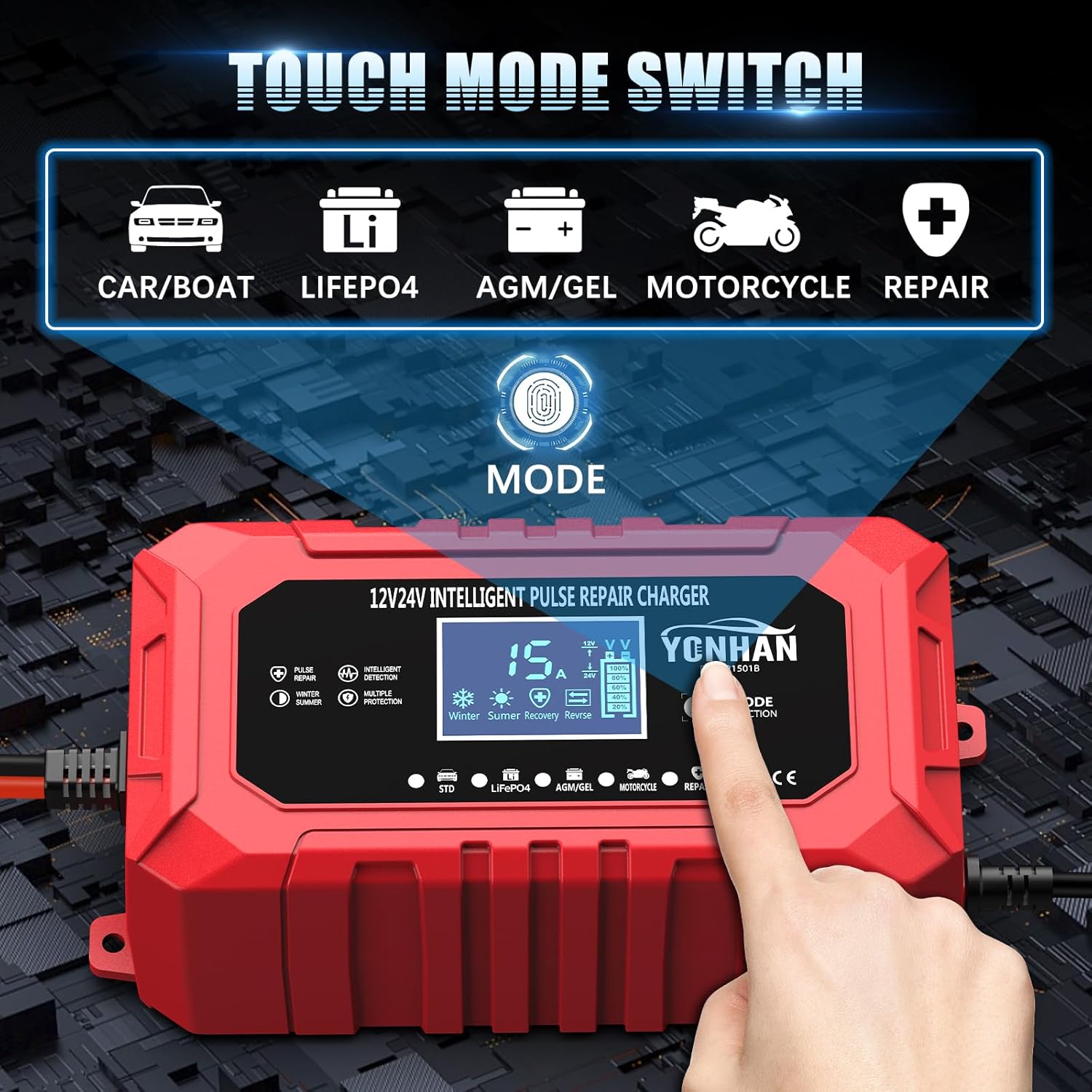
Figure 4.2: Touch mode selection interface.
- Car/Boat Mode: For standard 12V/24V lead-acid batteries in cars, boats, and other vehicles.
- LiFePO4 Mode: Specifically for 12V/24V Lithium Iron Phosphate batteries. Ensure your LiFePO4 battery has a BMS.
- AGM/GEL Mode: For 12V/24V Absorbent Glass Mat (AGM) and Gel Cell batteries.
- Motorcycle Mode: For smaller capacity 12V/24V batteries typically found in motorcycles.
- Repair Mode: A pulse repair function designed to desulfate and recondition deeply discharged or sulfated batteries. This process can take several hours.
Press the "MODE" button repeatedly to cycle through the available charging programs until the desired mode is selected. The charger will automatically begin the charging process once a mode is chosen.
4.3 Automatic Charging Process
The YONHAN charger utilizes a multi-stage charging architecture to ensure optimal and safe charging.

Figure 4.3: Precision 9-Stage Charging Architecture (LiFePO4 is 5-stage).
- The charger automatically detects the battery voltage (12V or 24V).
- It proceeds through various stages, including desulfurization, soft start, bulk charge, absorption, and float/trickle charge.
- Once the battery is fully charged, the charger automatically switches to a trickle charging mode to maintain the battery at 100% without overcharging. The display will show "FUL".
5. Maintenance
5.1 Battery Maintenance Charging
The YONHAN charger can be left connected to a battery for extended periods to act as a battery maintainer. It will automatically monitor the battery voltage and provide a trickle charge as needed, preventing self-discharge and extending battery life.
5.2 Charger Care
- Keep the charger clean and dry. Wipe with a soft, damp cloth if necessary.
- Store the charger in a cool, dry place when not in use.
- Do not expose the charger to extreme temperatures or direct sunlight for prolonged periods.
- Regularly inspect the cables and clips for damage. Replace if worn or damaged.
6. Troubleshooting
- Charger does not turn on:
- Ensure the AC power cord is securely plugged into a live outlet.
- Check if the battery clips are correctly connected to the battery terminals.
- "E--" displayed (Reverse/Abnormal Connection):
- Disconnect the charger from AC power.
- Verify that the red (+) clip is connected to the positive battery terminal and the black (-) clip is connected to the negative battery terminal.
- Reconnect the charger to AC power.
- Battery not charging or charging slowly:
- Ensure the correct charging mode is selected for your battery type.
- Check for poor connections at the battery terminals or charger clips.
- The battery may be severely discharged or damaged. Try the "Repair" mode if applicable.
- Verify the battery voltage (12V or 24V) matches the charger's capabilities.
- Charger gets warm during operation:
- It is normal for the charger to become warm during charging. Ensure adequate ventilation around the unit.
- If the charger becomes excessively hot or emits smoke/unusual odors, immediately disconnect it from power and battery, then contact support.
7. Specifications

Figure 7.1: Input and Output Voltage Specifications.
| Feature | Specification |
|---|---|
| Brand | YONHAN |
| Model | 15-Amp 12V/24V Smart Battery Charger |
| Input Voltage | AC 110-230V (50-60Hz) |
| Output Voltage | 12V-15.5V / 24V-31V |
| Current Rating | 15 Amps |
| Supported Battery Types | Lead-acid, LiFePO4, AGM, GEL (12V & 24V) |
| Charging Stages | 9-Stage (Lead-acid, AGM, GEL), 5-Stage (LiFePO4) |
| Operating Temperature (Winter Mode) | 0°C - 10°C |
| >Operating Temperature (Summer Mode) | > 28°C |
| Operating Temperature (Normal Mode) | 10°C - 27°C |

Figure 7.2: Weather-Resilient Charging System Temperature Adaptability.
8. Warranty Information
Warranty details for the YONHAN 15-Amp 12V/24V Smart Battery Charger are typically provided with the product packaging or available on the manufacturer's official website. Please refer to these sources for specific terms, conditions, and duration of the warranty.
9. Customer Support
For technical assistance, product inquiries, or warranty claims, please contact YONHAN customer service. Contact information can usually be found on the product packaging, in the included documentation, or on the official YONHAN website.