
1. Product Overview
This manual provides detailed instructions for the installation, operation, and maintenance of your Motorsi 4+64G 7-inch Car Stereo. This unit is specifically designed for seamless integration with Fiat Panda models manufactured between 2013 and 2020, offering advanced features such as wireless CarPlay, Android Auto, GPS navigation, and multimedia capabilities.

Figure 1.1: Motorsi 7-inch Car Stereo and Included Accessories.
The image displays the main car stereo unit, a rear view camera, an external microphone, and a smartphone illustrating the CarPlay and Android Auto interfaces. The stereo features a large touchscreen with physical knobs and buttons on either side.
2. Package Contents
Please verify that all items listed below are included in your package. If any components are missing or damaged, contact customer support.

Figure 2.1: Installation Comparison and Package List.
This image illustrates the car stereo installed in a Fiat Panda dashboard, showing a "Before Installation" and "After Installation" comparison. On the right, a comprehensive list of included components is displayed with corresponding icons.
- Motorsi Car Stereo Unit (1)
- Power Cable (1)
- RCA Cable (1)
- Original Car Camera Cable (1)
- Microphone (MIC) (1)
- AHD Rear Camera (1)
- Radio Antenna (1)
- USB Cable (1)
- Rear Camera Input Cable (1)
- GPS Antenna (1)
- Antenna Adapter (1)
- User Manual (1)
- Canbus Decoder (1)
3. Setup and Installation
The Motorsi Car Stereo is designed for plug-and-play compatibility with Fiat Panda 2013-2020 models. Professional installation is recommended, but the system is designed to be straightforward for experienced users.
3.1 Compatibility
This autoradio is specifically engineered for perfect compatibility with Fiat Panda vehicles manufactured between 2013 and 2020. It retains the original vehicle functions, ensuring a seamless upgrade.
3.2 Wiring Instructions
Refer to the wiring diagram below for proper connection of all components. Ensure all cables are securely connected to their respective ports.

Figure 3.1: Wiring Diagram.
The diagram illustrates the rear view of the car stereo unit with numbered connection points. Corresponding cables are shown extending from these points, labeled as: 1. Power Cable, 2. RCA Cable, 3. 8Pin Canbus Plug, 4. Original USB Cable, 5. 6Pin USB Cable, 6. Rear Camera Input Cable, 7. Radio Antenna & Antenna Adapter, 8. GPS Antenna, 9. Canbus. An additional inset shows the connection of the rear camera to the vehicle's reversing light and the stereo.
- Power Cable: Connect to the vehicle's power supply.
- RCA Cable: For audio/video output and input connections.
- 8Pin Canbus Plug: Connects to the vehicle's CAN bus system for steering wheel controls and other integrated functions.
- Original USB Cable: For connecting original vehicle USB ports.
- 6Pin USB Cable: Additional USB connection for external devices.
- Rear Camera Input Cable: Connect the included AHD rear camera. Ensure the camera's power is connected to the reversing light for automatic activation.
- Radio Antenna & Antenna Adapter: Connect for FM/AM radio reception.
- GPS Antenna: Position the GPS antenna in a location with a clear view of the sky for optimal signal reception.
- Canbus: Ensures compatibility with vehicle's original features.
4. Operating Instructions
This section details the primary functions and how to operate your Motorsi Car Stereo.
4.1 Wireless CarPlay and Android Auto
The unit supports wireless CarPlay and Android Auto, allowing seamless integration with your smartphone for navigation, music, calls, and messages via voice commands or the touchscreen.

Figure 4.1: Wireless CarPlay and Android Auto Interface.
This image depicts the car stereo screen displaying the CarPlay interface on the left and a driver interacting with the system using voice commands on the right. The voice commands are shown as "Open Spotify and play a jazz song," "Navigate to the bank," "Hey, Siri," and "Call mom." Below, two smartphones are shown, one with the CarPlay logo and the other with the Android Auto logo, indicating wireless connectivity.
- Connect your smartphone wirelessly via Bluetooth or Wi-Fi.
- Access phone functions such as calls, messages, music streaming, and navigation directly from the car stereo screen.
- Utilize voice commands for hands-free operation.
4.2 GPS Navigation and WiFi Connection
The built-in GPS and WiFi connectivity allow for reliable navigation and access to online applications.

Figure 4.2: GPS Navigation and WiFi Connectivity.
The top part of the image shows the car stereo displaying a GPS navigation map with route information and a car icon. Various navigation-related app icons are also present. The bottom part illustrates the car stereo screen with a music player interface, surrounded by floating icons of popular apps like Spotify, YouTube, Google Maps, Instagram, Facebook, and TikTok, indicating WiFi connectivity for app downloads and usage.
- GPS: Navigate safely with pre-installed maps or download offline maps.
- WiFi: Connect to a WiFi hotspot to download apps (e.g., Spotify, YouTube, Google Maps) and access online content.
4.3 Bluetooth, FM/RDS Radio, and Steering Wheel Control (SWC)
Enjoy hands-free communication, radio entertainment, and convenient control.

Figure 4.3: Connectivity and Control Features.
This image collage highlights several key features: a Bluetooth calling interface on the car stereo, an FM radio tuning screen, a close-up of a steering wheel with control buttons, and a top-down view of cars with a rear camera display showing parking lines.
- Bluetooth: Pair your phone for hands-free calls and audio streaming.
- FM/RDS Radio: Access stable FM/RDS signals with 18 preset stations.
- SWC: Control the radio directly from your vehicle's steering wheel buttons for safe operation.
4.4 Display Features: Split Screen and EQ Sound
Optimize your viewing and listening experience with advanced display and audio settings.
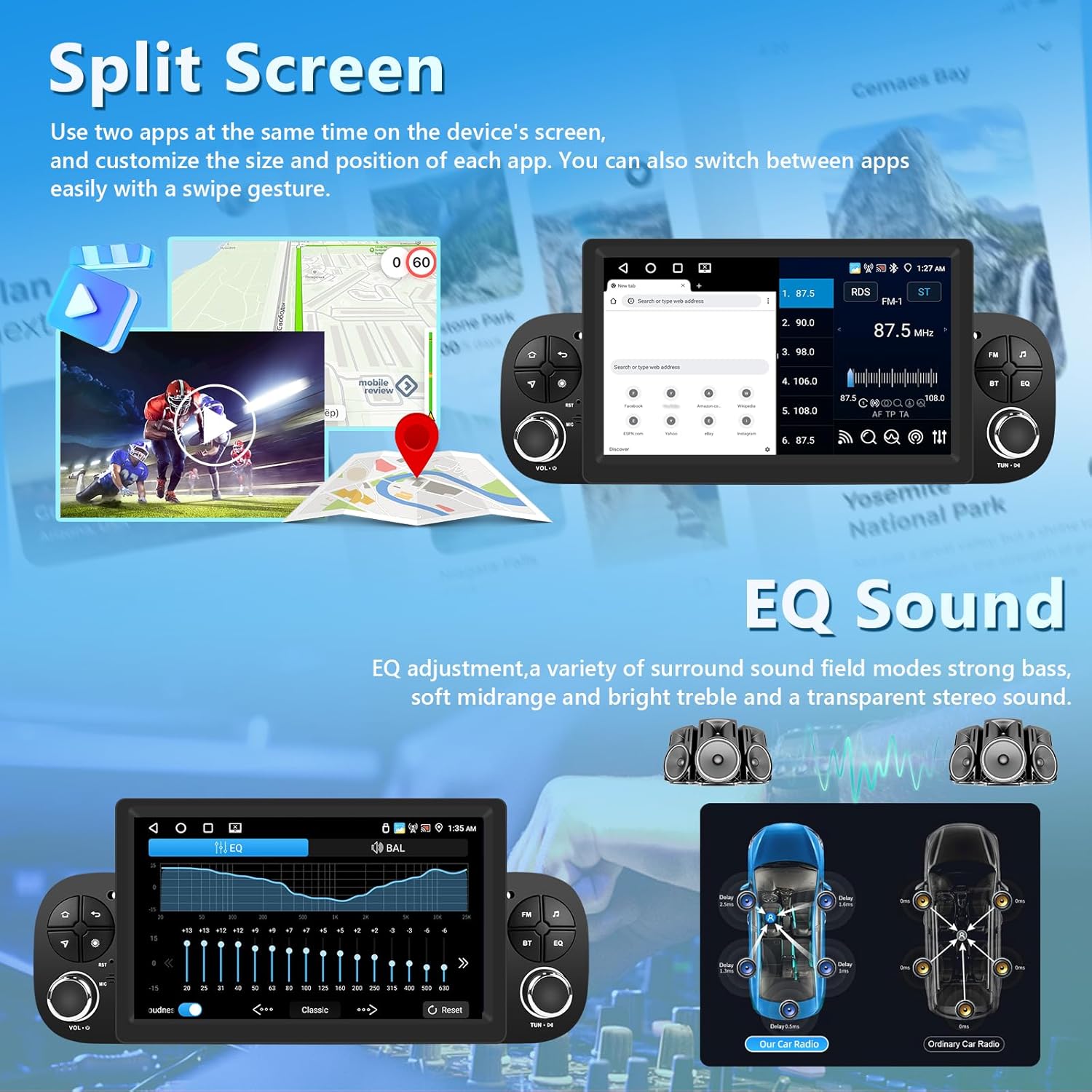
Figure 4.4: Split Screen and EQ Sound Interface.
The top part of the image shows the car stereo screen in split-screen mode, displaying a navigation map on one side and a video player on the other. The bottom part illustrates the audio equalizer (EQ) interface, allowing users to adjust sound frequencies. To the right, diagrams of a car's interior show speaker placement for both a "Car Car Radio" and an "Ordinary Car Radio," highlighting sound distribution.
- Split Screen: Use two applications simultaneously on the 7-inch HD display, such as navigation and music.
- EQ Sound: Adjust audio settings with the advanced sound processor for immersive, studio-quality sound.
4.5 Rear Camera Support
Enhance parking safety with real-time rear camera display.
- The system supports real-time display from the included AHD rear camera.
- Parking guidelines assist in safe maneuvering.
4.6 Home Screen Customization
Personalize your home screen for quick access to frequently used applications.
- Select your favorite apps to appear on the home screen.
- Organize icons according to your preferences for an intuitive and personalized interface.
5. Maintenance
To ensure the longevity and optimal performance of your Motorsi Car Stereo, follow these general maintenance guidelines:
- Cleaning: Use a soft, dry cloth to clean the screen and unit. Avoid abrasive cleaners or solvents.
- Temperature: Avoid exposing the unit to extreme temperatures, both hot and cold.
- Moisture: Keep the unit dry. Do not expose it to water or excessive humidity.
- Software Updates: Periodically check for available software updates to ensure the system runs efficiently and has the latest features.
6. Troubleshooting
If you encounter issues with your Motorsi Car Stereo, refer to the following common troubleshooting steps. If the problem persists, contact customer support.
| Problem | Possible Cause | Solution |
|---|---|---|
| Unit does not power on. | Loose power connection, blown fuse, vehicle battery issue. | Check power cable connections. Inspect vehicle fuses. Ensure vehicle battery is charged. |
| No sound. | Volume too low, incorrect audio source, loose speaker wires. | Increase volume. Select correct audio source (e.g., FM, Bluetooth). Check speaker wire connections. |
| GPS signal lost or inaccurate. | GPS antenna obstructed, poor satellite reception. | Ensure GPS antenna has a clear view of the sky. Move to an open area. |
| Bluetooth connection issues. | Device not paired, Bluetooth off on phone/unit, interference. | Ensure Bluetooth is enabled on both devices. Re-pair the device. Move closer to the unit. |
| Rear camera not displaying. | Incorrect wiring, camera malfunction, vehicle not in reverse. | Verify camera wiring, especially the trigger wire to the reversing light. Test camera functionality. Ensure vehicle is in reverse gear. |
7. Specifications
Detailed technical specifications for the Motorsi 4+64G 7-inch Car Stereo.
- Brand: Motorsi
- Model: 4+64G 7" + ASP RDS Split screen
- Compatible Vehicles: Fiat Panda 2013-2020
- Display Size: 7 inches
- Resolution: High Definition (specific resolution not provided, but implied by "HD display")
- Memory: 4GB RAM + 64GB Storage
- Connectivity: Wireless CarPlay, Wireless Android Auto, Bluetooth, WiFi
- Navigation: Built-in GPS
- Radio: FM/RDS with 18 preset stations
- Audio Output Mode: Stereo
- Special Features: Split Screen, EQ Sound Processor, Steering Wheel Control (SWC) compatibility, Rear Camera (AHD/CVBS) support, Mirror Link, Canbus integration.
- Compatible Devices: Smartphone
- Video Encoding: AVI/3GP/MP4/MOV/MPG/MKV/VOB/RMVB/RM
- Item Weight: 1.54 Kilograms
- Package Dimensions: 30.6 x 18 x 17 cm
8. Warranty and Support
Your Motorsi Car Stereo is backed by professional customer support to assist with any installation advice or technical issues.

Figure 8.1: Professional Technical Support.
This image provides a visual guide on how to access seller support through the Amazon platform, showing steps to find the seller's name ("Huanhuan shop") and click on "Ask a question" for assistance.
- Customer Service: Every purchase includes reliable customer service.
- Technical Assistance: Support is available for installation guidance and technical troubleshooting.
- Returns: Easy returns within 30 days of purchase.
- For specific warranty details or to contact support, refer to your purchase documentation or the seller's information on the platform where the product was acquired.