
1. Introduction
This manual provides essential information for the installation, operation, and maintenance of the Generic M36401-501 laptop motherboard. This motherboard is designed as a replacement component for specific HP 840 G8 laptop models, featuring an integrated Intel i5-1135G7 CPU. Please read this manual thoroughly before proceeding with any installation or maintenance procedures.
2. Safety Information
Working with electronic components requires careful handling to prevent damage to the product and personal injury. Observe the following safety guidelines:
- Electrostatic Discharge (ESD) Precautions: Always wear an anti-static wrist strap and work on an anti-static mat when handling the motherboard. ESD can severely damage electronic components.
- Power Disconnection: Ensure the laptop is completely powered off and disconnected from all power sources (AC adapter and battery) before opening the chassis or handling internal components.
- Tool Usage: Use appropriate, non-magnetic tools for disassembly and assembly.
- Component Handling: Avoid touching the gold contacts or sensitive components on the motherboard directly. Hold the board by its edges.
- Ventilation: Ensure adequate ventilation during and after installation to prevent overheating.
3. Compatibility
This motherboard, model M36401-501 (part number 6050A3217501-MB-A01(A1)), is specifically designed for HP 840 G8 laptop models equipped with an Intel i5-1135G7 CPU. To ensure compatibility, it is crucial to verify that your original laptop's motherboard part number matches M36401-501 or 6050A3217501-MB-A01(A1). Incompatible parts can lead to system malfunction or damage.
If you are uncertain about compatibility, please consult with a qualified technician or the product supplier before attempting installation.
4. Setup and Installation
The installation of a laptop motherboard is a complex procedure that should ideally be performed by experienced technicians. The following steps are a general guide:
- Preparation: Gather necessary tools (small Phillips head screwdriver, anti-static wrist strap, anti-static mat, plastic spudger). Ensure a clean, well-lit workspace.
- Disassembly: Power off the laptop, disconnect the AC adapter, and remove the battery. Open the laptop chassis according to your specific HP 840 G8 service manual. Carefully disconnect all cables, components (RAM, SSD, Wi-Fi card, etc.), and screws securing the old motherboard.
- Old Motherboard Removal: Gently lift and remove the old motherboard from the laptop chassis.
- New Motherboard Installation: Carefully place the new M36401-501 motherboard into the chassis, ensuring it aligns correctly with all standoffs and ports. Secure it with the appropriate screws.
- Component Reinstallation: Reconnect all previously removed components and cables to their respective ports on the new motherboard. Ensure all connections are firm and correctly oriented.
- Reassembly: Close the laptop chassis, reinsert the battery, and connect the AC adapter.
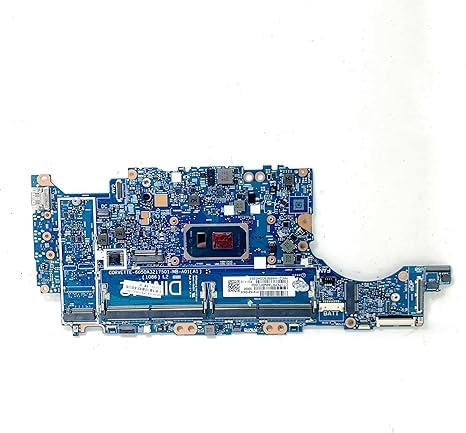
This image displays the Generic M36401-501 laptop motherboard. The board is blue with numerous silver and black electronic components, including capacitors, resistors, and integrated circuits. A prominent square area in the center is the CPU socket, designed to accommodate an Intel i5-1135G7 processor. Various ports and connectors are visible along the edges, indicating its function as the central component of a laptop.
5. Operating
After successful installation of the motherboard, proceed with the following steps:
- Initial Power On: Power on the laptop. The system should boot to the BIOS/UEFI interface or attempt to load an operating system.
- BIOS/UEFI Configuration: Access the BIOS/UEFI settings (usually by pressing F2, F10, or Del during startup) to verify that all installed components (RAM, storage drives) are recognized. Adjust boot order if necessary.
- Operating System Installation: If replacing a motherboard in a system without an existing OS, install your preferred operating system.
- Driver Installation: Install all necessary drivers for the operating system, including chipset, graphics, audio, network, and other peripheral drivers. These are typically available on the HP support website for the 840 G8 model.
- System Testing: Perform thorough testing to ensure all functionalities (ports, Wi-Fi, Bluetooth, audio, etc.) are working correctly.
6. Maintenance
Proper maintenance can extend the lifespan of your laptop and its components:
- Dust Removal: Periodically clean the laptop's internal components, especially the heatsink and fan, using compressed air. Ensure the laptop is powered off and disconnected from power before cleaning.
- Thermal Management: Ensure the laptop operates in a well-ventilated area to prevent overheating, which can degrade component performance and lifespan.
- Software Updates: Keep your operating system and drivers updated to ensure optimal performance and security.
7. Troubleshooting
If you encounter issues after installation, consider the following troubleshooting steps:
- No Power/No Boot:
- Verify all power connections (AC adapter, battery, internal power cables) are securely seated.
- Ensure the power button cable is correctly connected to the motherboard.
- Test with a known good AC adapter.
- No Display:
- Check the display cable connection to the motherboard.
- Reseat RAM modules. Try booting with one RAM module at a time if multiple are installed.
- Connect an external monitor to check if the issue is with the laptop's internal display.
- System Instability/Crashes:
- Ensure all drivers are correctly installed and up to date.
- Check for proper thermal paste application on the CPU and heatsink.
- Run diagnostic tools to check RAM and storage drive health.
- Peripheral Not Working:
- Verify the component is correctly connected.
- Install or update the specific driver for the peripheral.
- Test the peripheral in another port or on another device if possible.
If troubleshooting steps do not resolve the issue, contact technical support.
8. Specifications
| Feature | Detail |
|---|---|
| Model Number | M36401-501 |
| Part Number | 6050A3217501-MB-A01(A1) |
| Compatible Laptop Model | HP 840 G8 |
| Integrated CPU | Intel Core i5-1135G7 |
| Brand | Generic |
| Platform | No Operating System (Motherboard only) |
9. Warranty and Support
This product comes with a warranty service of up to 90 days from the date of purchase. This warranty covers manufacturing defects and ensures the product is fully functional upon shipment.
For any questions regarding compatibility, installation, or troubleshooting that cannot be resolved using this manual, please contact the supplier's customer service. Each product undergoes full functional testing before shipment to ensure quality.