
1. Important Safety Instructions
Please read all instructions carefully before assembly and use. Retain this manual for future reference.
- Electrical Safety: Ensure the product is connected to a properly grounded outlet. Do not overload electrical circuits.
- Overheat Protection: The fireplace heater is equipped with an overheat protection feature. If the heater overheats, it will automatically shut off. Unplug the unit and allow it to cool before restarting.
- CSA Certification: This product is CSA certified, indicating compliance with North American safety standards.
- Anti-Toppling Devices: Always install the included anti-toppling devices to secure the TV stand to a wall, especially in homes with children or pets. This prevents accidental tipping.
- Placement: Position the TV stand on a flat, stable surface. Do not block the heater's air intake or exhaust vents. Maintain adequate clearance from combustible materials.
- Ventilation: Ensure proper ventilation around the unit. Do not cover the fireplace insert.
- Children and Pets: Keep children and pets away from the heater's hot surfaces. Supervise children when the unit is in operation.
2. Package Contents
Verify that all components are present before beginning assembly. All necessary hardware is included.
- 1 x SIMOE Electric Fireplace TV Stand with LED Lights
- 2 x Remote Controls (one for LED lights, one for fireplace heater)
- 1 x Instruction Manual
- Assembly Hardware Kit
3. Specifications
| Feature | Detail |
|---|---|
| Brand | SIMOE |
| Model Name | FP10887US-BK |
| Product Dimensions (L x W x H) | 48" x 16" x 29" |
| Fireplace Insert Dimensions (L x W x H) | 19.1" x 5.1" x 17.5" |
| Material | MDF, Engineered Wood, Cold Rolled Steel, Tempered Glass, Plastic |
| Power Source | Corded Electric |
| Power | 1400W, 120V |
| Cord Length | 6 ft |
| Heat Output | 4777 BTU |
| Heating Coverage | Up to 400 sq.ft. |
| Thermostat Range | 62°F–82°F |
| Timer (Heater) | 0.5–8 hours |
| Timer (LED Lights) | 4-hour auto-off |
| Weight | 85 lbs |
| Countertop Capacity | 70 lbs |
| TV Size Support | Up to 40 inches |

4. Assembly Instructions
The SIMOE Electric Fireplace TV Stand requires assembly. Follow the detailed step-by-step instructions provided in the separate assembly guide included in your package. Ensure all parts are accounted for before starting.
- Tools Required: Typically, a screwdriver and hammer are needed.
- Anti-Toppling Device Installation: Securely attach the anti-toppling straps to the back of the TV stand and to a wall stud using the provided hardware. This is a critical safety step.
- Adjustable Shelves: The glass shelves within the cabinets are 3-level adjustable. Customize their height to suit your storage needs.
- Cable Management: Utilize the built-in cable management holes to route and conceal wires for a tidy appearance.
- Soft-Close Hinges: The cabinet doors feature soft-close hinges for quiet and gentle operation.


5. Operating Instructions
5.1 Fireplace Heater Operation
The electric fireplace insert provides both heat and decorative flame effects. It can be operated using the control panel on the unit or the dedicated fireplace remote control.
- Power On/Off: Press the power button on the unit or remote to turn the fireplace on or off.
- Heat Settings: The heater provides 4777 BTU of heat, capable of warming areas up to 400 sq.ft. Use the temperature control buttons to set the thermostat between 62°F and 82°F. The heater will cycle on and off to maintain the set temperature.
- Timer Function: Set an automatic shut-off timer for the heater from 0.5 to 8 hours.
- Flame Colors: Choose from 9 distinct flame colors and 5 brightness levels to create your desired ambiance. The flame effect can be used independently without heat, making it suitable for year-round decoration.
- Remote Control: The fireplace remote control operates effectively up to 26 feet away.


5.2 RGB LED Light Operation
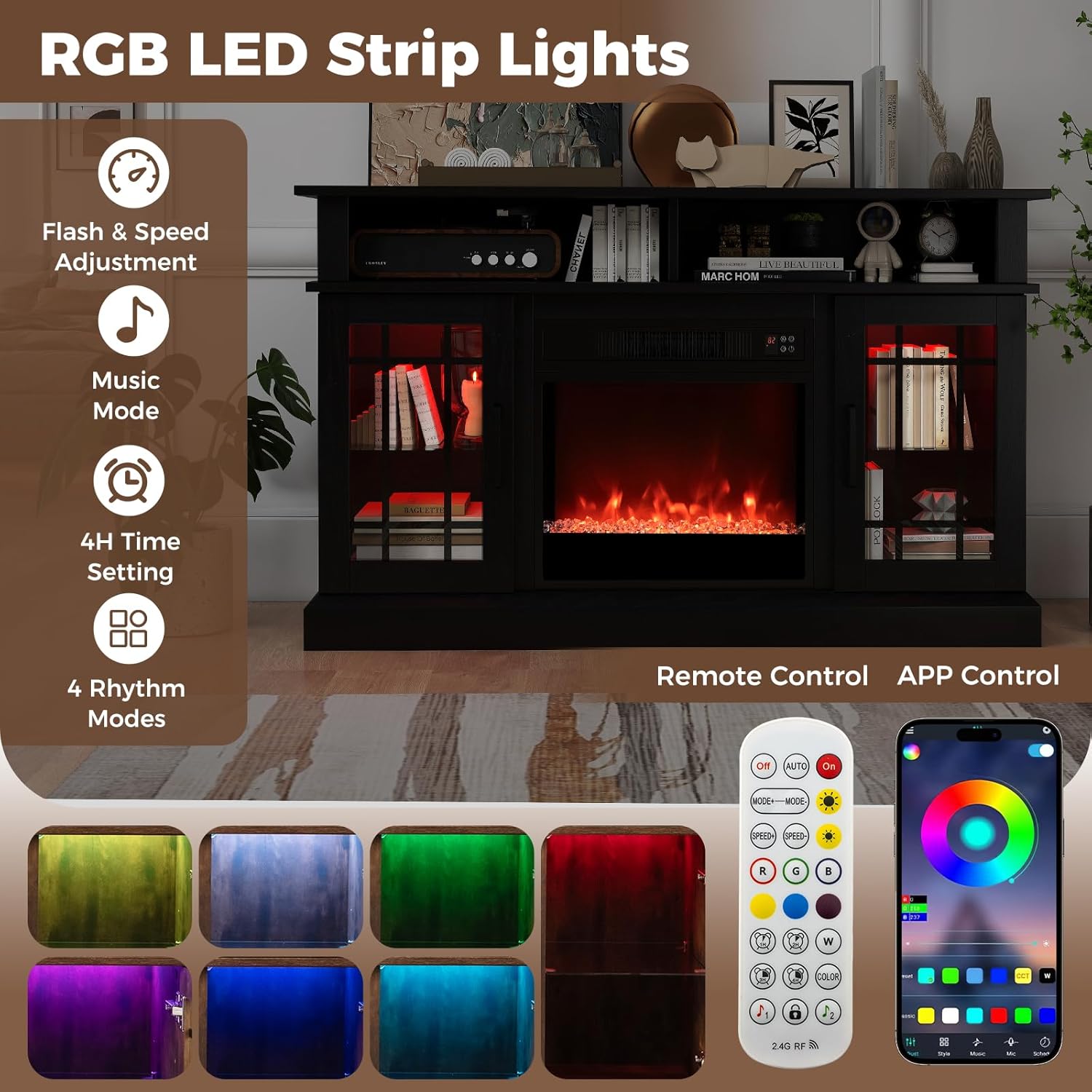
The integrated RGB LED strip lights enhance the ambiance of your TV stand. They can be controlled via the included remote control or a compatible smart app.
- Power On/Off: Use the dedicated LED light remote or app to turn the lights on or off.
- Brightness Adjustment: Select from 10 brightness levels to suit your preference.
- Rhythm Modes: Choose from 4 rhythm modes (flash, strobe, fade, smooth) to create dynamic lighting effects.
- Flash Speed: Adjust the speed of the flash effects.
- Timed Auto-Off: A 4-hour auto-off timer is available for energy efficiency.
- Control Range: The LED light remote control operates effectively from 49 to 66 feet away.
6. Maintenance and Care
Regular maintenance ensures the longevity and optimal performance of your SIMOE Electric Fireplace TV Stand.
- Cleaning: Dust the surfaces regularly with a soft, dry cloth. For stubborn marks, use a slightly damp cloth and mild detergent, then wipe dry immediately. Avoid abrasive cleaners or solvents.
- Fireplace Insert: Keep the air intake and exhaust vents of the fireplace insert free from dust and debris. Periodically vacuum these areas.
- Electrical Components: Ensure all electrical connections are secure. If the power cord is damaged, it must be replaced by a qualified service person to avoid hazards.
- Remote Controls: Replace batteries in the remote controls when their range or responsiveness decreases.
7. Troubleshooting
If you encounter issues with your SIMOE Electric Fireplace TV Stand, refer to the following common troubleshooting steps:
- No Power: Check if the power cord is securely plugged into a working electrical outlet. Verify that the circuit breaker has not tripped.
- Heater Not Working: Ensure the unit is powered on and the thermostat is set above the current room temperature. Check if the overheat protection has activated; if so, unplug the unit, allow it to cool, and then plug it back in.
- Remote Control Not Responding: Replace the batteries in the remote control. Ensure there are no obstructions between the remote and the unit's receiver.
- LED Lights Not Working: Check the power connection for the LED lights. Ensure the LED remote control batteries are functional.
- Unusual Noises/Odors: If you notice any unusual noises, burning smells, or other abnormal operation, immediately turn off and unplug the unit. Contact customer support.
8. Warranty Information
For detailed warranty terms and conditions, please refer to the manufacturer's official website or contact SIMOE customer support directly. Keep your purchase receipt as proof of purchase.
9. Customer Support
If you require further assistance, have questions, or need to report an issue that cannot be resolved with the troubleshooting steps, please contact SIMOE customer service. Refer to the contact information provided on the SIMOE official website or your purchase documentation.